WHAT DO YOU RECOMMEND
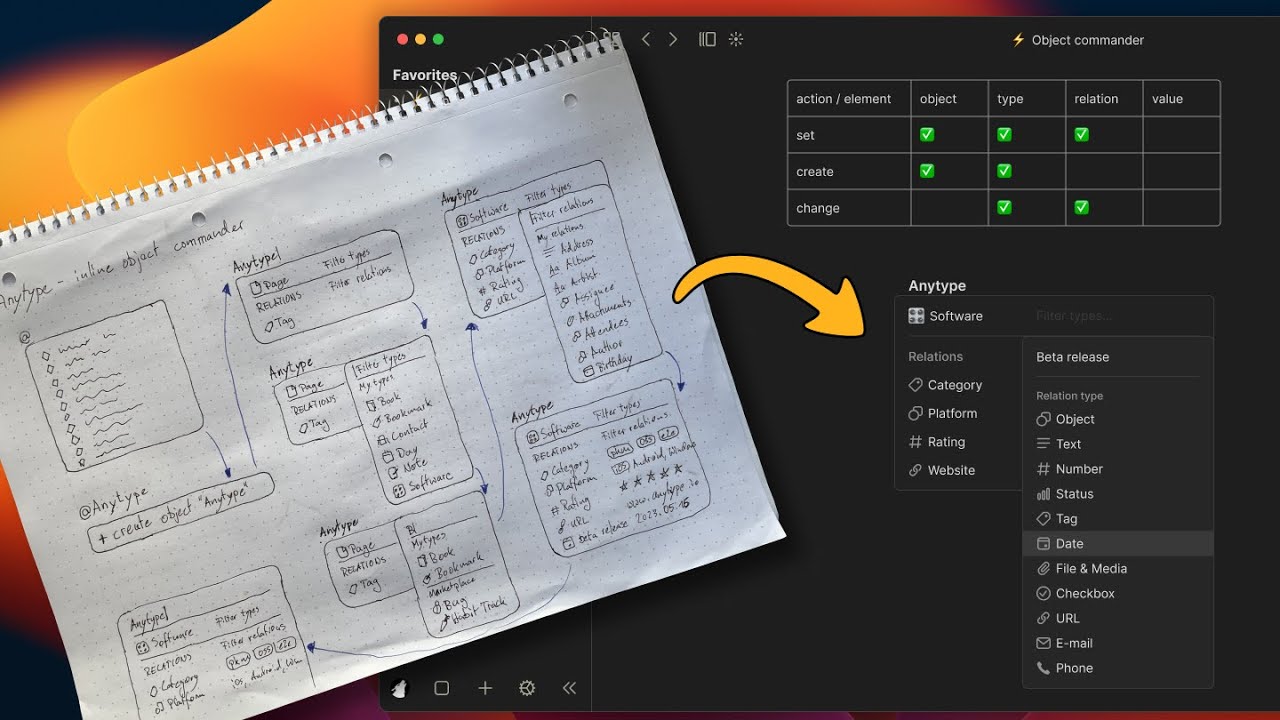
I would like to have inline object creation and modification using a popup modal on the go without leaving the page.
What I imagine is using @ to create a new object and also decide what type of object it should be.
It would be even more powerful if I could set and modify relations just by using the keyboard without leaving the current page. that would improve the speed of populating objects within the editor dramatically.
(As a power user I wish I could do more with keyboard only in general)
HOW COULD IT BE DONE
-
Type @
-
followed by the name of the object
-
popup modal: + create object “xyz” > (for discoverability consider “chevron right” indicating more options)
a. Press Enter to create the default type or -
Press arrow right to enter a type dropdown:
+ create object “xyz” > |Filter types…
—————————————————
+Create new type
—————————————————
Book
Bookmark
Contact
…a. Enter to select type and exit dialogue or
-
arrow right to enter relation dropdown - use arrow up / down to navigate
+ create object “xyz” /
 Contact > |Filter relations…
—————————————————————
+Create new relation
—————————————————————
⌂ Tag
✆ Phone
@ Email
…a. Enter to select relation
b. Type in value or select an option (depending on the relation) and confirm with Enter+ create object “xyz” /
Contact / ⌂ Tag > |Select Tags…
—————————————————
+Create new Tag
—————————————————
[family]
[friends]
[work]
…c. Enter again to exit the dialogue or
-
arrow right to enter relation dropdown again:
+ create object “xyz” /
Contact > |Filter relations…
—————————————————————
+Create new relation
—————————————————————
⌂ Tag
✆ Phone
@ Email
…to manipulate more relations:
+ create object “xyz” /
Contact / @ Email > [email protected]|
(and repeat if wanted ; )
Here is a demo of a prototype I worked on after submitting this feature request:
REAL WORLD USE CASES
A scenario could be writing a journal entry and I want to mention a “new” person and also set the tag “work” and maybe add some contact details. All without leaving the current journal page and the keyboard.
 I just edited the request and added some visual elements to show what I imagine.
 It’s a big hurdle to anyone who typically writes about things, and creates objects on the go. Similllary to how you’d see [[ in other PKMs.
 Task objects on project pages can take up as much vertical space on the page as they need, instead of being truncated to just a few headline and description words, as with a