'Document' View to show full-size objects in Sets and Collections

What Do You Recommend?

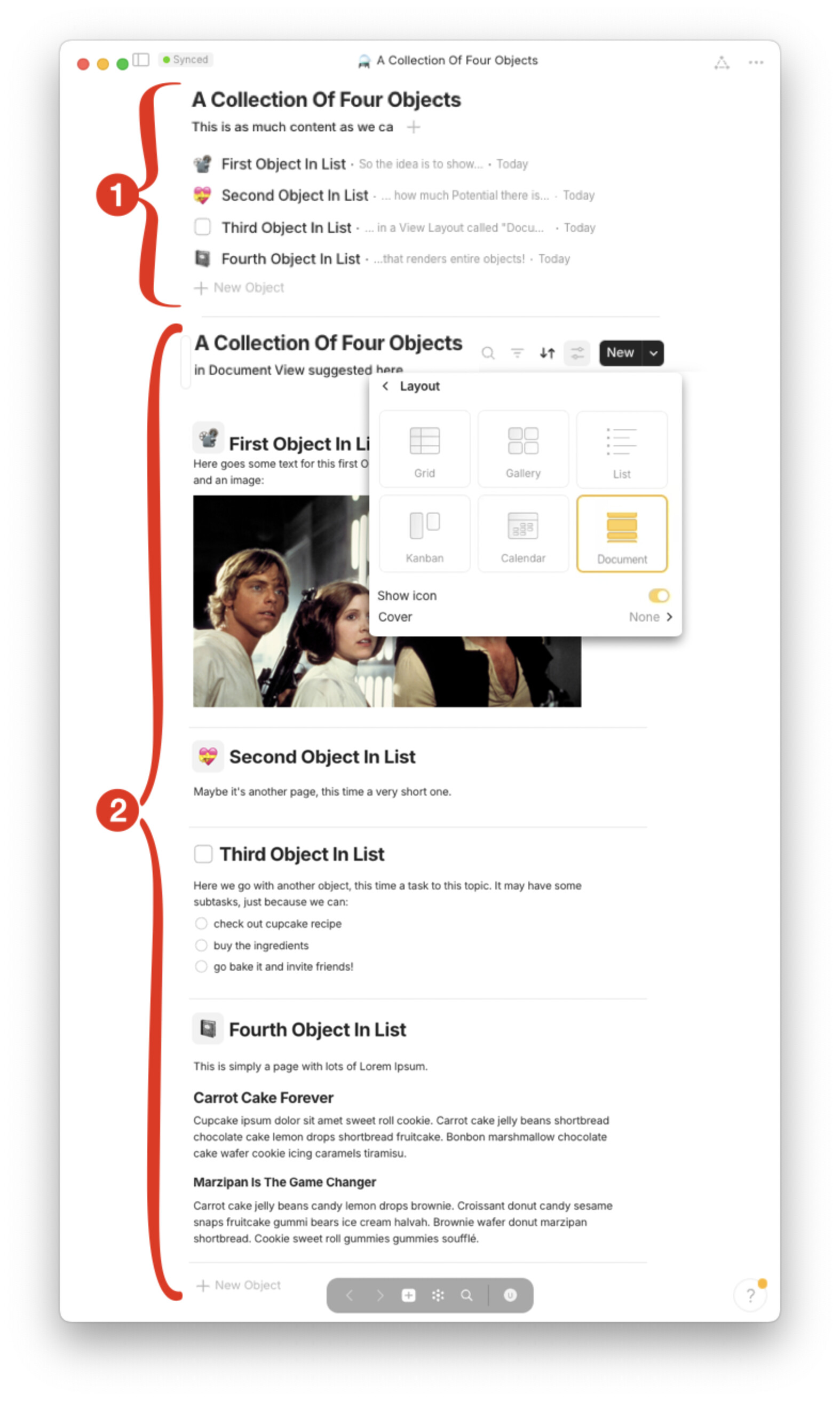
In addition to the five existing View Layouts (Grid, List, Gallery, Kanban, Calendar), offer a sixth View Layout called ‘Document’ (or ‘Page Flow’, ‘Onepage’, etc) that renders all listed objects in full size underneath each other (see screenshot mockup).

This way, journals, diaries, task lists or book chapters etc would be much easier to read; attaching Relations to sub-parts of objects is no problem anymore; printing a list of objects to a single PDF would be possible; and a lot more.

How Could It Be Done?

In attached screenshot mockup, Collection View 1 shows a typical example of how today, all of Anytype’s five existing View Layouts (Grid, List, Gallery, Kanban, Calendar) of a Collection or Set reduce each object’s content to just a few words.

If however a sixth ‘Document’ View Layout existed (Collection View 2) that shows all listed objects in their full length underneath each other, the user experience of reading through lists of objects would be much more natural, and much closer to what we’re often used to with diaries, logfiles, travel destinations, book reviews etc.

So the idea is basically to render Lists of Anytype objects exactly as we’re reading lists of posts here in the community forum: We don’t have to open and close each post individually, but we can scroll through all posts underneath each other in their full length here, hence with much more ease.

Image or Video
Real World Use-Cases

Besides creating a much more nature way to read diaries, logfiles, forum topics, travel destinations, book reviews etc. like topics in the forum here, and to print them as one document, this FR would also solve many of the user needs behind the transclusion FR, the FR for blocks-as-objects, deep-linking to blocks, Inline object creation and modification, and others.

This is because essentially, instead of trying to enhance the capability of blocks embedded objects (which might be hard to build), we fully leverage Anytype’s existing capability to embed Objects in List Objects (i.e. Sets and Collections) — similar to block-level objects, just at the parent level, where List objects already have the needed capabilities.

Recommended Alternatives

Reading listed objects in Sets and Collections, as well as in /Links and @mentions with a respective preview layout is already possible today, as well as >toggle content blocks.

However, all of these existing solutions cut off the vast majority of the embedded content, so that the only way of actually read (or print) a document that’s composed of many embedded child objects is to open/close, open/close, open/close and so on — or to wait for transclusion and/or blocks-as-objects to be available in Anytype.

This FR here expands on part of the functionality suggested in my FR to flip through objects from a list in the sidebar, yet addressing the underlying need in an even easier way. So I’d say this FR here is more critical (and I hope even more straightforward to implement).

Additional Context

Another interesting application of this FR here is to extend the full-length-object-preview suggested here to the available preview layouts of /Link objects. This way, a third way of nesting full-size objects inside objects could be achieved, besides collections and links (and maybe even a fourth way with @mentions inside table cells).

Personally, the readability of listed objects like journals and task lists etc in Anytype has been on my mind for quite a while now, and I wanted to dedicate as much time as possible this week to ‘solve’ it.

I believe, a full-size object preview layout would be a real breakthrough for a lot of wicked use cases, and I hope it’s indeed much more straightforward to implement than alternatives like transclusion or block objects, while offering a lot of their benefits.

Yes, yes, yes! I want it, I need it, I would love it!

(Btw.: Don’t forget to vote for your own request!)

Thank you, @Code-Jack.

I hope nobody gets confused by my two related FRs yesterday and today. This one here is meant to really address the core of the issue with as little additional complexity as possible.

I think the team has exactly this feature already on the radar.
Angelo or ignatovv mentioned some months ago an upcoming “reading mode” for Sets.
Can’t find the posting again, but it was related to making search more powerful and something more about about Sets.

This “reading mode” was only short mentioned by one of them, but I understood it exactly the way as you described it here in your FR.

I think in combination with this FR the thing would be round:

Again the szenario:
An angry customer calls me for complaining …
I search for his name.
Whatever I find: a right click on it, choosing “Instant Collection” → then further according to your FR for reading all related interactions with this customer in a chronological order.

Would it make more sense to call the View “Object”?

Apart from that, I love the simplicity of your envisioned functionality!

Terrific, @sambouwer! Let’s see what others think, happy to amend the FR

PS: how did you make the mockup? It looks super slick, especially how the Documents icon matches the style of the other icons.

MacOS preview app for pixel peeping, and Keynote to bring it all together :innocent:

No, please not “Object”, this would be completely confusing!
It’s hard enough for a newbie to understand what an Object is. You can’t come up with a second meaning!
It would also give chaos in the forum and in the forum’s search function!

I suggest “Readview”.

This FR paves the way to a document/object/readview representation of a link (along card and simple link)

I need that also.
I’m trying to use Anytype to plan my lessons, so I created a “lesson” object. As the planning is weekly and each lesson hangs on last weeks eavaluation, it would be much more easier if I could see every plan at once.

I totally missed this feature request but this is a brilliant one! I really really hope features like this get added soon!

This has so many usecases that it should be very high on the roadmap in my opinion. It would be so good for connecting idea’s and documents/objects.

This is genius.

But doesn’t achieving this ‘document’ view requires transclusion? It is basically displaying a full object inside another object…

WHAT DO YOU RECOMMEND

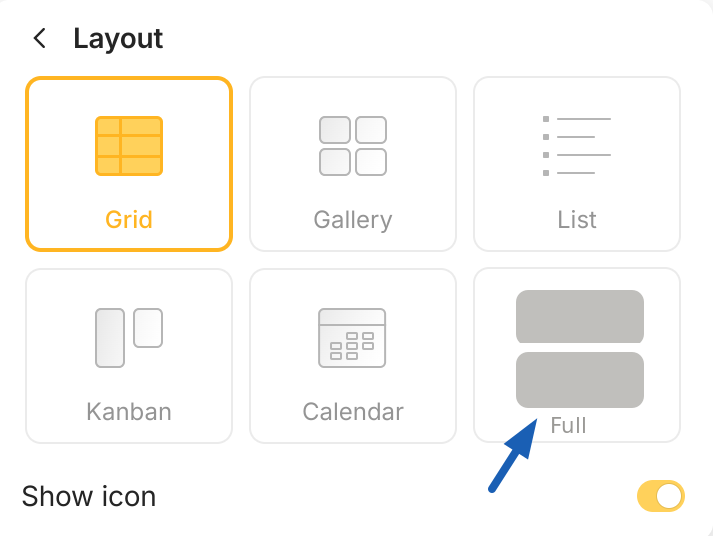
I’d like to suggest adding a Full option to the Layout possibilities in sets.

HOW COULD IT BE DONE

Selecting the Full option would display the entire content of the notes (or other objects) that appear in the set view. Essentially, it would enable a person to scroll through the content listed in a set, sort of appearing like a blog format.

REAL WORLD USE CASES

Having this kind of option would make it possible to scroll back in time quickly reading through journal entries by date. Currently this is not facilitated well because you can only see a small portion in the Grid or List layouts and must click each one to find out more about what it contains. The current workflow has a bit too much friction to enable easy skimming.

Above is a screenshot of the layout possibilities and I’ve attempted to show a rudimentary looking option for what selecting a Full Layout might look like.

RECOMMENDED ALTERNATIVES

It’s possible that a set with a lot of objects could take a long time to display or else slow down AnyType so perhaps if that was the case there could be a set number of notes to display before providing a “Show More” sort of button at the bottom to reveal the next quantity of notes.

I really like this idea. I use anytype to write a books. I throw ideas into anytype whenever I think of them, and then when it comes time to write a book, I compile all the ideas and decide which ones to use. It would be super helpful if I could just have all the ideas associated with a book in one view ( that shows all of the text in each idea note). Especially if I could order it all via sorts and filters etc. Then I could just copy it all and paste it into a word document to start the writing process.

In fact, there are loads of use cases:

  • ideas for someone’s youtube videos
  • ideas for lesson plans for a teacher

Really, any situation where people note down ideas, then want to export (a filtered and sorted view of) them to a document.

I am waiting for the transclusion like Notion, Logseq, etc… I think this suggestion is a good way to go. I’m using Anytype to create a Timeline for my genealogical researches.
The Timeline page could contain year pages with all the events…

Please can you work on this. (sorry for my english, I’m a french user :wink:

In a conversation with @anton and @Razor about this FR we found that this FR’s feature to show fullsize objects in list views could be seen as a “Stream” view just as in endless scrolling on Social Media sites, where the middleware fetches the next few objects in a collection and renders them fullsize read-only one underneath each other like one big document (opening a modal window for editing just as in lists today).

This could be a useful intermediate step before Anytype’s database model allows full Transclusion.

And it would elegantly solve use cases like e.g., a habit tracker, as in e.g. in this FR, “Display the same object on multiple dates within calendar view” — and journals, diaries, meeting notes, project notes etc in general.

It would solve them in a way that indeed each event is an object with its own @date, but actually they’re in a collection or set which gets rendered just like one big document of many parts that are actually objects, as illustrated with a mockup at the top of this thread here.

=> so displaying all events for this “big object” set in a calendar view as requested in the FR “Display the same object on multiple dates within calendar view” above would be trivial because the @date relations would automatically appear there.

Thank you for articulating the need for this feature. It is the only missing feature for me to move from logseq. This is a killer feature.