A big thank you to our amazing Community for the valuable suggestions and reports that continue to help us along the way!
Highlights of this release
In this update, we’ve focused on important technical improvements. Although the major changes are under the hood, they lay the groundwork for future features and enhancements. Alongside this fundamental work, we have also made a number of smaller upgrades and fixes - let’s dive in.
Improved Full-Text Search Speed
We’ve upgraded our search functionality with a new library to improve speed, particularly for large spaces. Users with extensive spaces will experience faster search.
Enhanced Any-Store for Faster Performance
We have implemented a new local database to enhance performance significantly. Users with large spaces will enjoy faster loading times and smoother interactions throughout the app.
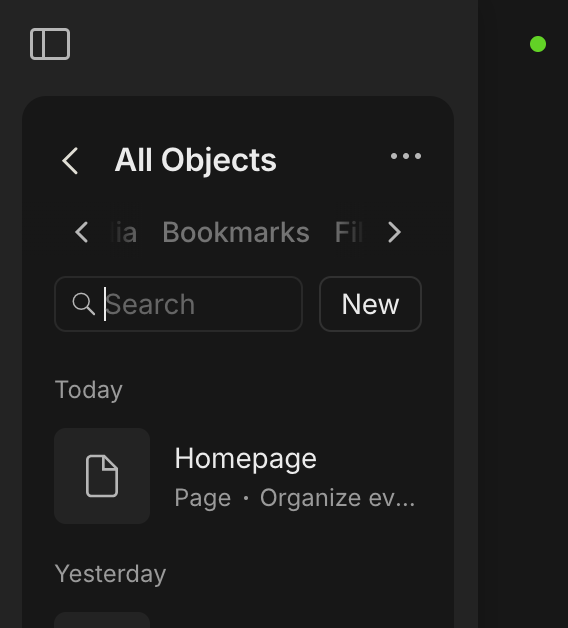
All Objects
Our improved navigation makes it much easier to browse through all your content. Now, you can search across all your Objects, Sets & Collections, and Media & Files in one place, with options to sort by Date or Name.
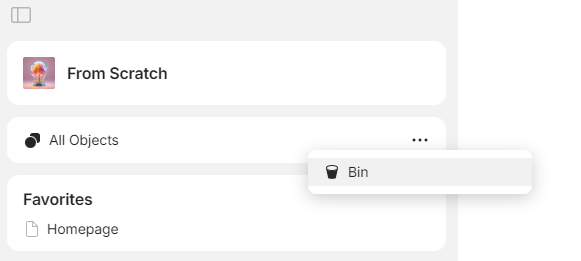
Additionally, the simplified Library and the Bin can be found here.
More Views & Widgets
..have been updated to improve visual usability.
Gallery has a fresh appearance for widgets.
Kanban supports displaying page covers on cards in a layout.
Quality-of-Life
Pressing Enter inside empty list and toggle blocks behaves as Shift + Tab for that block: moves up a level. Thanks, @purplekiwi & @Shampra!
Updated batch relation editing to allow adding new options and removing existing ones: now, when editing tags/objects/files the values are added or deleted instead of replacing with a new value. Thanks, @Shampra!
Created relations in batch editing are now automatically added to the Set or Collection view.
Updated icons for multiple file formats, including generic files, images, videos and more.
Updated icons for relation formats: select, multi-select, date, checkbox, and email.
Color of toggle icon is based on a block text color.
Updated layout of the File object type.
Added the option to paste text without its original formatting. Thanks, @Shampra!
Spellcheck language is based on the language selected in your preferences by default.
Added an option to save search results to a new or existing collection via the right-click menu in a search query.
Added the ability to create an object in the Calendar Set or Collection View, similar to the Calendar Widget.
Kanban cards now support cover previews. Thanks, @Elias!
Relation cells in read-only Spaces or read-only objects now provide the ability to read the full value of that relation cell.
Warning switch to “Local Only” network: we’ve added a notification and additional confirmation before selection.
Potentially harmful URLs have a warning before opening them.
Create new objects in Sets faster by using Shift + Enter. Thanks, @Pretzel!
Added an ability to multi-edit the Done relation.
Added tooltips to the Calendar view that display the full name of an object when the cursor is briefly hovered over it. Thanks, @MrDaisyBates!
Updated the plus icon and block menu icon.
When changing the format of a block from a list to text, the background color and styles are now cleared when pressing Enter.
Updated menu button on the Template type.
Disabled the ability to change an object type to Template.
Default Space icons now display the first letter of the Space name.
Dark mode colors have been updated.
Improved Code snippet readability when nested within a Callout block.
Removed the three dots from the drag and drop handle for a cleaner interface.
Added restrictions to prevent Templates from being created in multiple unintended locations.
Up to 50 private spaces can be created to suit your needs.
Performance
Calendar has been greatly optimized (& is no longer freezable). Thanks, @C.c!
Databases for different spaces have been separated to improve overall application performance.
Bug Fixes
Pin Code is now numeric for newly created PINs, allowing only number input. Thanks, @isllll!
Fixed an issue where pasting a Pin Code was not working.
Non-Latin characters in PDF files are now displayed correctly. Thanks, @BloomJieun!
PDF blocks added on Mobile platforms now display correctly on Desktop after sync. Thanks, @BCSharp!
Set Widget is synced with objects in the list and has a default View option when the type is changed.
Creating an object relation works correctly.
Updated menu actions for Sets and Collections moved to Bin.
Fixed the invalid key error that occurred when entering the phrase from the keyboard during the login.
Selecting “Last Opened Object” as the Homepage now correctly opens to the last accessed object. Thanks, @stendekoniko!
Text highlighting does not change when an object is locked. Thanks, @Terit!
A right-click on an object in Calendar View now correctly opens the context menu instead of opening the object. Thanks, @Code-Jack!
Individual orphan nodes are farther from larger clusters of objects on the Graph. Thanks, @C.c!
Fixed unexpected behavior where clicking on a Link could redirect to a Homepage. Thanks, @kellertuer!
Color of numbered and bulleted lists changes according to the color of a block. Thanks, @dzlg!
Resolved the issue causing a black screen when opening Anytype on Linux. Thanks, @Jefferson!
Text changes no longer disappear when the slash menu is open.
Locked objects are now fully protected from being accidentally modified in Sets and Collections.
Fixed an issue where local links with “$” in their path would cause the super link text to appear in some source text. Thanks, @4thHydro!
Thumbnails in the image library are now displayed correctly. Thanks, @a44!
Adjusted buttons in the link editor pop-up window in German localization. Thanks, @VisualNotes!
Fixed an issue preventing the creation of types that end with accented characters, such as “à”.
Restored the ability to move blocks between objects by dragging them to the sidebar. Thanks, @Andris!
Inserting a toggle no longer causes scrolling to the top of a page. Thanks, @SwiftyChicken!
Links following inline LaTeX in a line are now placed correctly. Thanks, @eloitor!
The count of selected objects works correctly.
When editing multiple objects in a Type view from the Library, relations are displayed according to the list in a Type. Thanks, @bee6000!
Fixed an issue that could cause square brackets to appear in an Object’s title when modifying its content or supported relations. Thanks, @C.c!
Drop-down menu with [Editor / Viewer / Remove member] options has been removed for a Space owner.
Mermaid diagram now switches a color style according to the color mode of the App.
Multiple file selection on import is fixed.
When adding an object relation to Set, the selection popup correctly closes instantly.
Fixed an issue on Linux where the menu visibility toggle was not working correctly through the window menu.
Platform Updates
Starting with the next release, we will no longer support macOS Catalina. This decision comes as Apple has officially dropped support for this version, and maintaining compatibility requires significant development effort on our end. We understand this change may affect some users, but it’s a necessary step to ensure smoother updates.
I have always thought Anytype had fast performance and speed, with no lag (though I don’t have an extremely large space), and now you’ve made it even faster. Thank you, Anyteam, for these improvements. I’m excited to see the app getting better and better!
I’m big fan of the all-object menu after seeing it in my own personal space by now It’s very compact and efficient to create page/set there or find my own untitled pages and so on. and finally, kanban support page covers hoping soon to show first image as a cover and it will be complete for me.
But what I appreciate the most which’s not mentioned here displaying by picture which’s very useful for bookmarks now I can display the fetched thumbnail in my bookmark set of every link I put in the space.
Great update The performance improvement is notable, and all those small quality of life improvements add up!
Quick feedback on this: discoverability is very hard. It took me 10 minutes to find the Bin (even though I was already looking inside the All Objects widget, so someone who doesn’t know to look there will never find it) and a long time to find how to delete types and relations. My suggestions are to:
Add a meetball button on hover to types and relations, so we know there are actions available for them. Right-clicking isn’t obvious.
Add all actions available when right-clicking a type or relation (copy link, export, move to bin) to the type/relation full-page
Create a full-page version of the All Objects widget. I know this may feel like a step backward, as Anytype just moved from a full-page library to the widget, but this widget is great; the preblem is that it just packs too much stuff into too small of a space. It’s not comfortable to navigate. It would be great to have something similar but available in the central pane rather the left-hand sidebar.
Find another place for the Bin.
But despite these small issues, this is a really great update!
I hope you guys don’t rush with dropping support for older macOS, there are many users using Big Sur. But I also understand that it is a burden for the devs. I see both sides, but I’m going to be really sad when this reaches my OS (like how I’m sure the Catalina users are sadden by this news). Anytype is a great app, we want to use it as long as we can; same goes to our Macbooks.
Big Sur is 11.0, and there was like 100 users in 6 months on Catalina, and Catalina allows updating on Big Sur, we were making this decision for over 3 months already. We can’t support old OS versions forever so we have decided to drop Catalina support to be able to build on MacOS 14 and higher.
New All Objects menu is hard to navigate. I agree with @raph it’d be better to utilize the whole screen when working with all objects, types or relations. And those arrows just to scroll the tabs… not the best solution.
In the previous version you could build a navigation almost as like as you want. Now you have a fixed first option All objects, which you can not move somewhere else.
Bin is hard to find. And when I found it, I thought, is it an option to “Delete all my content”? And again, Bin above all the content? Not intuitive at all.
Thank you for the update!
I especially appreciate the “unlinked objects” view in the new All Objects widget, but I agree with others that have said that navigating to different tabs in such a small space is unwieldy (especially since Library used to be a full window).
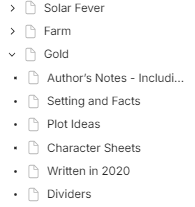
One thing that I am not enjoying upon this update is the fact that icons have been added to the “tree” appearance of a widget from a page.
As I have several pages nested within each other, seeing the same icon over and over is repetitive and makes glancing at my formerly very minimalist and simple widget a bit of an eyestrain.
The option to either hide icons in this view or from the object itself would be greatly appreciated!
A new version with no major features… thank you. Having a stage of corrections and improvements to the content is important too.
Even if I’m looking forward to the big update mentioned in several posts (especially if it contains a good UX evolution, the famous tag as object, an overhaul of collections/sets… I can’t wait).
As for the “all objects” menu, personally I’m not a fan. If I’m looking for an object, I get the search.
But it’s pretty good for a first draft.
Still, I agree with what was said earlier: being able to move or hide it, being able to put it on a full page, and other improvements will be relevant to finalize this addition. So don’t forget to fine-tune it, and that’ll be great.
Thanks team for the update, especially seeing the many bug fixes.
My first impression of this release:
If this all objects widget is the replacement of library, I can see how this reduces accessing steps… However, I am curious why Pages and Bookmarks have their respective places, but not other object types (e.g. Note or custom object types), or even user assigned list/set/collection…
It might be good to be able to reassign the order of Pages/Lists/Media/Files/Types/Relation
On Bin, I find this “bin” button hard to find and a little confusing, because I thought this is to remove the widget instead of accessing the bin for overall Anytype.
On Performance, it takes longer to load inline sets and thus it feels less smooth, especially noticeable for my Homepage which contains multiple inline sets.
On objects’ icon, the implementation of showing icons for everything is not small screen friendly. For objects without assigned icon, a “page” icon is shown for all custom object types, which is rather meaningless… I hope there can be an option to hide icon if none is assigned. Text only in set would also be helpful since there aren’t much space for displaying information already. Or objects with custom object types will “inherit” the icon for the custom object type.
Indeed, this will be good option to have with the addition to hide which tabs you particularly don’t need. flexibility is always needed. same with moving the widget itself although it have information’s of the members in my space.
Sure, but the layout feels different. All objects widget vertically show more objects of the same group, rather than several clusters of objects in set/collection.
Not a big deal for me though (since I restrain my usage of widgets on my small screen laptop anyway).
I agree with your last part.
The fact that we’re forced to have an icon for every objects is really annoying to me.
I do like having icons sometimes, but not all the time. It just looks ugly now.
Hope we’ll be able to hide them at will in the near future.
I don’t mind the icons for objects, although I understand why others might find them annoying.
The “Turn into Object” change, where an indented item makes the top level become the title, is great—a really nice qol improvement.
The “All Objects” interface is a nice quick access feature, but I think having the Library as a backup would be better. It’s not immediately obvious which Types and Relations are default and which are not (removable); you have to right-click, which adds a bit too much friction. Overall having settings only as quick access is I think not too intuitive.
A big thank you to our amazing Community for the valuable suggestions and reports that continue to help us along the way!
 The performance improvement is notable, and all those small quality of life improvements add up!