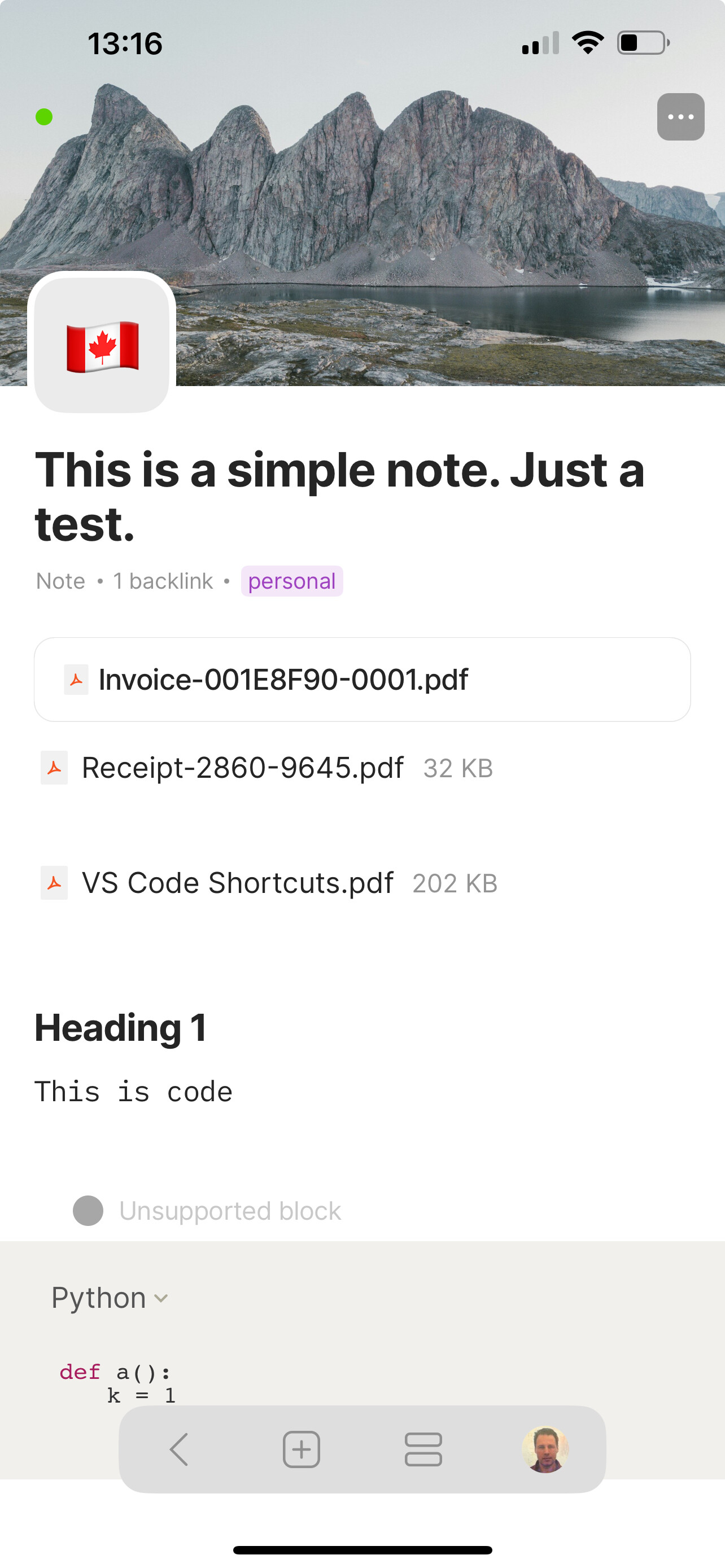
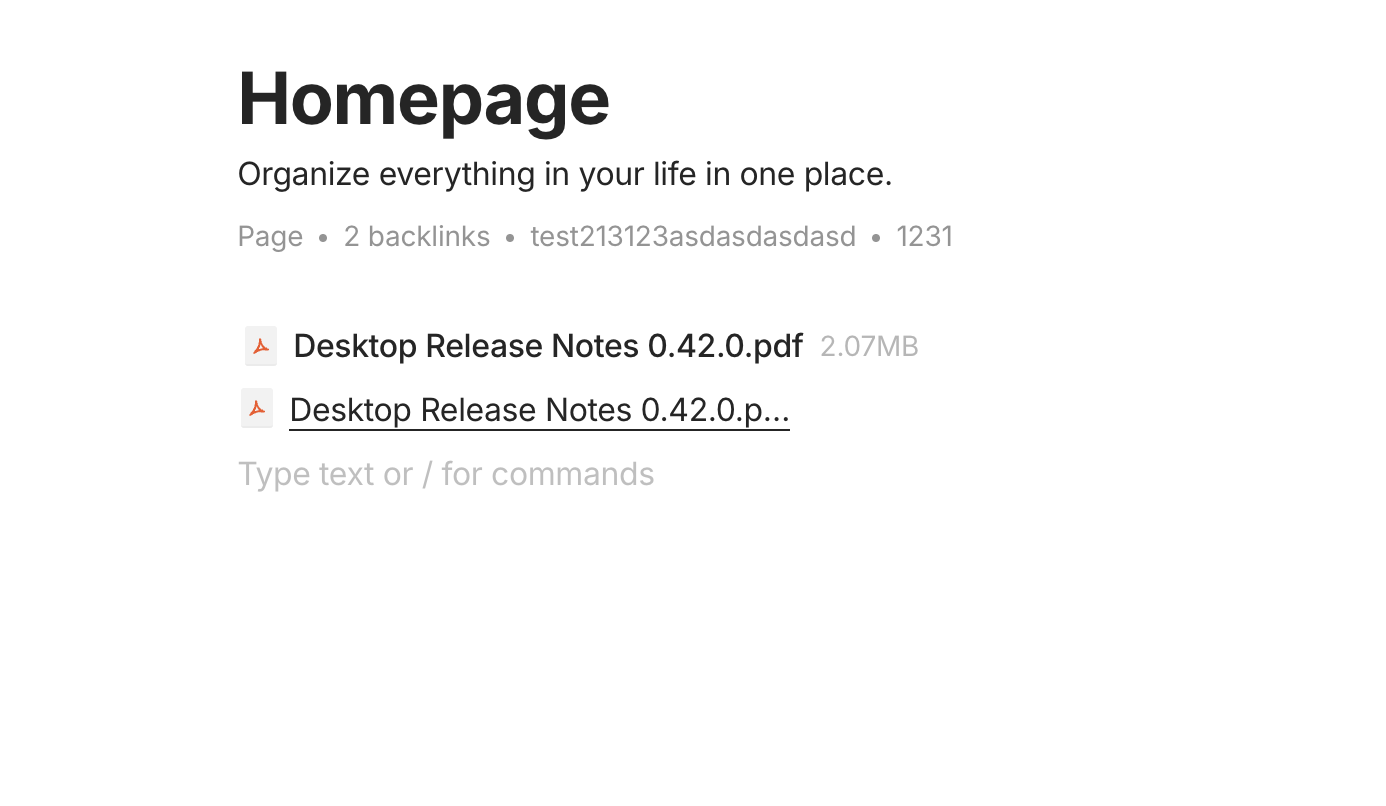
When adding a PDF file to an existing note on iOS, I am presented with an option to add it as a file or a block. Adding it as a file works as expected: a file object is created and an icon with the file name appears in the note. Adding it as a blocks is a little bit strange, since the content of the PDF is not displayed inline but again, an icon and the file name appears, just without the frame around. I suspect it’s because preview of PDF files on iOS is not implemented yet and this bug report is not about it. It is what happens when the note gets synchronized to the desktop (macOS): the icon/file name appears mangled. Adding a PDF file as a block on Desktop (drag-n-drop) works as expected: the file is displayed inline on Desktop, and when synced to Mobile, it is shown as an icon and the file name without the frame around.
How To Reproduce It
Using iOS, open a PDF file.
In the bottom toolbar, tap “Share” icon. A menu with applicable actions appears.
In the row of applications, select Anytype (this assumes that Anytype has been enabled as a handler of actions beforehand).
Page “Add to Anytype” appears, with among others, “SAVE AS” selection. Select “File Block” there.
Tap “Link to” and select an existing note/page. Tap “Done”.
Open Anytype and the note/page selected in the previous step. Notice how the PDF block is displayed. Wait until the sync to AnyNetwork is complete.
Open Anytype on Desktop, open the same note/page. Wait for the sync to complete. Observe how the added PDF block is displayed (mangled).
The PDF block created on iOS displayed inline on Desktop (macOS).
Additional Context
Just to be clear: the actual PDF file content is properly synced from mobile to desktop; clicking on its mangled name or icon opens the Preview app with the correct document content.
Device
iPhone 13 Pro Max
OS
iOS 17.5.1
Anytype Version
0.32.0
Network Mode
AnySync
Technical Information
Device: iPhone 13 Pro Max
OS version: 17.5.1
App version: 0.32.0
Build number: 29
Library version: v0.35.0-rc11
Anytype ID: A9zbFQiMNt7u57eTzA7Tpgwt2MdqSDVUQYtju8Z2sD3PNHGB
Device ID: 12D3KooWMMtoWdbBw2YedQHeyWCvg9fmiKcfexctpr1ggcARQvdM
Analytics ID: 57a863f5-6332-4088-9d3f-10d14daa5b21
OS version: darwin arm64 14.5.0
App version: 0.42.3
Build number: build on 2024-08-02 12:17:02 +0000 UTC at #e1e3c496021c87ea0488f4a9eba8836e61a01072 (dirty)
Library version: v0.35.0
Anytype Identity: A9zbFQiMNt7u57eTzA7Tpgwt2MdqSDVUQYtju8Z2sD3PNHGB
Analytics ID: 57a863f5-6332-4088-9d3f-10d14daa5b21
Device ID: 12D3KooWPRNsUvhmTMydfRbTGa9su5nZq2N96iX8BdbGeqnCfFFX
On Ubuntu/Linux:
OS version: linux x64 6.5.0-45-generic
App version: 0.42.4-alpha
Build number: build on 2024-08-02 12:17:02 +0000 UTC at #e1e3c496021c87ea0488f4a9eba8836e61a01072
Library version: v0.35.0
Anytype Identity: A9zbFQiMNt7u57eTzA7Tpgwt2MdqSDVUQYtju8Z2sD3PNHGB
Analytics ID: 57a863f5-6332-4088-9d3f-10d14daa5b21
Device ID: 12D3KooWHwysj9eTw8HbXUb5qUxHkGXJcPG8mcMwzuC81m3sR2z5
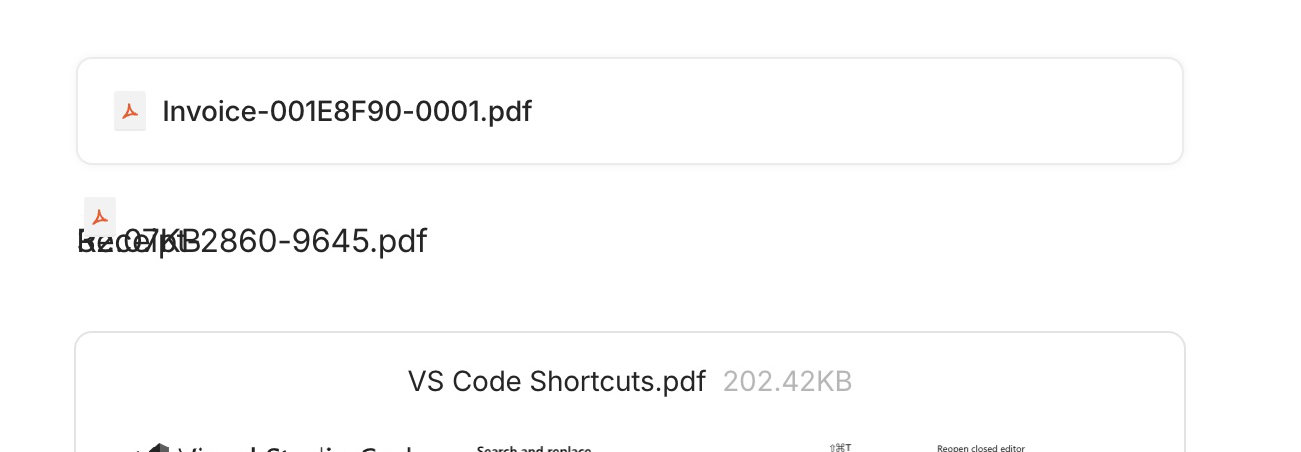
The mangling effect is in place regardless the desktop platform I used. I have attached the screenshot of the appearance of the block on desktop to my initial report. Here is the cutout (on desktop):
The first block (“Invoice”) is a link to file, created on the mobile.
The second block (“Receipt”) is a file inserted as a block, on the mobile
(I believe there is an empty line/block between the second and the third)
The third block (“VS Code”, only partially visible) is a file dragged and dropped onto the canvas on the desktop
I reported the problem as the problem for the mobile app, assuming that it had inserted the file in an (incorrect) way so that the desktop app is being thrown off. After all, how come that the mobile app displays both the second and the third block exactly the same, but the desktop does not (see the mobile screenshot attached to my original report)? There must be some difference in those blocks to account for the different presentation. But of course it can be the reverse: the note is perfectly OK, but the desktop app has some problems.
@Razor, it is not clear to me what your screenshot represents:
is it on the mobile app? if so, note the problem manifests itself on the desktop only.
is it on the desktop app? then why doesn’t the link have a frame around the block, and the inline block the content of the PDF file displayed?
Further information that may be useful: The second block, which does not display properly, has its Appearance set to Show as embed. When I switch it to Show as link, the block is displayed correctly and as expected: an icon followed by the file name, no frame around. When I switch back to Show as embed, the problem reappears, exactly as it was.
I don’t think it is document-specific, I just tried with “VS Code Sortcuts.pdf” on a new, empty page, created on the mobile, and it has exactly the same effect. Sure I can share that PDF with you, but perhaps it will be more useful for analysis to export the whole page object (as Any-Block, with include files)?
I find it strange that it is not reproducible at your end, anyway, here is the PDF document I used:
Here is the exported Any-Block of a page created on the mobile app. When I import this page to an empty space on the desktop, the problem is reproduced.