Why I Can't Stay In AnyType For Now

Why I’m Writing This:

I am so excited for AnyType to improve. It has the highest potential to be the long-term solution for my note-taking. After failing again to fully switch over to AnyType from my current tools, I want to document my experience so the information can be used to iterate on the issues I encountered during this attempt to switch over.

Who I Am:

My undergrad is in computer science, and my master’s degree is in design. I work as a consumer electronics UX designer and run a physical prototyping shop space.

I absolutely love taking notes. Anywhere from quick notes during a conversation, to long documents and collected references. Part of why I was hired at my current job is because they wanted my note-taking mentality applied to their laboratory. My collection of notes is a sizable part of who I am, and I like who I am!

All the things I’m proud of in my life, I can at least partially attribute to my note-taking systems. However, I have yet to find a software solution that I can finally consolidate into. My current notes are straddling Notion, Google Keep, and physical notebooks.

AnyType has such promise to be my long-term solution for where my notes live.

  • It offers safety and independence with its offline-first and self-hosted functionality.

  • It has relatable ideals for note-taking structure.

This past week, I tried again to make the switch to AnyType. I hit some problems that sent me limping back to Keep and Notion.

Why I Can’t Stick With AnyType Yet:

The Lack of Context

A good note-taking software can do the same wonderful things your mind can do:

  • Memorizing = Recording a new note

  • Remembering = Retrieving a specific note

  • Considering = Modifying/Updating a note

  • Thinking = Looking broadly at all notes as a gestalt

The experience of most of these actions are rapidly improving in AnyType, but the “Thinking” experience of note-taking is completely absent. I always get the feeling that I cannot “take a step back” and look at my notes in AnyType. I commonly feel lost, like I have no sense of place in AnyType.

Fortunately, this problem has been solved before. Google Keep gives a good example of how to give a sense of place and enable a context-rich experience.

Take a look at the main view of Google Keep, with no clicking around, you immediately get an intuitive feel for your notes as a whole. They’re just right there! Not only do you remember what you were working on yesterday, but you see a wider context of the notes you took alongside it.
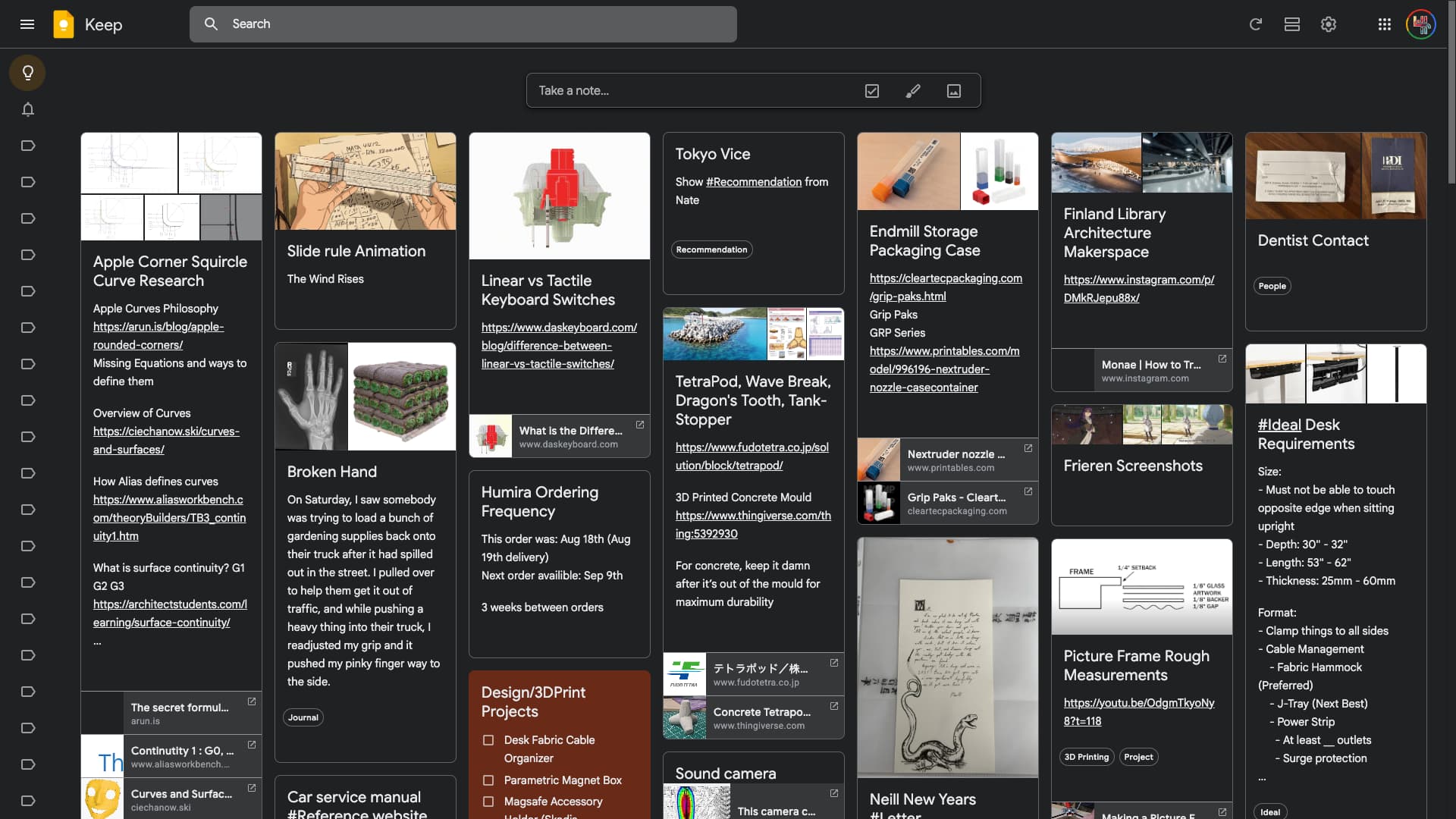
And when you open a note to investigate further, notice how you remain grounded in the context of the main page. It’s like an open door that you can always walk back out of. You know intuitively how you got here, and how to get back.

These two aspects of Browsing With Context and a Feeling of Location are sorely missed in AnyType. When I try to look at all of my notes as a gestalt, this is the best AnyType can do. A rigid list of covers, titles, and properties.
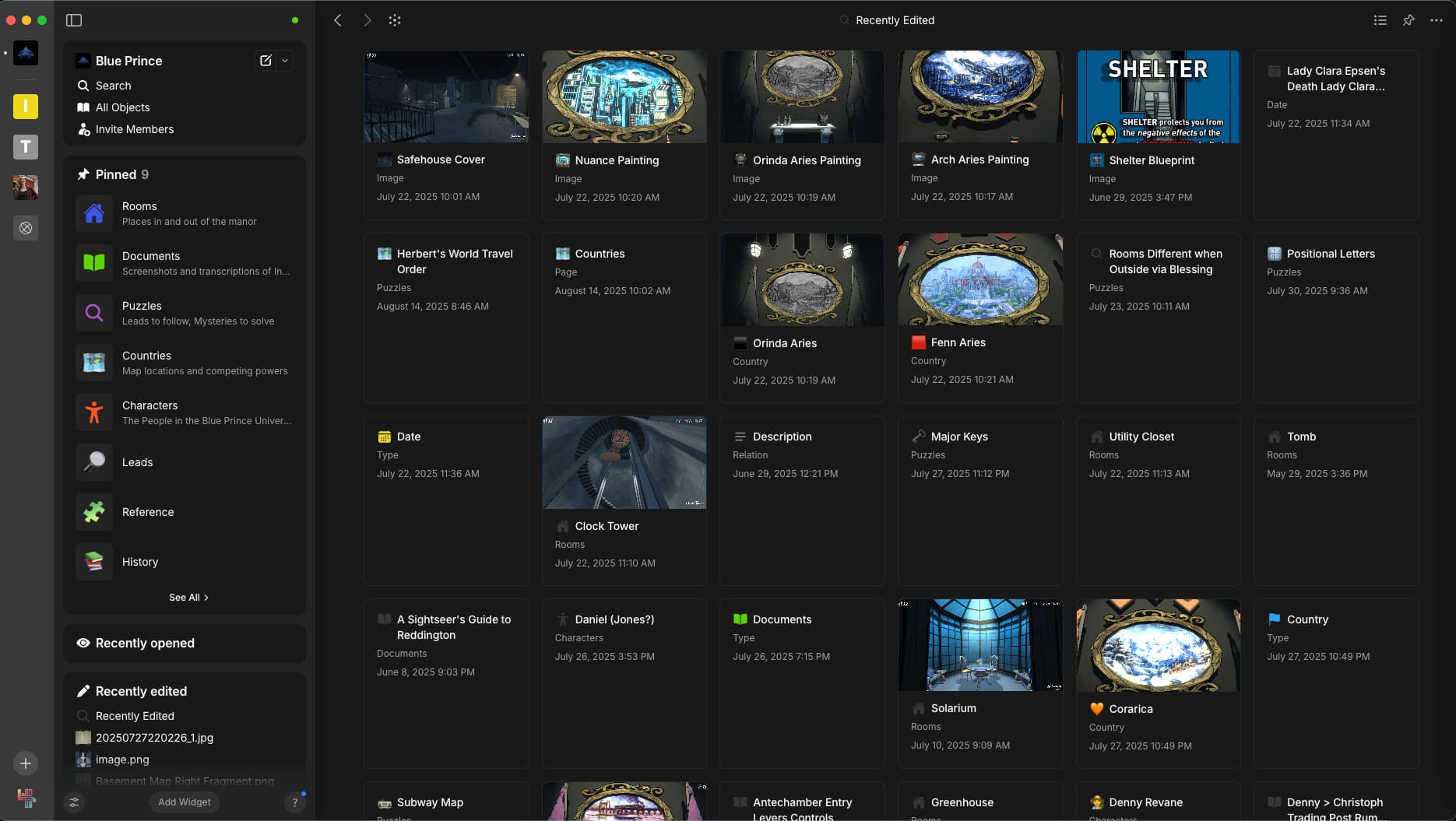
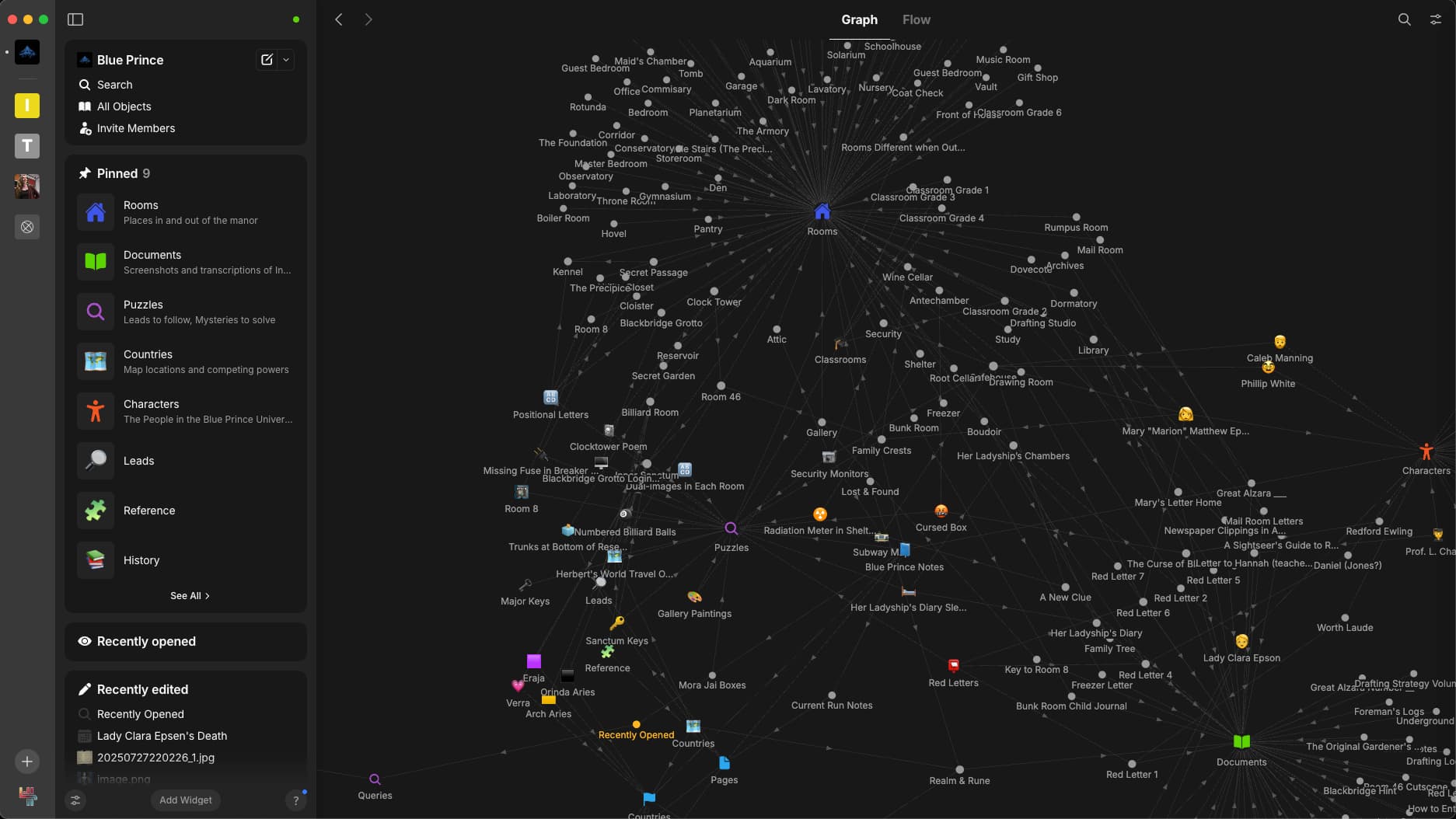
And opening a short note makes me feel like my nose is glued to the page. I either feel too distant to understand, or too close to see anything else.
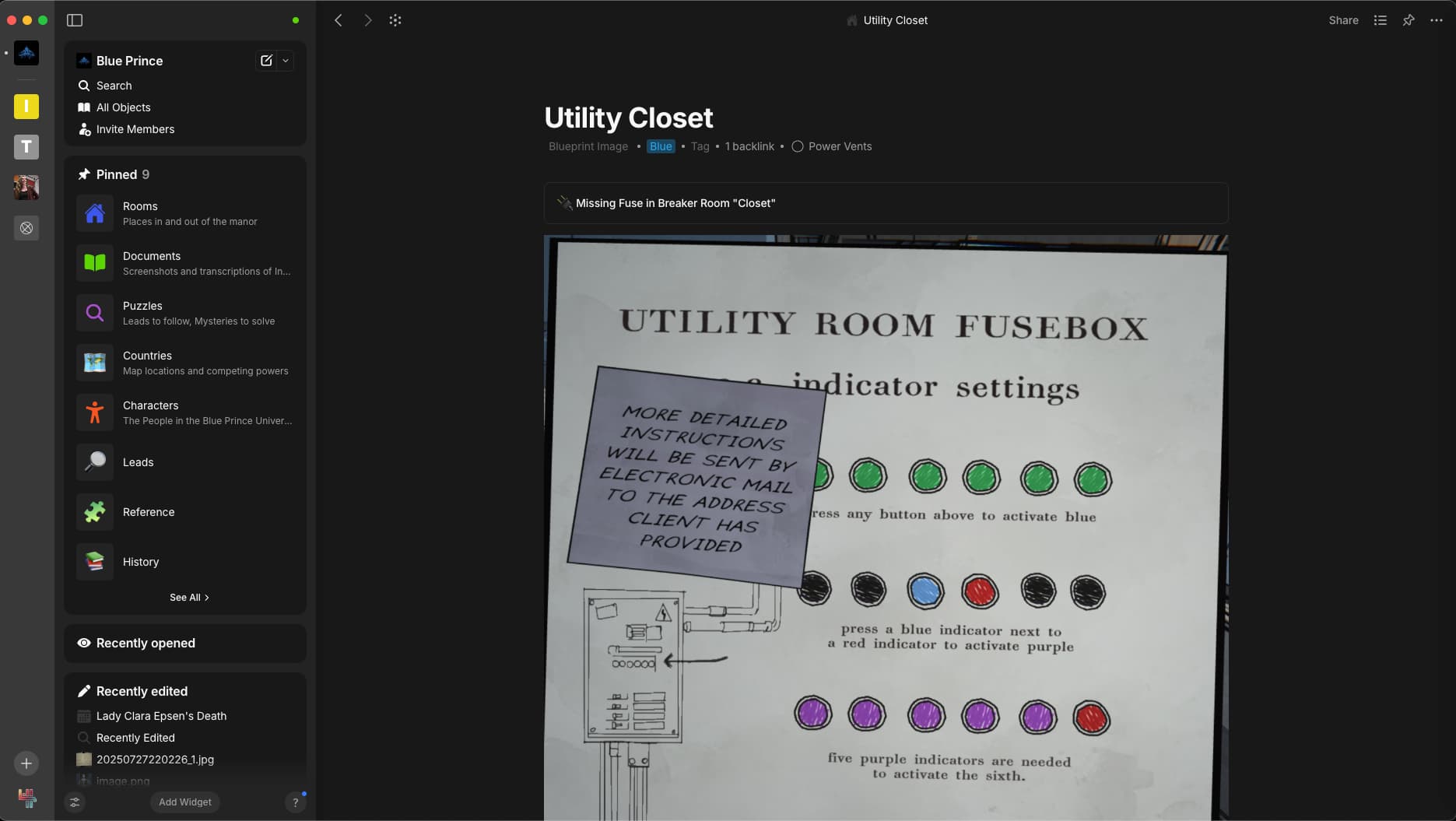
AnyType needs a way to browse not just the titles and properties of notes, but to celebrate the content of a note. Some way to view all my notes including the surrounding context would make AnyType feel like home.

If this isn’t convincing, I hope to give more explanation in my comment below to demonstrate why this is so important in note-taking software.

Though this may seem like a minor feature to some, I believe it will be indispensable to many when implemented. The feature would be mostly UI development, and is very possible to do. This change would not interfere with other features, as it would be another view for sets or collections. And a card-based view that takes the best parts of the Keep Interface would legitimately improve my life.

Feature Request: Setting to allow more note content on cards displayed in gallery view

Feature Request: Masonry Grid

Overhead Effort for Managing Notes Mess

When trying to work in AnyType, I couldn’t escape a growing anxiety that many of my actions were leaving a data-mess that I couldn’t clearly see.

  • Orphan Pages / Media

  • Unclear Properties attachment Style

  • Duplicate File Uploads

When editing a note, things can happen at a wider scope that you don’t immediately see or understand. If you mistype a property name and remove it, then you’ll have to chase it down to correct that error. If you add an image, delete it, and add it again in another spot, am I now using storage space for duplicate photos? Did I make a mistake when structuring a collection by not making it a object type?

The user’s little mistakes and decisions leave obscure artifacts that add up over time, and it sometimes feels like I have to pay attention too much to what’s under the hood of the application. Even if all these examples are fixed, AnyType must consider how to convey to the user that they should not be concerned with such things.

Feature Request: Ability to Limit The Scope of a Relation/Property

Feature Request: Images Should Have Links to Source Objects

Feature Request: Add Support For Collection-Specific Relations

Feature Request: Add Option to Automatically Delete Unedited Objects After Some Time

Image Format Support

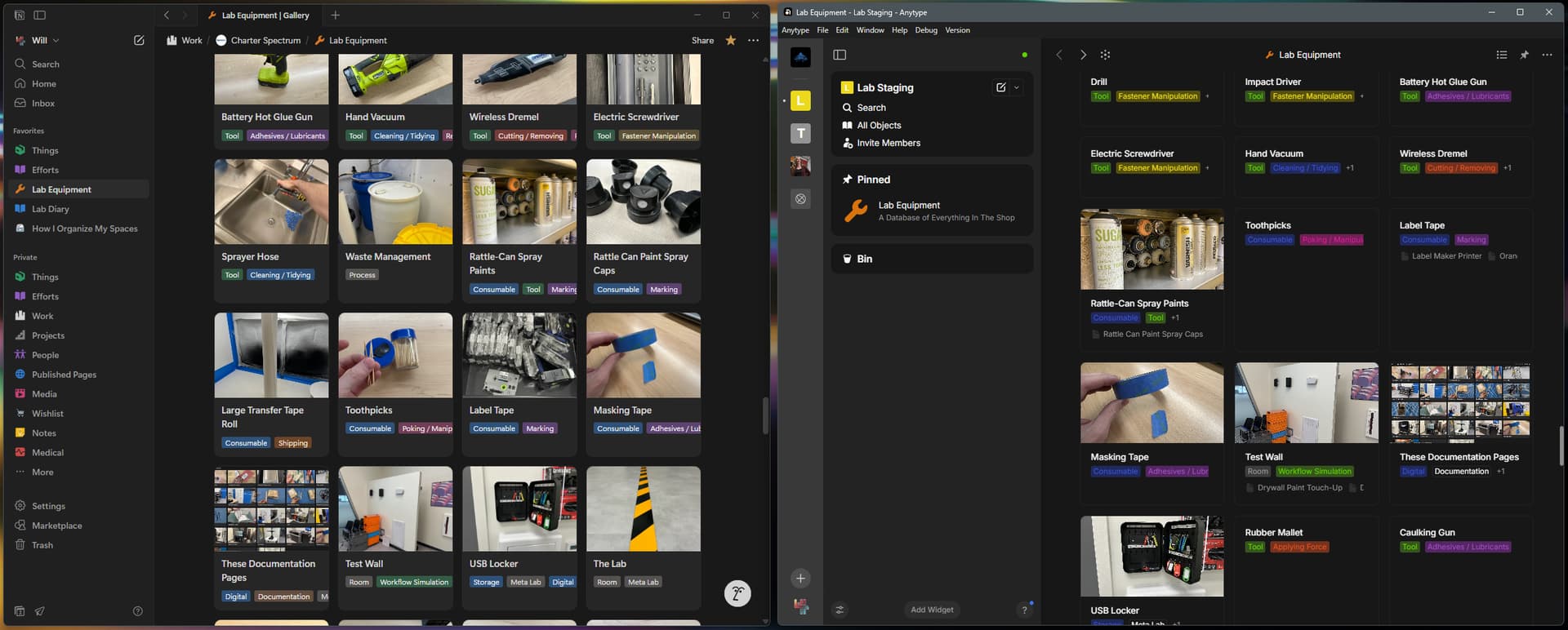
When I imported my database of Lab Equipment from Notion to AnyType, I ran into a showstopper. Many of the images were in the .HEIC image format, which is the contemporary default image format for iPhones and some Android phones. This stopped me from using AnyType at all, because hundreds of notes became unreadable. Both the preview image and content of the note could not be read by AnyType.

Feature Request: HEIC Image Support

Even if other issues are not addressed, this is a hard-stop that prevents me from migrating.

Edit after comment: Even if AnyType cannot implement HEIC, I hope for some way to deal with HEIC files that are imported or added to notes; even if just flattens or copies them into JPG format so they can be rendered.

Notion on the left, with HEIC support, AnyType on the right without HEIC support
Conclusion

I love the idea of AnyType, and I believe it’s where I will eventually land. But currently, there are a few solvable problems that are getting in the way of that. All of the problems are solvable, and I’m trying to give those issues some visibility so I can move completely to AnyType asap.

  • Need to be able to browse notes in context

  • Need to cultivate trust that the background clutter of use won’t build up

  • Need HEIC support

I appreciate the devs for taking on, what I believe to be the most important software project in my life, and for iterating on it so quickly! I’m going to keep trying to migrate, until it works! You have my subscription, and my excitement.

The Ideal Note-Taking Application

As a broader way of explaining what I’m searching for, I’ve written about my standards for “The Ideal Note-Taking Application,” which goes over what you should expect from your software, comparisons of modern options, and a requirements list:

+1, I agree with everything.

I straight up turned off HEIC on my iPhone. Too many places just don’t support it that it became an inconvenience. Windows 10 doesn’t even natively support HEIC (you have to download an app to view them). Heck even Google Cloud storage doesn’t natively support HEIC photos (you can upload them but google sees it as application/octet-stream so you can’t view them in browser – you have to download them). So while the feature would be nice, I don’t really blame Anytype when massive corporations like Microsoft and Google don’t even always support it.

For Windows, you can grab HEIC support for the default windows apps (Photos, thumbnail generation, file explorer, etc.) from the windows store for free:

##Need to be logged into windows store on browser!

##Open link in browser, and let it launch the windows store app

https://www.microsoft.com/en-us/p/hevc-video-extensions-from-device-manufacturer/9n4wgh0z6vhq?ocid=AID2000142_aff_7795_1243925&tduid=(ir__693elfclhckft3agkk0sohzg232xgqphfxwfjpj300)(7795)(1243925)(je6NUbpObpQ-FSm.NNnC.wasQOoowtqvpQ)()&ranMID=43674&ranEAID=je6NUbpObpQ&ranSiteID=je6NUbpObpQ-FSm.NNnC.wasQOoowtqvpQ&epi=je6NUbpObpQ-FSm.NNnC.wasQOoowtqvpQ&irgwc=1&irclickid=_693elfclhckft3agkk0sohzg232xgqphfxwfjpj300&activetab=pivot:overviewtab

And HEIC has some notable benefits over .jpg that I like:

Smaller File Sizes:

HEIC files are significantly smaller than JPEGs of comparable quality, saving storage space on devices and in the cloud.

  • High Image Quality:

    Despite smaller sizes, HEIC files maintain high image quality and support a wider range of image data, including 16-bit color for more flexible editing.

  • Rich Data Storage:

    HEIC files can store more than just pictures; they can also hold sequences of images, like those from a burst mode photo, along with relevant metadata such as time, location, and editing history.

  • Editable History:

    HEIC files can store edits made to an image, allowing users to revert to the original image at a later stage.

(From Google AI Summary, so grain of salt) I like it for its smaller file sizes and more straightforward compression from my experience.

That being said, I would even go for a way to automatically convert all HEIC photos to JPG, or another already compatible format with AnyType. It is not possible to take hundreds of photos again, or even to batch process them, because I wouldn’t know where to put them back into my notes.

In order for me to import my notes into AnyType, I will need some way to either view, or convert these HEIC images in-place.

I also recommend taking a look at Memos.

Compared to AnyType, it seems to me that it focuses on maximum simplicity and concentrates directly on content.

You can then shape the form, types, and structure with links as needed.

I stick with AnyType primarily because of:

  • Offline mode;
  • Speed;
  • Kanban / galleries / graphs;

I completely agree, that’s exactly what I keep mentioning and have been wanting for a long time. In Anytype, this would be a gallery layout with cards containing content previews (as has long been the case in Notion).

Of course you can fill the face of the cards in the gallery layout with properties to your liking, but that requires a lot of effort, discipline, and consistency in the workflow, and you still may not recognize the actual content of the note.

hum…

Point 1: I don’t necessarily feel it. Sure the mansory layout is very cool, but I see it as improvement, not “game changer”

Point 2: I am 377% in agreement! Nothing else to say.

Point 3: What is your operating system? I can make or share what I use to migrate all my images to anytype (converting to webp, generating a “cover format” and also a thumbnail/icon from an image).

Overall: Thank you, this is excellent in documenting what is needed and what can be done. Both for us and for you! It is kinda what I also do myself to help me review several applications (not just PKM/note apps).

This is much better than “Anytype sucks” topics :slight_smile:

Yup, that’s what I said :smirking_face: . Windows doesn’t natively support it. You have to download an app in order to view HEIC files.
Point 1: I don’t necessarily feel it. Sure the mansory layout is very cool, but I see it as improvement, not “game changer”

I see where you’re coming from. I would like to try to convince you with a few examples, because the point I’m trying to make is less about the specific masonry board, and more about letting notes become more than the sum of their parts. I think once I can explain better, you might like the feel for it.

The core concept that I’m going to try to prove is: Great value can be gained by looking at a collection of notes as a gestalt.

==========

My first example is of the user experience of browsing photos. Here are two applications browsing the same collection of files:

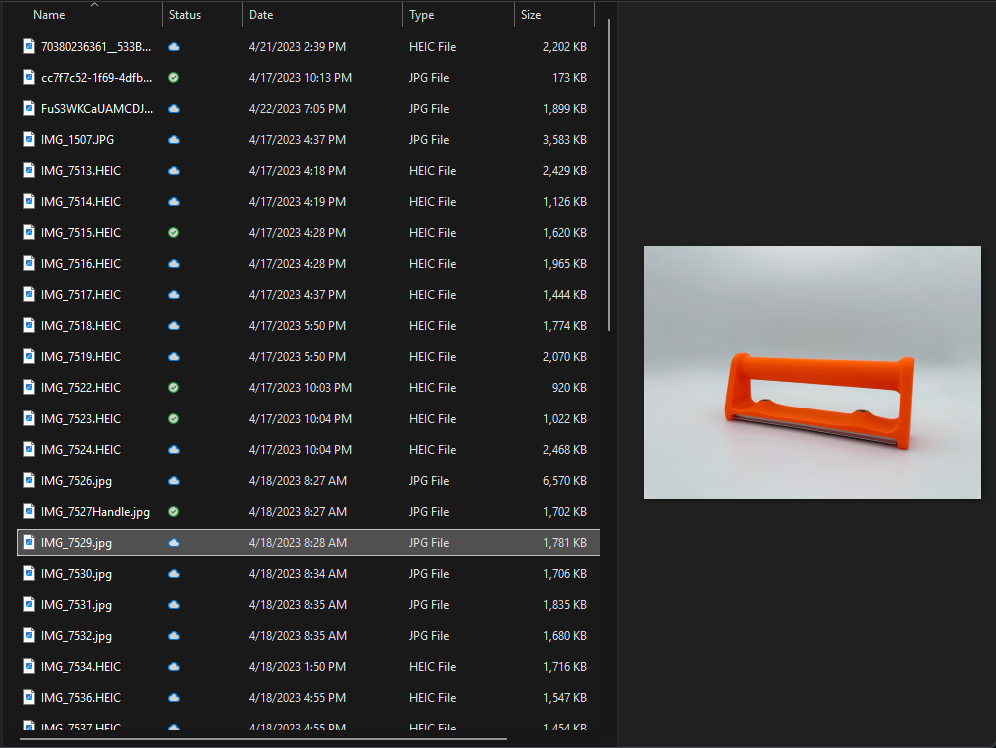
Application One: A list of photos with a myriad of information about each photo.
This is obviously a terrible way to browse photos, but I want you to ask yourself why it’s terrible. The images are perfectly accessible. You have plenty of information about the photo including its date, title, location, tags, and a preview is only a click away.

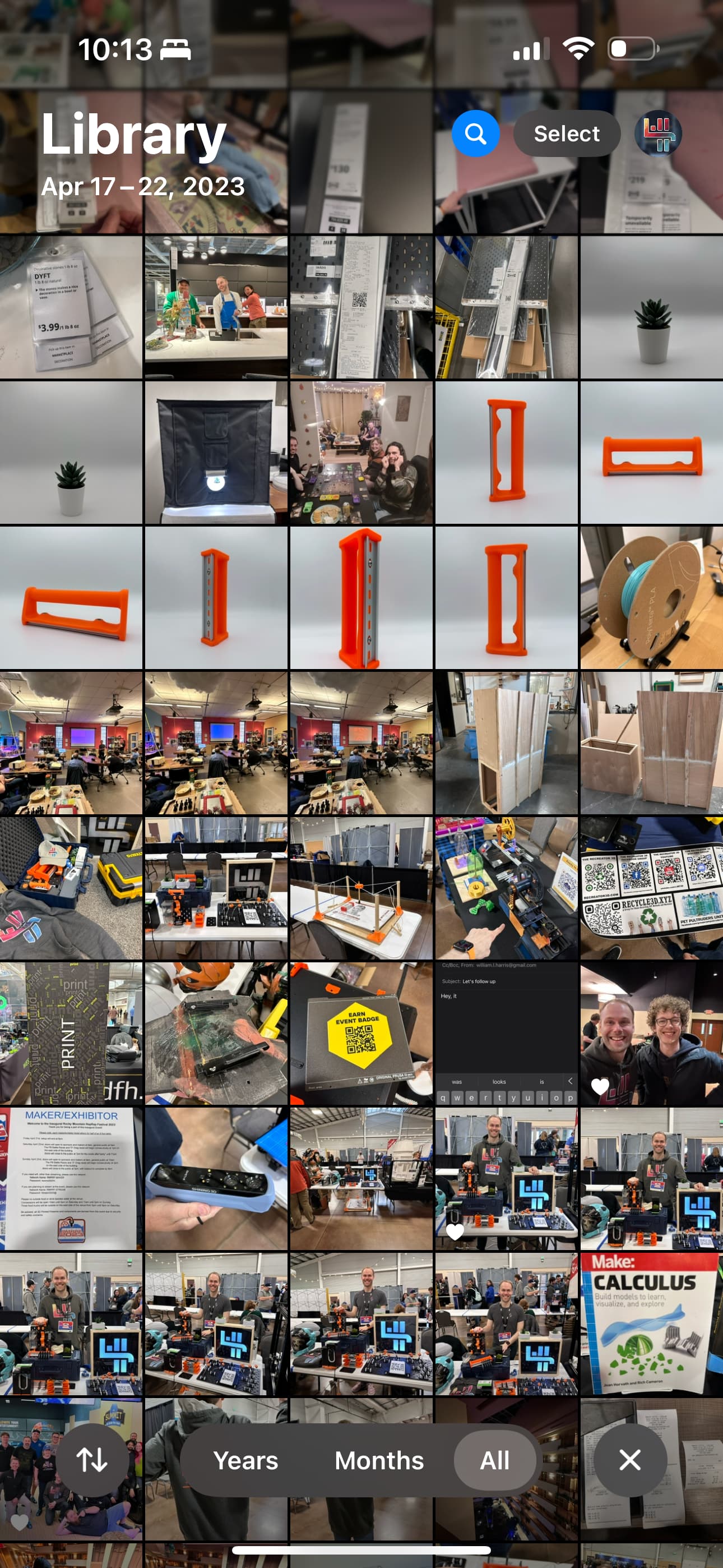
Application Two: The view from my photos app, conveys infinitely more. It shows the content of the photo, because that’s what’s important. It shows the context of the photo, because that’s what is valuable.

When I look at this group of photos, I remember the first time showing my work professionally at a convention, and I even met Stefan! I realize I haven’t talked to my friend Chris in too long. I had forgotten that he was there too. I was just playing around with my new lightbox, and I realize I still haven’t published the changes I made to my PTFE joiners.

Even just by looking at it, the application tells a story. Memories and ideas come flooding into my mind, and it’s all because I am viewing not just one photo at a time, but the collection of photos at once. The collection becomes a gestalt; more than the sum of its parts.

So why am I using this as an example?
It’s because the same is true for notes! Viewing a list of just the titles and properties of notes will never be enough to view your collection of notes as more than individual scraps. Just like in photographs, it’s the content of the note that matters. And if you can view the content of your notes surrounded by the context given by your collection, then you graduate from just remembering, to actually thinking with your notes.

==================

I want to give you a second example, and this one comes from physical notebooks.

In a notebook, any individual note is surrounded by the other notes you’ve taken close to the same time. When you review a note, the surrounding content reminds you of the background context from when you recorded the note. A collection of notes becomes a gestalt that conveys more than just what you write.

Often in a physical notebook, the context of the environment leaks into the note. For instance, consider if you need to write down a person’s phone number, and borrow that person’s blue pen. It becomes easier to locate that note because you know to look for blue ink instead of your standard pencil. Such little details become a memorable landmark because of the noise of everyday life.

By its context, it gains more information density than the written text itself.

=======================

Lastly, I want to revisit the masonry board with, hopefully, a new outlook of why it brings so much value. I cannot leave Google Keep because my written notes there come alive in a way that no other application has been able to beat.

Why does Keep beat all these other applications? It’s the same reasons as the examples above. Because it lets me view my notes in context with my collection, and it prioritizes the content of the note.

In user-experience design, the ultimate goal is to make an experience that disappears because it seems so simple and intuitive. Google has made their design work disappear in a way that lets you forget about the designer and work involved, and conveys notes more clearly than anything else so far.

So imagine my disappointment with how Google could pull the rug out from under me at any moment. It’s why I have to get out of Keep. I have to find an application with the contextual browsing style of Google Keep, the editing UI and native databases of Notion, and the self-hosted backend and extensibility of Obsidian. Right now, the closest is still AnyType, and I have high hopes.

Having read this, I’d like you to take a second look at my writing above about what Google Keep did right as an example. I hope it can convey how important this aspect of note-taking applications is.

===================

Point 3: What is your operating system? I can make or share what I use to migrate all my images to anytype (converting to webp, generating a “cover format” and also a thumbnail/icon from an image).

Thanks! I’d be eager to figure out a programmatic way out of this. I primarily use Windows, but have easy access to OSX and whatever Linux distro I feel like putting in a docker container (Ubuntu is closest at hand).

I can’t stress this enough

Good post to which I had just added a heart because there was nothing else to add.

But since this point is also one of my concerns (just read through my latest exchanges), I would like to add a few related FRs:

To get context in Anytype the only way to to this for me is proper linking objects to another via properties and / or tags plus inline queries.

For example I have a topic called “megatopic” and in there I have an inline query that lists everything that links to it in some way. I can then fine grain this with multiple inline queries for meetings, notes… whatever helps to differentiate information.

I will never have an overview of everything like in Google Keep (and therefore a more time based context) but for one topic or a project I have a good enough overview of what I have in there.

Sure the anxiety stays (do I have tagged / linked everything properly, could I potentially mess something up when I want to clean something up…). But this is part of this “blackbox-feeling” and either one embraces it and trust the system one creates or not. I personally have to give up the feeling of “having an overview”.

After using Obsidian for months and trying to return to Anytype it is indeed very hard to do so again. In Obsidian I can clean my vault with everything that is not filled (empty files) or not linked to something else (like not linked files). But in Obsidian you also have files and a folder structure that let’s you think about all this more than having a system in Anytype you built yourself that you potentially learn to trust and where files and leftovers eventually don’t matter.
I never could let go about this feeling when it comes to files that can fill up your storage quota. When one uses the clipper for example so much little crap gets saved that one will never be able to clean. I just have a bunch of files that fill up my space and I have no clue where they are embedded, if at all. This always gave me an uneasy feeling. The team might not have an issue with that as they potentially have set their account to unlimited storage space haha.

When it comes to text objects I was at a point in Anytype where I said “if I don’t see something ever again it was not worth keeping anyway”. If you search for something though and can’t find it, this is an issue and perhaps a problem with not having the right system for yourself.

But this then brings one to the burden of finding a system one can trust and that at some point won’t need much maintenance anymore in the future to be efficient. This alone can be a mountain task of it’s own, and then comes the learning curve of trusting it.

Hum… Gave it some thought, and I guess I will come back more times to re-read your reply, since it is interesting. In a way, you talk about a topic which I have been pursuing for decades literally, and a slight data hoarder! Why I am or was having difficulty understanding you, was because I am the opposite of you in this regard, meaning, I am a coder and you are a designer (I imagine in text, not pictures :)). Example, I have always been an "neo"vim and emacs user, as mentioned previously in other comments, I use Emacs Org for the PKM part (diary/everyday notes and tasks, the “being alive” of a PKM, not just storing information for retrieval later). I say this with jealousy, because I always wanted to have designer skills :slight_smile: If only I could do something great with photoshop/gimp/etc.

Blink twice if I am correct :slight_smile: , but what you mention is not, like you said, being a masonry gallery, but having for example a graph of related content, but instead of showing the arrow relations, it shows the content of the notes, maximized for readability of the content. A graph based wall of content previews, disregarding the arrows, as they aren’t really needed, since if it is there, it is assumed to be related!
This to work though, it has to happen a collaboration of the system/software and the organizing of the data.

I am more of a text person (I almost found my bliss on Emacs Org, where although there is Image support, I completely disregard it and use only text. I am a “text structure person”), so I am imagining that to me a “cloud of words” would have the effect you are mentioning.

Thanks for your reply, very interesting, and like I said, I will for sure be re-reading it later.

About point 2, I have to clear up that my feeling about it, is not so much as having files using quota. I actually “hate” (hate is too strong words, but big dislike) folders. The fact that the system allows for information or data to be “lost somewhere”, but able to be retrieved when wanted, is my goal. It means it scales with huge data amounts, without having to parse a listing of 10/100/1000 folders as the information grows.
My issue with point 2, is that all the data on Anytype has an “abstraction” layer, where it is given id’s and stored indirectly. An example might be more helpful:
I can have

  • Type “Note ABC” with id “guid-1” and property “color for something” with id “guid-2” and have half the space linked to it
  • Type “Note ABC” with id “guid-3” and property “color for something” with id “guid-4” and have the other half linked to it

and not notice!
In Emacs OrgMode, and since org format is 99.9999% complete for noting needs (even way more than I need or use), everything is right there, and using fd (find), ripgrep (grepping tool) and sed (mass pattern replacing tool) can instantly tell me if everything is properly linked, noted, duplicated or not, etc. If it is on the text of the org file, it is working! I don’t have to worry if it is processed or something has to run or what not.
My partial solution to this issue on Anytype, is to export to json and use my tools to try to check the “sanity” of my space. Since the years of using Anytype, I got to kinda understand the format and do tools for it, so I can almost read the json format, as if it was “markdown” or “org mode” files (the fact that json is so common and has so many support for it helps :slight_smile: ).

Anyway… TL;DR of point 2, it is not so much as having a picture I didn’t want using space on the vault, but as having a “Integrity Validator”, a “Scanner for duplicated things that should not be duplicated at ALL”, a “Link inspector”, etc :slight_smile:

The thing in Anytype is though, all files a flat in the files pane of the space. It’s not possible to clean those in a sane way. In Obsidian I also don’t care about folders when it comes to maintenance. I have a plugin that cleans my whole vault as described in the post before. I don’t have to manage much in this regard. I click on clean and every file that is not linked anywhere gets listed and I can chose to delete all unlinked files at once. I also got aware of files that should be linked somewhere and are not.

Yeah, I understand. That is why I spent so many hours working on “Space Export in JSON” :slight_smile:

One of the first tools I did was a “Merger manager” :slight_smile: If objects/properties have the same name but different ID’s, it would join them and consolidate everything under the same ID. (I would love to be able to check and specify an guid or static ID for objects/types/properties/property options).

I have to admit, though, the new Export to Markdown helps… that is… until space gets some GB files :slight_smile: (I would love for a space to be able to be exported without files and then imported back. Everytime I exported a space without files, it loses them. Haven’t done this in a while, so have to recheck)

I never did a “Not linked anywhere” tool, because I never really thought of cleaning non linked files, but … I can test doing one, shouldn’t be too hard.

@LineArcLine thanks for sharing your use case and frustrations. I skimmed, so will need to come back later to re-read.

Thank you for such a detailed description of you issues. We need more of quality feedback like this.

I support all your ideas.

This is such an intelligent and thorough review. I definitely have a lot to learn from you about note-taking.

Point 1 - honestly have not thought about this before. Don’t know how much I would use it unless I had it at my fingertips.

Point 2 - yes and yes! My workaroud is to create an “overview” with one central page that I’ve named “homepage.” Everything else is tied to that page in someway. This gives me a feeling of not losing things. However, having this built into the app would be superior as a simple page doesn’t have the features it needs to fill this task. With AT I often feel as if I’m at the same level with my notes, looking at them eye to eye. What I think you’re talking about is the ability to see them from above, which helps those of us who like big-picture thinking.

Thanks for the comment!

I agree with everything, especially the part I quoted above — that really messes with my head sometimes. I tried to put up with it for a while, but what finally pushed me to quit wasn’t only the small frustrations piling up. The real last straw was the roadmap: not just the addition of AI features, but also the fact that the team seemed to prioritize AI over core user-experience improvements that many users had been asking for. That direction just doesn’t align with what I want from a local-first tool that puts privacy and data security first, so I decided to step away.

I think you are wrong here.