Sort option for objects in widgets

The new sidebar is great but I would love to see the following feature:

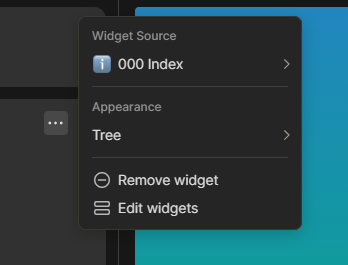
Under Appearance I would love to see a sorting option.

image

Sort options could be:

  1. Alphabetical, A-Z / Z-A
  2. Time/Date Modified, Newest first / Oldest first
  3. Time/Date Created, Newest first / Oldest first
  4. Custom, allowing custom sorting for the objects in the widget

Side effect is that this may make the Recent Widget a bit obsolete.


Optional: Group Sorting
This would add groups (headings/dividers) based on the sorting. For exampe I have the following favorites:

-Projects
-Areas
-Resources
-Archive

P.A.R.A. for those familiar with that organisation system and above would be a custom sorting. Grouping them while sorted A-Z makes it look like this:

A
-Archive
-Areas
P
-Projects
R
-Resources

While (custom) sorting could be done by making an object with all the links it would be a great feature to have for all widgets that have lists views.

Voted for this. Custom sorting is my most wanted feature, but the other sorting versions would also be very helpful!

Currently, widgets just follow the sort from the views. So if you want a custom sort, you can always try to use a collection instead of a set if possible.
Also, just implementing custom sort for sets as well would solve this issue, at least temporary.

Except collections are not automatic and new objects are not added automatically. It’s some kind of work-around at the moment but it’s very hacky and does not replace the need for this feature :slight_smile:

Thanks for the tip though! :+1:

Sets, on the other side, are automatic and you can use those for widgets too.

Oh yeah, I misunderstood. I thought you were saying that implementing in the future a custom sort for sets would fix this.

You are right I did not think of creating a set, then sorting it. My bad, and thank you again! :+1:

WHAT DO YOU RECOMMEND

I recommend introducing a function that would allow users to rearrange the order of objects within the widgets in the sidebar/navigation menu.

HOW COULD IT BE DONE

One way this could potentially be implemented is through a drag and drop interface within each widget. Users could click and hold on an object, then drag it to their desired position in the list. Alternatively, (which I don’t prefer) up and down arrows next to each object could allow users to move them higher or lower in the widget list.

REAL WORLD USE CASES

There are some objects (pages, notes, sets, etc.) that I use more frequently and I would prefer to have them at the top of my widget category. For example, in my AnyType, I use “All Characters” more often than “Picrews Collection,” so it would be much more convenient for me to have “All Characters” at the top and then arrange the rest based on most used to least used. Here is an image that illustrates my current situation:
RECOMMENDED ALTERNATIVES

N/A

ADDITIONAL CONTEXT

N/A

This topic also request a custom order of objects.

Oops! Thank you very much for pointing that out. I’ll go vote for that.

Perfect. Thanks for writing a good report though, i like the idea. :smiling_face:


@sambouwer This can be closed as a duplicate.