Is your feature request related to a problem? Please describe.
Not quite a problem, but it improves the user experince if we have a webclipper (Chrome/Safari) that allows us to quickly capture what we browse or read on the internet.
Describe the solution you’d like
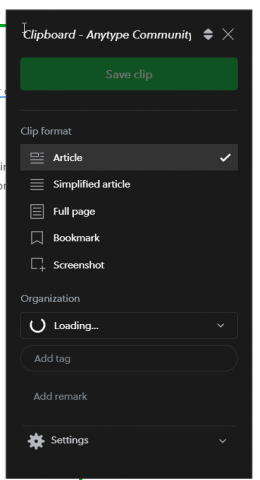
Idealy this works like the evernote clipper where we can decide what to capture (whole page, keep formating? highlights? Selection? file/image?) It can also prompt to let us decide where to place it in the AnyType. It will be also awesome if this can pull images or videos from Twitter/FB and IG.
Describe alternatives you’ve considered
Currently, it’s just the good old, Select, Copy and Paste.
Big upvote on this one. Especially if it can interact with databases in the future! It’s great for e.g. recipes or articles you want to read, with the option to copy page contents as well, along with using the web page icon for the Anytype icon, and then the first on-page image found as Cover image perhaps. And in databases, the option to fill in some fields with data from the page, e.g. URL, page title, etc.
I would also love to see a web clipper in AnyType. I do a lot of research and design stuff and so it would be wonderful to have webpages and articles that I can then make relations to with the other items I have in Anytype. I would love to see something similar to EverNote’s webclipper or Google Keep’s version. I want more than just text like Notion does.
It is great to see that this is now under development. I do like to draw attention again to the implementation of Mem.ai which is one of the very best implementations I have seen to date. You can access it from anywhere on your desktop, and it works for both browsers, but also text you select in PDF’s, word documents etc. Mem.ai came out of beta and is now accessible for everyone. So you can get a feel of what they call their spotlight function which is what is here called a web clipper. The big drawback with Mem.ai is privacy. It is all in the cloud and of course, it is not as rich in features as Anytype already is.
I currently use Pocket for saving articles and other web content that I want to read later, but my personal pet peeves with the app are the inability for permanent article storage (articles are deleted from onboard storage once you hit “Archive”, but permanent article storage is offered as part of Premium) and the lack of easy export and import of full article contents and data.
I’ve also experimented with using other solutions to serve this use case: Safari’s Reading List is decent but only limited to iOS devices, I never could get Wallabag to work, and other closed-source/SAAS products like Instapaper are not a viable solution for me. Trying to store articles as .md files within Obsidian seemed interesting, but as Obsidian doesn’t have a good cross-platform web clipper that works across platforms, this also was a no-go for me.
I can’t wait for Anytype’s Web Clipper to arrive, it’d solve lots of problems for me - and hopefully, there can be some functionality for importing data from other platforms like Pocket.
Also, preserving the reading position would be essential for Pocket-esque functionality; I’ll shamelessly plug my feature request about that
It’d also be great if Web Clipper functionality was not only limited to desktop browsers via an extension, but also if it was available through mobile devices via the OS’s Share functionality - you could share a webpage, link, or contact via the system share sheet and Anytype would be there as a target.
Pocket and Notion offer something similar - you can go and share a link or file (in the case of Notion), and it’ll save the content in the specified location.
Hello @vanish. We decided to focus on different aspects of our product prior to public release for now and also we encountered a couple of technical limitations so for now development of web clipper on hold for some time. We will definitely will return to this on as soon as our dev resources will be fried from more priority tasks.
We are going to share the public roadmap with the community soon and it will be super awesome if you could participate in discussion. Sorry for delay in update
Thanks for the response. It makes complete sense to prioritize product work for public release. I will be more than happy to provide my feedback for the roadmap. Thanks!
i know the web clipper is in the works, but i want do ask for it to be available on mobile too. i really need to have it in the share sheet in ios and on android (i don’t know it it’s called share sheet on android too )
I am also aware that this is in the works, but I figured I would share some thoughts for inspiration.
Tagspaces
Personally one of the best web clippers I have used is opensource [tagspaces](Tagging a file Tagspaces webclipper has pretty good functionality. Here is a video of how it work. TagSpaces WebClipper | Demonstration - YouTube)
What is nice about it is that you can add tags, which it would be nice to somehow incorporate in Anytype. But it also has a pretty nice UI.
Save to Notion (3rd part webclipper example)
I know that there are alot of Notion fans here. Notion’s web clipper is pretty basic. However “Save to notion” provides the ability to create form/templates to send clippings to a specific workplace in notion. After a clip is sent, it also has the ability to send highlights to the link page in notion. Here is a video
Metadate Capture
Personally I like it when metadata is carried over with the capture, however many web clippers only bring over the page title and the url. It would be nice if more metadata could be included in the link properties. The application that I have used that does this the best with a website’s meta data is the open source Zotero (specifically its Zotero connector), because having the page metadata is important for citation. When clipping a page, it populates the following fields : Item Type, Title, Abstract, Website, Website Type, Date, Short Title, URL, Accessed (date), Language en-US, Rights etc etc. See image below.
Probably not possible but I figured I would mention it:
Contact/ Address Capture: (My guess is that this is a pie in the sky)
Years ago I used a webclipper with CRM (contact management system) that would recognize if the text your were copying was an address, telephone number, email address and it would parse out the fields to the corresponding fields in the CRM. I believe it did this utilizing the html tags. I know many people are interested in using Anytype to manage contacts and relationships and I could see having some way of streamlining this would be helpful.
Online Videos:
Clipping or taking notes on an online video is another web clipping use case that might be helpful to consider. Currently youtube dominates.
When watching a video online people like being able to capture:
Video’s title Metadata
Timestamps
Timestamps with hyperlink link so that clicking on timestamp in their PKM takes them to that part of the video.
Screenshot of video (to capture a slide etc)
Capture/Utilize video subtitles/transcript.
Control video. (pause, video speed etc)
Having a “notes field” or a template as I mentioned above Save to Notion (3rd part webclipper for Notion example) with various fields, would provide people with a way of collecting the info they want from an online video manually.
It occurs me that podcasts kinda fall in this space as well.
Web Clipper History
I know a number of people who use their clipboard history to retrace their steps etc. There are all sorts of ways that that this is useful. Even a log entry that [Type of clip] was clipped from a [website]. I have been meaning to write a feature request for an anytype activity log that could be viewed like a timeline.
These are ideas, and I know how difficult it can be to develop something like this.


 )
)
 so that clicking on timestamp in their PKM takes them to that part of the video.