Object Hierarchy and Breadcrumbs (forked from Collections 2.0)

(and the following posts)

I can only speak from my own experience.
But in my opinion, what’s missing most is usability.

The need to “store” objects within other objects—Anytype handles this without any issues (more or less like organizing by folder).

But on the other hand, a very, very common use case for me: I’m working on an object, I open a “child” object, and possibly a “grandchild” object.
And I need to go back to the parent or grandparent: that’s the whole point of a breadcrumb trail. In a folder-based architecture, this is easy to implement (and therefore almost always available). In Anytype, it’s more complicated since there are no folders. There are links, but they can be multiple.
That said, the need for navigability is still there, and it’s a flaw I hope to see fixed someday.
(It’s worth noting, by the way, that this need is widespread and not limited to this specific issue; see, for example, the case of navigating through the elements of a collection—which Razor supported in 2024, but apparently it got stuck elsewhere).

Dear Shampra, doesn’t the Flow serve exactly this purpose?
Breadcrumbs are generally fine things, but IMHO not possible in Anytype, because a child can have multiple parents.

Instead of a breadcrumb bar, I would suggest that there is a simple button that opens the Flow.
– It’s IMHO a little more comfortable for mouse users, then the shortcut.

What about defining an object as folder and implement the possibility to filter backlinks, because backlinks of backlinks are sort of like a directory?

And if you could filter for backlinks of folder objects only, you would have your path.

Like this you can have multiple parentns, but it doesn’t confuse so much, because it’s only folders.

What do you think?

The problem is with navigation, not with creating fake folders (which I already do in some cases)

I think a demo is the most effective response :wink:.

Example: I have a folder/project named X, with a folder structure for organizing documentation, project updates, photos, archives, and so on.
Another example (which I’m currently working on every day) could be “Our House,” with a main page containing general information, then subfolders/subpages containing thematic sections (history, renovations, administrative, …), and even more subfolders/subpages (for example, within the “Renovations” section, subpages organized by specific renovation projects, each containing plenty of information, a collection/database, links, and further subpages)

If I’m on the Home/Projects/Plumbing page, I sometimes need to quickly go back to the Home page to look up some general information.
Or I might want to quickly go to Home/Administration/ to add or retrieve something.
Or I might want to quickly switch to Home/Projects/Electrical (Notion just rolled out a great update that makes this extremely easy and seamless)

Let’s compare the ease, speed, and fluidity of…

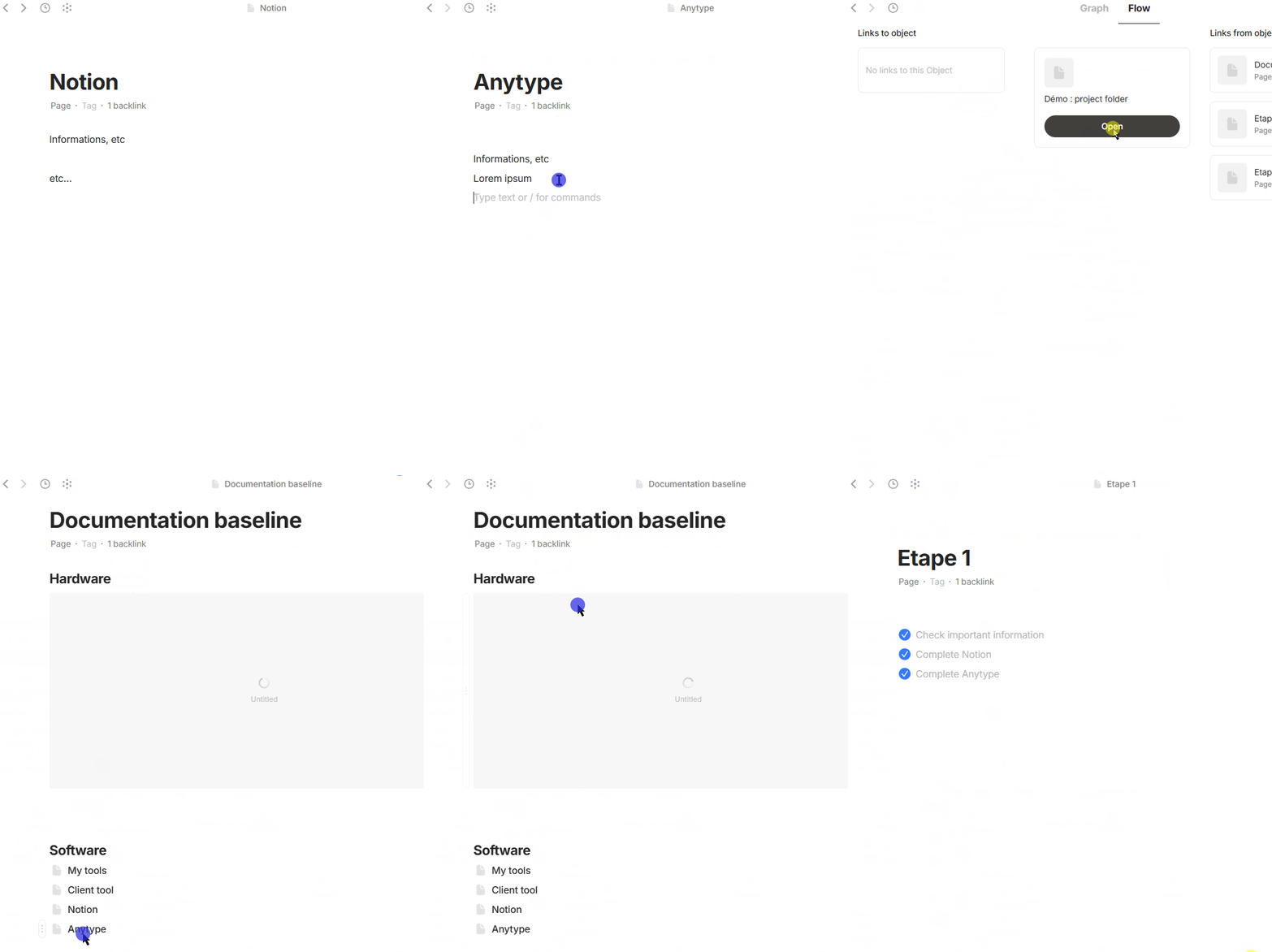
  • Anytype (using backlink or flow)
    anytype
    (fun fact : I upload the same image for Hardware, but it’s clearly glitching in Anytype—it’s been “loading” for an hour now)

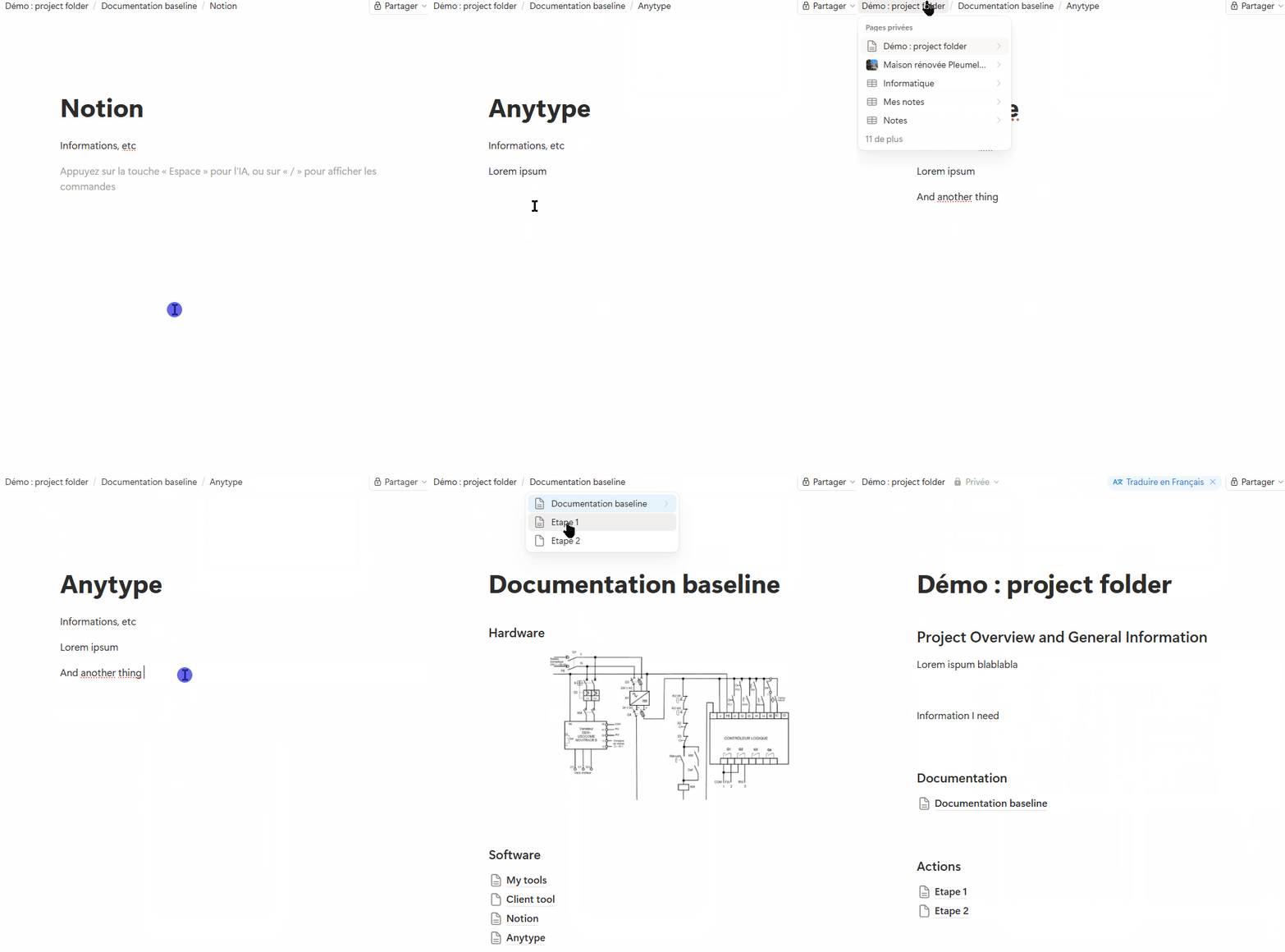
  • Notion
    anytype

Conclusion :
Breadcrumbs offers plenty of opportunities for optimization (Notion has just revamped it, and honestly, it’s even better now), each of which further improves navigation between items in this type of layout.

And technically, I don’t think it’s impossible in Anytype: whether it’s folders or pages, Anytype or Notion, it’s just a matter of links. The only limitation in Anytype is that an object can have multiple “parents.”
But it’s entirely manageable, though it does require a bit more thought regarding UI design. That’s what we already have in Flow.
So I recommend taking the principle (from Notion or other tools) and adapting it to allow for multiple possible “parents” (where Notion displays other unrelated pages/folders, Anytype would only display the parents, following the same principle).

That’s exactly why I think that there can’t exist a solution in Anytype.
Although it’s not a usual case, it could be that an Object has 20 parents and each of these parents have also 20 parents.
This leads to 400 grand parents for the Object if you want to see the wohle tree for just only two levels above the Object. Not to speak about a third level …

That’s why the flow manages only one level up and one level down.
If you are in the flow, you can easily chose one of the 20 parents to come one level higher.
There you can do the same to come to the grand parent of your Object.

By using the Flow, you are only two mouse clicks away from the Object’s grand parent.
Isn’t it easy enough? Really?

– How would you implement a user interface that shows the whole tree with all 20 parents and all 400 grand parents and maybe a third level with even more Objects?
Think: there could be even loops in the structure. It’s not in all cases a clear and simple tree structure.
Some childs could be parent of their own grand parent and so on.
Take a pen and a paper and try to draw such a structure.

Breadcrumbs work very well for a simple folder-like tree structure.
But for other topologies it becomes problematic if not even impossible.

When I’m working on these files, constantly navigating back and forth through a folder tree—whether it takes 5 clicks (not counting the time it takes to load the graph, which is mandatory and sometimes slow) or just one click with instant display—yes, it’s very tedious.

Sometimes I also don’t understand the relentless requests (yours included) for such minor things.
Even the table of contents… seriously, scrolling takes half a second longer, a second if it’s a really big document. Isn’t that enough? Really?
But I imagine that the “little glitches” we repeatedly encounter are very irritating.
That’s the case with many requests for UX improvements, actually: often details, but ones that make the experience tedious. I strongly believe that all the small changes to editing or collections, when added up, will make the experience so much more enjoyable.
So in my opinion, any improvement to the fluidity of the user experience should be encouraged, and even if I don’t personally find it useful, I wouldn’t oppose it. I could easily do without the table of contents (in fact, I use breadcrumbs more than tables of contents), but I appreciate using it to save that extra second of scrolling to find my title.

To revisit the issue of feasibility, it’s always helpful to discuss the challenges involved. To find solutions. The early versions of the table of contents were cumbersome in some cases.
A simple solution in your example (though there must be other options, perhaps better ones): enable a breadcrumb trail when only a single parent is present. After all, there’s a lot of demand on the forum for folder-based organization (which fits this rule), so this will meet the needs of many people. And we can look into improving the concept later on.

Note that Anytype manages to display a tree view in a top-down direction… :wink:

I’m with you to some degree.
That’s why I’ve suggested that the Flow should be reachable with a button (not only per shortcut).
The Flow could simply drop down, like a menu, while the Page is still open.

That all has nothing to do with the Graph and its loading time – I don’t know why you mention it?
Simply press Ctrl + o while you are in a Page and the Flow is immediately there.

Once the Flow is open, you are only one click away from the parent (no matter if there are multiple parents) and only two clicks away from all the existing grand parents.
In my opinion, that’s not bad.

.

And I don’t know what your’re talking about the table of contents?
I can’t remember that I’ve ever made a request here.
The thing is still buggy as hell and I was complaining about it long ago, but I’ve given up, because it isn’t important for me.
– May it be that you confuse me with someone else? It was another (well known) user who again and again wrote about the TOC.

:grinning_face_with_smiling_eyes:
As for the summary, I wasn’t targeting anyone in particular; as far as I recall, there was a wave of requests (just like there is now with the reminders—certain topics tend to come in “waves” :grinning_face_with_smiling_eyes:). And generally speaking, I see a lot of requests that I don’t quite understand (and, quite logically, the more people participate, the more requests or topics there will be that may differ from my own observations).

Let’s start simple: just one “parent”? No need to worry—we can handle that. I just checked my spaces, and when I use “folder objects,” I always have a single parent > grandparent > great-grandparent (okay, with one exception…).
Curious to know if other tree structure users have different scenarios?

So: if that’s the case, the breadcrumb trail is displayed. If not… some kind of collapsed/expandable flow? Yeah, not ideal—we’ll have to look into it, depending on how often it happens.

Do you have any ideas in mind yet?

It’s difficult to implement a solution that is intuitively understandable across all scenarios for users who shouldn’t need to know the underpinnings of object-based systems.

One issue I see with directly using a breadcrumb-like UI is that it signals to a user to expect a tree-hierarchy system. We already see this issue with dropdowns, but breadcrumbs take it to a whole new level. Ideally, what we’d like to do is to have a UI that guides users into the object-based system, where there is no linear hierarchy path for objects.

TLDR: We don’t have any great ideas at the moment, but frankly it’s also not on the highest of priorities—even though I agree it’s very important to the overall usability of Anytype. With Collections 2.0 and so many other aspects, we simply only have so many minds and hands to work. Anyway, it’d make sense for this navigation discussion to be broken off into a separate thread because it’s only tangentially related to Collections 2.0.

A good UI example is the widget with the hierarchy view.

If it would be possible to sort the view, it would be almost like a directory window.

The same could apply to the flow. Honestly, nobody has a problem with millions of entries in a directory. You sort, search and just scroll up and down. And here we would have filters too.

The key is the view configuration.

Sorting and filtering would be essential.

If you show all backlinks by default and give the user the power to filter them, everybody can make up his own system.E. g. filtering for Folder objects. :slightly_smiling_face:

In an object orientated system, you have relative directories. You define a starting point and look at all children. That’s how the widget does it, and it works perfect. (Except for the missing sorting and filtering functions.)

Actually, people like me love directories because they really direct you to the right drection

And if you could set a filter for the flow, you could reduce multiple parents with ease. You could, for example, set up a directory attribute and just look for all elements in the hierarchy that have this attribute active.

The possibilities are endless and users are very creative in finding their ways.

That’s why I would rather give more options and let the user choose.

To make the people know, it’s rather a question of documentation.

No @Zak-from-Zork , it isn’t.
The widget misleads some users to think that there is a hierarchy underlying. Because the widget gives the (wrong) impression that a Collection is a “start point” and it shows the childs one level down in this “tree”.
– But in reality, there is no tree!
The widget shows only a tiny section of the whole data structure. And this tiny section gives a wrong idea.

Sorry to say that, but I have the strong impression that some users in principle don’t understand that Anytype really really really doesn’t have a hierarchical structure.
No matter what you do, it is in principle not possible to bring a typical Anytype structure in the form of a tree topology!
– Really, the is no way, there will never be a way, not even if the starship Enterprize is on the way to somewhere in the universe.

The discussion came in past multiple times, for example here (read the whole thread):

Especially see in that different thread (read the whole thread) this post from me:

What we usually have in Anytype is a mesh topology (see the image in the linked post).
The image there shows the most basic example of a mesh.

  1. For a breadcrumb bar you need a start point.
    → A mesh topology doesn’t have a start point.
  2. In a breadcrumb bar does the actual Object have only one parent.
    → In Anytype’s mesh topology can each Object have multiple parents.
  3. A breadcrumb bar can’t deal with loops.
    → Anytype’s mesh topology leads naturally to loops.

I know, breadcrumbs are fine, it’s understandable that everyone likes them! But they work only for tree like topologies, or even simpler ones.
They can’t work more complex topologies; they simply reach their limit with “tree”.

Same is true for the widget navigation.
The widget uses the “trick” to make a Collection mimic as if it would be a “start point”. It hides the bigger image of the whole structure from the user, because it isn’t relevant for what the widget navigation does when it simply shows what’s one level down.
The problems starts if we come to the point: “what’s really one level UP?”
In the “up” direction can be multiple parents. Neither the widget, nor a breadcrumb bar, can handle that.

What’s really able to show the whole data structure, is the Graph View!
For a navigation we don’t want to see the whole Graph of course. We are more interested in a smaller section of the whole thing. But the general problem stays: everything can be connected to anything else, and the navigation concept needs to deal with that somehow.
– There is no simple solution for that!
No matter how much some users love their good old trees hierarchies and breadcrumbs - they are not sufficient to handle a mesh topology.

@ all “tree friends”: Please forget trees and breadcrumbs once and for all!
We are dealing here with a much more complex structure!
Anytype’s structure needs a different and much more advanced way to show a good representation and to enable a good navigation for the user.
There is no simple solution!

An idea for a navigation concept that the breadcrumb fans would like:

In principle does Anytype already have the tools to deal with the mesh topology.
– If you want to see the whole real structure, use the Graph.
– But if you want to navigate and you want to see only what’s one level up and down, use the Flow.

The Flow is in principle a good and underrated thing!
But I have two suggestions to make the Flow an even better and more often used tool;

  1. Implement a button in the navigation bar on the top left (right from the “Graph” button).
    This makes the Flow always reachable with only one click.
    I further suggest that the fFow should behave like a pull-down menu, for the psychological effect that the user has the feeling that he’s still in the actual open Object.
    – This may sound like a minor thing, but I believe it’s psychological important. The Flow as we know it, is like leaving the open Object and switching to another one. That feels slow, even although it works quick.
    A kind of drop-down Flow would feel more comfortable.
  2. This is the real deal:
    What the user who’s familiar with breadcrumbs wants, is to see at least one ore two up-levels more then the normal Flow does. As mentioned, the Flow shows (for a good reason) only one up-level).
    The Problem that Anytype has with showing more up-levels, is the fact that there can be masses of grand parents above the usual parents.
    .
    BASIC ASSUMPIONS FOR MY IDEA:
    I assume that the most usual case is, that the user previously has navigated down.
    For example, he came from a Collection, then he opened one of its Objects, then he has maybe followed a link to a child of that Object.
    With this assumption in mind, it is the most usual case for the user, that he wants to have a quick way back – usually the same way that has lead him to here.
    .
    NOW THE IDEA:
    The suggested drop-down Flow does still act as we know it. But with an important addition:
    It should become a combination of the path that has lead the user to here, and below that path it should show the usual Flow (with one level up and down).
    The mentioned path should show at last five stations, or it should show the whole path in a scrollable list, up til the point when the actual Tab was opened.(or the Anytype session has started).

To imagine it:

Think at the usual Flow, but with a kind of breadcrumb bar above it.

  • The Flow section shows the full truth about everything what’s one level up/down.
  • While the breadcrumb section above it does “lying” a bit, but in a useful way.
    It doesn’t care about the truth that there are multiple parents and grand parents, because it doesn’t need to care – it shows the way how the user came to the actual open Object.
    – This path is always a line. Therefore it is possible to represent it like a breadcrumb bar.

Some problems with this approach:

First problem:

There still does no fixed start point exist in Anytype. Therefore there must be a convention about what’s the first station of the displayed breadcrumb bar.

  1. There could be the convention, that the breadcrumb path is restricted to (for example) five stations.
  2. Or there could be the convention, that the displayed path could become as long as it is, til the (start) point when the user has started Anytype or opened the actual tab.

Second problem:

I practice, it could be that the user has switched multiple times between two objects back and forward.
This would lead to the effect that the breadcrumb representation of the path that has led him to where he is, shows nothing else then a repeated pattern of these two Objects as the stations o the path.
That means that he can’t no longer use the breadcrumb bar to go two or three levels higher.

We all must understand, that there is no real “up” in Anytype!

OK, one could say that an Object has a “parent” (or some parallel parents). The Flow shows that.
But already the parent could at the same time also be a child of his own child (like in the Muppet’s show: “I’m my own grandpa”).
Our familiar imagination that we have from our daily usage of PCs (a folder-like structure) simply doesn’t fit to Anytype!
We all must forget the idea that there is a path “up” that leads to a kind of “start point”!
There is not such an “up” and there is no “start point”!

Every attempt to make a representation of what’s true in Anytype needs to lie (to a certain degree).

The middle age is over!

We have to deal with the complex truth:
It’s NOT the case that the earth is the middle point and the sun + stars would circle around it.
Nope, the middle age is over, we need to understand:
– The earth circles around the sun.
– But the whole sun system circles around the center of the galaxy.
– And the galaxy moves in a complex way through the galaxy cluster.
– And the galaxy cluster reorganizes itself all the time and floats in an expanding universe that hasn’t a middle point or a fixed point.

We are like helpless floating somewhere in space, there is no real “up” and “down”. There is only a relative “up” and “down” one level, relative to our actual position.
We can only say what’s just above our head. But it could be that we are floating upside down relative to the next planet (if there is one).

Also have in mind:

Whatever an (always lying) breadcrumb bar just shows:
It can be that there is a second tab open and that the user there just has deleted one of the Objects that was stations in the breadcrumb path.
– That’s of course a solvable problem, but the devs need to deal also with such little evil details.
Don’t underestimate the complexity of all that (and much more) together!
If someone thinks, it must be a quick thing to add a kind of a breadcrumb bar, then he lives totally in an illusion! We are here in Anytype, not in a simple hierarchical structured local only one-person-App.

I think you are confusing the underlying data structure (the substance) with its visual representation (the form).

Claiming that a tree view is impossible or misleading in Anytype is a very rigid perspective. A modern application should be able to manage its display independently of its technical architecture. Besides, the Anytype team regularly breaks through these kinds of technical ‘impossibilities’ caused by their unique framework.

Having worked professionally with Graph databases (in cybersecurity), I can assure you that we constantly use top-down or bottom-up views. These are simplified as soon as you establish a context or a target: it’s simply a matter of defining the display logic at the start. It reminds me of debates about database types: the tech stack doesn’t dictate the UI; it just makes its implementation easier (or harder, yes :sweat_smile:).

  • The Tree View is not an ‘illusion’; it is a local view that complements the global graph (which many, myself included, find unreadable :grin:).
  • Breadcrumbs are not a definition of the structure; they are a contextual navigation tool. They show where you are coming from in a specific work session.

Other ‘folderless’ tools like Obsidian have plugins that offer breadcrumbs or hierarchical views. It is perfectly doable.

Is it technically more complex to implement within a graph? Yes. Is it incompatible? Absolutely not. Rejecting these tools in the name of ‘technical purity’ is an unnecessary self-limitation that degrades the UX for many users who need structure to be productive.

By dismissing this, you are also pigeonholing users (or idealizing one specific category), which ultimately deprives Anytype of a wider audience. While some users can manage without it (I’m advocating for breadcrumbs but I can live without them for now), that’s not true for everyone. Providing solutions that make this audience feel at home in Anytype would significantly improve user retention.


Your next message is interesting and picks up on the context-related points in particular. But I have to go; I’ll read it more carefully later.

And since @kaye is going to complain that we’re derailing the original thread, we should move this whole interesting discussion to another thread (either an existing one or a new one), but I don’t have permissions in the News section—could someone from the team handle that?

Sorry my dear and appreciated fellow Shampra, but I’m absolutely convinced that it is not a technical impossibility, that could at some point become overcome by a genius.
It’s an impossibility in the core principle.
– That’s why I’ve mentioned the starship Enterprize: It will never be possible, no matter how advanced the technology becomes in future.

If you think otherwise, then proof it:
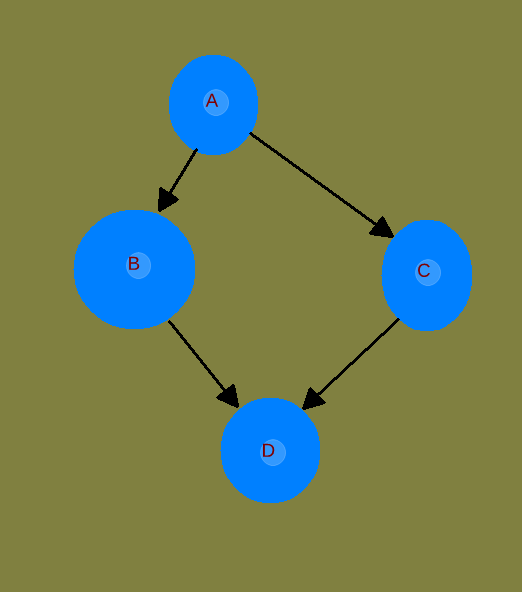
Show this ultra simple structure as a tree:

I’ve made it extremely easy for you, only four Objects, and a clear direction of the arrows (no bi-directional linking, no other complicated things).

This structure is not a tree and it can’t be displayed as a tree.

Yeeaah, one could argue, that depending from the context, one could show only the one path that has lead to Object “C”.
– That would of course be possible, to display this one path as a “tree” (a line with no branches) and also as a breadcrumb bar.
But in cases where it’s no longer clear which path has lead to Object C, you have no chance then to show both possible parents.
– But if an Object has more then one parent, then it is not a “tree” anymore in the sense of the terminology of network topology.

There is a definition what the sentence “tree” means in network topology. I haven’t invented that!
Part of this definition is, that an Object can have only one parent.

If some of you guys speak on base of something else, where branches can regrow together again after they have brached, then we argue on different bases.

Quick reply : I did it, and I’m no genius by any means :innocent:.

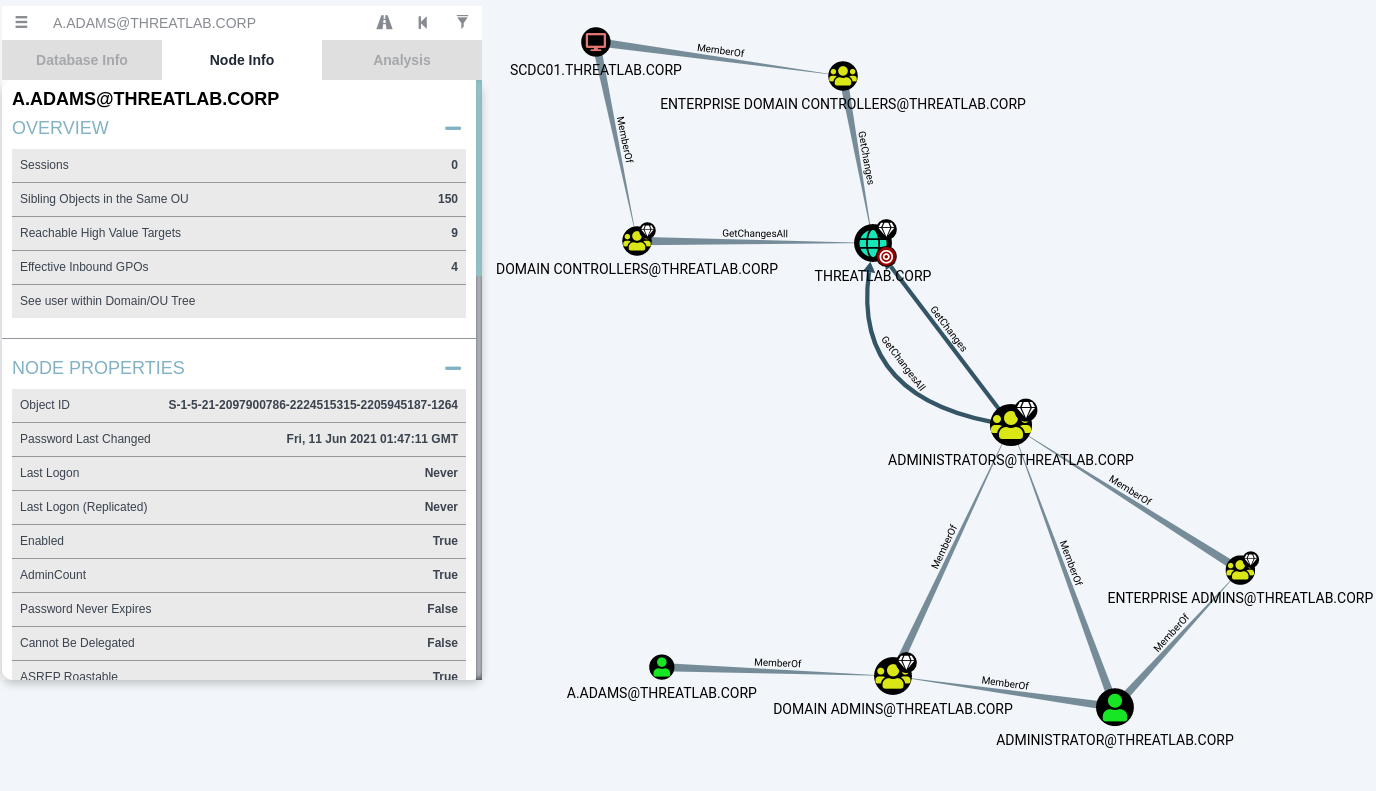
Context:

  • Neo4j database (so pure graph data, no relational or tree structures)
  • Analysis of attack paths in an enterprise context (i.e., a node that can be connected to multiple children, multiple parents; with loops, etc.)
    Well, sorry, but yes, in the end we had a path xxx > yyyy > zzzz > my element.
    As mentioned earlier, it’s not impossible; it requires defining the requirements (i.e., establishing the rules that enable creating a relevant display for the user).

A visual example of the context described above (very simple—it’s just to clearly show that it looks a lot like your “impossible” example) :

So yes, exactly :grin:! But the display still depends on the user context, right? The goal is to show data that’s useful and relevant to the user, not all possible data and visualizations (even if that might be a use case… that’s what the graph is for here)

Maybe this is a way out. Nested tags + priority relations or links, that could be breadcrumbed or not. E.g., the user chooses which priority relation or path to display - for example in a type template or in the type itself. This would help (dynamically, if needed) scope relations - valuable in itself, because it makes certain things implicit. This in turn helps keep some kind of hierarchy when/if needed without annoying the majority of Anytype fans who prefer a purely graph-based approach.

An alternative could be some kind of dynamic inheritance of types - which was touched on in this forum - combined with relations becoming types (or similar) and having configurable parameters.

Sidenote: it’s hard to understand the broad dislike towards hierarchies. Hierarchies occur in nature and need a representation, ignoring them won’t make them go away. It doesn’t mean they have to dominate the tool. It’s great to see that some thinking on how to address this is going on.

No, you didn’t do it.
Or I’m much too stupid to understand what your image and your whole last post has to to with the very simple task I’ve given you.
The simple task was, to show the four Objects from my image as a tree structure.

I become tired again, it’s the same here as in one of the other threads where it was heavily discussed, where I’ve asked the other user there to draw on paper a simple structure, for which I gave him the definition.

– I know he wouldn’t be able to do that! That would normally force him to admit that his assumption is wrong …
But he hasn’t even tried it. :frowning:
Instead, he stubbornly still claimed that it would be possible, and that there’s no need for him to draw it on paper. :frowning:

This pattern now repeats here and I’m really tired of that! We can’t come to a conclusion this way.
Again I ask you: show me the four Objects as a tree and I will admit that you are right and I was wrong!
But I’m sure that you can’t do it. Therefore I expect the same honesty from you.

It’s not important for me to be the shining bright mind who’s right. My ego doesn’t need that.
But I want that we finally reach an agreement about what’s possible and what isn’t.

.

And first: of course it is possible to present the user some representation that’s just in the moment of the actual context is somehow meaningful. But how ever this representation may look, it will not be a TREE in the sense of network topology.
It’s simply not possible – by principle.

And second: in the very simple and straight forward cases where there was a path of navigation that has lead the user to a grand grand child, it is of course easily possible to show this path that he has gone, as a breadcrumb bar!
If you have the simple case i mind that the session has started from a Collection and then two or three levels down, then it is possible to show this path as breadcrumbs.
BUT in practice, it is often not so clear and easy!
What if the user came somehow direct to the grand grand child?
– For example because he got an invitation link, or whatever reason. Now he is where he is, but there was no “from up to down” navigation.
He is in that grand grand child. And this grand grand child has for example three parallel parents.
What do you expect how a breadcrumb bar should look that enables him to navigate up?

In such a situation, it’s meaningless to say that the Object is a grand grand child!
It is that only in relation, only if there was a path that has lead to here.
At the moment, the Object is the start point itself!
But although it is the start point, is has (for example three) parents.

Anytype is like a hologram.
In some sense is every Object the center of all what is.
– This is a fundamental difference to a classic hierarchical and tree-like structure. Because there is no fixed location.
In the Windows file system has every Object a fixed location. You can always say what’s the parent, and the parent’s parent … and what’s the root of all.
– It’s different in Anytype.
There is no root of all.
It’s like the theory of relativity. Everything is only in relation to everything else. There is no center, there is no root, there is no no special point.

@Code-Jack @Shampra Can you both “make peace” :kissing_face_with_closed_eyes: ?

@Code-Jack Of course @Shampra can display your graph in a tree:

  • A >
    ---- B >
    -------- D
    ---- C >
    -------- D

There, done it! @Shampra will never though, be able to display the whole information correctly. If it was possible, trees would be graphs and graphs would be trees.

It is a decision for Anytype team to do, each side has its pros and cons

  • @Code-Jack for correctness and proper “education” of users.
  • @Shampra for use case familiarity and wider user base.

I honestly, I think it is a decision for Anytype team to make and for us to respect. Although I have my bias (which should be clear by now), I fully respect and understand Anytype’s decision on this. It is just a case of selecting understandable priorities.

DISCLAIMER: (I did not manage to read everything, and was kinda of in “the diagonal reading”. So … er… this comment contains human slop, read it at your own discretion)

It’s because a hierarchical structure leads to unsolvable problems.
Problems that every user should already know, because Windows and other OS work hierarchical.

For a solution think back to your school time and to Set Theory.
Have a bunch of different Objects of all kinds: fruits, toys, books, tools, invoices.

In Set Theory, you are easily able to draw an ellipse around all round Objects and to call it the “Set of round Objects”.
You can also define a Set of all red Object.
And a Set of all things that are made form plastic.
And a Set of items that was natural grown, plus a Set of things make by humans.
And a Set of items that need a battery.
And a Set of things that weight less then two kilogram.
And a Set of things that are important for your work.
And a Set of things that you need daily.

No problem in Set Theory! The Sets can (and will) even overlap. No problem! – That’s Anytype!
BUT: try to sort these items in the hierarchical folders in the Windows file system!
How do you arrange them?
– Do you see the problem with hierarchy?

In Anytype there is a “Space” of ALL Objects.
And in that big Space aka “Set of all” you can have as many Collections as you want and you can put each of the items in more then only one Collection.
Furthermore, you can define as many Queries as you want. The Queries will find the Objects no matter where they are. No matter how they are connected.

This is freedom! This is pure power! This is Anytype!
But there is no root or center of some kind of hierarchy. – For good reasons!
You are still able to connect your Objects in such a way that the connections mimic a kind of hierarchy.
But you are not restricted by a real hierarchy. You can have unlimited of such “hierarchies” in parallel. In principle “infinitive many”.
But if there are quasi “infinitive” hierarchies in parallel, then there is no real hierarchy!
Everything is as flexible as the user wants. And what he wants can easily change every day. No problem.

In Windows folders on the other hand, if you tomorrow come up with the idea to reorganize your folder system so that it has a different concept of arrangement, I wish you a lot fun!
And no matter what you do: no kind of folder system and file name convention could ever fulfill all your needs.
You could take a folder for every holiday and put your images in them:
– Holidays in Paris
– Holidays in Egypt
– Holidays in the mountains
– … and so on.
But now you suddenly need to have all images together, that show a very bright blue sky!
No matter when and where the images was taken, you simply need the blue sky images, to make a website background.
– Do you reorganize your windows folders?
No, you wouldn’t, but I know what you are doing: you will create a new folder and put by hand copies of such images in there.
Now you have duplicates …
And this new folder of blue sky images needs also a place where it’s located.

– It’s a pain in the ass!
But we all know and somehow accept that, because we know it since many years and we didn’t know a better concept. Windows simply doesn’t offer a real better concept.
Windows forces us to use a strict hierarchy, therefore we are so familiar with it. But it never fulfilled our needs

One could even say, we all are brainwashed by the operating system so that we think everything must have a hierarchy.

Anytype is something that gives us the chance to finally become adult persons that overcome the old brainwashing and the restrictions in thinking.

(Btw.: There is peace, I have no bad emotion at all, and I’m sure for Shampra it’s the same.)

About your representation of the structure:
What you did show here IS NOT a tree!
Object D has two parents, therefore it isn’t a “tree” in the sense of network theory.
(And btw.: I would have preferred a drawing, because it shows it more clear then a text representation).

What you did show is a representation of the real structure, but not a tree.
It’s in fact the same topological structure that my image has shown.
Of course I didn’t expect to see something different, I didn’t expect to see a tree. Because it’s still simply impossible by principle.

All the discussion would immediately end if the term “tree” wouldn’t be used anymore.
In Anytype we have to deal with a mesh structure.