The affirmation treats hierarchy as a physical constant (like gravity). In reality, biological systems are often more accurately described as rhizomatic or network-based, where decentralized nodes interact without a central “top” command.
Affirmation Claim: “Hierarchies occur in nature”
Scientific Counter-Evidence:
Networks and loops are just as common (e.g., mycelial networks, food webs).
If the hierarchical widget view could be activated for all kinds of objects and contain some sort and filtering functions that would help me with 99% of my needs. Actually, it would already be okay if the entries of the widget would have the same order than the respective objects.
There may not be an objective God’s-eye-view point of reference, but, just as in real life, there is the place where you are. In this case, it’s either the object that the user is viewing the Flow or Graph from, or that has been turned into a widget.
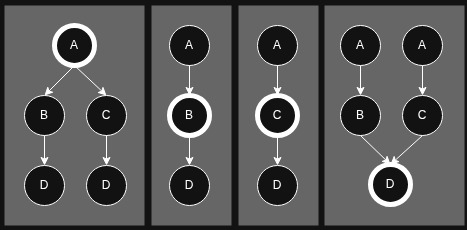
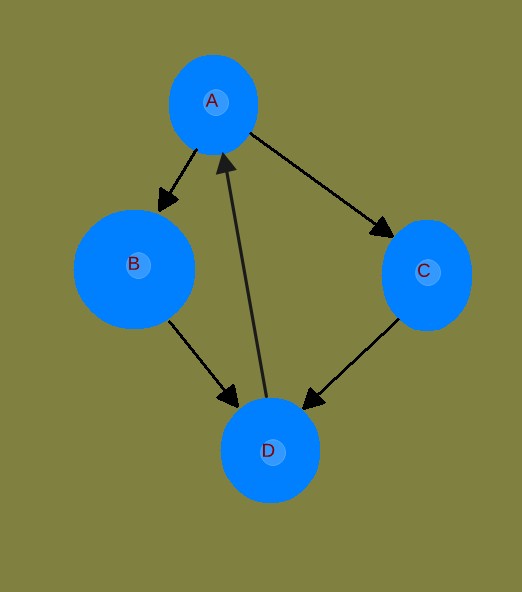
Here’s how your graph could be displayed from the point of view of each object. I don’t know if any of these fit the technical definition of a “tree” you’re using, but the point is that they show a hierarchy. I started with the idea of the Flow view (where you can see both parents and children of the object you’re on), expanded it beyond one level, and applied the logic of the widget view:
As in the widget view, the convergence problem is solved by allowing a single object to appear more than once. In the second and third examples, a “sibling” object disappears, but that’s already how the Flow view works, so that shouldn’t be a problem. It’s only a problem if you always want to be able to see the whole web, but as you’ve rightly pointed out, a heirarchical view is ill-suited for that. And that’s not the purpose here. The current Graph can already show you everything, and I don’t think anyone is saying that that needs to be done away with. What people seem to be asking for (what I’m asking for, anyway) is the additional option of a more narrowed view - a filter, if you like - for any single object and its direct relations, out to multiple levels. The widget view is a great start, but there could be better.
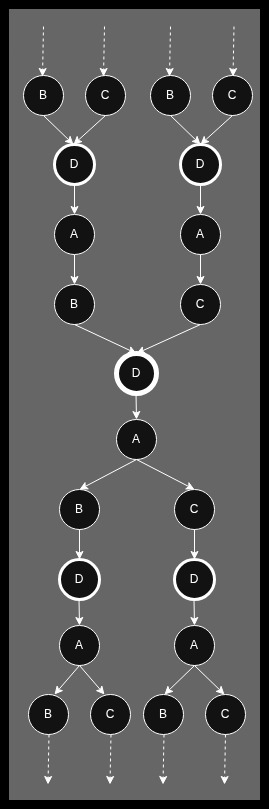
For good measure, I’ve made a variation of your example to show how looping can be addressed:
The widget view constrains the display of loops by requiring the user to expand them manually one level at a time. Something similar could apply here, where the dotted lines represent places where the user can choose to expand if they want:
Also, I’m not sure if I conveyed it well, but I intended for repetitions of the primary object to be denoted with a sort of half-strength visual bolding.
I appreciate that you linked to that related feature request. I support it and added my two cents, though you’d bowed out of the thread by that point so I don’t know if you saw it.
So when it comes down to it, are your objections actually about function, or are they really about philosophy? The posts of yours I’ve seen here and in the FR thread seem like they’re about the former, with articulations of network-theory reasons why you think hierarchical displays wouldn’t be workable in AT. But saying that a desire for hierarchy is “brainwashing” and not “adult” thinking makes me think the technical arguments are secondary to your real objection that those of us who find hierarchy useful and want to create it in AT are simply wrongheaded. I want to engage in good faith here, but I’d like to know that my interlocutors are doing the same. I understand that AT is meant to transcend hierarchy, and that’s awesome for those who want to use it in that way! But my needs are actually hierarchical (charting task dependencies), and I’ve been successfully using AT as such for months, to better effect than any other app I’ve tried. To use the physics analogy again, relativity was liberating, but it didn’t make Newtonian physics obsolete. I see no reason why having “Newtonian” tools available within the “Einsteinian” framework of AT would be wrong.
Finally did someone give it a try and brings even worthy thoughts!
Well made, @Astro-L !
Thank you a lot that you tried it!
OK, your image shows four examples.
The first one is indeed even a tree! But it is shown from the perspective of Object A. That was never the problem, because for breadcrumbs we are interested in the higher level that’s above the actual Object.
And what you show here also comes with the high prize that Object D is listed twice.
– That’s an disadvantage that the users wouldn’t accept.
Imagine that from Object A would not only two paths lead to Object D, but more. Much more.
The tree would be blown up and full of redundancy. The users would write Feature Requests and ask the devs to do something against that nonsense.
– I’ve consciously given the most simple example in my image, just enough to demonstrate the principle problem. I’ve expected that it’s inherently clear that the real data structure in Anytype is much more complex and contains more then only four connected Objects …
The second example in your image shows the structure from the perspective of Object B.
That’s a valid representation and sufficient for a breadcrumb bar.
But that was never a problem for Object B.
Dito for the perspective from Object C.
Now we are on the interesting point: Object D!
And here we have it again: It’s not a tree!
– It’s a good representation, yes (although it comes at the high cost that it lists Object A twice). But it isn’t a tree. Remember: “B” and “C” are parents of “D”. Therefore it isn’t a tree.
And now we must speak about something that you was bright enough to mention:
Do we speak here about “philosophy” aka network theory, or do we speak about a meaningful and helpful representation?
– It’s indeed an important question.
I was all the time moaning, because multiple users in this and the other threads repeatedly spoke about a “tree” although they always described something else then a tree.
What these users may have had in mind, is simply a meaningfull representation that has some similarities to a tree, although it’s different.
– This is not just hair splitting of the emperor’s beard by me. Let me explain:
Try do do what my image shows in the Windows file system!
There is a root directory “A”.
In that root directory are two parallel Folders “B” and “C”.
And now comes the clou: you have an image “D”. and it should be in both folders “B” and “C”.
In Windows, it’s simply impossible!
An image can’t be in two folders at the same time. No way! Because Windows uses a tree structure for the file system.
Only solution that Windos user can do: He can put Object “S” into folder “B” and then copy it and put the copy into folder “C”. – That is what your left example really shows.
Understand: in such a case, Object “D” now exists twice! They are not really identical anymore!
Do some edits in the original “D” in folder “B”, but but it doesn’t affect the copy in folder “C”. They are different Objects (at least in Windows).
In Anytype, on the other hand, we can easily do things like in my graphical example with the four Objects.
Object “D” can easily be child of two ore more parents, no problem!
But you could never ever press such a structure into the Windows file system!
The Windows file system is a dammed simple and therefore strictly restricted tree structure.
In Anytype we have a much more complex mesh structure.
You can’t press that into a tree based system!
That’s a fundamental thing and that’s why it isn’t just hair slitting of the emperor’s beard when I again and again argue, that a tree representation isn’t possible.
It’s very good that you’ve mentioned that, because it feels indeed as if the discussion has drifted away in a kind of “philosophical” direction; away from what the users want and need.
I’ve mentioned it before: the discussion could immediately end if the term “tree” would no longer be used.
My point is to show that the example that my graphic has given would in principle never fit into a structure like the Windows file system.
You would end up with the same paradox situation as your image shows: copies of the same Objects.
Each of us knows this problem, we all have masses of duplicated images in our folders. And even that doesn’t serve us well, we are simply not able to organize our data in a real useful way, Windows restricts us too much.
We may have much better ideas in the mind how to organize our files, but when it comes to the point to do it in Windows, you can’t do it. The tree based file system simply doesn’t allow that.
– Your post has more content worthy to discuss, but I need a break now, maybe I come back to it tomorrow.
The big issue is that that case is only possible because the underlying structure is a graph/network.
Example as in files and folders. To achieve that, one of the 'D’s would be the real one, the other would be a symlink.
That is why I think, the “visual representation” can be a “tree” (or something similar to a tree), but the underlying structure CANNOT be a tree.
Hence again, the two options:
Either make the users understand the underlying capabilities to its fullest
Either care with user familiarity and wide user base
Each have pros and cons, so its a matter of choice, neither is wrong.
And honestly, I’m fine with double entries. It took me a moment to realize that the widget hierarchy repeats itself if you have a linking loop, but that’s fine because it’s logical and absolutely understandable.
Maybe in any type, each branch of a tree-like-view-system, or part of a directory, can be seen as a view from a different perspective on the same object. Maybe like monitor screens that are distributed all over the system. So you see the same object in different places.
That would even apply in Newtons physics.
And again, it is just one type of view to make sense of all this information packed in this system, that I really love. And there’s no problem if you want to organize your stuff in other ways.
@Code-Jack: Maybe you could publish a space/channel in the gallery to demonstrate how you do it. It would make things easier to understand.
And again, thanks for your effort to try to make things clear.
Ah, yes, your’re right. – So easy to oversee something in such a text representation. Ovject D is there twice.
And here’s the problem: Either an Object is needed to appear multiple times (although it exists only once), OR it isn’t a tree.
But if if you list certain Objects multiple times to force it all into a tree, then it leads to the paradox that the representation blows up and becomes de facto more “volume” then the real data structure. – That doesn’t make much sense.
Imagine you have a more complex structure then in the four Object example. A structure where the actual Object has 10 Parents and even much more grand parents.
The so enforces “tree structure” would easily have over 100 entries with lots and lots of them listed multiple times.
But as I already said in my quote: it’s not the interesting case, because it shows the down-structure from the perspective of Object “A”.
For breadcrumbs we are interested in the up-structure, therefore we must look on Object “D”.
In reality, Object “D” exists only once.
Therefore we have a representation like the fourth in the fist image that @Astro-L has made.
Object D has there two parents, therefore it isn’t a tree.
And Object A is listed twice; in a more complex structure it would be listet multiple times.
As explained, that doesn’t make sense, because an artificial blown-up representation that makes the situation look more voluminous then the real structure, isn’t a help.
Yeah, I agree.
And with “something SIMILAR to a tree” you’ve found the right words!
I believe that we all meanwhile understand the basic problem, as well as the users wishes.
A sufficient representation can (in simple cases) have some similarity to a tree. (But never be a tree.)
The real problem starts when we look on a more realistic example from real practise.
My highly simplified example showed only four Objects and the most basic kind of connection.
Even then it was hard enough to represent it somehow.
Now look on a highly connected Object in your real Space.
Think for example on a fully connected mesh of 10 Objects. Each Object is connected to each other:
– Each Object is at the same time parent and child of each other.
– And it’s at the same time also grandpa and grandson of each other. And even grand grand …
Not direct a usual case, but in principle possible. And whatever the devs cook for us, it must be able to deal even with the most complex things that could exist in someone’s Space.
How would a kind of breadcrumb bar look in such a case?
– It’s of course not possible to press such a structure into a breadcrumb bar, because we need at least two dimensions, not only one. And a breadcrumb bar is only one-dimensional.
.
I just have a very vague idea for a fully new representation!
But I need to think about that.
I give only some hints (loud thinking):
In Anytype can each Object be seen as the center of the whole Space.
(Engulf that for a moment!)
And there could be a kind of 3D-Representation that always holds the actual Object in the center.
Similar to a spirit level where the air bubble is always on top.
I need to think more about that all, but it has similarity to the Graph, that’s restricted in such a way that it doesn’t show The Objects that are further away then (for example) three connections.
More irrelevant Objects could become presented more in the background of that 3D-Representation.
They are there, they must be shown, because their connections lead to the actual Object, but the path that comes from a Collection weights more then a connection from a normal Object.
– That was only load thinking.
It’s sometimes good to throw something new into the crowd. A brainstorming idea that can become discussed later.
Thank you, I’m glad you appreciated my feedback! I feel good about how I articulated my thoughts.
True, my model doesn’t provide a means to get a single breadcrumb trail unless the parentage happens to be unilinear or, as @kayesuggested, a manual “priority links” feature is added. I’m not personally interested in breadcrumbs, but I am interested in improvements to the display of hierarchies generally. It seemed to me that the conversation was about more than just a breadcrumbs implementation.
I appreciate specificity in language as much as anyone, but “tree” can mean other kinds of visualizations than what you’re referring to. You’re familiar with a “family tree”, yes? Where every node by definition has more than one parent? I think you’re doing yourself and this discussion a disservice by spending so many words arguing against people whose usage of the term is more common than yours. You’re not going to be able to stop everyone, especially people who don’t have your background and/or training, from using an also correct but not technically rigorous definition.
Ultimately I don’t care what we call my model or some other thing like it. Call it a “bush” or a “shrub” or a “hedge”, I don’t know. But this gets back to the good-faith thing: Are you really trying to engage with the core idea here - the desire that some of us have for more robust ways to track hierarchy - or are you using technical arguments to throw sand in the gears because you’re actually against the core idea itself in any form? Credit where it’s due, your suggestion in your last post for a 3D Graph view does sound like you’re starting to engage with the core idea, and I appreciate that!
But that’s exactly how the widget view currently works, and who’s complaining and writing feature requests about it? I think you’re projecting your own distaste for this notion onto the whole userbase. Several other people in this thread and that linked FR one have expressed a desire for something like this. I won’t predict how the userbase as a whole would react to it being implemented, but you don’t know that either.
(And for the record, duplication can also happen in Flow view if two objects are both linked and backlinked to each other. The same object will appear on either side. That’s probably a rare occurrence, but I thought it worth mentioning.)
Absolutely agreed, and thanks for making that graph image; it was a good springboard.
Thanks again - I wanted to hold off on my reply until you’d finished your thoughts, but I just couldn’t resist. I’m with @Zak-from-Zork that improvements to hierarchical display “would help me with 99% of my needs.” So I’m keenly interested in any discussion and ideas on the topic. Have a good evening, or whatever time it is for you!
? What do you want to see?
What I make is nothing special. And there is also no connection to the topic that we discuss here.
In fact I’m waiting for Tag as Object and Connection 2.0 etc. like everyone here.
Because the existing tools are not enough to built everything as I would like.
Oh, and I’m waiting for the micro jobs or how it calls!
And I’m waiting for so much more!
@kaye here’s one example of something that I can’t built in Anytype yet:
I have a Space for health care study.
There are many diseases.
There are many symptoms.
There are many medicines and healthy herbs.
Each disease can have multiple symptoms.
Each single symptom can belong to multiple diseases.
Each herb can be helpful for multiple diseases. But it can also have multiple side-effects.
How to organize that?
At the moment, it’s IMHO as good as impossible (or at least way too cumbersome). I don’t know if Collection 2.0 would help?
Of course, I could crate a Page for each single disease, each symptom, each herb, and so on.
And I could connect them by hand. But the effort to connect that all would be immense!
If a patient moans about his symptoms, I want to see all possible diseases that fit to the symptoms and look for their details.
And if I’m sure enough about his disease, I want to see all medicines and herbs that would help him, as well as their side-effects.
A typical Anytype Page about a disease (or medicine, or herb, or symptom) is about 4-5 printed pages long.
there are many Blocks in each of these Anytype Pages that each could link to a different Page.
But we still miss Block linking.
Ah, and about Block linking:
That’s an often requested feature. But there is the problem, that Anytype’s Blocks are too fine granulated.
Anytype puts each single line break into a new Block.
IMHO do we need some kind of “Group of Blocks”. And it would be helpful if we could organize such Meta-Blocks like independent Objects and link to them!
I’ve addressed you, Kaye, because the topic is now back to Collections 2.0 and the needed features.
Do the devs have such a use case already on the radar?
Or do I need to write a Feature Request? – But there was already so many requests in thqat direction …
I’m only not sure about the “Group of Blocks” feature that can be organized like independent Objects and embedded into Pages and Notes.
At the moment, I have a lot redundancy in my Pages.
For example, I explain in multiple disease-Pages why “vitamin xy” would help. It’s again and again mostly the same text block.
It wouldn’t make sense to link to the external Page “vitamin xy”, because that works only in the computer, but can’t become printed for the patient.
It would be much better to be able to embed such text blocks similar to the way as we put existing images into our Pages.
Maybe it has less to do with Collection 2.0 but more with Editor 2.0?
Yes, it is.
It is about breadcrumbs and it is about “trees”.
Two things mixed together here, that are related but not identical.
Both have to do with navigation, especially the “up” navigation.
That’s why I’ve written multiple times “in the sense of network topology”, or I wrote “in the sense of network theory”.
I wrote it so often, that it should be clear about what I’m talking and from what point of view.
– We discuss here about the navigation in a data structure. And the topology of our data structure here in Anytype is a mesh (not a tree).
A mesh is more mighty then a tree, therefore it can’t be represented as a tree. It has (at least) one dimension more.
That are the technical facts. And it feels absurd for me if you bring “family tree” into the discussion as an example for a non-technical view on the things!
We talk here about how to implement a navigation concept and visual representation concept for our existing data structure that has a mesh topology with which we need to deal somehow.
(Yawn), that’s clear but normally no word worth.
Because that can’t count as a duplication (although it is one); an Objects appears only once per side.
For the up navigation we look only on the left side of the Flow. And there will never be a duplicate.
Hey, that’s not nice!
I don’t throw sand in any gears. Instead, while outside is best weather, I spend here a lot of my valuable energy and life time into a discussion about how to make Anytype BETTER!
Oh, does it?
I’ve never recognized that.
But I must admit that I don’t use the side menu for navigation. I find it relative unsuitable and it doesn’t provide a good overview in my opinion.
I use only Collections and Queries for my navigation. OK, I reach them with a pinned section in the side menu, but I don’t use all these nested navigation there.
My “start page” is a Query that shows all Collections in it’s first View and all Queries in its second View..
Oh, believe me, I’m here long enough and more then active enough to know relatively well what will the users trigger to write requests, or to moan about certain behaviors of the App!
I must admit that the discussion overwhelms me and my capacity.
I procrastinate everything else to a point that’s beyond the threshold of what is still acceptable and healthy.
Sorry, I can’t hold with tempo of everything here anymore.
But I can say this two things in short:
Although I stay with my words, that a tree representation (in the sense of network topology) is in general principle impossible, I understand what the users really wish when they speak about “trees”.
Same for breadcrumbs.
They are also (more or less) impossible, although there are some cases where they would work (to some degree and with limits).
But I understand what the users really want if they request breadcrumbs.
Indeed, I’ve secretly wished something like breadcrumbs myself.
But I’ve never requested them, because I know that they are impossible in Anytype.
But it’s worthy to think about “something like that”.
– Something that enables us to navigate “up” – even although there is no real “up” in Anytype.
The idea that breadcrumbs give the user is this:
“If I navigate “up” often enough, I will finally come to the root”.
– But there is no “root” in Anytype.
For example: if Objects are connected as a ring, you could endlessly click “up” and you would simply move in a circle but never come to a “root”.
Therefore is a normal breadcrumb bar impossible (and there are more reasons, like multiple parents).
Nevertheless, the idea to have a quick way to navigate up has its charme!
The Flow does the thing, it even shows the multiple parents. But it would be better if the Flow would be better accessible, direkt on top of each Page and dropping down on demand.
Fair enough, and I didn’t mean to come across harshly. We have the same goal of helping make AT better! (And perhaps the same issues with time/attention management ) Hopefully our friends on the AT team get some value from seeing us hash our ideas out. Will respond more at another time - have good one.
I’d like to suggest a possible middle-ground solution for breadcrumb-like navigation in Anytype.
Instead of trying to turn the whole graph into a tree, users could manually select a specific path in Graph View and save it as a contextual navigation path.
For example, if object D can be reached through multiple routes:
A → B1 → C1 → D

A → B2 → C2 → D

A → B3 → C3 → D

...
the user could choose one meaningful route, such as:
A → B2 → C2 → D
Anytype could then display this selected route as a breadcrumb-like hierarchy view:
A / B2 / C2 / D
This would not mean that D has a fixed location or a single true parent. The underlying structure would still remain object-based and graph-based. The breadcrumb would simply represent one user-defined context or saved route through the graph.
In other words, the graph remains the source of truth, while the selected path becomes a navigation aid.
This could help users who need folder-like navigation for certain workflows, without forcing Anytype to adopt a traditional folder hierarchy.
Maybe this could be implemented as “Saved Navigation Paths” or “Contextual Breadcrumbs”: a user-created view that turns one chosen graph path into a temporary or saved hierarchy for navigation.
Just to recap, the task was to add a breadcrumb trail (not exactly a tree view).
What can I say to that, since you know better than I do what I’ve done in my professional life…
I’ll pass.
But I’d be happy to chat with the team later
Thanks for bringing your ideas and making these nice images, @360lime
But there is nothing new.
Two things.
As I earlier wrote, there are cases where the user somehow has jumped direct to Object “D”.
There was no navigation path.
For example, he could have received a direct link from another user.
Or Object “D” could be the default Page what the Space always shows as first.
Or he could have used the global search.
In such cases, there was no path that has lead to “D”.
But nevertheless, the user may know that the Object is de facto a child Object of three parents. And he may want to navigate up, to one of the parents.
What should the breadcrumb bar display in such a case?
And the opposite case:
What if the user was navigating in that structure all day long?
Your (very nice made) example shows a breadcrumb with only three up-levels for Object “D”.
But what if that path is much longer? What is then the start point of that path?
I’m thankful that you brought these nice images, because they show the problematic better then my ultra simple example with only four Objects.
Do you have suggestions for the two cases I’ve mentioned?
Hey, everything is good! Calm down please, we want to be constructive.
When I wrote “No, you didn’t do that” I’ve of course meant that you didn’t do this task (see next quote):
And you answered “I did it”. But you didn’t show the ultra simple structure, that’s seen in my image, as a tree. What’s wrong when I point it out that you didn’t do that?
Do we communicate passing each other?
Did you mean something else when you wrote “I did it”?
Hard to pick a point in the conversation and fork it, but this is the best I could do. Just some high level points reflecting back what has already been discussed:
Yes, better/more ways to navigate through objects in Anytype is a win for everybody.
Indeed, a mesh structure is not fundamentally compatible with a tree structure—however there are optimisations we can make to help with navigation regardless.
Like most things (especially in Anytype), issues arise when we think about edge cases more than when we think about simple scenarios. How do these systems operate when you chose to export certain parts of your space and not others? Are these UX/UI decisions immediately understandable to multiple users who share the same space, etc.? Do these solutions scale well over time or do they become a mess to manage/untangle?
Overall, it’s clear to us that most people are used to tree hierarchies and are 100% satisfied with them—this is the majority of all (potential) users. Then there are those who have fully bought into the object-based mesh system, who don’t have much personal need for hierarchies. Then there are those in the middle who like the object-based system, but do want more ways to simulate hierarchies within Anytype.
As @sturdily mentioned, there’s no way to please everybody but we do need to make decisions regardless. Maybe I’ll prototype something in the future and we can have a more tangible discussion on specific solutions.
Yes and this is helpful, that’s the value proposition that almost all of us subscribe to.
What is unhelpful is the inability of the tool to provide a comfortable, optional hierarchy when a user needs it.
Example: when putting a note in a sub-sub-folder in some software, it
immediately inherits the properties of that hierarchy,
it does that automatically with a single click, without having to dive in a sea of tags and
there is scoping going on.
Sometimes the structures of the folders refer to properties A-B-C (meetings-with whom-topics), sometimes to X-Y-Z (music-chill-downtempo). Once Collections let us do that or reasonably emulate this, the problem will have been solved. Having to make a new globally visible tag for every property creates an impassable mess. This is just a tired, base use case example, hierarchies have other useful applications. And, it doesn’t have to be one thing or the other, both hierarchies (e.g., a light variant) and networks could work side by side. No problem with the network/mesh approach dominating - just allow smart nesting here and there and things will significantly improve.
Again, yes - the comment was not making a statement on anything other than hierarchies. They could be an option and don’t have to derail the current approach of Anytype in any way. Constructive suggestions have been made by the team and forum members on how that could be approached.
This is what I would like to believe. Overlays, or nested tags, or nested collections could all help - fully agreed that edge cases could be tricky.
I think that might explain a lot. I’m not the only one in this discussion who’s been pointing to the widget-tree feature and saying, “That! Like that, but more!” If you’d like to understand where we’re coming from, I recommend making a widget from one of your objects that has a chain of linked objects, and seeing how the tree unfolds from it.
True, I’m pretty new here, and I’ll grant your familiarity with the community. Still, I said I wouldn’t predict how the userbase would react, but I’ll say this much: If there is a negative reaction to this kind of feature being implemented, I expect the scale of the reaction would be directly proportional to the degree to which people were forced to use it. Meaning, if it were implemented as the only means to navigate object relations, that would be a bad move and I would expect a justifiably loud hue and cry. But if it were an optional feature that’s easy to avoid if you don’t like it (such as widget-trees and the Flow view currently), I’m sure some people would still make a fuss because people be like that, but I expect other people would just ignore it like you ignore widget-trees. And that’s great! The beauty of a well-made “everything app” isn’t that every user uses every feature, but that every user can find some features that work for them and curate their own experience.
Whether we’re talking about my “shrub” variation on the Graph, @Zak-from-Zork’s expanded Flow or enhanced widget-tree, or any other idea, I don’t see why they couldn’t politely coexist with other visualizations, such as the current Graph, to be used or not according to purpose.
I’m glad you see that this is still worth thinking about, in a sort of “useful fiction” way. After all, from the perspective of any given object there definitely is an up/down (backlinks/links), even if the AT “universe” is relativistic. You’re right that things can get hairy if one tries to do too much in a hierarchical frame, with objects being repeated, sometimes being both up and down from the primary one - or the primary one can be up and/or down from itself, as my diagram showed - and it all turns into a hall of mirrors. If the goal is to sensibly represent the whole mesh topology that AT is capable of, then I’m with you that hierarchy is a terrible way to go.
But a frame that’s terrible at a wide scale can be great at a narrow one. I know from my experience using widget-trees as a primary organizational tool for months that my link-chains are short and well-contained. Widget-trees serve them very well, and the ideas I mentioned above could serve them even better. This is even with the occasional repeated object or infinite loop-chain, which I’ve found very manageable.
An analogy occurred to me: I picture myself walking through a wilderness at night, trying to get my bearings, and I say, “It’d be great if I could magic up a star chart based on my position that shows me constellations, coordinates, cardinal directions, etc. Then I could use the sky to orient myself and get where I’m going!” Someone appears and says, “No! Wrong! The stars aren’t actually arrayed in a giant sphere around the Earth! Constellations are meaningless; those stars aren’t related to each other at all! You’re brainwashed! Grow up!” And they hand me a map of the observable universe. Which, sure, is more literally accurate in a sense, but is the opposite of helpful for getting me out of the woods. (The story in my head also includes a bit about climbing a tree for a better look, with an ensuing argument about which species counts as a real tree. But no need to belabor )
In this analogy, the complications that can result from applying hierarchy to AT’s mesh are the equivalent of epicycles in classical astronomy: warning signs that the model isn’t suitable beyond a certain scale. But they don’t invalidate the model’s usefulness within limits.
Whether that usefulness is relevant to enough users, and how to address it if it is, is up to the AT team to decide, and I defer to them. All I can do is articulate my desires and hope for the best. Thanks again @kaye for listening and responding!
Moment, chaos. We lost the track somehow. We must sort that out.
I wrote: “The tree would be blown up and full of redundancy.”
You answered: "But that’s exactly how the widget view currently works.
Then I wrote: “Oh, does it? I’ve never recognized that.”
I’ve meant that I never saw duplicates, aka redundancy, in the widget navigation.
That’s why I wrote: “Oh, does it?”
It’s not the case that I’ve never used the widget navigation. I know how the tree-like structure enfolds there.
But:
I gave up to use it, because I can’t accept it as a serious way to navigate in my Space.
I see the widget navigation more as a funny gimmic with little real use. – A kind of proud demonstration from the programmers, that the widgets are mighty enough so that it’s in principle even possible to do some basic navigation actions in the side menu.
Yes, mildly impressive (so as a prove of concept), but in practice not very useful.
What the widgets do is to show the next deep level in the down stream.
That’s not really problematic.
Much more problematic is the up-stream! AND this not only to one level up (what the Flow already does), but at least for two levels! (Not to speak about a third up-level!)
Remember:
We talk here about two things: 1. Tree-like navigation. And 2. breadcrumb-like navigation.
Breadcrumbs show the up-stream. And that’s the much more interesting part, then the down-stream.
The users want especially the up-navigation.
One level up already exists, the Flow offers that.
But to implement a representation that includes at least a second up-level – from here on start the problems.
A heavily linked Object could have hundreds of grandpas.
If you get this presented as a long list, then happy scrolling!
And that’s not the only problem.
In that long list you would have a mixture of parents and grandparents.
They are either mixed, or sorted. Both ways to present the list have disadvantages.
If the list is sorted, then you can’t see which grandparent belongs to which parent.
But if parents and grandparents are presented close by each other according to their relationship, then does the look become confusing. If you simply want to navigate one level up, and you simply want to choose the right parent (there may be 10 parents), it will stress you a lot if you get a list with maybe 400 entries, most of them are the grandparents that are just not of interest for you.
With even a third up-level, the whole thing would become absurd!
– And this is what the breadcrumb lovers should get clear in their mind: A simple one-dimensional breadcrumb bar can easily handle three up-levels, or four, five, six … – no problem at all!
But already a simple tree-like structure is already two dimensional.
Much worse is it for our mesh structure: for a mesh it’s not even meaningful possible to count the amount of dimensions it has (if you look at “dimensions” as “coordinates”.). The amount of possible up-paths explodes!
How ridiculous must it feel for the user?
Let’s assume he simply wants to navigate three levels up. In principle, he needs to do only three clicks.
But instead, he gets presented an overwhelming and confusing list of hundreds entries.
Yeeees, of course, it’s not always so drastic. But it can be so drastic. And even if the list shows only 20-50 entries (because the user doesn’t use heavy linking), it still sucks to use such a navigation, if you very well know that you’re only three clicks away from your destination.
There are more things, but I want to come to an end now.
Only this:
It’s sooo easy for people to request:
“I would like to have a breadcrumb navigation! Dear devs, do something!”. Or:
“I would like to have a tree representation; dear devs, make it for us!”
Sorry to say that, but some guys deny even bare facts and insist that they definitely want what they have as an only vague idea in mind.
– I can tall you: even if the devs would take all effort and magically somehow do all these things, it doesn’t mean that the users will be happy with the result, if they exactly get what they have ordered!
Remember:
“Be careful with your wishes, they could become true!”
 :
:


 ) Hopefully our friends on the AT team get some value from seeing us hash our ideas out. Will respond more at another time - have good one.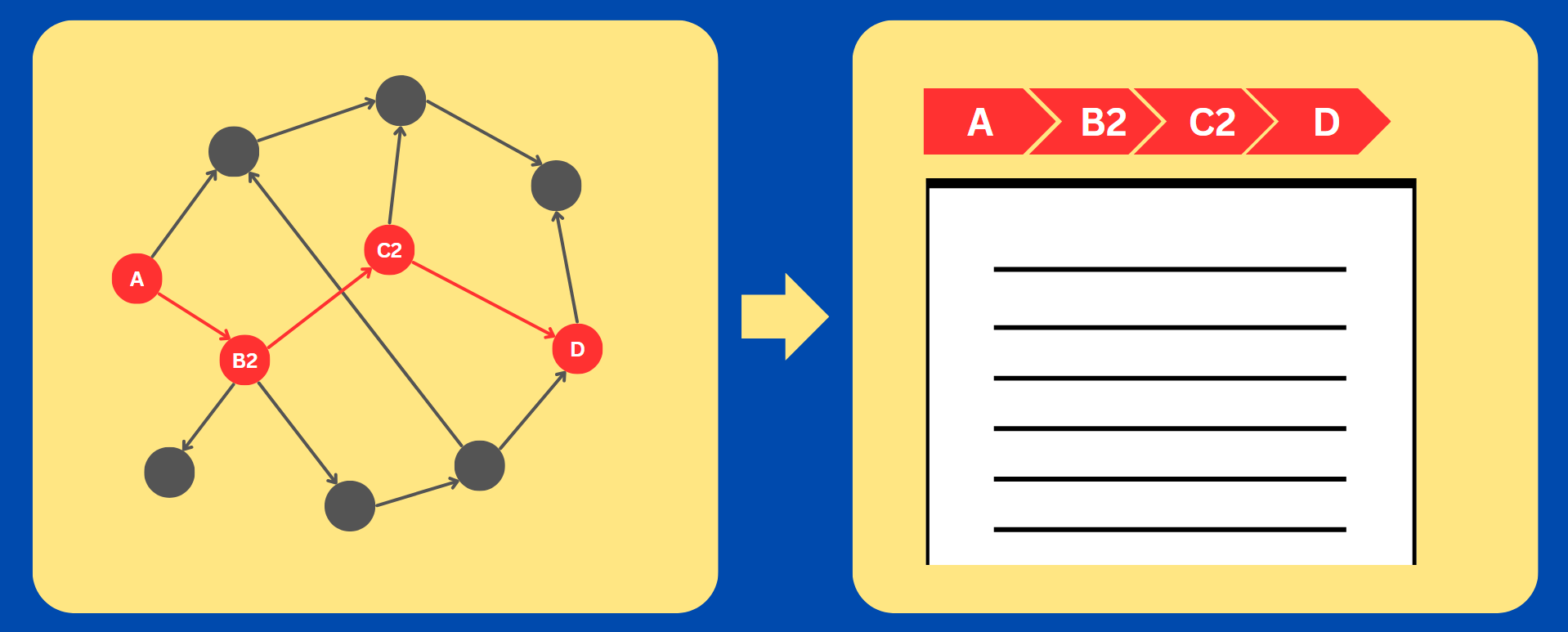

 )
)
