I don’t speak against your request. I also wish for some more filters in the Graph.
But why don’t you make a Collection for Sets?
If you see a floating Set in the Graph, simply link it to that Collection and it no longer floats as an Orphan in the Graph.
The benefit of doing so is that you have one central place (the Collection) where you can find all your Sets.
I totally understand, that missing object is not deleted, we can add it back by dozen of ways
But this topic is about edit experience right? It not about whether we are able to do it. It about how can we do it intuitively.
Yes, you are right the question was related only to the editor experience, but not to the data view functionality. Perhaps I was not clear enough in my post. So we’ll need to make some work to organise all the replies. Thanks for all the answers.
Actually, I have to copy, paste into notepad, copy the result, paste into Anytype.
No need to explain what I think about it
Please let use paste with CTL(or CMD) SHIFT V (or with right clic, “paste without format”, complementary with this FR)
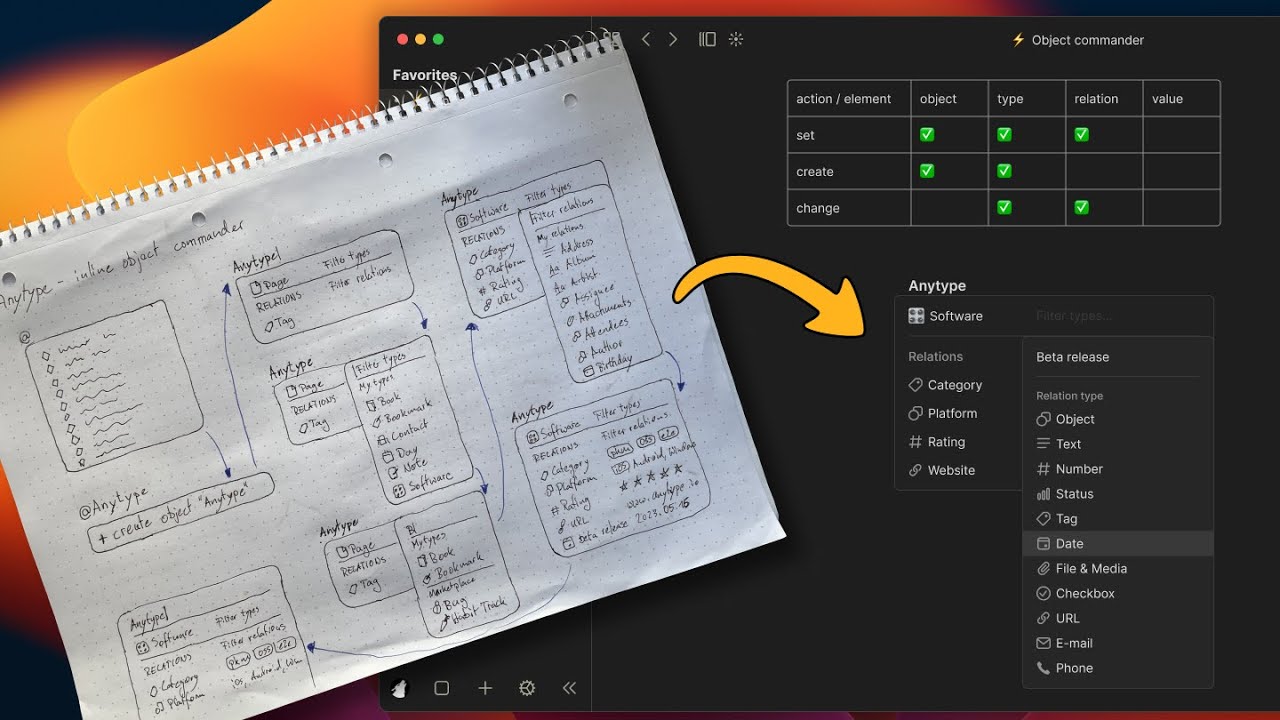
I use inline mentions a lot to create new objects while I am writing. But I have to jump away from the page I am currently writing on to set the correct type and to set relations for those newly created objects. Also this involves a lot of mouse/trackpad usage on desktop and creates a lot of friction in my typing flow.
To improve the UX in this case I submitted the FR object creation and modification a year ago including this detailed prototype demo:
OMG, if that was a thing on the app right now, this would solve a lot of things when creating new objects, sometimes I do not create certain objects because I really have to weigh its importance against the fact that for each I’lll have to select it, then click on link, create new object, open the object, select the type and fill its values and if I want to add something else then add it through the slash create new relation or through the relationship panel. Many clicks that with that demo would be simplified.
Just one quick question I had, how would you exit that? I mean, I did see that you pressed space but what if you want to change the name to something that contains a space? perhaps using TAB would be better(?)
I LOVE your design and the UI and UX implemented in it. Anytype definitely need some consistency and optimisation of the UX and UI, because it is too complex and too dispersed. I needed weeks to figured out how to used it and where are the different parts of the menu that you’ve just shown.
Thanks for the great feedback. At the time I worked on this it wasn’t possible to create a new object via mention with a space. Pressing space in Anytype just created the object. I guess after this improvement using TAB to leave the commander instead of SPACE should work.
keep @ for quick link/creating and use [[ ]] for “object commander” (like linking from logseq)
exit when pressing “enter” on the name of the object or somewhere in the window outside of the menu
keep the name of the object easy to write inline, like in logseq, for example [Anytype](Anytype application). this would link to object “Anytype” but display the text “Anytype application”
When adding templates or relations to the library, add option to sync across spaces; label user-added templates/relations as such; and automatically alphabetise these added templates/relations. Makes it easier to find/edit if I know where to expect the item to be!
Also, if possible, have template-associate properties for relations. For example, I’ve made a select-type relation called “Category”, but depending on what type of template I’m using, I’d like to be able to filter the options. If the template is for a book, the list of “Category” might only show “nonfiction, fiction, etc” whereas if the template is for a software, the list might just show which OS it is designed for, instead of showing every single category option I might set for any object in my space.
It’s definitely been mentioned in the feature request forum before, but being able to set recurring tasks would be such a huge help. For example, if I have a to-do list that I want to check off but it is a daily/weekly/(n=x) occurrence, it would be able to save me so much time to make it an automated process. Currently, I have to go and “rescue” tasks or make new ones…which tends to become confusing as I have several objects with identical names…
A more intuitive organisation/search.
It’s also been mentioned before, but it would be incredible to have some sort of sticky table of contents that remains on the side of the page as I scroll through a long sheet of notes.
I’m not sure if this exists already (and I am just inept lol) but being able to search for words within objects as I’m trying to find something in my notes.
An image uploaded to Anytype should be usable everywhere
Usercase :
I upload an image to an Anytype object. Cool.
I’d like the same image as a banner (because set/collection views are so limited that I have no choice): I have to re-upload it.
I’d like to display it on another page: I have to re-upload it. In a thumbnails? Upload again!
Not good for UX, not good for our space, not good for your server
I don’t like how bullet points behave. After a sub-bullet (or sub-number or check mark), pressing delete or enter on a blank sub-bullet should move the indebt back but keep the formatting as bullets
When in table mode, I want to make a new object without first having to fill in the title - I want to open it immediately as the open object, sometimes I want to write down my thoughts before giving it a title
Right
It annoyed me again yesterday (especially as I was working on Notion in parallel, which handles it well) but I didn’t think to write it down!
Most applications allow you to manage the list level easily: not Anytype
So…
ENTER must change the level of the list, not break it
I’d like to be able to set fixed sizes for images and see its actual measurements/dimensions, so I’m not guessing if my images are of the same height.
Use case:
layout consistency for book review entries with different-sized covers
placing images side by side on different columns
Mobile image quality inside a canvas also needs improvements:
transparent images have shadows, creating this dark border that kills the point of being a transparent image
small images are enlarged to fit width, causing these images to look pixelated and front-center when it’s only meant to be decorative (example is a small sticker placed in one column or as a content divider)
Other suggestions:
a basic image editor to crop images in-app
an image library to reuse images (like in page covers)
CAPTIONS
Relations or not, I think captions are needed for a good editing experience.
Hi, anytype is my main driver app so I have lots of feelings about this. Anytype is beautiful and these come from a place of care
philosophical critique
Anytype is no longer going down the “every block is an object on the graph” route anymore. So the focus on block editing rather than WYSIWYG is questionable imho, as block editors are not usually known for ease of writing great prose. Seems worst of both worlds - in an outliner like Logseq, it makes sense because the UX price comes with a great reward.
Case study: try pasting poetry into the editor and see the destruction that occurs to the formatting due to rigid block system. Using shift+enter for multiline blocks (1 block = 1 stanza) seems to leave you in the worst of both worlds despite superficially looking good.
pain points (all platforms)
ability to select text which spans across many blocks - selecting text from the middle of block A to the middle of block B. the competition here is fierce; Notion is a great example of a hybrid block/free-form editor, although it took them time to implement it
In general the line height feels too large. Maybe this could be dynamic, smaller between text and larger between multimedia.
Anytype’s editor seems built around an excitement for drag and drop but this is only really useful for multimedia and sometimes mobile
iOS
Indenting bullet points is really awkward; the drag and drop is too slow. Loqseq can be an example here of horizontal swipe gestures to change indentation
No idea when pasting an attachment into the editor from outside of Anytype will work; seems random
iOS autocomplete often breaks the ability to enter a newline char. Ive really tried searching for a stable way to reproduce this to make a bug ticket but it’s totally random
referencing other pages often makes the in-line text editing relly buggy
iPad keyboard doesn’t work well which kinda negates the main reason to take notes on an iPad