Simple (& Genius) Way to Organize Anytype

Not sure if anyone else will find this useful but it’s kinda revolutionised how I’m organising Anytype. Incredibly simple but pretty profound I think. I have created a (multi-select) relation called ‘Set’ and all of my sets are now based on this one relation.

It’s made things so much easier. Here are some benefits / what’s changed:

  • Before, I had sets based on tags, and categories and all sorts of different relations which meant I was never really sure how to tag or categorize new objects. Now, I just choose the set(s) the object should be in when I create it and everything is always and immediately in the right place.
  • It’s incredibly easy to create new sets because I can just duplicate any other set and just change the filter.
  • I can now have templates of views / layouts - and again, super easily just change the filter.
  • I have zero collections now. Before, because my sets were so messy, I used collections more because they felt more reliable somehow. Now, I only use sets because they will stay up to date because they are live queries - no manual work involved.

I also have groups of sets, and each group of set is a widget so all my sets are organised into categories in the side bar.
The only sets that aren’t based on the relation ‘set’, are sets based on object types. As in, I have a set for all the ideas, all the pages etc. These aren’t front and centre but I can access them if needed.

The rules are simple: every object must have a set, and every set must have a set group.

I mostly like how fast it is now to find anything, and to input anything into the correct place. It’s insane how much faster everything is. I can get to any object in 2 clicks. And I think it should scale pretty easily too. I have about 400 objects at the moment in this space, but as my business grows, I could use the same system for 4,000 or even 40,000 objects no problems.

Hope this is helpful. Let me know if you have any questions

Here’s a quick screen recording of it so you can see what I mean:

I’m all for faster and easier!
Do you think your workflow will change once Tags as Objects is released?

Hi Curie, I’m really looking forward to the tags as objects actually because I use tags loads. But no, I don’t think it will affect this new system. I use my relation called Sets to categorize everything into buckets, then I normally use tags for niching down to smaller categories. So I might use tags to create sub-sets of my sets.

Although, with my other project, I use them a bit differently, and I think tags as objects will be huge for that. It’s a series of comedy books (kind of like the Simpsons but in books), for that, every idea is tagged with at least 4 tags of things it might relate to. This is to help me connect my ideas. E.g. if I made a joke about a donkey, I could see if I had any other donkey related jokes that I could use with it. So, I’m very excited for any improvements they make to tags.

Nice to meet you btw - I’ve seen a couple of your youtube videos :slight_smile:

Ok, good to know it won’t affect this system. I’ve been wanting to reorganize too, but waiting until this next update with Tags as Objects and Dates as Objects.
I’ve only focused on beginner videos & updates on the YouTube channel, since I haven’t really figured out an advanced workflow that I like enough to share.

Nice on the first glance.
But I believe it will not still work as good as now with much more Objects.
Your sentence “I can get to any object in 2 clicks” can’t imho longer be true then.
The relations between Objects become more complicated over time.
But Sets are somehow more flexible then Collections, that’s true.

Also I wonder how your Graph looks?
I suppose it looks like a chaotic blobb without a structure.
That’s a benefit of Collections over Sets, they give structure.

I still wait and hope for the reworked combination of Set and Collection that (hopefully!) will have much more Views.
This would really help to organize a large number of Objects.

But much more important is in my opinion that we finally can trust that certain dates not change on their own and that the sorting works correct!
No matter how we organize our Objects (in Sets or Collections) - if the list in the Grid grows, we need to sort them correctly!
Somehow I can’t understand why the devs work on unimportant things (like making the side menu more cumbersome), instead of addressing such really important bugs in no time!
The sorting problem with date is half a year old or maybe much older, but still unsolved.
And the problem grows every day, the more Objects we add the bigger the prob.

I don’t use the graph but yep, it is definitely a big fat blob lol.

The main thing that’s made things easier is having a relation called ‘set’, and always making all sets based only on this one relation. This concept has simplified everything for me massively. It’s working for me so far anyway.

And I have decided to stop grumbling about what is missing from Anytype and instead enjoy what it already is. Things can only get better from now on in my opinion. And I applaud the developers for their efforts thus far. I get your frustrations but I’m sure they will fix it all in the next few months.

I really like your idea and it might be a game changer. Can you make a longer video tutorial to get started with it, and a detailed explanation of how you build it from scratch.

So your “Set” relation is a multi-select field for Sets, like this?
image

This does sound interesting, as it acts like pseudo-Collections that are easier to manage.

Currently, I have a type for Projects, and every object I create must be related to a Project (via a similar Relation as Set). However, it is a bit of a pain to set up Sets for each Project (although now I have added a default Set, where I only need to adjust the filter to the current Project). Your approach is intriguing, although I do use Projects as a landing page to track project items.

Hi Ferdzso, yes, exactly.

And yeah, I used to base everything on a relation called Category but then sometimes I would use tags, and then I had category 2, it just started becoming a mess.

Hi Jed, I don’t have time to make a full video tutorial but it’s not too difficult - I’ll try and give a better explanation here.

The basic idea is that all of your sets are based on the same relation.

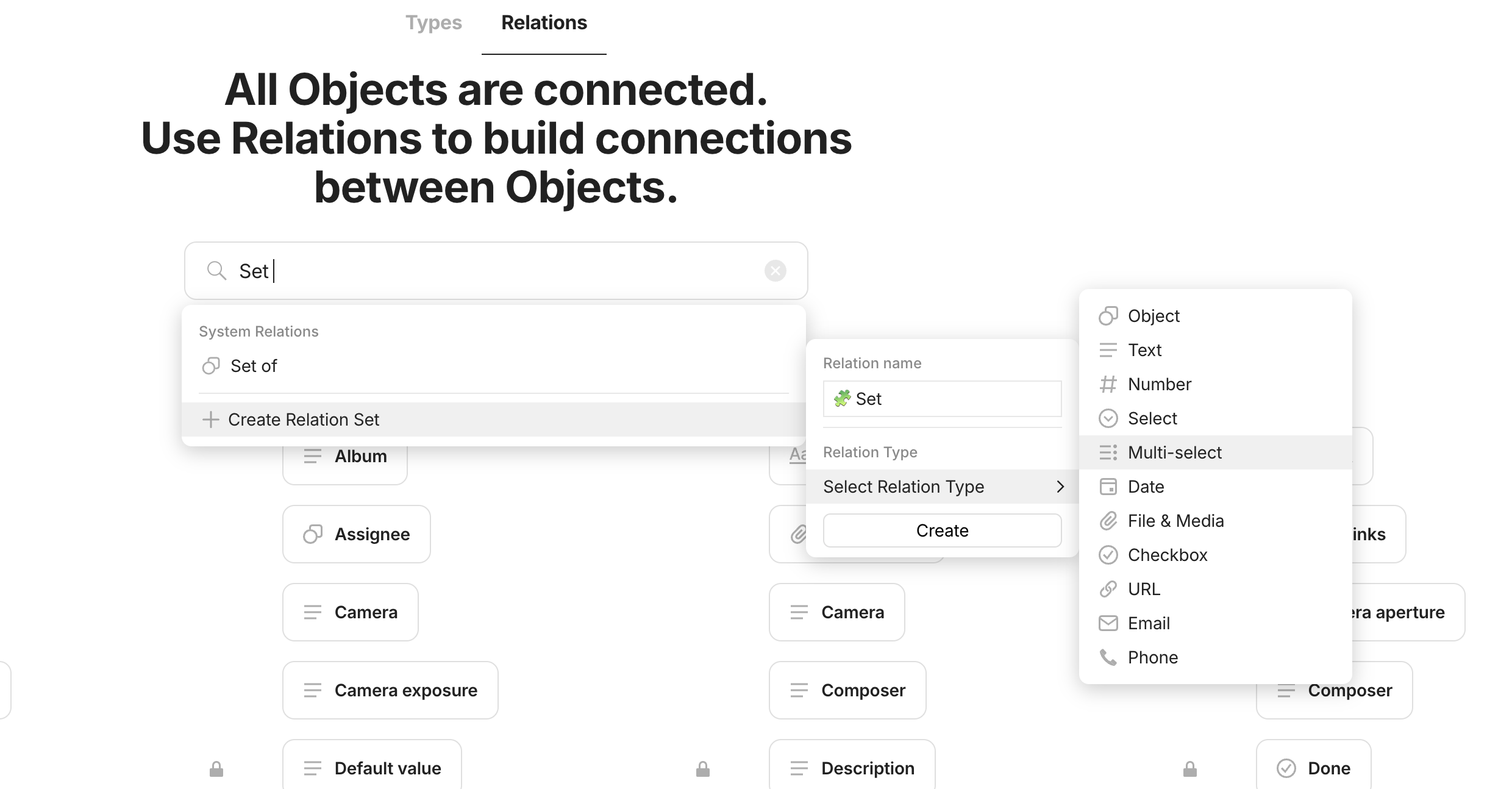
So to start with, create a relation called ‘Set’. This should be a multi-select relation.

Step 1 - Create a Relation called ‘Set’

Go to the library, go to the Relations tab, type in ‘Set’, choose multi-select

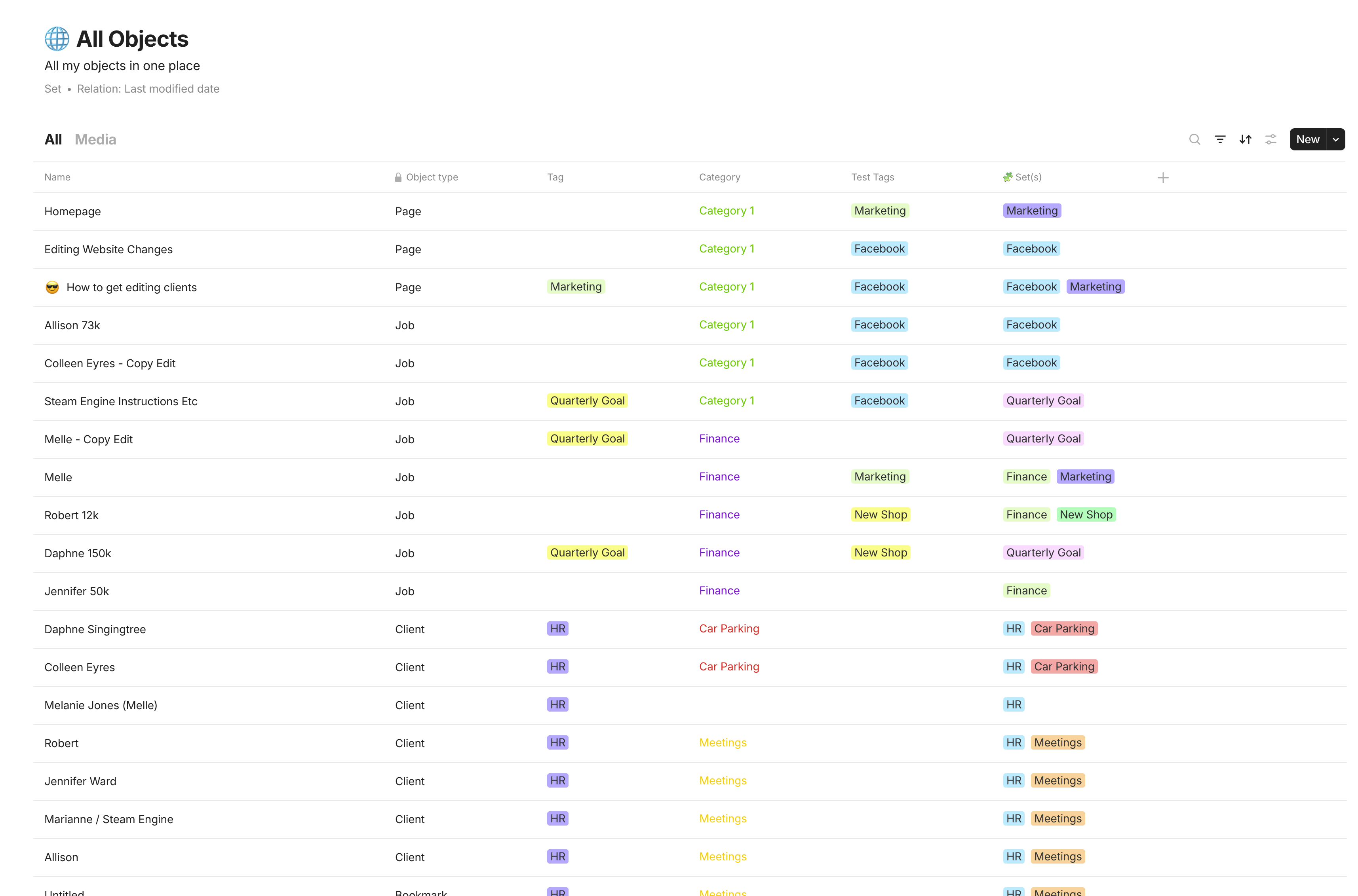
Step 2 - Assign a set to every single object in your system.

The easiest way to do this is to use the system set of All Objects (in the Sets widget) then just use different sorts and filters and bulk edit the new set relation for all of them.

So here, I just sorted by tag / object type / category etc. And each time you sort it, bulk edit the new Set relation so all of the objects have at least one set. As you can see in the last column in this screenshot.

Step 3 - Create Your Sets

Once everything has a set, you can just create a new set based on the Set relation for anything you want.

Then filter the set using the Set relation to whatever you want and create all your different sets.

Here’s a quick screen recording of making the sets:

Step 4 - Create Your Set Groups

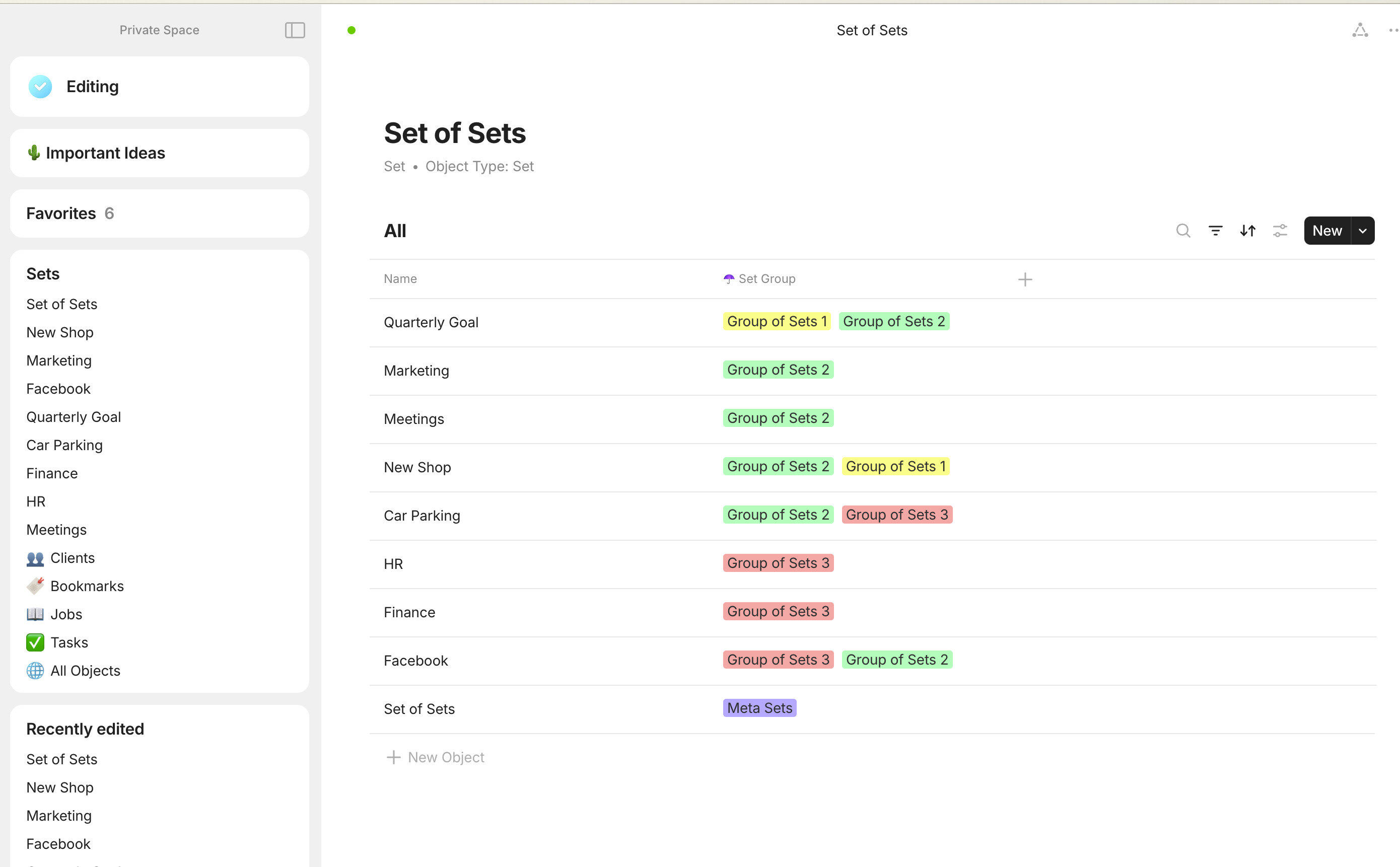
Once you’ve made all your sets, you will probably want to organise the sets themselves. To do this, first create a Set of Sets. Just create a set as normal, but base it on the object type of Set

Then create a new relation called ‘Set Group’ (This will be a multi-select again).

In your Set of Sets, add at least one Set Group to all of your sets.

Then, you want to make new sets for each of the Set Groups, but this time basing the set on the Set Group relation. This is less confusing than it sounds and is basically the same process for creating the sets as earlier.

Step 5 - Make Your Widgets From Your Set Groups

Super easy. Here’s a screen recording again:

Final Tips

It’s important that ALL of your sets are ALWAYS based on this same Set relation - that way you can duplicate and re-purpose any set to show whatever data you want, whenever you want, just by changing the filters. And likewise, you can now turn any set or views into a template to use however you see fit.

I have a Set Group widget called Set Templates where I have common set layouts etc that I can reuse (just duplicate the template and change the filters).

I would also recommend adding this new Set relation to all of your objects in the library and to all of your templates. Whenever you create a new object, make sure you assign at least one set to it using the Set relation.

The rules are: Every object must have a set. And every set must have a set group.
And every set must be based on the Set relation

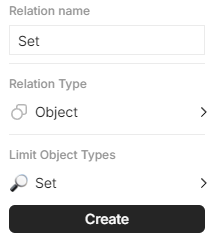
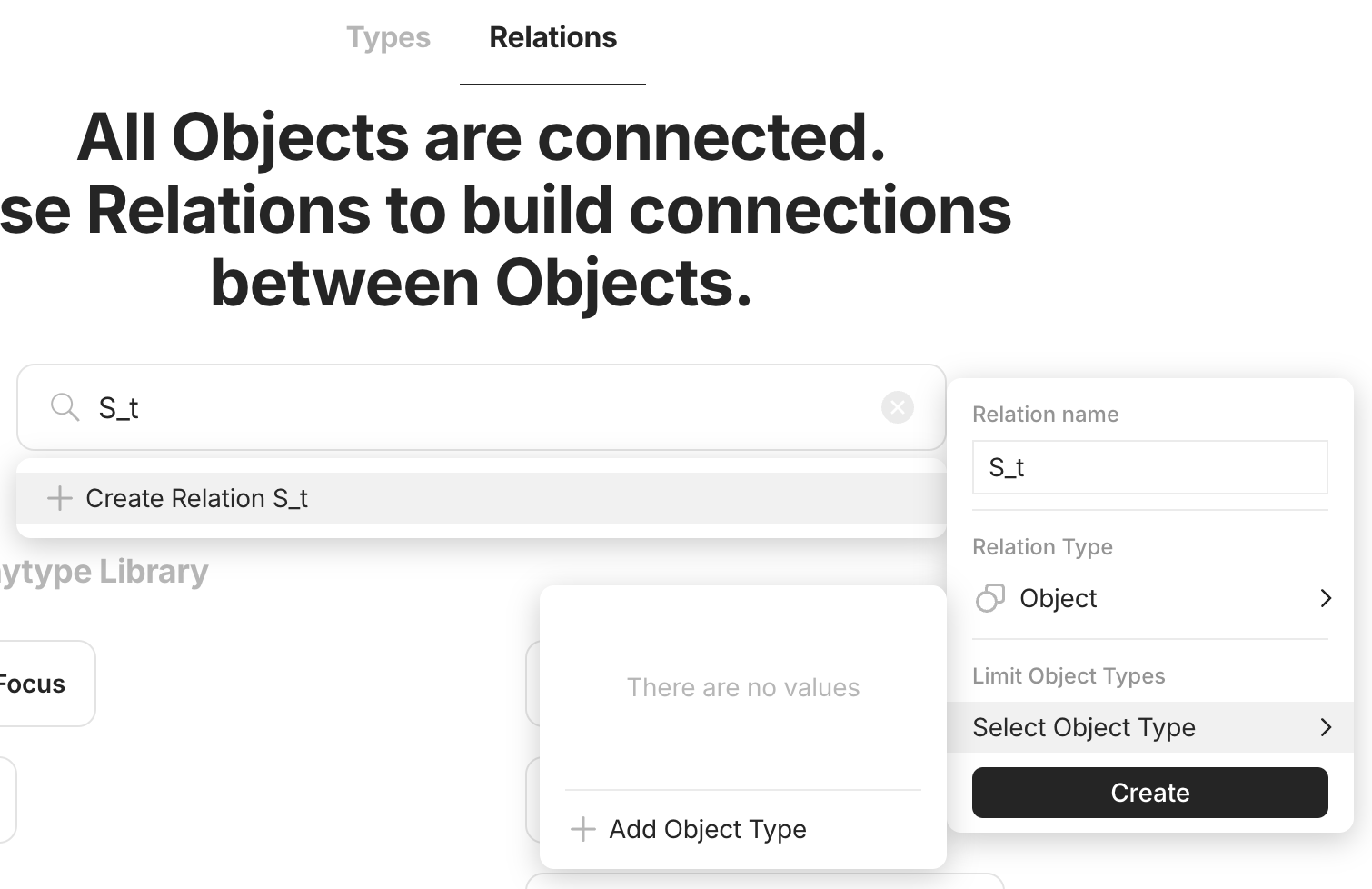
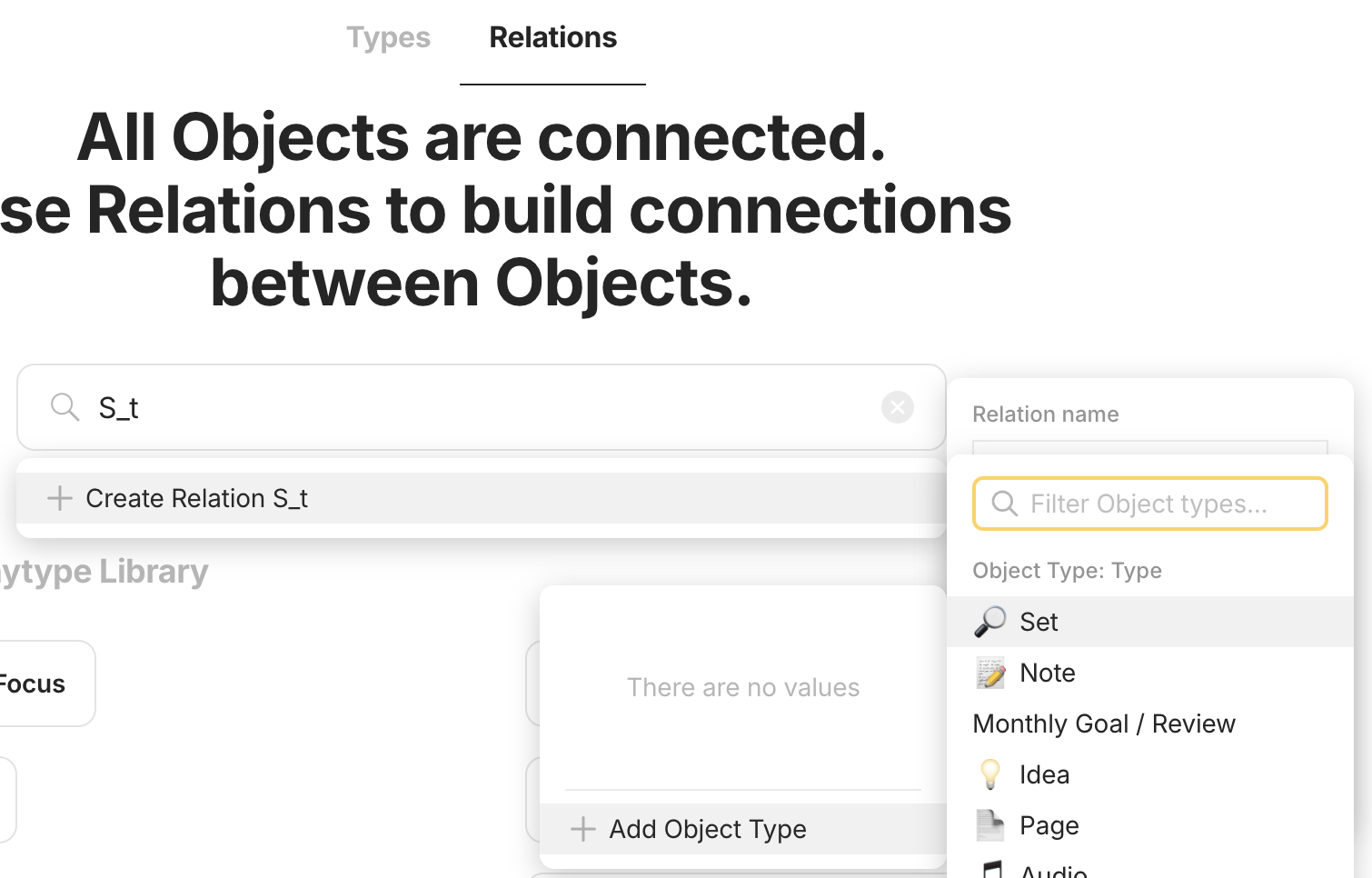
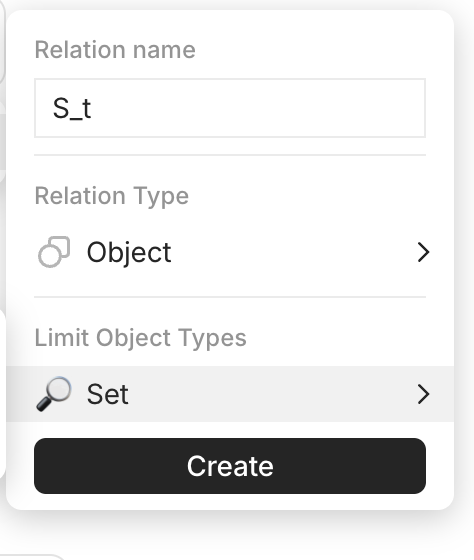
In this case in Step 1 you could consider setting up your Relation Type as Object with limit to Sets instead.
image

That way, you cannot assign a set to an object that does not exist yet (so your relation is directly linked to the available sets).

Additionally, your graph view will be tidier, as all objects will be anchored and related to the Set they belong to.

Okay, I think I get what you mean. So if I did that, I wouldn’t have to create the tags for the Set relation, and then also create the sets? I’d just create the sets?

So what would you do about the Set Groups?


I think you might be right actually, it probably is a better way of doing it.

Exactly. The only downside is that you first have to create the set before you can assign it. However, if you have a view of orphaned items (without a set filled), it is easy to catch in case you forget to assign something.

In practice they are also just Sets. So you can just fill the Set relation for the “child” Sets, to point to one of these categories. You would not need a second relation for it.

I have a strong preference for this approach (I’ll share my personal use case below), but since you mentioned you do not use the graph view, it might not be worth the effort to convert your process. Fortunately, it should be a simple change, as you can bulk edit the relations once you create them.


Here is my usecase:
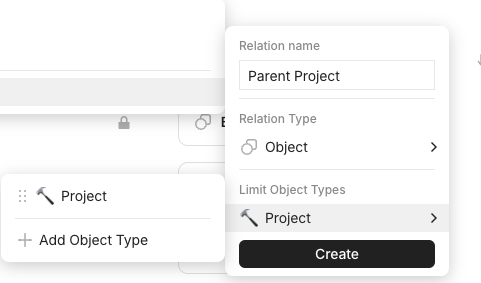
I have a separate type called Project. This can be as generic as “Technology” or as specific as “Plan holiday to X.” I also have a relation called “Parent Project,” limited to the object type of Project.

Screenshot 2024-07-31 at 16.42.16

Any object I create must belong to a Project. For example, a task like “Book flight” would have its Parent Project relation filled with “Plan holiday to X.”
Once I have the tickets, I would create a note “Flight tickets to X,” also associated with “Plan holiday to X.”

Sometimes, I also have sub-projects. For example, “Learning Python” has its Parent Project relation filled out with “Technology” (while “Technology” has no parent project).

I often use the Project as a landing page, where I include descriptions or lists of to-dos. Therefore, your Sets approach, although appealing, does not work for me.
However, I have a generic Project Objects Set that includes all the views I want in a Project. This set is added to the template of each of my projects. When they are created, I just need to add the filter for the given project.

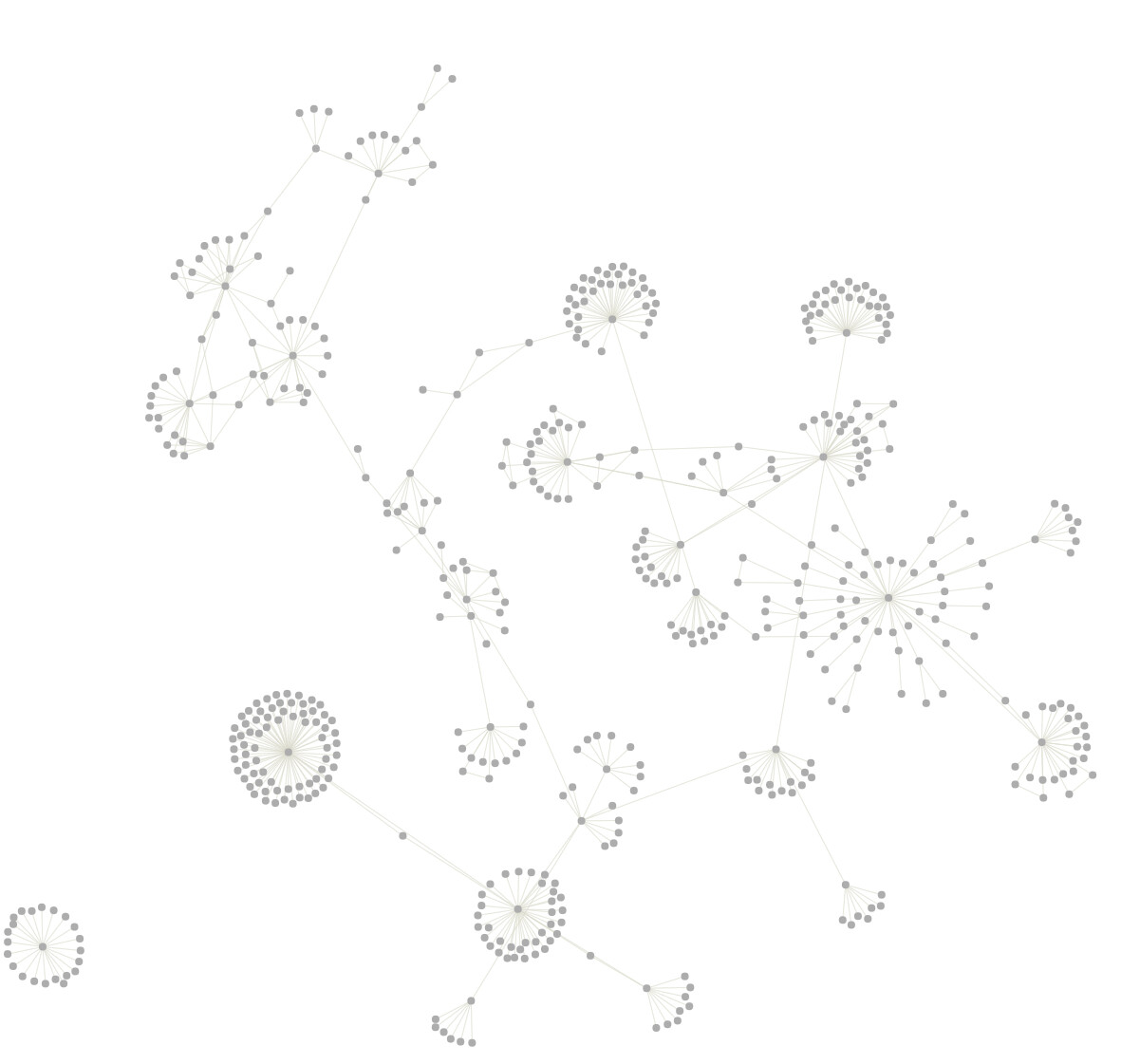
Thanks to the actual relation between objects, it creates groups in my graph view. When I filter out links (which can be messy due to how I use daily notes), the view becomes much clearer:

Thanks for taking your time. It’s a really nice approach, I’m going to replicate it.

I’ve just been playing around with it and your idea is definitely better.

Actually, you can create a new set as you assign it - if there is no existing set with that name, it lets you create a new one.

And actually, the only reason I don’t use the graph is because until now, I have been a heavy user of tags which don’t show up on the graph yet so it isn’t very helpful. Obviously, your idea of using actual sets makes the graph better, and it will mean I can use the graph in the future as the developers improve it.

So, thanks for your suggestion, it is even more simple and even more genius. I’m going to change how I’ve done it.

It sounds like you have a pretty well thought out system already.

No worries. I suggest adding Ferdzso’s twist on it though, it’s much better than my original way of doing it

I’ve been considering it as well. Thanks

The only downside is it’s slightly slower to enter a set. It seems to take a fraction of a second slower to load / find the options. Bit of a bummer but it’s probably worth it the long run.

I completely forget about all the many options of creating stuff in Anytype and default back to clicking the plus button at the bottom :smiley:

I am in the process (past few days) of simplifying and reviewing my workflow, so this topic came up at the right time for me to consider using Sets the way you propose. It could simplify my approach if I decide to ditch Projects in favor of this as well.

I think there is a bug or issue with the object search. Even when you search for dates, it is a bit hit or miss. What does seem to work is if you know the exact name of the set or object, just add a space at the end, and it usually pops up as the top result.

Yeah, also it’s only when you create an object from scratch or if you change the set relation from within the grid view when it’s a bit slow. When you create an object from a filtered view, which is what I normally do anyway, there is no lag

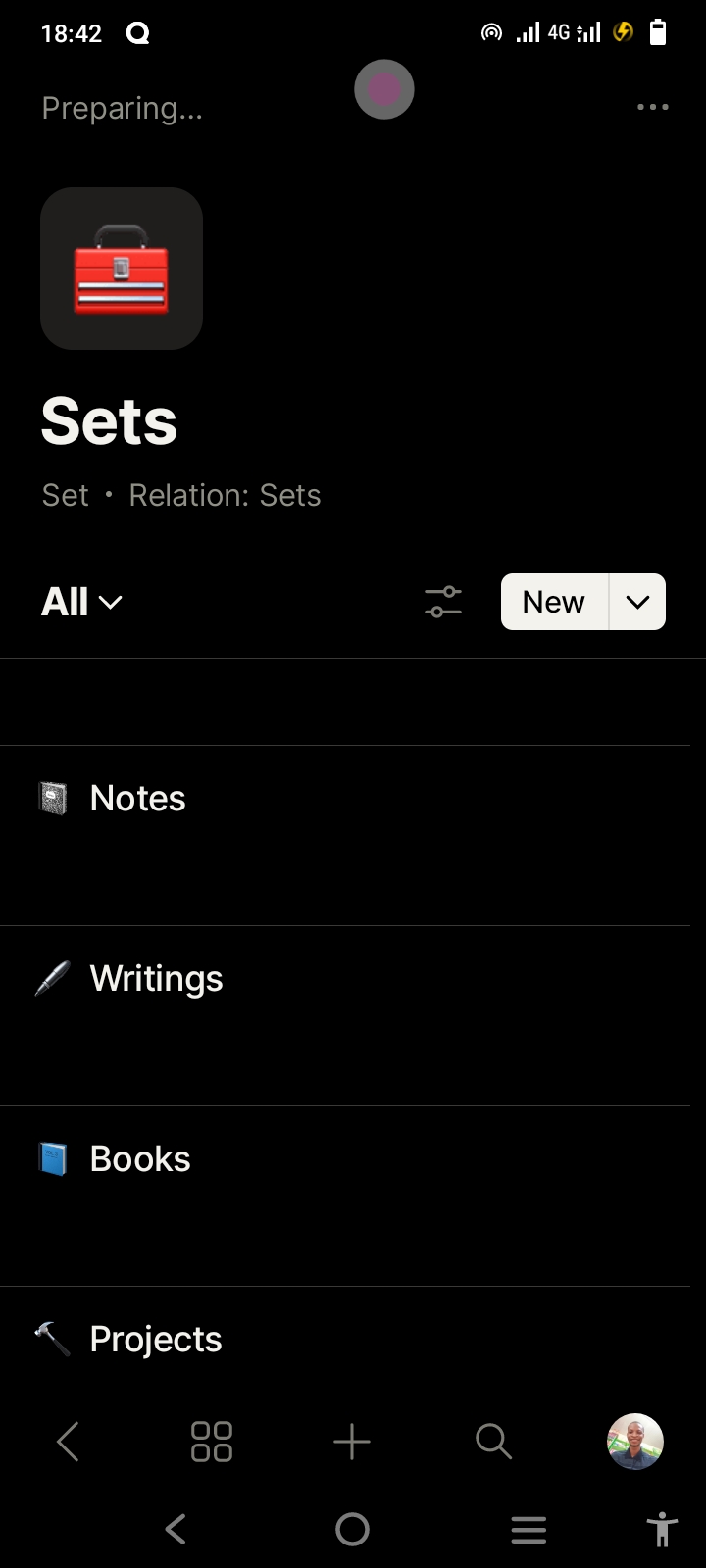
@ferdzso @MikeyP Did I get it right with this approach

I’m not totally sure just from your screenshot - I haven’t got my phone handy. Your starting point should be to create a relation called ‘Set’. The relation type is object. Then the object type is set.


Then create all of your sets based on this relation type.

I think it probably is right. As long as your relation ‘Sets’ is relation type: Object, Limit Object Types to: Set