Describe the bug
If I create a new block in an object, type some stuff in it, and then use ctrl+shift+arrow to move the block, it moves the block but also deletes all the text I just typed.
To Reproduce
Steps to reproduce the behavior:
Go to an object page
Type some text in a new block
Do NOT hit enter
Press ctrl+shift+up arrow
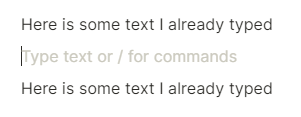
See the following:
As you can see, the block I was typing in was moved up between the two blocks above it, but all the text I typed is gone.
Expected behavior
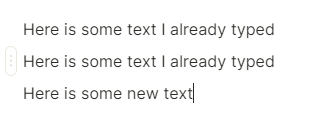
The block should be move and the text should still be there, like so:
I would imagine that upon first creating a block, the contents aren’t “saved” properly until you hit enter - so until you hit enter, the app itself just views the block as empty.
This could indeed be how Anytype functions at this moment or is a bug. If it is intended behaviour there should be a warning when that you lose your text when doing something like this without hitting enter. So you don’t lose anything.

 DO NOT HIT ENTER