I’m a heavy keyboard user and I love to do as much with the keyboard as possible. Working like this in Anytype is still quite cumbersome sometimes.
But one of the most missing features for having a nice user experience would be to know in which line my cursor is exactly at the moment. Im often reordering my blocks with “CMD + Shift + arrow up, down”. But as soon as the cursors is in a linked object I have no clue where it is exactly…
HOW COULD IT BE DONE
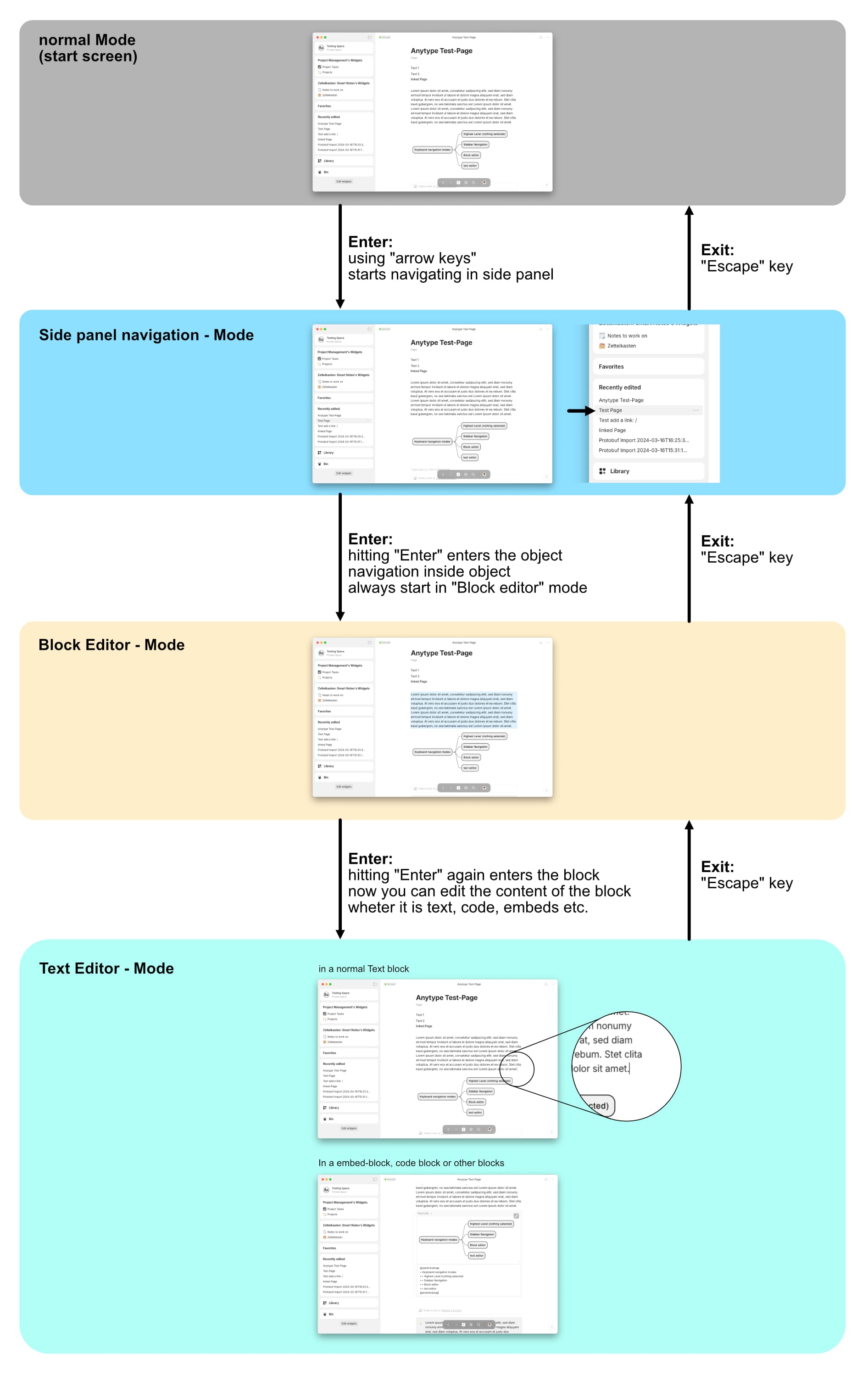
While writing, hitting the “ESC” key should exit the writing mode and highlight the whole block. When now using up and down key the highlight would go up or down. This way you always know, which block is selected at the moment.
REAL WORLD USE CASES
as described above, reordering blocks, using keyboard heavily
RECOMMENDED ALTERNATIVES
ADDITIONAL CONTEXT
Notion is doing it exactly like this… I’ve made a video to show what I’m missing
I really hope this can be implemented as I think this should be a “basic” editor feeling. What do you guys think?
Sorry, no.
I principally support your request, but highlighting the whole Block is not what the ESC key is supposed to do.
On Windows the combination Ctrl + a highlights the whole block. I suppose it also works on Mac OS.
Another way to achieve what you want is to press Ctrl + arrow down for jumping directly to the end of page.
The problem with it is, that it only works if the cursor is somewhere in the text (writing mode active).
This is often not the case, for example after closing the search box inside the Page.
I’ve already made a request to change this behavior, so that Ctrl + down always works:
The developers have it already on their issue tracker.
I would think of hitting the ESC key as diving out always further. Nearly every application I’m using is following a similar approach. My suggestion would be:
being in writing / edit mode
hitting ESC for the first time would dive out of edit mode into selection mode, highlighting the just edited line
Hitting ESC again would dive all the way out having nothing at all selected
It actually already works quite like that when you are in the overlay mode… when you open an object (in a set) for example. When you hit ESC it exits the edit mode. When you hit esc again it closes the overlay-mode.
Other very good examples are:
Notion, Logseq, Craft etc…
I can’t think of a block based App I’ve been testing so far, which didn’t have this functionality. It’s very intuitiv and a very common approach. And that’s why I’m missing it in Anytype
Edit:
I don’t want to select the text of the block. I want to highlight / select the whole block. Also blocks like added object links or images or all the other blocks. I just can’t see when I’m using the keyboard which block is selected currently.
This is another thing and not what I’m looking for here.
Yes, this is how ESC is supposed to work and this is as it already is.
No need to change anything on this behavior.
But you asked for highlighting the whole block with ESC, what in my opinion would be completely strange!
Nothing on it is “common”; I don’t know what Notion Logseq etc.do, but I’ve in my whole life never seen any software in which the ESC key behaves the way you describes!
It also has the risk that a this way selected block becomes deleted by mistake.
Sorry, I don’t get it!?
What’s the difference?
What do you mean by selecting the whole block but not the text in it?
I thought you simply want to see where the cursor is?
Simply press (as one way of many) the combination Ctrl + a. It selects the block where the cursor stands.
Then press, for example, Arrow down and the cursor will stand on the Block’s end.
You could also press Shift and arrow left, then arrow right to see where the cursor ist.
Or simply type a capital letter and Backspace.
There are many ways to male it clear where the cursor ist.
A very effective way: press “/”. → It shows the choosing box on the cursor’s position.
Then press ESC and Backspace, to delete the Slash.
It works faster than it sounds.
In Anytype you can have a lot of different blocks. If Anytype would only be a text editor then what you describe would make sense, you will always see the cursor. I also always see the cursor in Microsoft Word. But as you surely are aware Anytype can have a lot of different blocks like pictures, videos, files, Embeds etc.
Yes… but it’s not working in Anytype. Let me try to make an example:
Add a few objects to a note. Multiple Pictures, Videos and some relations. In between those objects write some text. When you now use the arrow key to navigate up or down and the blocks above the text is not text then the cursor disappears. You will have no clue where the cursor is at the moment. But keep pressing arrow up and as soon as there is text again the cursor will appear.
Here a video:
I use the up or down key to move to other blocks. Here the same in Notion:
Therefore I want the block to be highlighted. Independent it being a text block or an image block or Anyblock… Does this make sense?
And in a lot of other applications this is standard.
But this has nothing to do with the ESC key’s behavior.
The problem we suffer is half a bug and half a missing feature: Anytype often doesn’t show the cursor at all.
It’s not simply invisible, but it is nowhere at all!
It also has ended the edit mode.
Best example is opening the page.
Or doing a search and closing the search box.
The cursor is simply nowhere and typing has no effect at all.
For that reason it’s not even possible to jump to the Page’s end by pressing Ctrl + down.
This combination works only if the cursor is somewhere.
I suggest to change your request this way:
“Never hide/disable the cursor in an open Object.”
The cursor should always be somewhere.
If we close the search box in a Page, the cursor should stand in the position of the actual search result in the text.
And also if we use the arrow keys between pictures: the cursor should always be visible and in edit mode - without any need to press any key, or key combination.
It simply should be there, wherever. But it should never disappear completely.
I do not agree with you. Please do a proper research on Keyboard navigation of some other block based Apps like Notion, Craft, Logseq and similar. It is a very common way of navigating by keyboard, using escape key to dive out of “navigation layers”.
Even the keyboard navigation in many Graphic Softwares as Affinity (Designer, Publisher, Photo), Adobe Illustrator, Photoshop etc. All those applications have a keyboard navigation concept where you dive out of a selection / block / layer / anything → hitting esc key.
Here an example in Affinity Designer:
When you would hit escape again it will unselect the object at all. So one higher layer of navigation.
It’s basically just a fact that escape key is widely used to navigate between layers of editing modes in a big variety of applications… whether you like it or not. For me it feels very intuitive.
Therefore I would even go as far and say:
Anytype has currently not a proper concept for keyboard navigation.
In all those threads the missing thing is a proper keyboard navigation concept. Therefore I’m renaning the title of this Request to: “Missing Keyboard navigation concept - Block Edit mode, Text edit mode, Highlights”
In addition there’s also a missing concept using the “tab key”. But this is covered in other requests in the forum like here: Keyboard only navigation with tab
Have a great day Anytypers!
Update:
While being in block edit mode one additional nice feature could be to use the space-bar to view images, videos and other blocks in full-view mode. (it is done like that in Notion for example)
Yes, off course!
– This is exactly how the ESC key is supposed to work!
I’ve never made an other statement!
The ECS key always ends a selection or aborts an action.
But seemingly there is some strange misunderstanding between us, because what you wrote in the start post is the opposite (I understand it as the opposite).
You wrote this: “hitting the “ESC” key should exit the writing mode and highlight the whole block.”
I agree completely with the first half of the citation, but I totally disagree with its second half (I’ve made it bold).
ESC should never highlight anything.
It has always to do the opposite: dehighlighting, deselect, canceling, defocus, leaving – things like that.
But maybe you have something else in your mind then I understand it.
I understood it all the time so, that you suggest ESC should de facto make the same thing as Ctrl + a already does in a block.
I call it “select all” (the whole Block). But you wrote “highlight the whole block”.
Maybe it’s only because of my weak English, but in my understanding “select” respectively “highlight” is the same in this case.
And what I have in mind what “select” respectively “highlight” means is definitely not was ESC is supposed to do.
If you simply mean this: “ESC should end the edit mode but the block itself should still have the focus” (so that it is movable by ‘CMD + Shift + arrow up, down’)”
then I can agree.
Although I see here a new potential for misunderstandings
I know, my English is weak, so maybe all the mess is my fault. But I always have the subjective feeling that English in general misses the razor precision of the German language. That causes confusion all the time.
Yes I mean exactly that. By hitting ESC you dive out of the text edit mode into the block edit mode and the block will be highlighted. And yes, this highlight of the block is not the same as the full selection of the text in a line what CMD+a is doing. Sorry if I have not been clear enough.
And as mentioned above several times, this is how a lot of applications work.
In logseq for example you can either hit esc to switch from text edit mode into block mode Or you press CMD+A then it normally selects the full text of the block only. When you hit CMD+A again you select the actual block. When you hit CMD + A again you select all the blocks in the page. → This could also be a possible approach to switch to block mode.
The ESC behavior you mention is completely in line with other outliners.
Logseq does that, and its very handy.
I would say: currently, its up for grabs, its up to each one’s opinion. If Anytype does become block based, (which is something I think they want to do, when all tech limitations are solved), ESC behaving like you mentioned and selecting the block is a “must”, as it is handy and is common practice in any Outliner.
As for keyboard in general… vim mode… nough said! (obsidian has inbuilt vim mode )
Do I understand it right, that in outliners like Logseq the ESC key has not only the normal (in my opinion normal) function: “Cancel it, go one step back!!!” ?
Does it really have the additional function to highlight something (a block) although it wasn’t highlighted before?
It seems unbelievable strange for me!
I would never ever expect that the ESC does anything else or additional than canceling an action.
I think making 3-dots marker follow the I-cursor and not the mouse would show the focused block clearly. Now I don’t see a reason or use case for it to follow the mouse pointer, at least when typing.


 )
)