(Edited FR after considering discussions in other threads.)
What Do You Recommend?
For crating a new Object from a Collection, I press the “New” button in the right top.
After that appears an input field in the Grid. - Up to here it’s OK for me.
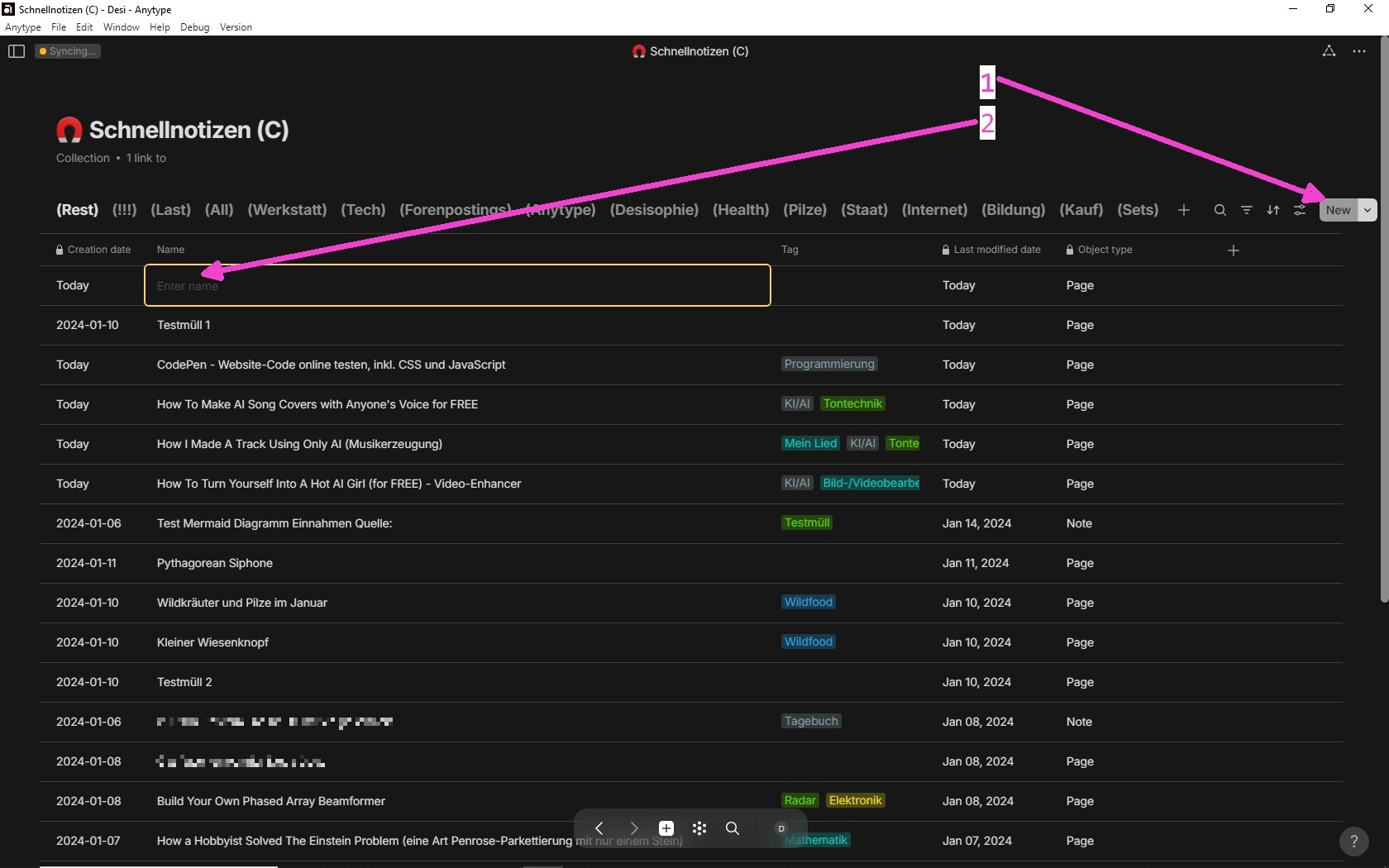
But now to the problem:
I wish that finishing the Object’s name (by pressing Enter) directly opens the new created Object for a full edit mode.
Unfortunately it isn’t so (except for Notes).
Pressing Enter finishes the input in the grid. - OK, I don’t want to complain about it. But unfortunately it doesn’t open the Object automatically.
(Maybe there’s a bug involved in my case, see Additional Context.)
Not even a second Enter opens the new Object, because it is not selected in the Grid.
So I have to use the mouse to open it. That disrupts a fluid workflow.
How Could It Be Done?
Implement a switch in the Collection’s settings:
“Directly open new created Objects for editing?”
Real World Use-Cases
I want to be able to create (and full edit) new objects quickly!
There shouldn’t be any further need for using the mouse after pressing the “New” button.
It’s an unnecessary friction in the workflow for the user that he always must switch from the keyboard to the mouse and back again.
Additional Context
Related:
In this thread the user @SweetRoyce asks for NOT directly opening a new created Object for a full edit, but staying in the Grid instead (he speaks about Inline Sets there).
- That’s clearly the opposite of my own wish. I don’t want to stay in the Grid, instead I want directly do a full edit of the new Object.
As we see, different users prefer a different behavior in this case.
For that reason, a switch in the Collection’s and Set’s settings to choose the preferred behavior would be the best way.
Also Bugs involved?
@Filip couldn’t reproduce the behavior I described in this FR (see his post number. 11 in the linked thread above).
I experience it since some versions, actual in the v0.37.15-beta.
Maybe there’s a bug involved, so that it behaves differently for me and for other users.
But the suggested switch in the settings would also solve it nearby.

 , it’s not the default template! I just realized that you can choose a default template for each view, BUT if you create an object with another template, it becomes the new default template! Why? Perhaps there’s room for improvement here (click on a template to create an object with that template; use the “define by default” option to set it as default; don’t mix expected actions).