What’s The Bug?
continuing on from this bug on iOS mobile:
What’s The Bug?
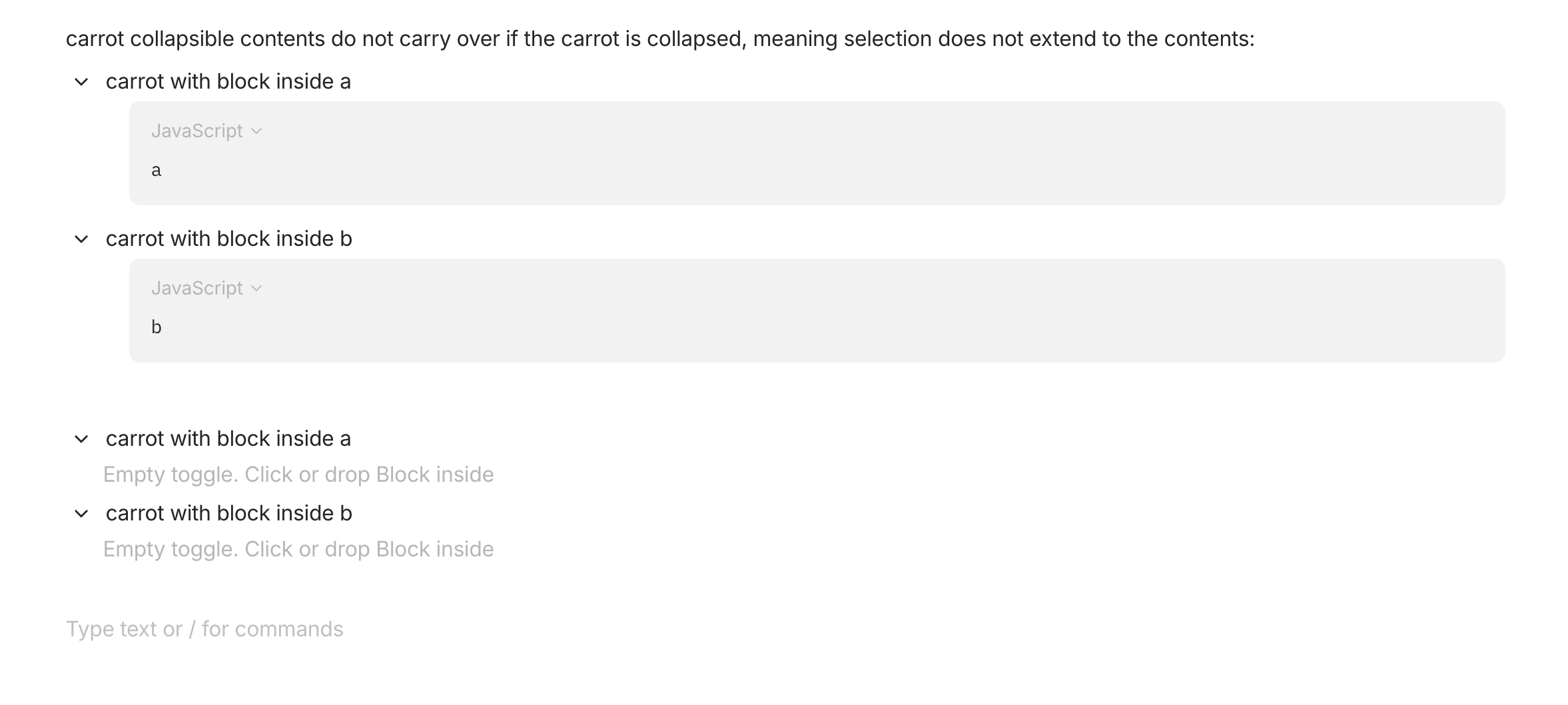
contents not selected within collapsed toggle blocks, so when copying → contents are empty, and when moving into another object → contents are empty and lost (since the previous version does not exist)
*for some reason ⌘+D or right-click + “duplicate” works for the contents.
How To Reproduce It
- create a few collapsible toggle blocks
- give them some contents, in my example a code block is used but images and regular text give the same results
- collapse the blocks, then copy paste them or try to move them into another object
- no contents are present, only the collapsible blocks themselves remain but they are empty
Image or Video
The Expected Behavior
all the contents remain intact
Device
MacBook Pro M1 Pro chip
OS
Sonoma 14.4.0
Anytype Version
v0.39.0
Technical Information
OS version: darwin arm64 14.4.0
App version: 0.39.0
Build number: build on 2024-03-05 15:37:42 +0000 UTC at #a7986fffadcc2031b1eb3372265db5dda05f4c6d
Library version: v0.32.1
Anytype Identity: A9C8QjrX3qg48xgpxEPdNWEinvPthsZZ8oufR8RzEuRVmAF8
Analytics ID: 20235cb9-746d-4d0f-9382-a483c5f96145
Device ID: 12D3KooWDpbVty8vjShmHHV2qaFiBkgMM5qZJqprANScAKQ3t4F5