“massively” improve the “keyboard experience”. the goal should be to not need a mouse to operate the desktop application.
Take up UI / UX behavior people are expected from their OS, and the context.
HOW COULD IT BE DONE?
Tons (sorry ) of little papercut fixes, and provide “intuitive” functionality. See next item.
REAL WORLD USE CASES
What I would be most greatful for, right now, is this:
[Keyboard] Grid view of sets: When adding a new object in the Grid view, that I want to switch to the next field within a line using TAB (like in basically any table/sheet app)
[Keyboard] When pasting a link and choosing “Create as Bookmark”, I have to re-click into the app to continue writing in the next line. Extremely annoying.
[Mac OS] The touchpad can be configured to go forward/backward with three/four finger swipes. Any somewhat nicely integrated app uses this (e.g. all browsers) – would be amazing for Anytype as well. (Oct 13th, 2024) (Fixed at or shortly before 0.53.1, f*ck yeah, muscle memory finally works again)
[Keyboard on Mac OS] The same goes for the keyboard: Provide either a method to configure shortcuts (why? because “CMD-[” is a non-starter on German keyboards), or (much better) a Mac OS menu item for forward / backward / etc, which I can then bind to my shortcuts using the system settings. (Oct 13, 2024) (Fixed quite a while ago by implementing configurable keyboard shortcuts)
[Keyboard] have a very clear system for when the “line” loses foucs, and you will need to re-click into it to regain it (prefereably almost never)
etc. This is just what constantly annoys me, there defninitely is more.
When it comes to “intuitive behavior”, I realized this:
When I am in “Grid view”, and I mark the lines, and I “copy” them using CTRL/CMD-C, I would like to have that table in the clipboard, to paste to any sheet app (Excel, LibreOffice, Google Sheets, …).
When I cut a table row from any sheet (HTML, the named ones), and I paste into a row in a Grid view, would be amazing to have those possibilities:
“Paste into new objects”
“Set fields of existing objects”
Example: I want to port my “wine list” Excel sheet from Excel to Anytype. Now I have to manually enter all this information, while I could theoretically just open a grid view, and paste name, year, brand, grapes, etc. into it – automatically creating the objects. WOW!! (so useful.
(Also, since I still don’t really trust your source-available model, that would make me much more comfortable I need to run away from you should the MBAs take over and start implementing monetization á la MicroSoft or VMWare)
(Also, little annoying remark, sorry: Before you start doing any “AI” stuff, maybe make the thing an absolute pleasure to use in its basic, non-AI state? … Just a thought … )
RECOMMENDED ALTERNATIVES
Speaking for myself – none. I really, really, really would like to see this.
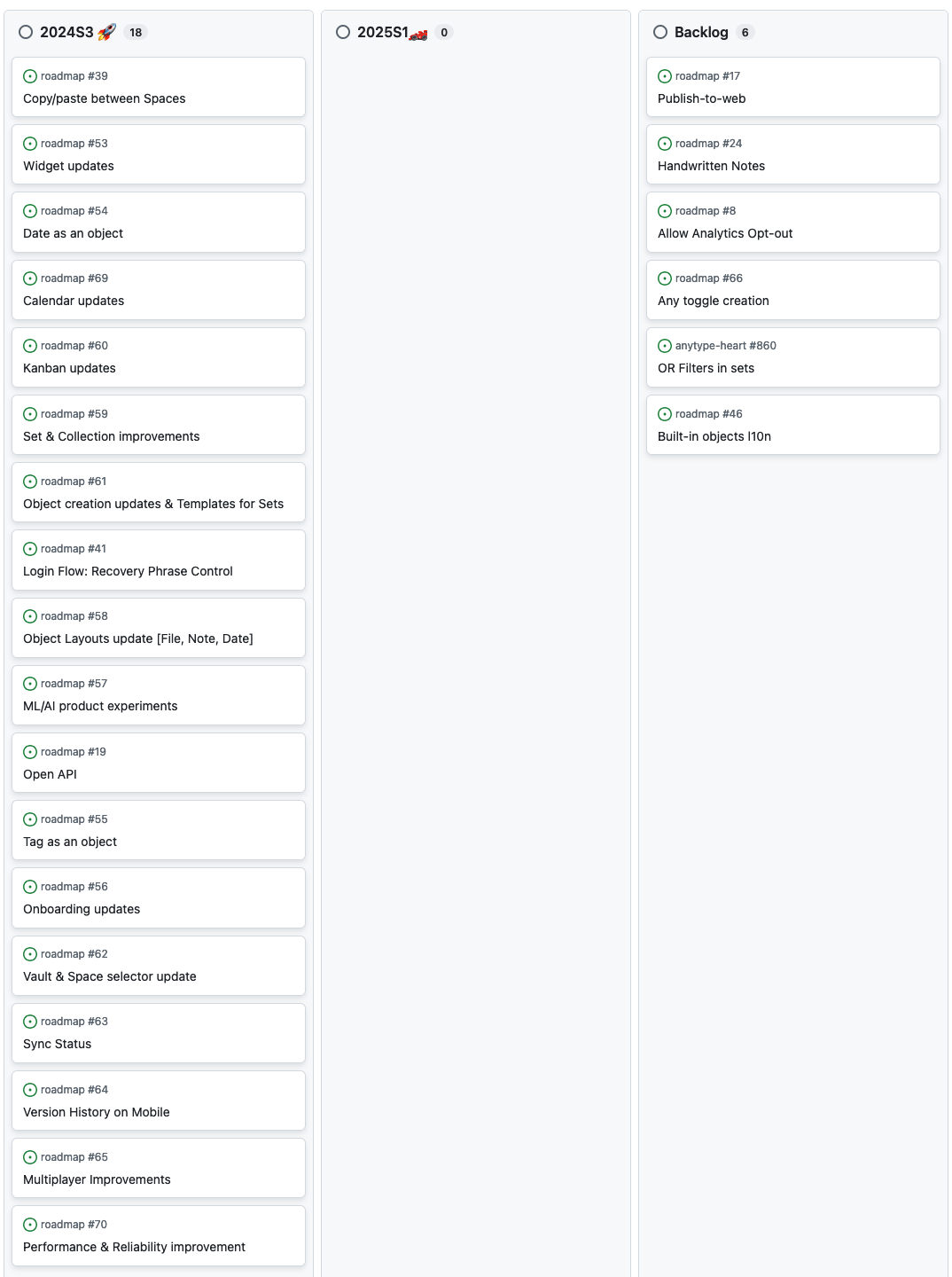
aha. not according to your roadmap (see below). there is nothing in there that could be read as a “large keyboard-improvement effort”. or what does that say about the roadmap?
also, what about some public tracking of concrete items, e.g. “grid views copy/paste behavior” suggestion? that would be incredibly convenient.
this feels a bit weird just now. very intransparent. (which is cool, but then close the roadmap, and use blog posts or whatever – just not sth that can be read as “ah, that’s whats being planned and worked on”).
(Addition: Also the actual content of the roadmap items is in a shape that no dev team could ever work with this, so you definitely have another private task tracker … which is also a bit … weird).
Could you specify what this public roadmap then is? Because, if I look at, for example, “date as an object” – that’s plain and simply useless for anyone who does not already know what is meant. Also what should be and should be not on the roadmap, like topic-wise? Because making suggestions is just super annoying if you then hear “well, our secret roadmap …” and the issue gets closed. Thanks, great, so I put in the effort of trying to write an understandable feature suggestion for … nothing. Cool!
Then why don’t you track that publicly? At least on a usable epic / story level, that describes at least high-level what concrete things are in the pipeline? Any reason? And if updating public roadmaps is too much effort – why have them?
Sorry, I should have said “roadmap”. A private task tracker is naturally fine.
Also, solving this … don’t know. Even with your answer I don’t know which of my suggestions you’re working on, planning, or ignoring. That’s really not helping. I can basically summarize your post with “we have a secret roadmap, some things are already on there”. Hm. Useful.
As an afterthought: If that sounds overly critical, then it is because I really start using Anytype for some of my important data, and I want to keep expanding it – because I really, really, really like it. I recommend it to peole using alternatives.
Yet I will immediately run away if I get the idea that my data is not long-term safe, your future ideas are not what I need, or (since you’re not open source) you have a hidden agenda. And transparency is a very good countermeasure for this.
This is one of the things that will be improved. We’ll add an description for every major project, and we’ll also provide links to the forum posts for more context.
Only big projects will be featured on the roadmap. For specific feature requests, you can check their status here, on the forum. If they are in-progress, planned or something else, there will be a status tag below the title.
But the feature requests are being tracked publicly? Maybe you are referring to something else here?
We can’t go through each post like this and link all the relevant feature requests for you. It would simply take way too much time.
For a general feedback post, this is fine, and our product team will eventually see this when they start planning for the keyboard project.
But if you want us to provide you with the status of each one of your requests, you’ll need to find all of the relevant feature requests yourself and link them in this topic.
If you think there are none, you can create separate feature requests for each non-existing request.
i really don’t know what to say. the only reason this discussion exists is that i did not find that information you claim was there, and at the same time you claim „is planned“ (the roadmap info). so unless you provide links to that mythical planning place I can see implementation progress, let’s agree to disagree. (note that is is entirely possible that the place exists and I did not manage to find it – you just failed to provide a link …).
also, please be aware that i find it pretty weird that you claim you don’t have the time to “go through each post […] like this”. this has never been the intention, and even if – I would say the goal was missed here, and so we go back to the other one.
let’s leave it be, and I will gladly wait for the updated roadmap.
I would like to get better keyboard shortcuts handling too.
I expect Anytype to behave like a text editor and respond to common text editing shortcuts. They are so common that even notion supports them. For instance:
ctrl-home / ctrl-end should move cursor to the beginning / end of the current page. Not just within the block
Ctrl-A should select all text, not only current block.
 ) of little papercut fixes, and provide “intuitive” functionality. See next item.
 )
)
 And if updating public roadmaps is too much effort – why have them?