This release brings several highly requested additions. Tabs let you work with multiple objects in the same window, Filters have been redesigned with cleaner controls and more advanced logic, and you can now search through chats to find past messages.
Also included are toggled headings, dynamic filter values, channel ownership transfer, and a range of refinements across the app.
Tabs
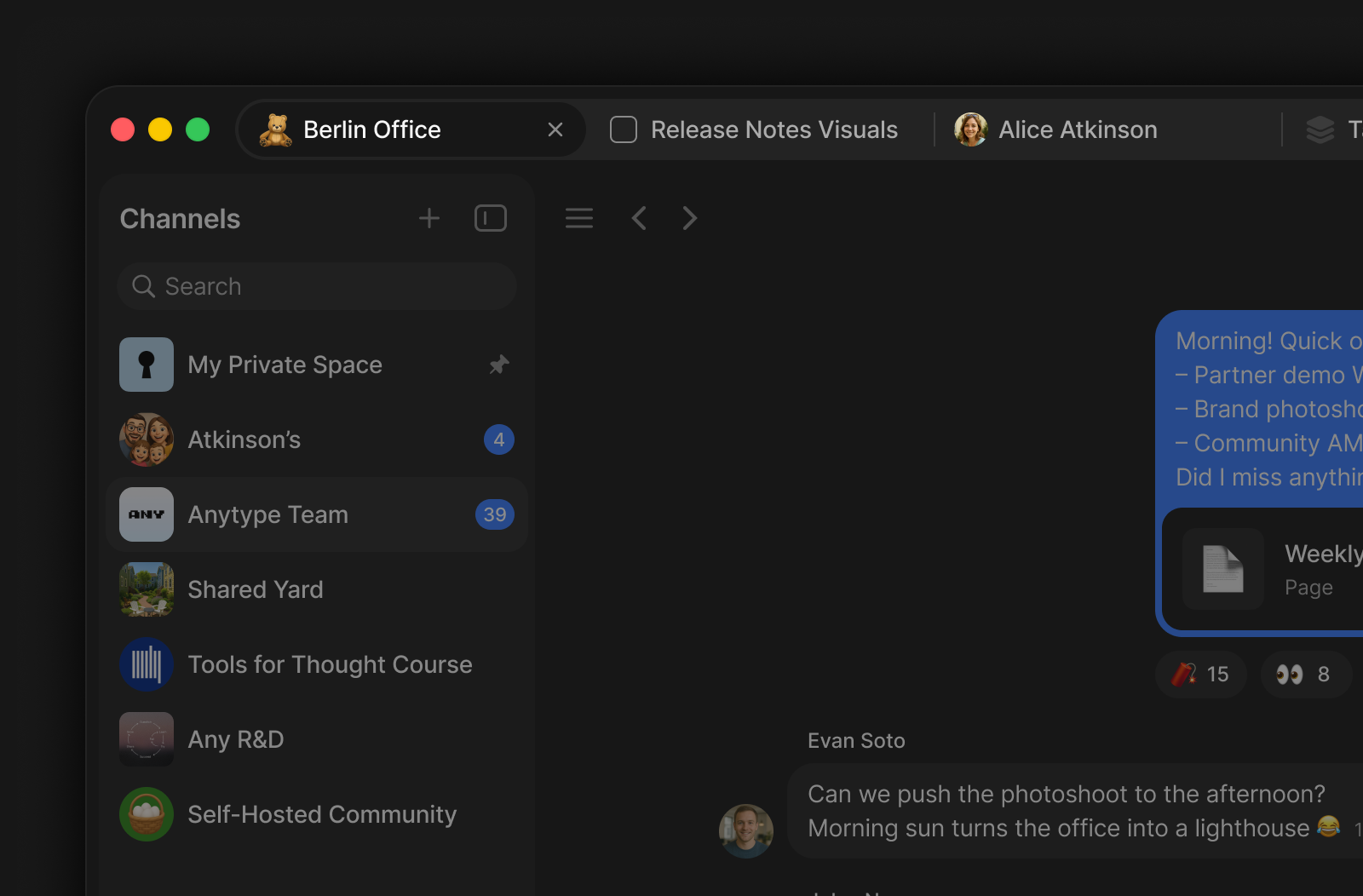
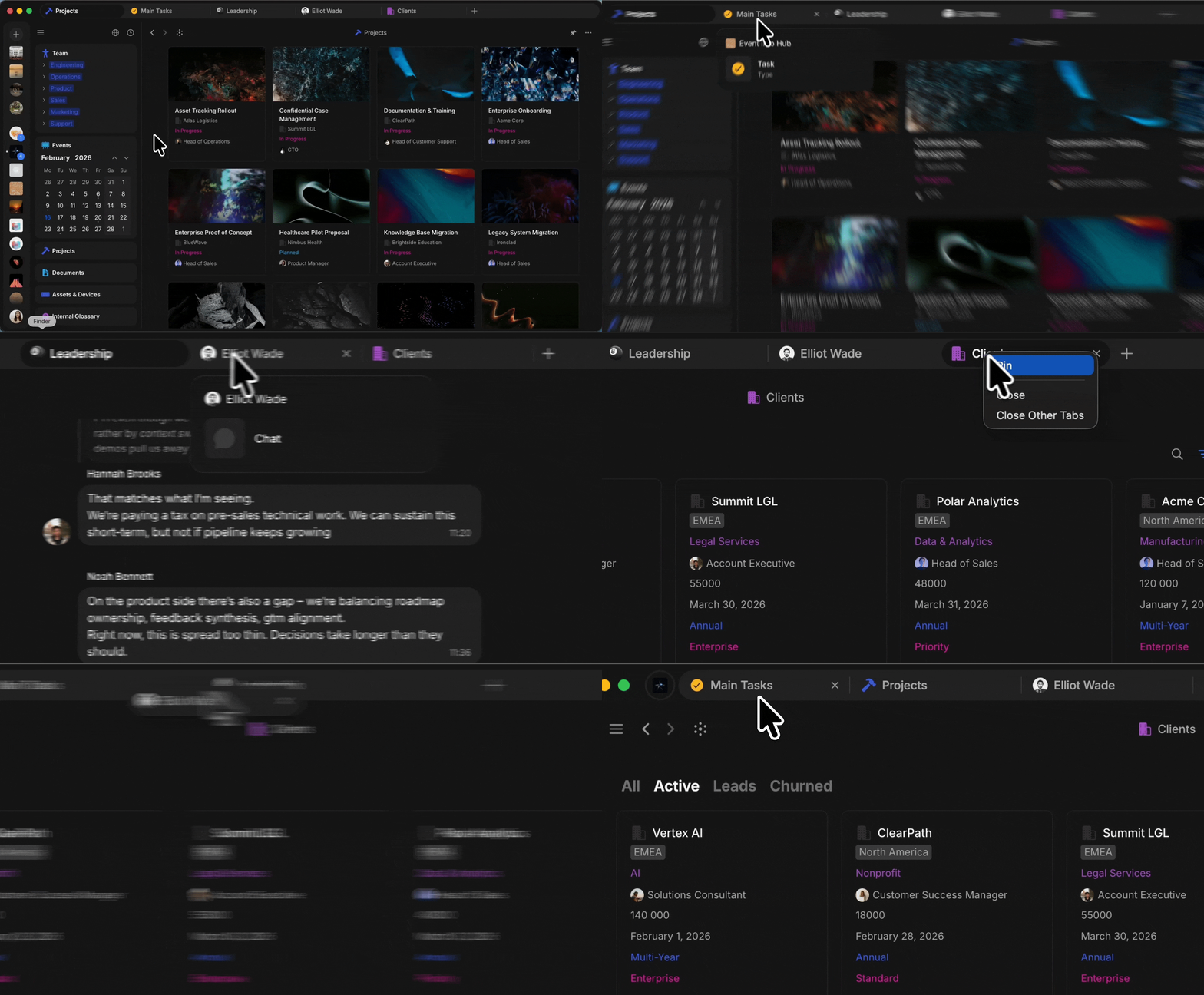
One of the most requested features is here. You can now open multiple Objects side by side in a tab bar, just like in a browser. Open any Object in a new tab from the context menu, with Cmd+Click / Ctrl+Click, or from Widgets.
Choose between two modes in Settings > Preferences: Contextual, where the tab bar appears only when you have more than one tab open, or Always visible.
Drag tabs to reorder them, pin important tabs to keep them in place, drag a tab out to open it in a new window, and return to your open tabs when you relaunch the app.
New Filters and Sorts
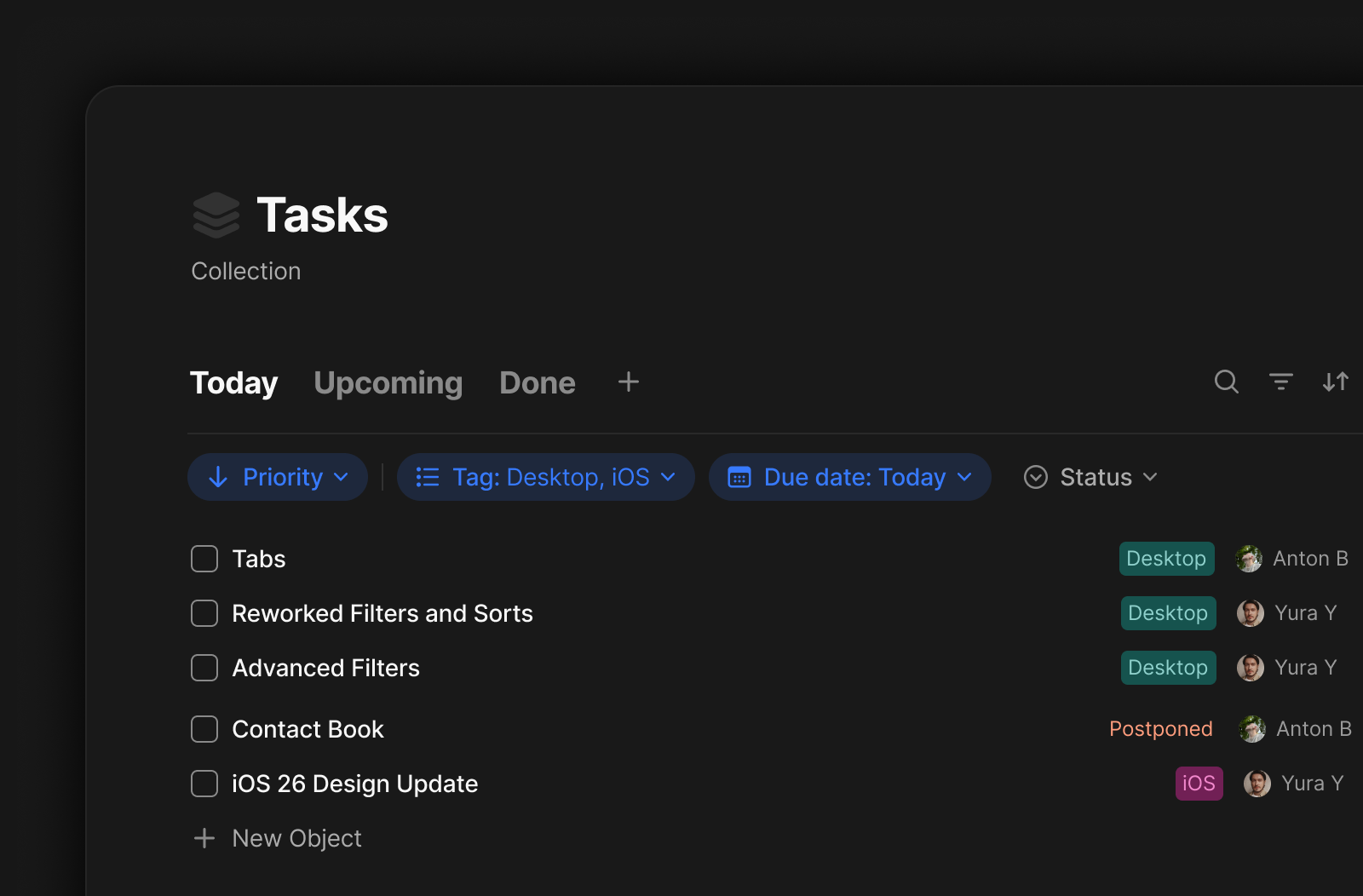
Filters and Sorts in Queries and Collections got a fresh look. Active filters now appear in a dedicated bar above your View, showing the property name, condition, and value at a glance. Sort indicators sit alongside filters, so you always know how your data is organized.
Adding new filters is faster with the + button, and clearing everything takes just one click.
Advanced Filters
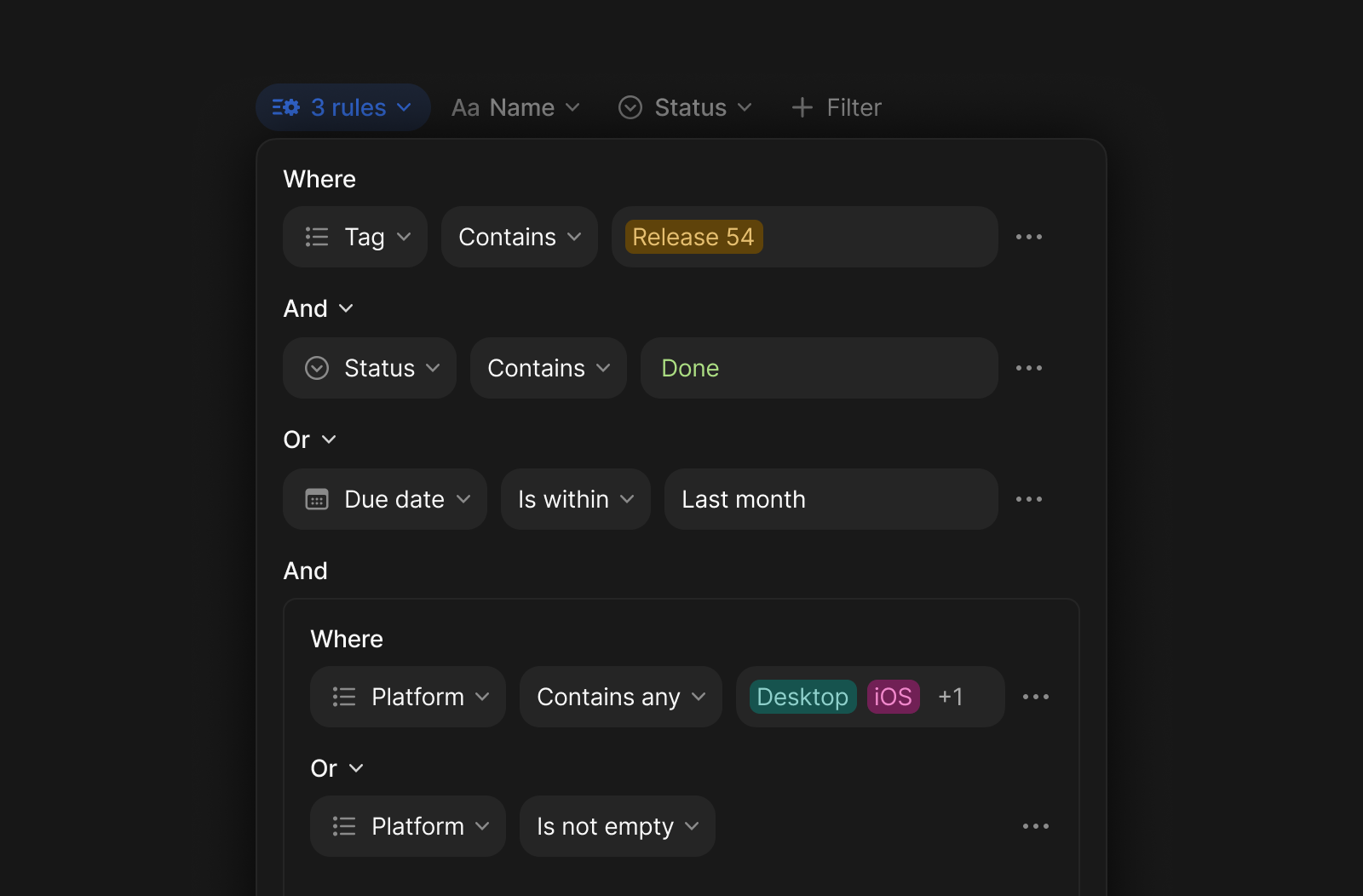
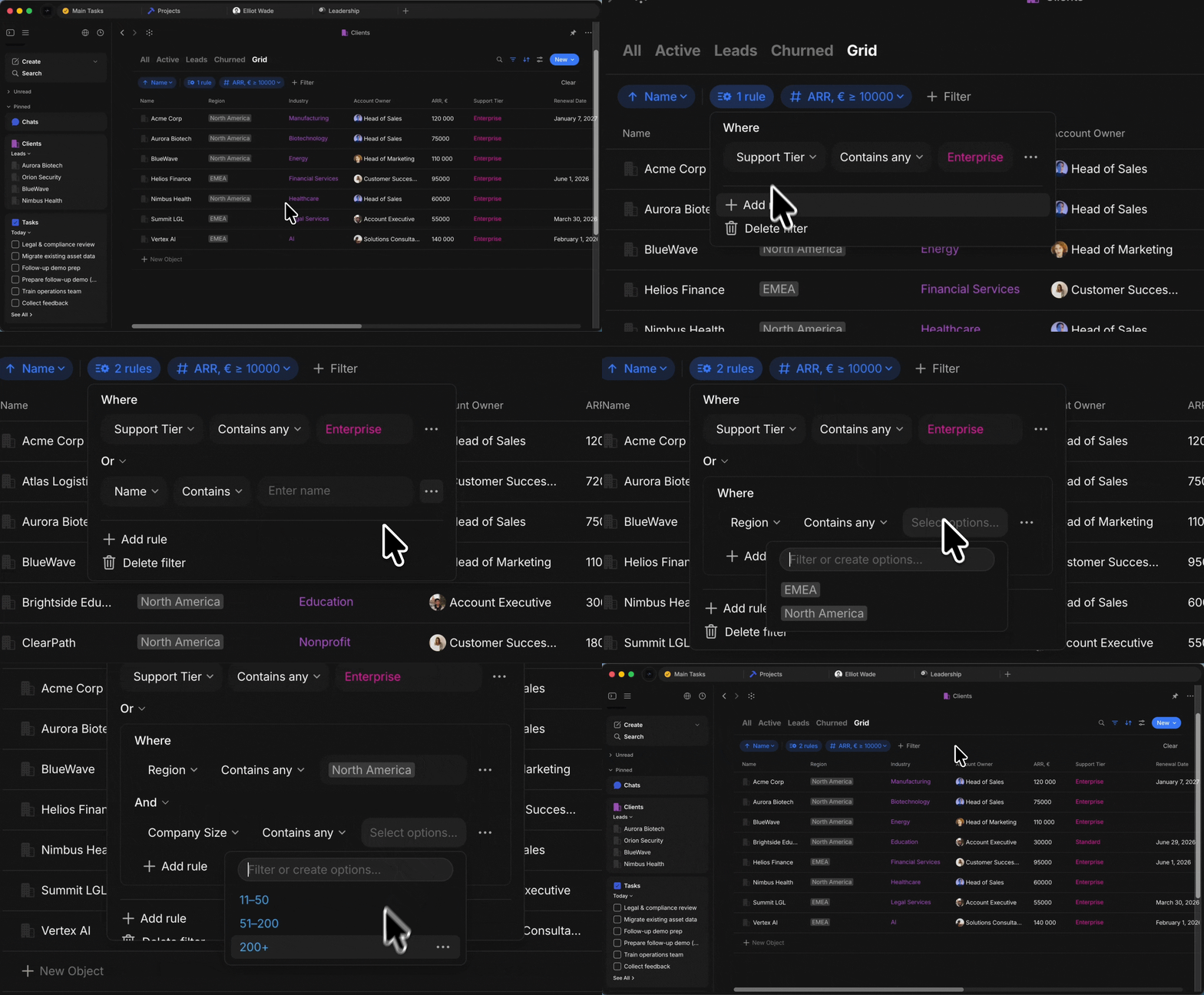
Filters now support complex logic. You can combine multiple conditions using AND / OR, and group related rules together to build precise queries – like finding all tasks that are either high priority or due this week.
Add an advanced filter from the filter menu and define your conditions in the dedicated bar.
Chat Messages Search
You can now search through your messages with Cmd+F / Ctrl+F or from Search icon. Results appear in a dropdown sorted by date, with navigation arrows to move through matches one by one.
Transfer Channel Ownership
Channel ownership can now be transferred to another member. This allows Channels to be handed over as roles change, without recreating them or losing history.
After the transfer, you become an Editor, and the new owner takes full control – including the ability to transfer ownership again.
Quality of Life Improvements
Dynamic Filter Values
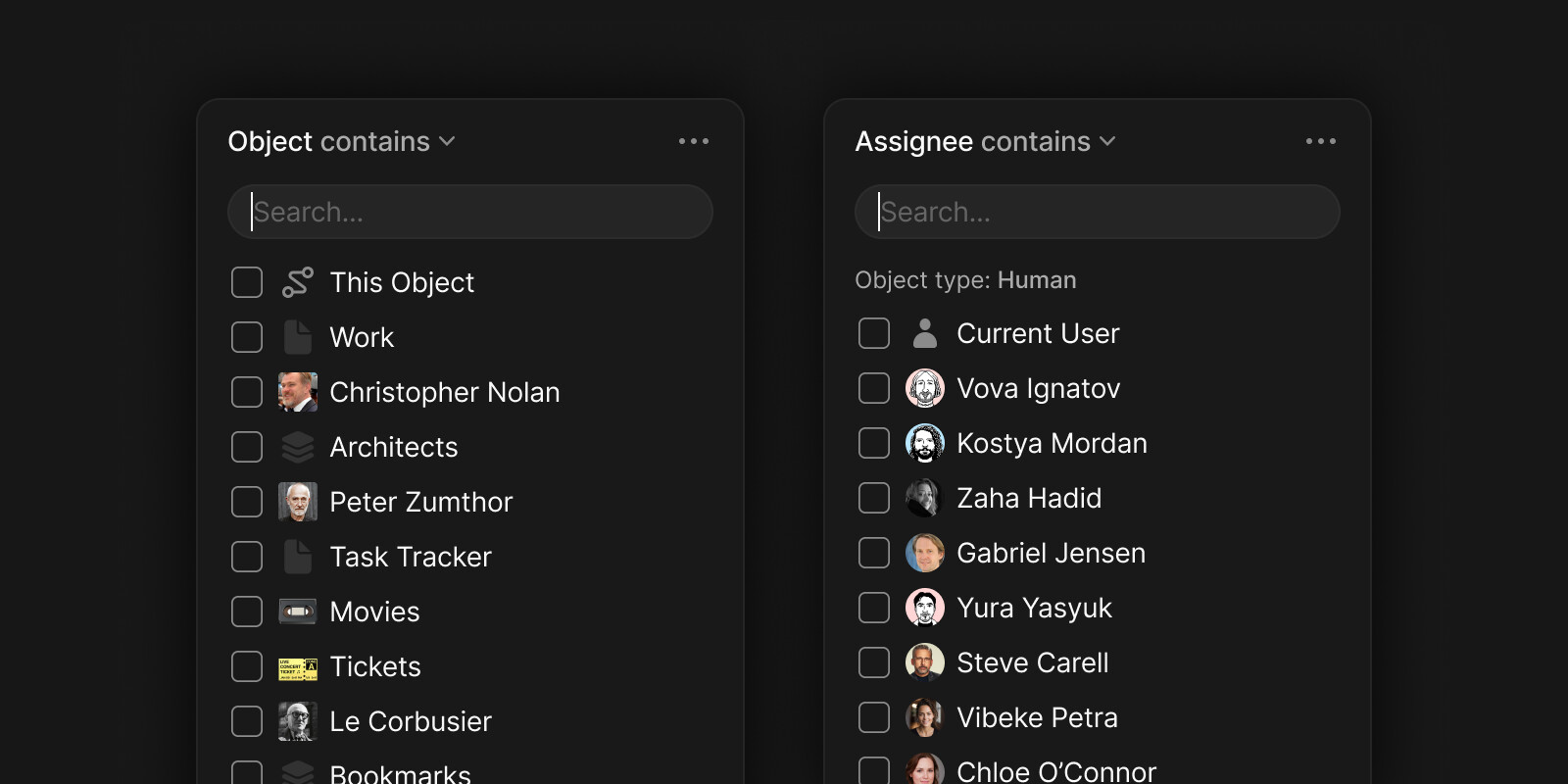
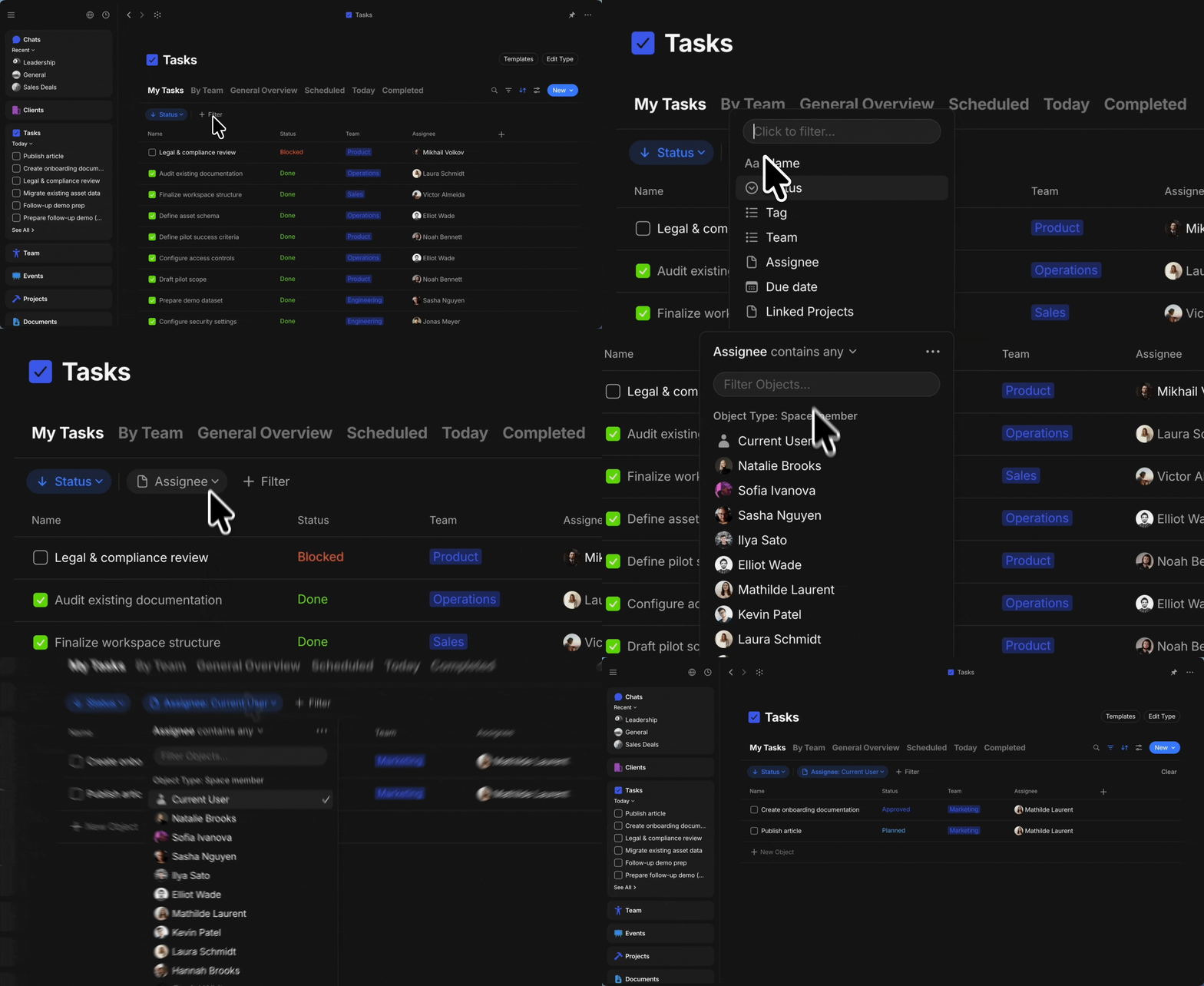
Filters now support dynamic values such as Current User and This Object. For example, a Tasks view can be filtered by Assignee = Current User, so each member sees their own tasks. Inline Queries and Collections can use This Object in the Object-related properties, to automatically scope results to the object they belong to.
Toggled Headings
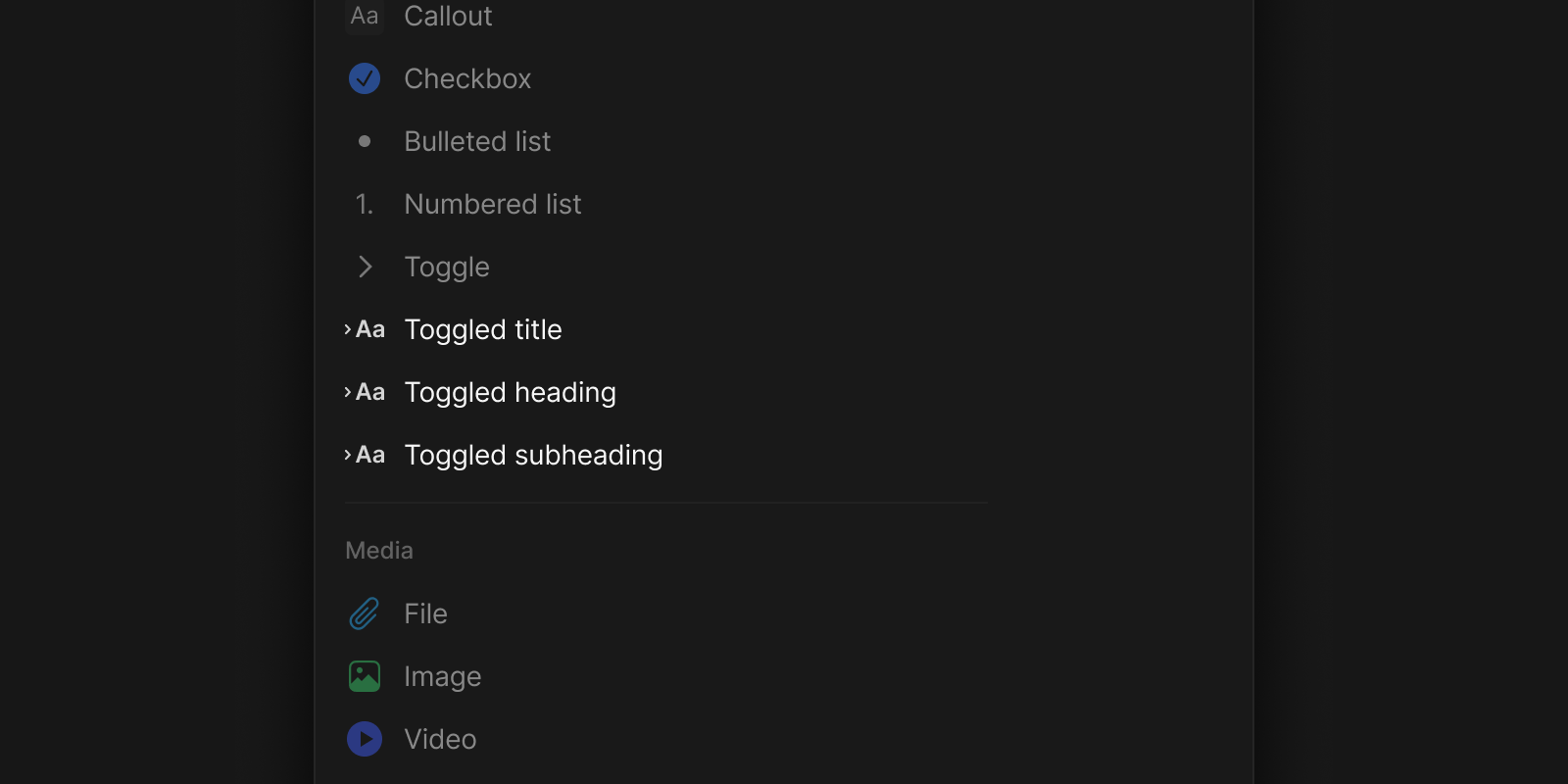
Title, Heading and Subheading can now be collapsible toggles. Create them from the / menu or with Markdown shortcuts (#>, ##>, ###>). You can also create a toggle with > + Space and then use your heading shortcut (#, ##, ###) to convert the toggle into a toggled heading.
Multiple toggle headings can be opened or closed at once, and converting a regular heading to a toggle automatically captures everything beneath it as children.
Spell Checking in Chat
Chat messages now support spell checking with the same red underline and suggestions you already get in the Editor. It uses your existing language settings – no extra setup needed.
Updated Sync Status
Sync status moved to the widget panel header with a refreshed look: a new globe icon shows your network name, a device counter shows connected peers, and a red dot appears in the sidebar when there’s a notice to review.
Automatic File Download
Files in shared Spaces are now downloaded automatically, so you no longer need to manually fetch each one.
Paste Link Menu Redesign
The paste link menu now shows clearer options: Bookmark, URL, Embed (for YouTube, Miro, etc.), and a new Object option for Anytype links – letting you insert an Object card directly from a copied link.
Image and File Backlinks
File and Image objects now display backlinks to the objects where they are included. Backlinks are populated for both newly added and existing files after upgrading.
File Block Default Style
A new setting in Editor Personalization lets you choose whether files added to the Editor are shown as embedded previews or compact links by default.
Click to Edit Title in Grid View
A new toggle in Preferences lets you choose whether clicking a title in Grid view enters edit mode (new default) or opens the Object directly (legacy behavior).
Content Wrapping in Grid View
Grid view now supports wrapping content inside cells. Enable Wrap content in Layout settings to display full values directly in the table, without opening each object.
Template Name Pre-fill
Templates now include a setting that lets you choose whether new objects inherit the template name. You can find it in the Template editor header and switch between Pre-fill name and Empty name.
Toggle Sidebar and Widgets Together
You can now assign a keyboard shortcut to toggle both the Sidebar and Widget panel at the same time. This lets you quickly switch to a more focused view of the current object.
Full-Text Search in Collections
Searching inside a Collection now matches Object content, not just titles.
Grid Layout as Default
New Queries and Collections now use Grid layout by default, making properties immediately visible and easier to discover.
Jump to Message in Chat
Click a quoted reply to jump to the original message. The scroll-down button then takes you back to the reply first, then to the bottom. Thanks to @boots!
Fullscreen Image Preview
Click anywhere outside the image to exit fullscreen preview. Double-click the image to zoom in.
Windows System Menu via Alt
On Windows, pressing Alt now opens the system menu, making it accessible for keyboard-only users.
URL Properties in Header
URL properties placed in the header section can now be opened directly with a click.
Quick Create from Type Widget
Hover over a Type in the Objects section of the sidebar to reveal a + button for creating a new Object of that Type instantly.
Clipboard in Title and Description
Copy, Cut and Paste actions are now available in the right-click menu for title and description blocks.
Keyboard Shortcut Panel Focus
Opening the Keyboard Shortcut panel with Ctrl+Space now places focus directly in the search field. Thanks to @EricNoteTaker!
Table Column Widths in PDF Export
Exporting a page to PDF now preserves custom table column widths. Thanks to @William Bruneau!
Property Option Sorting
Property options can now be reordered via drag-and-drop even when there are only a few of them.
Copy/Paste with Spellcheck Menu
Copy and paste shortcuts now work correctly on Windows when the spellcheck context menu is open.
Colored Text Reset in Chat
Colored text pasted from the Editor into Chat is now reset to the default color to keep messages clean.
Bug Fixes
Chat & Messaging
- Vault counters no longer appear for deleted Chat objects.
- The emoji reaction popup in Chat no longer closes itself immediately.
- Images pasted from clipboard now show a preview in Chat, just like uploaded files.
- Dragging DWG, PSD and TIFF files into Chat no longer causes an error.
- Muted Chats no longer show a blue unread badge – the indicator is now grey so you can tell at a glance which conversations actually need attention. Thanks to @Shampra!
- The unread message counter in the Vault now updates in real time as you read through a Chat.
Editor & Blocks
- Pressing
Enterin a code block now creates a new line on the first press. Thanks to @personnotman! - Switching between RTL and LTR text no longer deletes the first character.
- Copy-pasting a Callout block now duplicates all lines, not just the first. Thanks to @Code-Jack!
- Mermaid architecture-beta diagrams now render correctly.
- File links with spaces in the path now work as expected. Thanks to @George A Kastanes!
- The Editor no longer makes small jumps while typing near the bottom of a modal. Thanks to @Code-Jack!
- Deleted blocks are now shown correctly in Version History. Thanks to @cicko!
- “Move to” now preserves the original order of selected blocks. Thanks to @pomp!
- Replacing a link on selected text now updates the link preview immediately.
- RTL and LTR text alignment no longer gets mixed up when switching between objects. Thanks to @Daniel Zolfaghari!
- Pressing
Enterabove a collapsed Toggle block no longer moves nested content out of it. Thanks to @crediblesauce! Shift+Clickselection now works correctly in large Pages. Thanks to @Code-Jack!- Blocks now correctly switch from RTL back to LTR when you delete RTL text and start typing in a left-to-right language. Thanks to @Hexara!
- The cursor now correctly moves to the left side when switching from an RTL to an LTR language.
- Selection is no longer inverted in very large Pages. Thanks to @Code-Jack!
Shift+Clicknow correctly limits the selection after using Select All. Thanks to @Code-Jack!- Undo now works correctly in large code blocks after using a heading shortcut. Thanks to @szc188!
- The
Enterkey now works inside code blocks while theCmd+F/Ctrl+Fsearch bar is open. Thanks to @szc188! - Closing the in-page search bar inside a Toggle block no longer loses the cursor position. Thanks to @Code-Jack!
- Right-click context menu now reliably appears when selecting multiple blocks on Windows. Thanks to @Code-Jack!
Keyboard & Shortcuts
- Zoom in/out now works with
+and-keys on the numeric keypad. Thanks to @Code-Jack! Ctrl+Fin the Bin now opens the built-in filter instead of the editor search menu.- Keyboard shortcuts no longer insert a character after drag-and-dropping a block.
- Buttons at the top of the Shortcuts popup are now fully clickable.
- SecureEventInput is now properly released when input fields lose focus, restoring compatibility with third-party input methods on macOS.
- Shortcut recording no longer inserts Cyrillic characters when a non-Latin keyboard layout is active.
Page UpandPage Downkeys now scroll through the entire document, andAlt+Up/Alt+Down(Ctrl+Up/Ctrl+Downon Windows) hop the cursor between blocks. Thanks to @mig2k & @Code-Jack!
UI & Rendering
- Content is no longer visible behind the “Creating new type” screen in small windows.
- Long Any ID / unique name no longer overflows the Membership screen layout.
- The sync status deletion confirmation popup now appears above the sync status window.
- Action icons in the object header now look consistent across light and dark modes.
- The Vault sidebar no longer reopens when you resize the window.
- Pressing
Escon the “This is your Key” screen no longer puts the app in a broken state. - Rendering issues on certain Linux distributions (e.g. Zorin OS) have been resolved.
- PIN input no longer registers two digits at once on a single key press.
- The header bar on Gnome/Fedora now follows the system theme correctly. Thanks to @rakko!
- Window scaling on Fedora with Gnome no longer causes jerky or delayed behavior. Thanks to @jpcshka!
- The layout no longer breaks when navigating back through Version History.
- Screen flickering when moving the mouse has been fixed.
Objects & Views
- Dragging an object between views now correctly applies the target view’s filters.
- Property columns in Grid view no longer break position after horizontal scrolling.
- Editing a Type now opens the existing type instead of creating a new one.
- Grid layout now updates correctly when you change zoom level.
- The “Move to Bin” option no longer appears for files owned by other members.
- Deleting a Type no longer shows a false warning about objects using it when there are none. Thanks to @flypenguin!
- Creating a new object in the Notes type now consistently navigates to the newly created note. Thanks to @Hexara!
- Pressing
Enterwhile editing a Select or Multi-select option no longer changes the option’s color. Thanks to @Hexara! - Drag-and-drop scrolling in long option lists now works correctly.
- The “New” badge no longer persists after creating and naming a new Type.
- The Object Picker now shows results in the correct order when converting text to a linked object. Thanks to @Khang!
Navigation
- The Channel Sidebar no longer opens empty when switching Channels with
Ctrl+Tab. - Objects that were never opened no longer appear in the “Last opened objects” menu.
- The second window now works correctly after waking from suspend. Thanks to @krst!
- Anytype now asks for the pin code on launch after a Windows reboot. Thanks to @stef47!
- The pin code setting no longer deactivates itself after a system restart. Thanks to @stef47!
- Deep links now open the correct object when launching Anytype on Windows.
 Heads up on mobile! Be aware that new features like Advanced Filters and Toggled Headings are desktop-only for now and not yet supported on iOS and Android. We’re rolling out mobile updates in the next few days. Stay tuned

 Congrats to all of you!


