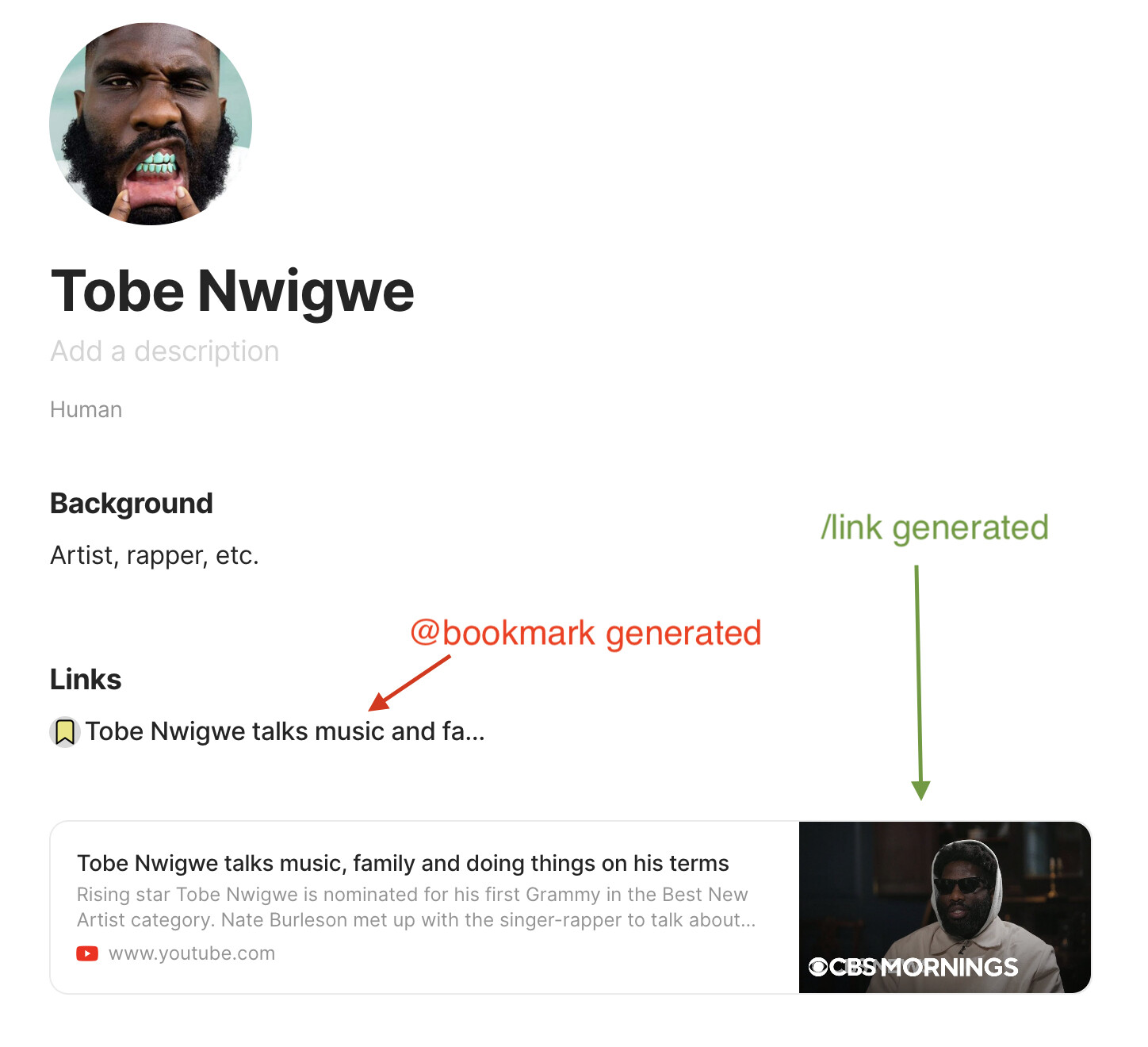
Improve consistency between bookmark related objects. Presently using the @bookmark inline link (to a bookmark object) and /link (bookmark block) results in two totally different objects. I’d argue the inline link to a bookmark object is pointless and better replaced by the same block created by a /link object. The present bookmark model with two results is pointless and inconsistent.
HOW COULD IT BE DONE
Both @bookmark and /link objects would ideally end up creating the same object, each using the URL to source its content. Presently only the /link object does this; the @bookmark object could pull the URL to perform the exact same function.
EDIT: /link to an existing bookmark object (not just to a URL when no object exists) should also create the same link objects in a note.
Anytype should retain access to the bookmark object. (Note in this scenario, either one already exists — bookmark block instantiated by @bookmark — or the user is creating an object on the fly — bookmark block instantiated by /link.) Since the inline link @bookmark presently seems intended to access the source bookmark object, the bookmark block should provide access to the bookmark object, perhaps by popup or some other hover-activated means.
REAL WORLD USE CASES
@bookmark and /link would create the same object. Presently they do not. See screenshot; ideally both methods end up like the /link generated object.
At least for a bookmark, why have different type links? One type with a keyboard modifier works well (that much I agree with), unmodified to reach the object, keyboard modified to go to URL via browser — or opposite (the former is consistent with other AT object links).
The issue here is that URLs are a unique in their purpose in that they inherently lead to two different places, one in the AT context and one outside it. Their design doesn’t seem to recognize this.
I am a little bit confused at to what you mean by inconsistency. Anytype currently has three different model for giving the user the ability to link objects to each other.
1st is using the “/” command which is not limited to the bookmark type. When you use this, you are either creating a new object or linking to an existing object in a way that you can choose its appearance from “card” and “text” preview options. For bookmarks specifically this leads to the URL upon clicking.
2nd is using the “@” command to mention/link an object inline with your other texts; kind of the same functionality as the “[[]]” function in markdown based apps such as Obsidian. You no longer has access to “preview” options as to how to style your page mainly because as the name suggests, you would use such option to mention/link existing objects within others while you are writing not styling. And its functionality is opening the bookmark object itself upon clicking which is inline with other markdown apps.
and the 3rd option is to manually link any text via the “command+K” or the pop-up menu option which is similar to the 2nd one as it is mainly designed for inline use inside of your paragraphs but differs in two way. It open the link upon click and can be used with any text since you are not restricted to the object name itself.
Personally, I find this model extremely satisfying as it gives the user flexibility. We can use the 1st and 3rd method when we are designing a notion style dashboards and pages ( the card preview option is not available in Notion btw and the only other place I see it being used is Coda) and you can leverage the 2nd and 3rd method while you are writing down your notes and want to mention/link you other objects.
So, am I missing something or did I get what you are trying to say?
If I understand correctly…
Isn’t it simply the difference between an inline bookmark (so integrated in a text string, no block is needed) and a block bookmark (so with frame, image, etc)?
Important difference and to keep in my opinion, the two presentations can not be similar even if the link is the same behind.
Thank you @Shampra and @dzlg for comments. No, you didn’t miss anything.
I guess my confusion is a reflection of the Anytype designers’ confusion. They seem to lack clarity around the philosophy of end-user power and designer’s top-down defining of these tools. (I’m alluding to another conversation about graph view.)
In the end I think all URL-based objects (as links in notes) should appear the same and function the same, with a modifier to reach either the object in Anytype or the URL (outside). This is because I don’t understand why graph view links to the object and not the URL; it’s also because the process of making @links (inline object) is nearly useless for a bookmark.
Why even give something as simple as a URL complete object status? If I wanted to write a bunch of notes about it, I could make a note and place the URL in it. This seems like overkill, but I get the “everything gets an object”. Still, simplify.
@Shampra mentioned an inline bookmark, the first form of it that I realized in Anytype. This is yet another inconsistency, but one that I suppose I understand. It produces just a text line with a link to URL; click once and you’re out of Anytype. I get it, seems useful without the big graphical block. I had totally forgotten that instance of a URL, and this FR doesn’t really consider it.
I appreciate the questions, if this idea is unclear to you then no one with the Anytype team will give a damn. So thanks again.
I believe this is based / functional on the concept of sovereignty. The information (pictures, descriptions etc) about the external link is stored locally for sovereignty, so user won’t lose the information even when the link is no longer accessible / is changed. This is good for offline as well.
Depending on the actual implementation, but web clipper might boost the function of a separate object for bookmarks. Separating source information and user-generated information will make it clear the status of object. This supports information management with single source of truth, e.g. what author said is always in original form of file.
Currently, I have bookmark object type and resource object type. If there is no additional information needed except the link, I use bookmark object. If I am marking down original content, I turn it into resource object by changing the object type. If I have my own ideas, I link/embed the bookmark / resource object into an idea object.
Therefore, I prefer bookmark stays in the same way they are currently. But perhaps it is useful to help a setting to enable or disable the bookmark function.