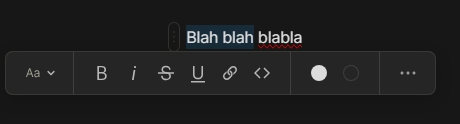
Add copy and paste from the edit toolbar menu to the to the right click menu on desktop.
HOW COULD IT BE DONE?
Software Update
REAL WORLD USE CASES
Moving the copy and paste function back to the right click on desktop provides ease of use, and familiarity to the anytype software. This would help users have a smoother experience on the software.
RECOMMENDED ALTERNATIVES
None
ADDITIONAL CONTEXT
(Polish the mobile copy and paste experience as well. Sometimes paste on mobile is unresponsive or the clipboard on different keyboards won’t pop up.)
@Shampra is correct, the Cut, Copy, and Paste functions can be executed using standard keyboard shortcuts: Ctrl + X , Ctrl + C, Ctrl + V, and from the “Edit” menu in the top tool bar.
Got it, keyboard shortcuts and tool bar menu all work, thanks! It may be better to move copy and paste from the top tool bar back into the right click menu in future updates… Just so there is no confusion for future users. I’ll add that in my request.
By tool bar menu, you mean the context menu (the right click menu that appears) ? If so I also agree, when selecting anything (copy) and paste when being able to paste.
Like @Angelo said, its not that Anytype does not have copy and paste, but in practically every other app, this “standard usability pattern” exists.
Right click on a text block, object name within an object, or object name in a collection, or anywhere else where text can be copy or pasted, to open up a context menu with a Cut option, Copy option and a Paste option. I would like to be able to highlight text, right click on it to open the context menu, and Copy the text.
HOW COULD IT BE DONE
Add a context menu or context options in places where text can be copy or pasted.
REAL WORLD USE CASES
When I’m one-handing the app and don’t want to use my left hand to Ctrl+C, Ctrl+X and Ctrl+V, which is very often because I’m used to it.
RECOMMENDED ALTERNATIVES
I use Ctrl+C, Ctrl+X and Ctrl+V after reflexively right clicking and seeing nothing.
Having to switch from from mostly using my mouse to keyboard shortcuts is a unnecessary pain.
Not having right click context menu cut, copy and paste for every field is a deal breaker for me.
It’s been 2 years and this simple right click context menu is still not implemented. It’s such a simple feature guys, I swear I’m almost open to hire programmers myself and help you out if possible but I’m broke AF.
Iff anything shouts “this is not serious software” it’s the absence of a right click menu (on the mac). I do a lot of copy and paste, and this is killing me. Also, a dark highlight indicating selection on a dark background? Difficult to love.