I’m working on a tool to import Evernote note to Anytype.
You can find it here :
Please note :
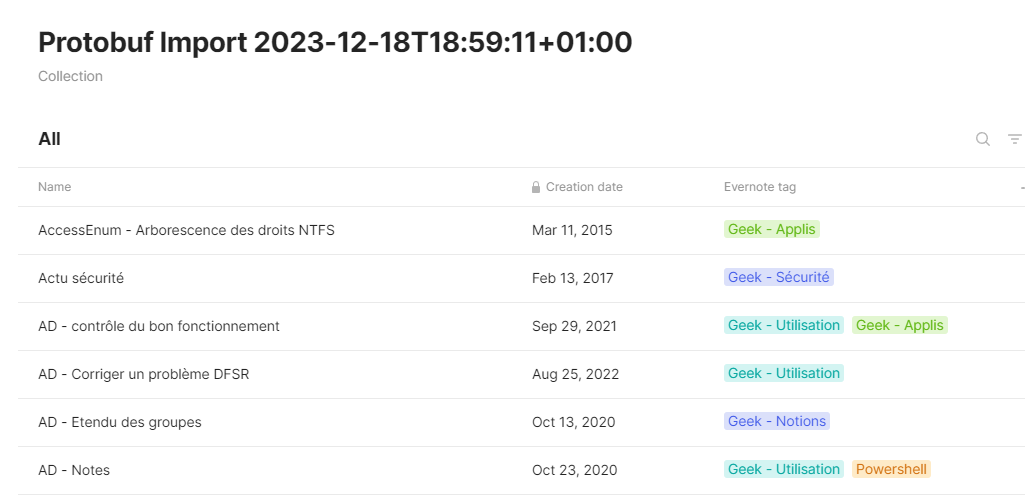
almost all is working (link, color, styles inline, titles, creation date, title of the note, list including todo list, block code with a small automatic language detection function…) but there are some limitations (when Anytype doesn’t support the equivalent, like simple table with multiples files)
you can use it with command line or with a gui because it’s more friendly
More informations about limitations and options on the github page, please read it.
Update 25 May 2024
Final version V1.0 is here
Add unencryption of your encrypt note ( encrypted one cannot be imported in AT)!
Converter rebuild all PNG files (AT doesn’t support of PNG with CRC errors)
SVG files (not supported by AT) are converted to PNG files
For now, I don’t recommend using it until all the bugs on the Anytype side have been corrected (file import, etc.).
And after that, I’ll have to update it.
I’m also planning some small updates: integration of the notebook notion, creation of an easier zip to import into AT. But that’s just for comfort, and the tool can be considered functional.
I know that this is a work in progress, but I’m encouraged that this will eventually help me import my 700+ notes in Evernote into AnyType when I am ready to fully transition.
Although it isn’t necessarily a one to one equivalent, maybe the option to set a flag to create (and link) Evernote Notebooks as AT Collections would be useful too.
Maybe there’s a need for something similar for note Views and Sets, but that would seem quite a bit trickier to me.
This is so brilliant, thank you for developing it! I can’t wait importing my 14220(!) Evernote notes into Anytype! Already in it‘s current development status, AT is so much more useful, elegant and private than Evernote. And I’m super glad that you’ve managed to import tags and colors. Now we’re only missing the import of images and attachments such as PDF, emails and audio files, aren’t we?
Actually, how does your import tool bring Evernote’s internal links between notes over into Anytype? Are they converted to Anytype’s ‘@mention’s?
Regarding the import of Evernote’s notebooks, I wonder if it wouldn’t make sense to export them one by one, and import each notebook as a separate Collection. But a relation is as good to me. Maybe at import time one could specify the name of the relation or collection that this import shall be labeled with.
Yes, as long as Anytype can’t import files correctly, the conversion tools are unusable in my opinion. Personally, I can’t migrate and lose images and other files!
I call up the team from time to time…
For @mention, no. I don’t think I can, because when we need the Anytype internal link, which is create after the import process (the converter cannot get it back).I’ll look into it when I can move on (being able to finish the files part would motivate me!).
And for notebook, I hadn’t noticed but Evernote only lets you export notebook by notebook (and without exporting the name). So it’s impossible to manage this: if you want to keep the notion of Notebook, it’ll be up to everyone to create it as they wish.
Here, the request to be able to edit in batch would be super useful: in a single operation, you could link all the notes in an import to a collection (or to an object, or define a “Notebook” relationship with the notebook name, etc.).
There are various FR about bulk editing, like this one :
Thanks, @Shampra. Makes perfect sense to me, including the batch editing. if Evernote can’t export notebooks’ names, just manually naming them is perfectly fine for me. I have only ~10 notebooks and maybe I even want to change some of their names while I pull them over from Evernote to Anytype.
Particularly I know I want to lump some notebooks together as I import them from Evernote. So the proposed batch-editing capability to select thousands of objects with a query “Set”, and then e.g. set a flag, or (better) add them to a new or existing Collection, would be necessary. Manually I’m afraid it would be impossible to edit thousands of notes. => Voted for batch-editing capability.
I checked, Evernote uses an id in its internal links, but the notes are exported without this link. So even the Evernote export blocks any possibility, sorry.
The link remains functional to the note in Evernote… (link evernote:\…)
Good news for anyone upset with Evernote’s ever degrading export capability? I had just manually exported the most important ~1000 notes in chunks of 100-notes-at-a-time (current limitation), with every second export failing with some random error… when I discovered this blessing from heaven on GitHub, while waiting for the 10th export chunk:
Using this Python tool on the command line, it’s been a total breeze to download all of my 14468 notes (2,8 GB) from Evernote to enex files on my hard drive, in less than an hour.
Now I want to test, of course, how these notes import into Anytype
But unfortunately, dear @Shampra, your ENEX converter
Yes and no .
I had planned to leave the possibility of putting it in the parameters of converter.py (with --enex_files), but as I wasn’t sure it would work, I never finalized it. But if it does, I’ll keep working on it!
Another option: by default (without using the parameter), converter.py will process what’s in Tests/Temp/. By limiting it to a specific file… but I can quickly change that.
I won’t be able to work on it this week, but I’ll see next week.
And thanks for the feedback!
I’m testing with my possibilities but my Evernote base remains more limited than some and I only do on Windows.
Hum…
Have you tried working with the source code or with the release?
The release normally compiles all the necessary modules (but I confess I don’t know how this is taken into account on the MAC side).
Version 0.8.4 published
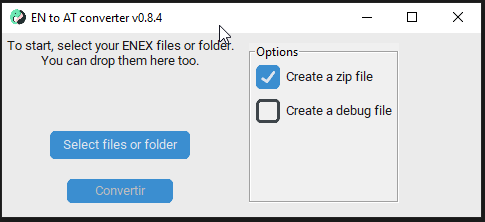
Minor stuff and a better solution to choose between CLI or GUI
if you run the file without parameters, it launches the interface.
If you run it with parameters, it runs directly from the command line.
(mandatory parameter: enex_sources to indicate the directory(ies)/file(s) to be converted)
A first version with import file has been release!
A betaversion is available…
Because, yes, there are so many specific cases that pose problems .
… because the application occasionally likes to do the same thing but differently (images managed differently, for example)…
… because Anytype certainly doesn’t know how to handle anything (you can say goodbye to everything you have in your tables… Hey Anytype team, is Simple Table V2 a thing of the past? Nothing on the roadmap)
… and even sometimes because my code is buggy?
You can test it to help me detect these cases.
Or send me a beer , I need it .
But keep in mind : it’s a beta, import in a specific space just to try (no risk for anytype but you can have wrong data from your import)
Thank you, @Shampra. After trying for many hours to build the whole package on my Mac, I ended up just using your converter source code on GitHub, and amended it so it would process my ENEX files instead of your test files, and fixed a number of bugs where the HTML parsing threw errors due to unhandled situations… and finally batch-converted all of my 14.247 notes from my ENEX files to Anytype! Thank you so much for building their missing piece!
Unfortunately though, when comparing the ENEX‘ original HTML content with the results in Anytype, I found so many bugs in the HTML-to-Anytype conversion that a majority of the imported notes are useless: While they look perfect in Evernote, many notes e.g. lost entire paragraphs in Anytype because the original text was not enclosed in <div>…</div>, etc.
So, way beyond the known trouble with importing tables and files, the current HTML parsing approach makes much of the imported content useless
I had in fact started to document the bugs I found and respond to you, but needed to drop it due to a private emergency.
Now I’m more available again and I wonder how I could best contribute here. It would probably be easiest to share a few test specimen as single-note ENEX files, but I wonder how to overwrite the private content?
I did a search on the web this morning how to overwrite all content in HTML with aaaa, bbbb, cccc, dddd etc to ensure privacy and make it easier noticeable when content gets lost, but could not find a related script.

 .
.


 ).
).
 .
.
 .
.



 .
.
 , I need it
  .
.