What’s The Bug?
I used excel in my Anytype doc, when I try to export as PDF, the excel style in PDF went wrong, it’s not the same width that I set in Anytype doc, and no matter how I change the paper type excel always have some blank space on the right side. I’ve tried A4 and A3, and make the excel smaller or put the excel on the left side or middle side, not working, still have some blank space.
How To Reproduce It
Insert table, and export PDF
Image or Video

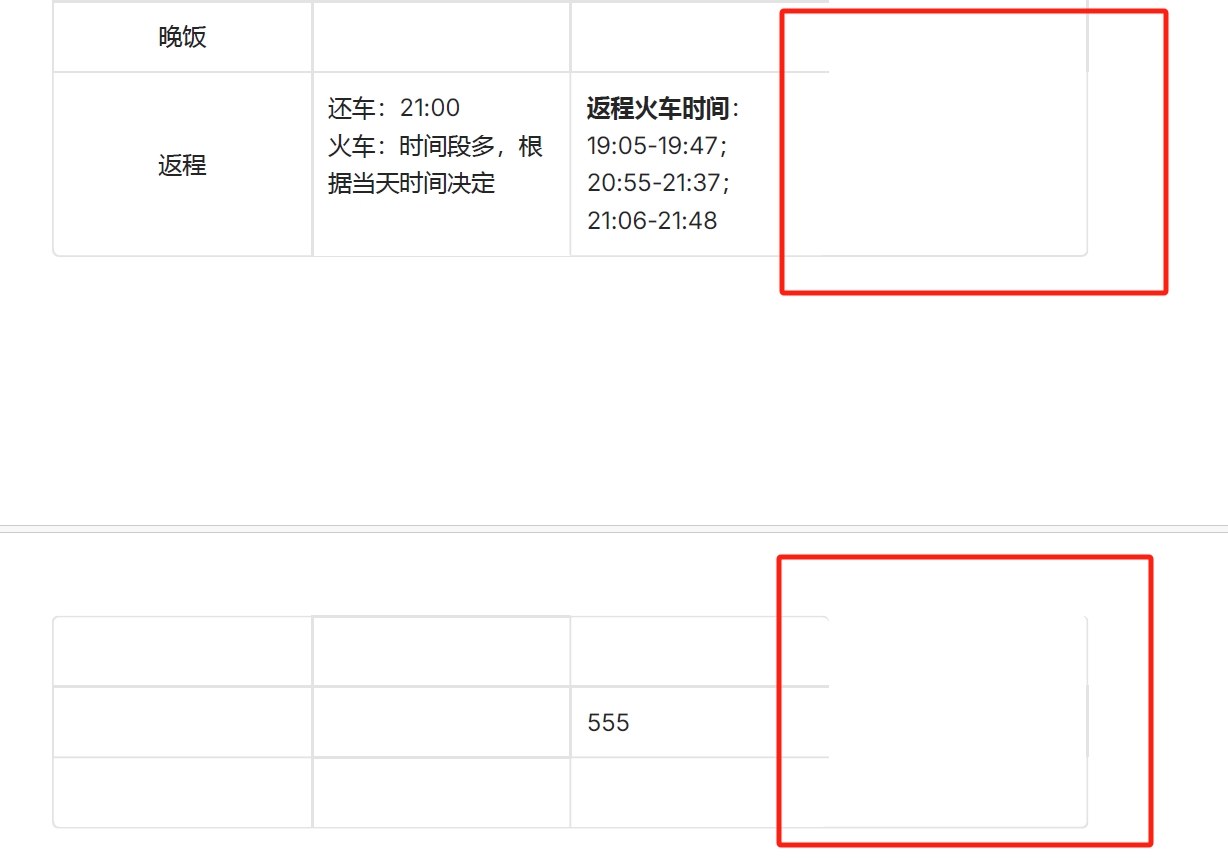
The Expected Behavior
I hope the excel can maintain the way I make in Anytype doc when export as PDF
Device
ROG Air 16
OS
Windows 11
Anytype Version
v0.43.8
Network Mode
local only
Technical Information
操作系统版本: win32 x64 10.0.22631
应用版本: 0.43.8
构建版本: build on 2024-11-22 22:42:01 +0000 UTC at #d8239d33731abecdf08762f35553950ae026db5e (dirty)
库版本: v0.37.4
Anytype 身份标识: AACN3L2f2751YfwBMz7LM9AHdh3ji8zLRAChpVswKkPBmhst
分析 ID: 56569f5c-3b2f-4da3-b329-d0d52e790e16
设备 ID: 12D3KooWQBfmamwNvkEbrs5YLnFFRG61MUCbshiSSJEvQEUBGaR5