WHAT IS THE BUG
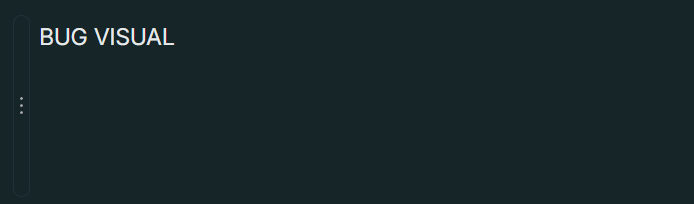
Pressing “Enter” to create a new line block behaves as if though I were pressing “Shift+Enter”
HOW TO REPRODUCE IT
The problem is exactly this, it just happens randomly. I have tried everything to get a somewhat consistent way to recreate the problem but at least from what I can tell, it truly starts and stops at random.
I thought I had an incling on how to replicate the issue; I thought it was a problem that happened everytime I Alt+Tabbed to another window. Unfortunately though, I realized the problem also happened if I had the window in focus, mid way through typing. So I am not sure if the ALT+TAB is related, I highly doubt it at this point, but I still wanted to mention it, especially since I have nothing else to go off of.
THE EXPECTED BEHAVIOR
When I press Enter I just expect a clean line break. But it just randomly decides to behave as if though I were pressing Shift+Enter and creates a continous line block, as opposed to the break. I also attached an image just for further clarification on what I mean when I say that it behaves like “Shift+Enter”. It’s apparent because of the continous block element on the very left.
ADDITIONAL CONTEXT
I did see some previous Bug Reports that had a similar problem. Some of them going back to 2021, and they are reported as having been fixed. I am attaching some of the aforementioned posts just for reference:
Also, haven’t posted here since I think the Alpha, forgive me if something about my post isn’t right like the topic, or location of the post.
TECHNICAL INFORMATION
Desktop Setup Info:
OS version: win32 x64 10.0.26200
App version: 0.54.11
Build number: build on 2026-03-24 15:27:50 +0000 UTC at #c5a40d8f6ff93ccdcdbf0f5487766cc5d54bdeb9
Library version: v0.49.0-rc08
Analytics ID: AApkYiWfM7c6XGB9dJsbkBY3ihj3c7qkvL9X5Zc1d9FifvKf