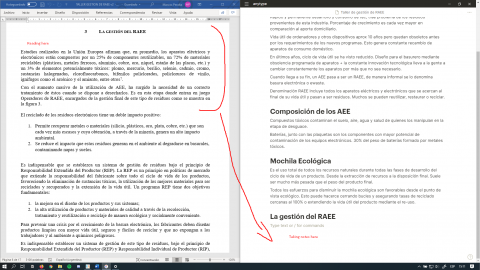
I think that the page should be infinitely scrollable so that i can ajust where the text is relative to other windows. For example:
The paragraph I’m resumming is on top of the screen but the area where I type my notes is always on the bottom of the page. After some time of takinkg notes this can get tiring. Heck I didn’t notice it until a few hours of use haha. It’s a minor thing and I don’t think it is urgent, but I wanted to point it out anyways.
I’d certainly find it useful at times to have this overflow area at the end of a page.
Though would not like it to be a default.
Two possible solutions I thought of:
Have a faint text link at very bottom of page saying something like “Add overflow”.
When clicked it would allow scrolling past the last block. I’d only advise against “infinite” overflow, as this would get messy. Maybe just until the last line of last block is visible on top.
Have a “spacer” block type, which can be resized and repositioned as any other block. Maybe even allow background color. This would even be useful for other situations, where someone just wants to add space between blocks. Like @Vova said, this can already be done with a standard block, but it is kind of a hack (as this is not what the text block is for).
This was implemented for Desktop.
Is this really needed for mobile?
I actually would prefer if it will not. Because on mobile, when I want to get to the end I just do a fast swipe. And I don’t want to see unused space there. Also I think the use case for desktop for this feature, doesn’t apply to the mobile devices.
For me it is mainly about having a bit more space to choose where to place more content, either when you want to place the cursor to start typing, or when you want to drag and drop content down.

 I knew (and understood) it as soon as I read it! (Portuguese here)