Option to use the default widget full view with custom widgets

WHAT DO YOU RECOMMEND

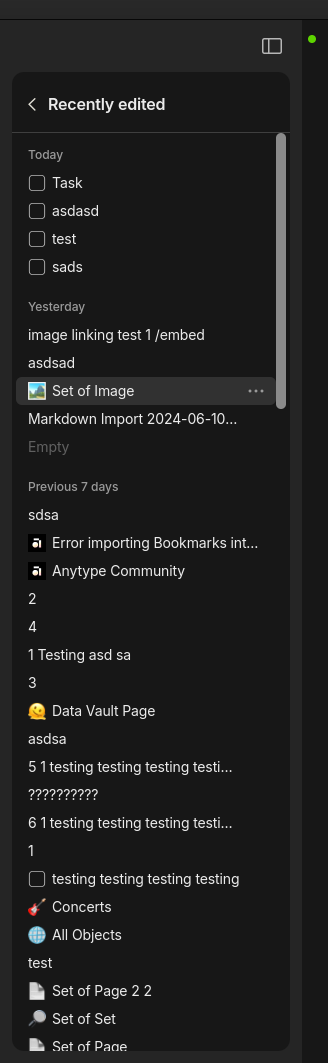
I propose a unification of how user-created sets/objects and the default Bin widget with how the default favorites, sets, collections, and recent widgets already work. With the latter widgets, you can click into those elements and get a sidebar view of the objects contained within. This makes it so that you don’t have to context switch from your editor view just to see the entirety of what’s inside. Very helpful. I appreciate that.

However, it seems with the former, this same convenience isn’t extended. I’d have to ask why that is. It certainly seems just as helpful as the functionality the default widgets have—if not more, because you can customize which objects you want to gather/link with your sets, collections, and objects to a greater degree than what can be currently achieved with the defaults.

I’d also find it especially helpful if this functionality was granted to the default Bin widget. As of now, deleting an object permanently requires a context shift from the object that you’re currently viewing to a full screen view of the Bin—which, for me, at least, isn’t necessary because the objects I want to delete are almost always very few (so, with the Bin view, I’m typically just staring at a few objects and a whole lot of unused whitespace) and, I don’t plan on selectively filtering out which objects to delete; I delete whatever is in there indiscriminately because it’s in the Bin for a reason: I don’t want that/those object(s) in my Anytype.

Let me know if these changes to unify widget behavior resonate with you—though, you’ll notice that I didn’t mention the Library widget, because, well, it’s not something I’m using very often and could honestly take or leave whether or not it gets the updated functionality. If including the Library in these changes is important to you, tell me in the comments. I’m currently undecided, but, leaning on the side of prudence, I’m thinking it will be important for many users that the same functionality is granted to Library.
Thanks @andre, I see that you have invested considerable thought into this matter!

My only ask is that you condense your feedback into focused key points, to facilitate clarity and streamline the Community voting process.

As this post encompasses multiple requests, it will require separate topics to address each one effectively, allowing fellow members to vote on specific functions, rather than your comprehensive vision for the Sidebar.

I believe my recommendations to be complementary. It’s only one feature request, really: that user-created object widgets (along with the Bin and Library) be treated the same as the default widget views, in terms of how they can appear in the sidebar.

I think that meets my request (otherwise I’d make another FR).

WHAT DO YOU RECOMMEND

When we click on title for Favorites / Recently edited widgets in the sidebar, the sidemenu display all objects.
It’s great but it’s so limited actually!

If we create a collection widget or a set widget, the sidebar has the same limitation of displayed objects, but does not allow this complete list.

Perhaps because the title also serves as a link to the collection, set or object, but we’d have to find a solution to display the complete list.
(either have the choice of link or complete list; or why not “…” at the end of the widget if there are more objects, clicking on it displays the complete list)

REAL WORLD USE CASES

In this user case, I want a full view of my cave in the sidebar, especially when I’m in a bottle object

ADDITIONAL CONTEXT

I really think you must expand it, it could even meet contextual sidebar needs!

Jumping in the conversation redirected by Shampra from this post. ( Widgets: Make Collections expandable in Tree View)

Collections are still not that intuitive to adopt for me compared to simply using a page with links for various reasons but one big thing missing is the ability to display a collection widget in tree view on the sidebar so I’m adding my voice for this request.