Is your feature request related to a problem?
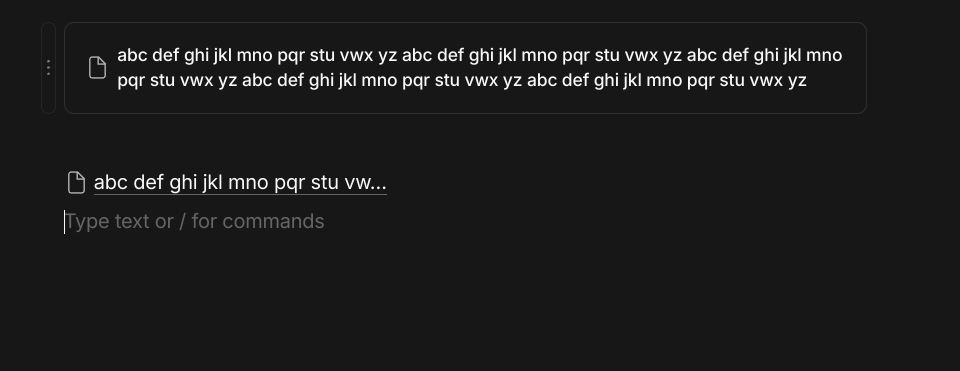
When adding a link, they are automatically truncated if they are longer than some arbitrary ammount, regardles of if there is space to render the full text
Describe the solution you’d like
The link should fill the available space rather than truncating regardles of available space
Give us a real world use case for this feature
take this screenshot for example
Add the ability to display full title in the inline links. For pages, it should be title, and for notes it could be till first line-break. I would prefer if this was the default option (only option) but having a toggle to turn it on or off would also work.
HOW COULD IT BE DONE
Turn this option/behavior on by default, so whenever we use @ to link to an AnyType Object, it displays the full title text of the object, instead of the truncated one.
We could also introduce a toggle or app level setting which turns this behavior on or off.
REAL WORLD USE CASES
If we are using inline links during writing and create links to various notes that relate to what we are talking about, we need a view that should allow us to see the whole picture of the argument without having to go to another connected note.
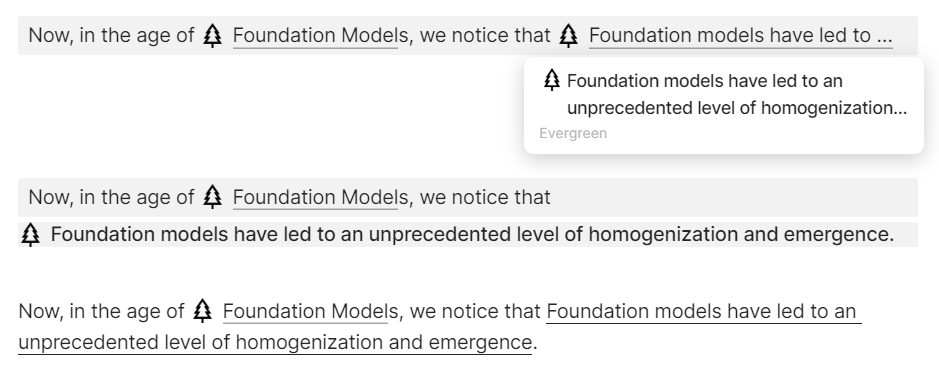
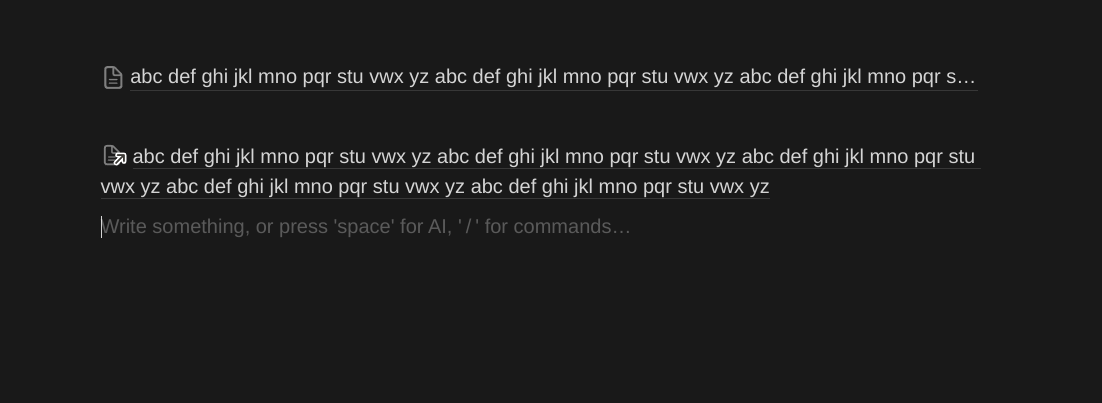
In the above example, the first option is the default behavior of inline links as of now. We can clearly see that it truncates the title of the page. Furthermore, upon hovering over the link, the full title of the page is still not being shown.
The second option shows that having a “Link to Object” option works in this case, but it is not inline now, it’s a new block, and furthermore, if the title is longer than the page width, it’ll get truncated again. I’m showing here just for reference. This is not the workflow that we require.
The third option is what I want, the ability to display the entire title of the page inline (with icon of course). I’ve just underlined that text here to showcase how it would look like.
Inside formatting menu, add a new option - checkbox to toggle text ellipsizing (truncating)
Or add an option to specifiy character/word count after which text is ellipsized.
In some cases it is hard to distinguish links when they start with the same text and then get ellipsized.
In those cases it is better to disable ellipsizing altogether.
Another use case for this is when the title of an object is meant to be used as part of a sentence in other places. For example, I collect quotations, like this one:
“It is a mathematical truism, however, that the more generally a theorem applies, the less deep it is.”
And I give my quotes titles that describe what they’re about. In this case, On the relation between the generality and deepness of mathematical theorems.
The idea is that elsewhere in my notes I can write something like
This is useful whenever I don’t want to actually place a quote in my notes, a common occurrence when the quote is several sentences or a few paragraphs long.
I think this is really a necessary FR, and I’m glad to see it’s in status “Planning”
I posted a more general suggestion to a closely related FR here in this comment, where I suggest a “full-size” preview layout for Links to optionally render as much content from the target object as possible, in order e.g. to embed the full quotation object, regardless of its length. In your case, this could look like this I Anytype:
On the relation between the generality and deepness of mathematical theorems
“It is a mathematical truism, however, that the more generally a theorem applies, the less deep it is.”
Or alternatively, by varying the preview attributes to show for this link, one could set it to just render the bare content without Description:
“It is a mathematical truism, however, that the more generally a theorem applies, the less deep it is.”
And so on. The idea is that such an ability to show entire objects inline would appear technically much less complex than a full implementation of transclusion that’s frequently being asked for, while delivering part of transclusion’s huge benefits: also to show e.g. tasks, diary entries, books or movies as fully embedded objects rather than as concateneted links, database fields or gallery elements.
I don’t think this should be an option, it should be the default. If a user doesn’t want to display to fill title, they can hyperlink a piece of text (select some text > link > select object to link), instead of using the @ command.
To be honest, if this kind of small things become customizable, the settings menu will be huge and very hard to navigate except for Anytype experts. This feels like the kind of things that shouldn’t be a toggle; it should simply behave differently (display the full object title).
A good use case for this is a daily, weekly, monthly journal that would tie in with other notes. Say you were writing in your journal and you had a prompt in your head that you needed to do something. You could easily create a task. Or you wanted to create a note on a topic to expand on later. Using the ellipse hides the full content when the text used is actually the title of the note. To do lists are a great example of this.
I can’t add anything else to what has already been suggested by other users, this truncating should be entirely optional, at least inside objects and also preferably inside the graph map.
My workaround inside objects it’s to write the full name with normal text above the truncated link, like this:
-Title of a page which is longer than 6-7 words, getting truncated

@Title of a page which is ... [truncated from this point on]
But this workaround isn’t possible inside the graph map, which only includes the object names.
I don’t know for others, but for me this isn’t a minor annoyance but a major impact in usability, specially in the graph map, because I can’t fully identify many objects with similar names from their titles until I open them.
On an iPad, when the task is displayed inline, the title of the task is truncated despite plenty of horizontal space still available on the screen.
How To Reproduce It
Create an inline task with /Task
Give the task a sufficiently long title
On an iPad, observe the page on which the inline task has been created and notice that the title is truncated with three dots despite plenty of space in the line being available
The text uses all available horizontal space on the screen, being truncated only at the right edge of the screen (if necessary).
Additional Context
As the two screenshots illustrate, this is happening regardless whether the task is formatted as text or a tile. This is also happening in the iPhone, but it is less significant since the width of the iPhone is much less than the iPad.
I would like to see more of a page’s title when it is linked in another page, currenlty it is limited to approximately 30 characters
HOW COULD IT BE DONE?
Set the caracters cutoff to around 100 characters or even 130 characters
REAL WORLD USE CASES
See screenshots : Notion does not limit linked pages to include more characters (100 characters is fine) but Anytype cutoff is less than 30 it seems ant it makes link often unreadable without clicking on them
MAny titles are more than 30 characters so really this limit seem too low for many uses
RECOMMENDED ALTERNATIVES
No alternative
Anytype example : around 30 characters is the limit for the link
To be able to see the full title of linked objects instead of seeing some of the title and then a “…”/ellipsis.
HOW COULD IT BE DONE?
I don’t know how this would work on the backend, but I don’t suppose it would be too difficult.
REAL WORLD USE CASES
I do my monthly reviews in anytype, and I often link to objects as highlights of the month. I want to be able to see the full event instead of having to fill it in mentally or open up the object/hover over it to see the full title.
RECOMMENDED ALTERNATIVES
Hovering over the object (would be simpler to not have to do that, though; I like seeing my month at a birds eye glance); shortening the titles of my objects (very limiting/annoying).
I think this goes along the same way as the oft requested feature of allowing wrapping in cells in sets and collections…I think this request is a duplication.
It is already possible.
We have different ways to link to another Object.
You’re using the “@” command, that does shorten the Name.
If you use instead the Slash command (type “/lin” for the command “Add Link”) you can choose an existing Object.
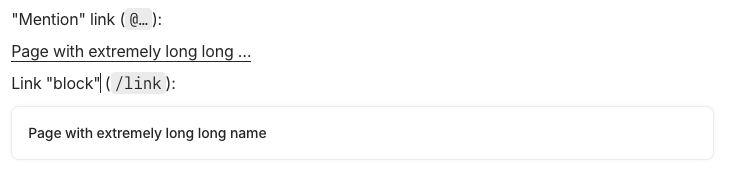
The link however, will show looooong Object names AND(!) appear in a separate line, even e separate Block.
By clicking on the yellow moving gripper (without moving it), you can change some settings of the preview style.
A third way, if you don’t want that additional Block:
Type whatever you want, mark a part of that text with the mouse or keyboard, then click in the now appearing context menu the chain symbol.
This way, the marked text becomes a link and will not change if you edit the linked Objects name.
Thank you for the explanations! I was aware of all of those already, the feature request is specifically to list the full name when using the @ sign. They could allow the option to see the ellipsis if people want it, though, for those who do.
Btw. It can become a bit “dangerous” to have the full name in the continous text.
Why:
Let’s assume, you link in a very long parent Page to a child Object with a short name.
The parent is well formatted and fine tuned, so that it fits perfectly on the paper sheets if you print it.
Later, you decide to change the child’s name, make it longer.
You don’t thing about the parent in this moment.
Some day, you need to print your parent Object that has always fitted perfectly on 80 sheets of paper.
But now, because of that changed link name, that’s now longer, the fifth sheet needs a single line more … and causes a page break … and all following sheets are now printed for trash!