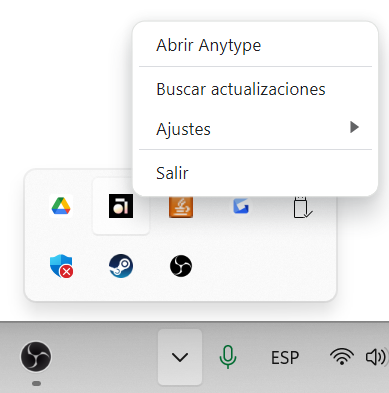
I just updated my Anytype app to 0.39.0 and every time I close it and reopen it again, it doesn’t open. I had to open task manager and end its task before I can reopen it normally again.
How To Reproduce It
Open Anytype in windows.
Close Anytype.
Reopen again Anytype.
It should not appear in the taskbar nor on screen.
The Expected Behavior
It should not open at all, it doesn’t even appear as an icon on the taskbar, which most apps do when you open them.
In my case, this happens because the “server” is still running. Also in my case, I disable the “system tray” icon, so the only way really to reopen the app is to kill it and launch again.
Keeping the server running is not bad really, since means reopening would be faster, but it would be great if it would open when the server is already running.
When the app is open then I minimize it to th tray, then trying to re-open it using the taskbar-pinned icon or the start menu one, it won’t open.
It’s only openable by double clicking the tray icon or restarting the app.
How To Reproduce It
Open the app
Minimize to tray
Click the taskbar-pinned icon or run the app from the start menu
The app won’t open
Try double-clicking the tray icon instead and it will open
The Expected Behavior
N/A
Device
PC / Laptop
OS
Windows 11
Anytype Version
v0.39.6 alpha
Technical Information
OS version: win32 x64 10.0.22621
App version: 0.39.6-alpha
Build number: build on 2024-03-13 18:00:16 +0000 UTC at #a5dd314556cf7b207f68f19341685691fb811bd3 (dirty)
Library version: v0.32.2
Anytype Identity: AAi5pJduhfVPGFybxvwfrxfjBmhhyLX4TYz8toHRr1VDCYQc
Analytics ID: 3563472c-ac88-43d4-89f9-224d2db3c0b5
Device ID: 12D3KooWLU875Z7fffMqFSenW4aNPg56sPZYBRbbMFuzMX1oZk3Q
When opening Anytype for the first time after powering on my computer. It opens flawlessly, but when closed and I try to open it, it dosen’t. I have tried rebooting my laptop. Uninstalling and reinstalling it. But it still dosen’t work.
For now I am keeping it open till I shutdown.
It would be helpful if you could look into it.
Hey everyone. The team is currently working on fixing this, but as a temporary workaround you can reopen the app through the system tray / menu. If clicking on it doesn’t work, you can try using the right-click to open the menu, and then select Open Anytype. For this to work, you need to make sure that you have the Show Anytype in Menu Bar option enabled.
When you close Anytype app and you try to open it again, it won’t open until you stop the process in the task manager.
Image or Video
How To Reproduce It
Open a window of Anytype.
Close it.
Try to open it again.
The Expected Behavior
You should be able to open Anytype again without problem.
Device
PC
OS
Windows 11
Anytype Version
v0.39.0
Technical Information
Versión del sistema operativo: win32 x64 10.0.22621
Versión de la app: 0.39.0
Número de compilación: build on 2024-03-05 15:37:42 +0000 UTC at #a7986fffadcc2031b1eb3372265db5dda05f4c6d (dirty)
Versión de la librería: v0.32.1
Identidad Anytype: A5pd87iDbeyk4yqLq3Ax4p8Zk8WkFzuw8iX4kCBEhn2DjNdb
ID de Analíticas: e5a857f6-6bb1-4971-81fc-3fc8dd5a7ebc
ID del dispositivo: 12D3KooWDwKib8dwGHYLkz8P6hfaYQN7nn8T34yH8UoXXuQ34Czq