What’s The Bug?
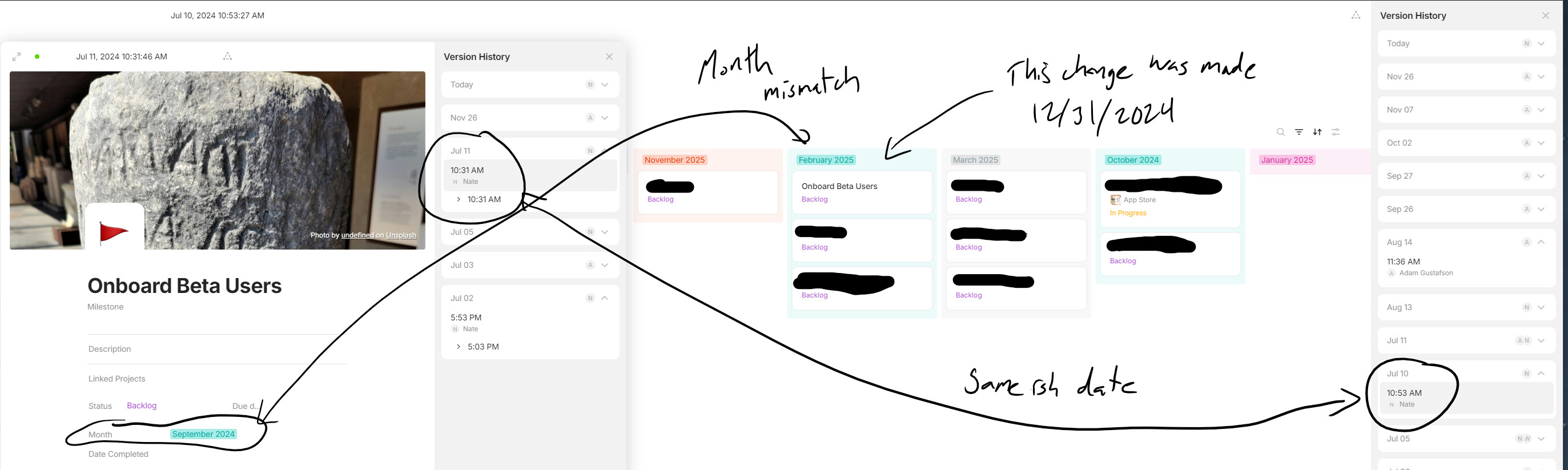
If changes are made to items on a kanban while viewing a previous version, those changes are shown in each previous version.
The individual items on the kanban still have the correct version history, but the kanban shows only the last changes made.
How To Reproduce It
- Create a kanban
- Add items to it
- Make 3 changes to items
- Pull up the version history and make a change on the 2nd version
- Click through all three versions to see that only the last change is shown.
Changes made were editing titles, statuses and dragging things around on the kanban board
Image or Video
The Expected Behavior
I’d expect changes to not be allowed in the version history, or version history changes to only affect the latest version.
Regardless of the above, the previous versions should show their status as of that date.
Device
Windows PC
OS
Windows 11
Anytype Version
v0.44.0
Network Mode
AnySync
Technical Information
OS version: win32 x64 10.0.22631
App version: 0.44.0
Build number: build on 2024-12-16 16:53:50 +0000 UTC at #c04d64d52304c0fe8800032e74e49a7159abdbad (dirty)
Library version: v0.38.7
Anytype Identity: AB7kzSPkF39Q3XY8q7q8LcukmTUziNzYsdFsweMCT35dB7v7
Analytics ID: bb4558c4-34f9-47fd-a63d-ce3e0678bf47
Device ID: 12D3KooWBr8CPsP5pjME37WEJV4Dx1ZbbForfZhHPnPm2qkZw8Ft