What Do You Recommend?
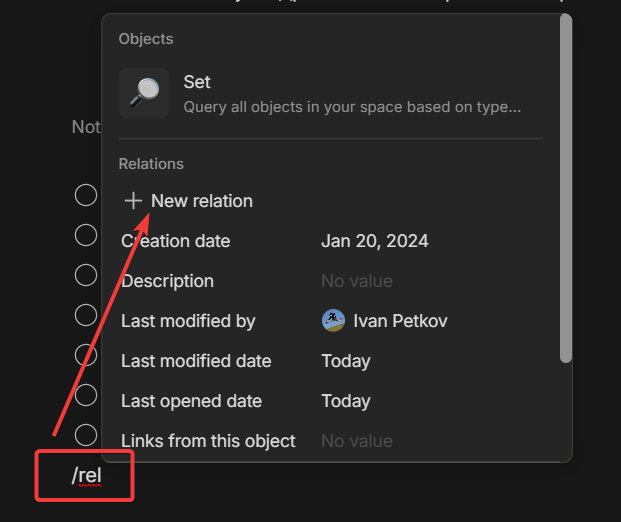
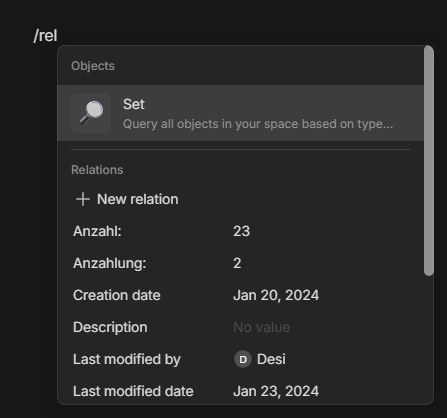
At the moment, the most frictionless way to add a new Relation (and then choosing one) seems to be typing “/ne”.
This triggers the lookup for “+ New Relation” so that pressing Enter does the Job.
But it has cost me about 10 weeks to find out … <:-(
I suggest to rename the item in the lookup list from “+ New Relation” to “+ Relation”.
The idea is, that we can in future simply type “re” (followed by pressing Enter) to add a new Relation.
How Could It Be Done?
see above.
Real World Use-Cases
Less friction, faster use when we want to add a new Relation into an Object.
Recommended Alternatives
No Alternative.
But there are some another goofs with the lookup list:
-
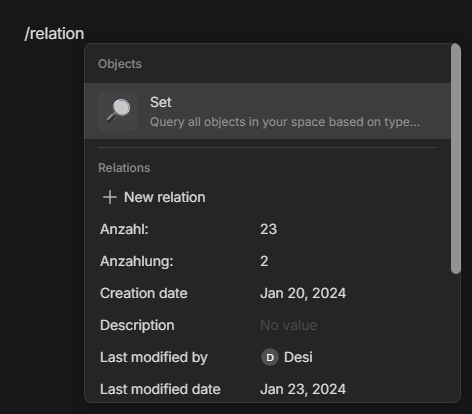
When we type “/relation” (character by character), the focus in the lookup list stays on “Set”.
What on earth triggers that?
By the way: we want to add MUCH more often a Relation, then a Set! -
When we type “/s” the focus goes not to “Set”, but on “Delete”! - Why?
And when we type “/se” the focus switches on “Dots Devider”! - Why?? -
When we want to change a background color, it’s enough to type “/b” and the focus comes to the background colors.
But not so for the text color! Typing “/t” or “/te” or even “/text” doesn’t set the focus on the text colors, but on different other items. - Why? -
Typing “/to” doesn’t set the focus on “Toggle”, but on “Checkbox”! - Why?
-
Typing “/ca” doesn’t set the focus on “Callout”, but on “Code Snippet”! - Why?
-
Typing “/ta”, nor even /table" doesn’t set the focus on “Table” or “Table of Contents”. But on “Inline Collection”! - Why?
-
Typing “li” sets the focus on “Allign Left”, but not on the entries with “link”.
Also “/ad” doesn’t set the focus on “Add Link”, but on “Inline Collection”! - Why? -
Also please make the lookup list much BIGGER!
There’s enough space on the screen and the app knows it!
There’s no need for endless scrolling in the list.
Additional Context
The lookup list is surely one of the most used functions in Anytype.
We all use it often per day.
Why is here so much goofy friction?
Edit:
I further suggest to show the specific keyboard sortcut left beside each entry in the lookup list.

 )
)