Keyboard cursor dissapears after you cut the whole line (block)

What’s The Bug?

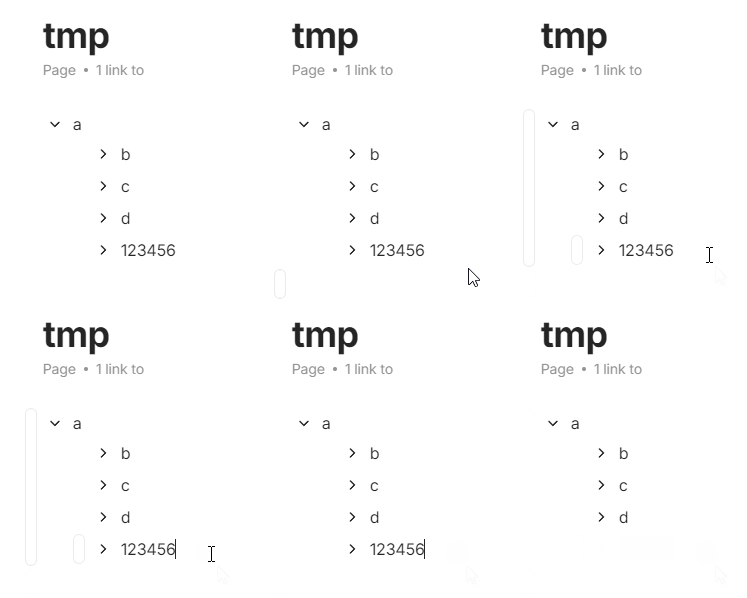
The (keyboard) cursor should always be somewhere. In this gif below, you can see that when I press ctrl-x to cut the line, the (keyboard) cursor disappears. Instead it should go to the end of previous line.

@SirCaptain

How To Reproduce It

  1. Write something.
  2. Select all of it.
  3. Cut it.
  4. The cursor disappears.

The Expected Behavior

I expected the cursor to stay in the text block.

Additional Context

Device

Zenbook 15 OLED

OS

linux x64 6.8.7-060807-generic

Anytype Version

0.40.12-alpha

Technical Information

OS version: linux x64 6.8.7-060807-generic
App version: 0.40.12-alpha
Build number: build on 2024-05-02 10:41:01 +0000 UTC at #949ac753f743beede8748733bc8b5d3a37ce0300
Library version: v0.34.0-rc1
Anytype Identity: AB7U28bGbzLryDPj9r8pcnxzCKDXa4s8htabD59q6sUoABfr
Analytics ID: 7e3dd39a-94ae-4633-933b-49f80380b442
Device ID: 12D3KooWGTJMBKmwS269HEXjXpRGUX7J6boC2cWNhys98GimGRgd

This report has been added to our issue tracker and received by the Development Team.

Yeh, this it how it should be.
This bug or missing feature was already reported or mentioned different times; it causes so much friction every day!

In addition I want to highlight that the cursor should be somewhere from the moment on you open a Page.
This would enable us to jump to the Page’s beginning or end by Ctrl + up/down (without the need to click first with the mouse in one of the lines to get the cursor).

Different actions let the cursor disappear:

  1. Opening a Page - there is no cursor.
  2. Using Ctrl + x for a whole block.
  3. Using Search on a Page and closing it with Esc.
  4. Moving a block up (with Ctrl + Shift + up) if there is a Simple Table above it.
    (the table even “eats” the moved block!)
  5. Opening and closing (with ESC) the Relations menu.
  6. Dito for the three dots menu.
  7. Clicking outside of a block.

… and maybe some other actions

Was it reported in a separate bug report somewhere already or not?
Because the reason why I created this bug report is because I couldn’t find an existing one already.
Your report is specific for the dissappearing cursor after using Ctrl + x for a whole block.

But the more general fact that the cursor is often nowhere was reported often.
I mentioned it in this Bug Report:

And more “in passing”, not in a separate bug report, it was mentioned here:

And here:

And here:

This issue has been fixed by the Development Team and will be implemented in an upcoming release.