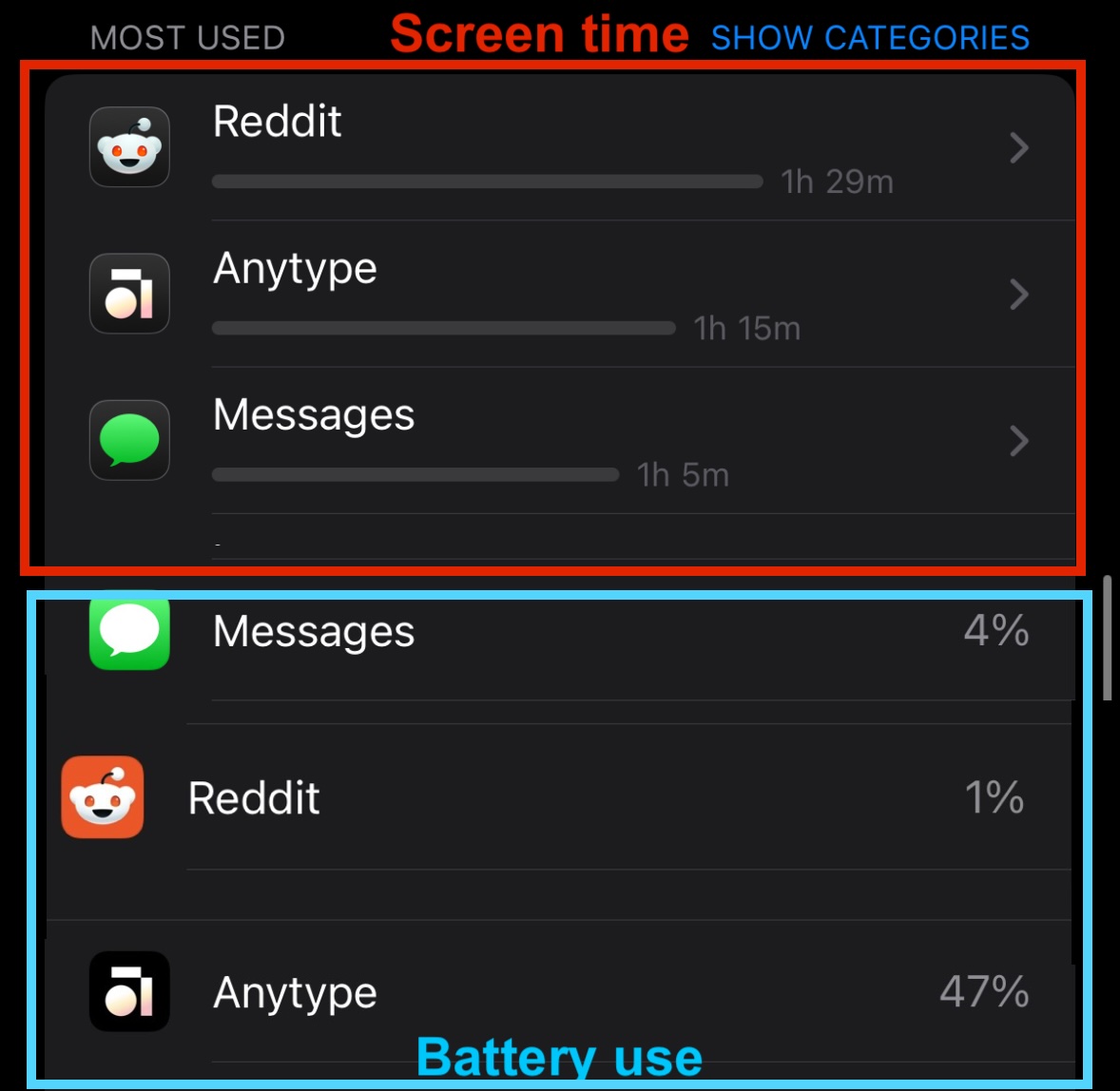
iPhone app is heavy consumer of battery. 1h and 17 mins of screen time of anytpe on my iPhone 14 Pro took 47% of phone battery according to battering setting section. For the context, YouTube with 1h and 5 mins took only 4%.
How To Reproduce It
Use anytype to write a note (change content) for 1h on your iPhone
2 Review battery usage in settings app
The Expected Behavior
Anytype should consume less than YouTube, avoid draining battery.
Additional Context
I suspect (speculate) this could be connected to constant syncing that happens due to p2p nature and results in heavier compute and network usages.
I have this exact same issue. Decided to install the app now that multiplayer is live and I have battery drain and overheating issue on iPhone 14 pro max.
I killed all other apps and have only Anytype open.
I can watch the battery drop by one percent-point every 20-30 seconds. 67… 66… 65… 64… 63… 62… within three or four minutes. During that short time, the screen dims due to overheating.
This bug was reported on May 5th, 2024.
Can the Anytype team please advise where the bug has been filed on May 6th? I cannot see any issue on GitHub for the iOS client about battery drain, neither open nor closed. (Just want to ensure it didn’t fall through the cracks.)
Just here to add to the pile. I’m on iOS 18.5 on an iPhone 16 Pro. Anytype app version 0.39.1. Check out my screen time vs battery usage of Anytype in contrast to two other apps I used for similar amounts of time today. Forgive the rough edit work in stitching these screenshots together.
Same here. My phone (iPhone 13 mini) sometimes even gets hot when typing in Anytype.
To note, also the desktop version sometimes used 100% of 4 CPU kernels (plus 2–3 kernels with a kernel_task that seems to activate when I type something in Anytype) on my 8-kernel Mac M1.
Note: I have a hunch this might have gotten a lot better with Anytype’s most recent iOS and desktop releases I installed yesterday, actually.
I’ll have to see if I’m getting similar results on desktop. I have a similar setup to you, so it’ll be interesting to compare.
Edit: FWIW, I’m not seeing the same behavior UBr mentions on my M1 Max Macbook Pro. It doesn’t seem like Anytype for desktop is using a large amount of battery. It’s only the iOS app doing that for me.
I’ll add my voice to the choir. Mobile is a key part of my workflow and over the last year I have noticed my phone getting hot and during use and started tracking similar battery drain tied to Anytype as described above. I finally decided to stop using Anytype because the app is noticeably denting the phone’s overall battery health and dropped the Max Capacity to below my old iPhone 13 Pro, which is still in use with another family member.
I’ll continue to keep an eye on this issue but I can’t continue using and app that is causing damage to expensive hardware that I rely on. And confirming what others have said, I’ve had no issues with the desktop version on Linux, Mac OS, or Windows. I believe this problem is specific to iOS.
Can only speak for iOS, but I used Anytype a bunch last night and didn’t see the normal high battery drain that I expect. Will continue to test. Hopefully this has been resolved. I use Anytype on my iPhone a lot. On 0.39.2
the drain perhaps comes through the massive network usage of AT. on desktop it is not that noticeable but when on a mobile connection the phone can indeed get hot when too many things are sent back and forth (noticable when using it as a hotspot, too).
There has been also an issue filed in the forum about the massive network usage on desktop (can’t find it atm). It might not be noticeable that much on desktop with a stable connection but costs more energy when on mobile (switching towers…).
That’s a great insight. Now that you mention it, I haven’t had the issue nearly as badly on iOS when using when using wifi. I didn’t think of the issue being worse when only using cellular data. I’ll keep that in mind as I make observations.
Back to report after some more testing. It seems really inconsistent for me. Sometimes it uses a lot less battery, sometimes it uses a ton. Last night it used 20% in about an hour. Most of my iOS testing is on cellular as I mainly use the iPhone app when away from home.
I’m finding that generally when I’m flipping back and forth between several pages and linking objects is when battery is drained the most. Though this might be a case of correlation doesn’t equal causation.
I too am still having really inconsistent results. But at its worst, it’s essentially the same usage as the screenshot I posted above – as much as I love Anytype, I can’t use it for now if it’s going to use that much energy. I’m eagerly trying every update in case it fixes it though!
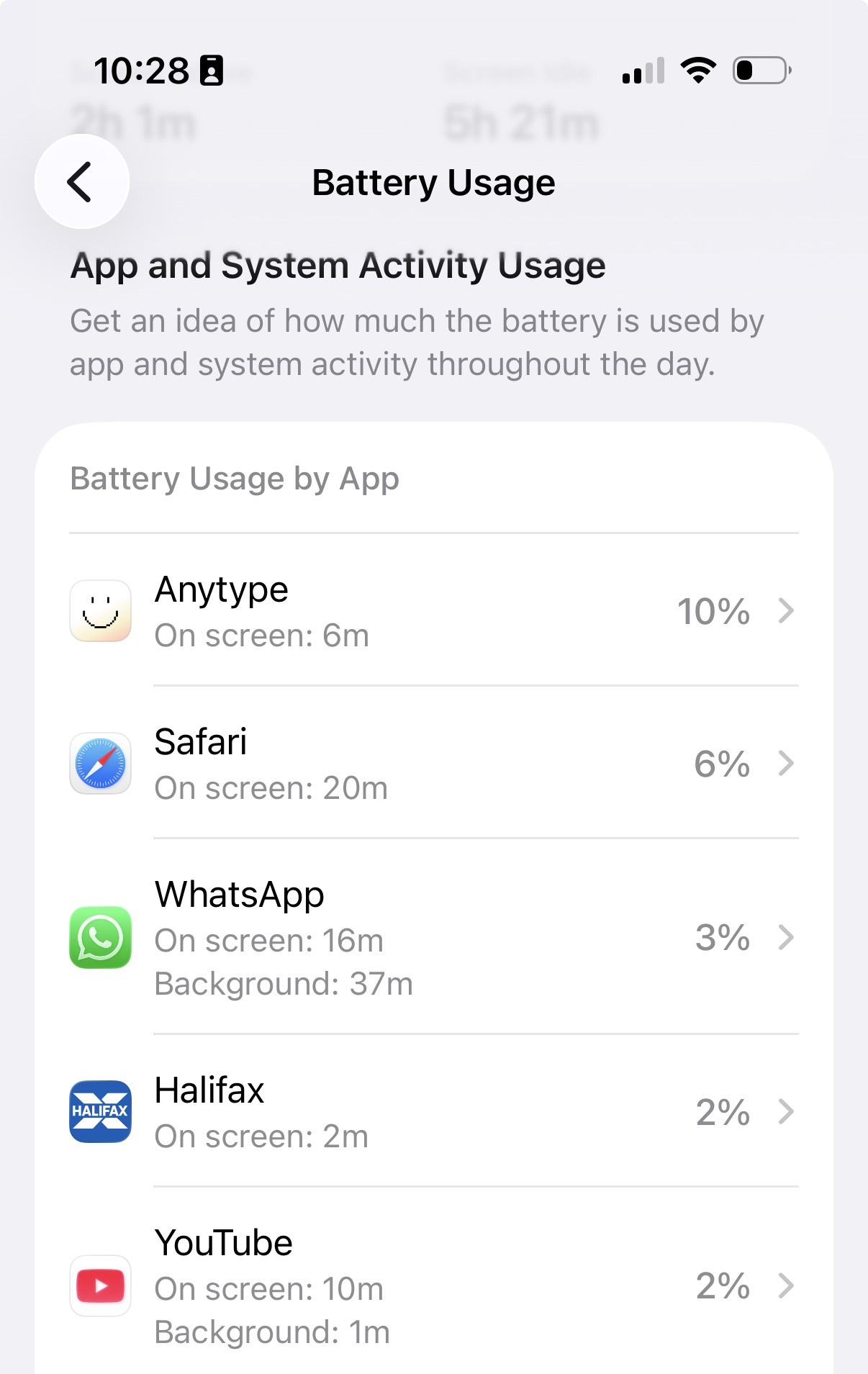
Hello! Just an FYI, that I’m hitting the same battery drain issues as described in this bug. I’m on a brand new iphone 17 Pro (ios 26.2), Anytype 0.43.2
You can see here that there’s 10% of battery drain for only 6 minutes of use, safari on the other hand used only 6% after 20 minutes use
The battery drain is bad enough that I don’t use Anytype on ios very much anymore, which is hard as I rely on it so much.. but I don’t want to harm my battery. Please please I’d like a fix for this
Update: We are aware of this issue. Unfortunately, it is very complex to fix and will take a significant amount of time. We appreciate your patience while we work through it.