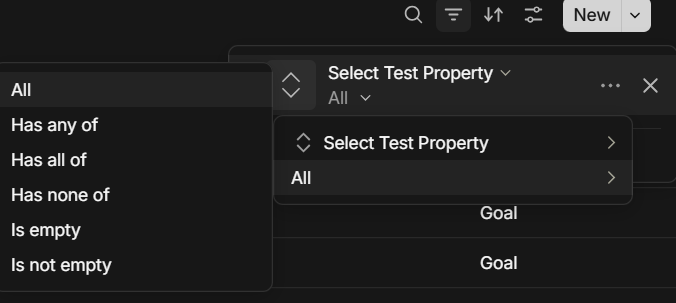
I’ve noticed a recent change in how Inline Queries handle filtering when selecting Select type Properties. After choosing a field such as Domain, the filtering menu now displays a fixed set of operators—has any of, has all of, has none of, is empty, and is not empty.
While I understand these operators may offer flexibility for certain property types, they feel redundant or confusing for Select fields, which are inherently single-choice. This layer seems to block access to my predefined enum values, making the filter unusable in practice.
It would be helpful if the UI prioritized showing user-defined enum values first, or better yet, streamlined the filtering experience for Select Properties by omitting irrelevant operators.
Thanks so much for your continued work on Anytype—I deeply appreciate your focus on creating such a thoughtful and user-driven tool.
Best regards,
Jun
How To Reproduce It
Open Anytype** and navigate to a page or object where you can create an Inline Query.
Insert an Inline Query block** (e.g. using /Inline Query).
Choose a database or object set that contains a Select type Property—e.g., a field called Domain with single-choice options.
In the filter configuration:
Click Add Filter
Choose the Select property (e.g., Domain)
You will notice that instead of showing your predefined enum values after clicking the dropdown list beside the “All”
The filter displays a fixed set of operators: has any of, has all of, has none of, is empty, is not empty.
Because of this UI logic, your enum options aren’t shown, making filtering effectively impossible for that field.
Looks similar to what’s mentioned in these feature requests; there are indeed some limitations to the current implementation of filters. Hope these can be addressed soon.
Every Select property should display its own predefined values during filtering—not a fixed set of generic operators.
The current behavior seems inconsistent: when filtering a Select property in an Inline Query, the UI shows static options like has any of, has all of, etc., instead of immediately surfacing the actual enum values I’ve defined.
So I think it‘s a bug. It would be much more intuitive—and expected—if my custom values were directly accessible for filtering, without an extra layer of irrelevant options.
I am now convinced that I am not understanding what you are proposing properly. Sorry. Can you make an example (screenshot) of how to achieve that, without the has any of or has all of or has none of ?
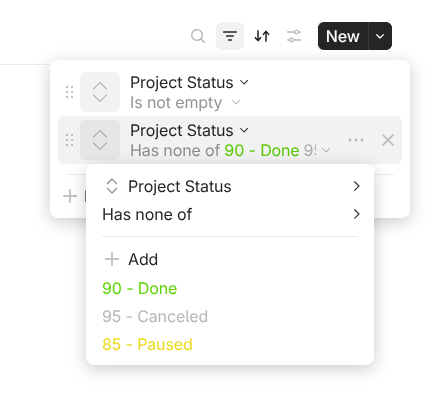
A practical example of mine, I have added several task statuses, and one filter I want to filter out status like “Done”, “Paused” and “Canceled”. How would I do that without being able to specify that I want has none of ?
What you ask in an new way to do that, not something that crashes or doesn’t work as intended by the team.
Otherwise, all UX improvement requests would be bugs ;-).
I strongly recommend creating a request to have a chance of it being taken into account.
Thank you for answering my question. I’ll use your example.
When I want to display tasks with a certain status, the “Task Status” property of type “select” contains a dropdown menu with the following options: Not Start, Done, Paused, and Canceled. I can choose any one of these to display the information I need. For example, if I want to see all tasks marked as “Done,” I select “Done” from the dropdown.
Using one of the fixed set of operators—has any of, has all of, has none of, is empty, and is not empty—doesn’t make any sense for this property. So I think it’s a bug!
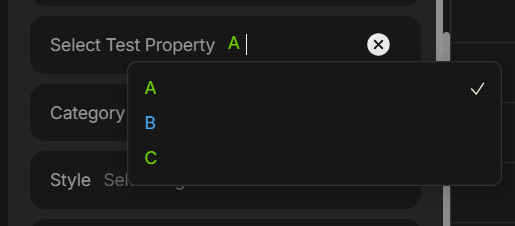
When using a Select type property named “Select Test Property” with values like “A”, “B”, and “C”, I noticed an issue during filtering in an Inline Query.
Instead of showing my custom-defined values in the dropdown list, the filter only displays a static set of operators—such as has any of, has all of, has none of, is empty, and is not empty. This means I’m unable to select the actual enum values I defined, making the filter unusable in its current form.
Since Select properties are single-choice, these operators don’t apply logically, and they seem to override the expected behavior. I believe this could be a bug, as every Select property should prioritize showing its predefined values during filtering—not just a generic operator list.
Yep, naming is incorrect, but only if we assume that relation has a number of options equal to one. Number of options is basically a setting in a relation which is not editable at the moment by users and for Select relations it defaults to one, while for Multi-Select relations it defaults to 0.
We are going to rework filters with major design and logic update to make them more flexible so I will keep in mind this naming problem. Thanks.
The thing is, that you didn’t. I asked about the example of filtering out 3 options. And you gave the solution of just filtering for “DONE”. That was not what I asked for, and does not really do anything useful, since I have more statuses for closed tasks.
When the property only has one possible option, or only want to be tested against one option, one uses the IS/IS NOT instead of ‘has any of’ or ‘has none of’. Still, even with one option, one has to specify if I want to select that option, or select whatever does not have that option.
Even in the example you gave on the screenshot, how do I filter for properties ‘A’ and ‘C’ ? or every property except ‘B’ and ‘A’ ?
Many programming languages have this, which is really great:
Python
Javascript
Ruby
C#
JAVA
SWIFT
Go
Php
SQL
You can indeed select the Enums, after selecting ‘is’, ‘has all of’, ‘has none of’, etc , a line appears where you can select your Enums. The only case where does this not happens, is ‘all’, since it wouldn’t make sense.
I don’t think the naming is at all incorrect, you can call it ‘contains’, isSubset/disjoint, in/not in, etc as programming languages do, but even if there is an option of one (meaning, a select only has one option), I still doesn’t make sense to break everything or having to redo the query filter whenever I eventually add a second option to the property.
BTW!!! I noticed that you are using a Beta version of unstable. There was a recent issue that many menu’s were below others and were not visible! Can you try latest Beta or Alpha version?
If this was the issue you were experiencing, than I now understand the whole issue with this bug report!
Thanks for the clarification! Just to add—I wasn’t suggesting there’s a problem with the naming itself. I was more focused on the behavior of the filters when selecting options. Appreciate your consideration!
Thanks for the suggestion. I’ve tried other options, but the issue still persists. I’m currently on version 0.47.56-beta, which is the latest. Even though predefined values are available, I’m not convinced that a fixed value set is really needed in this context.
 You will notice that instead of showing your predefined enum values after clicking the dropdown list beside the “All”
 The filter displays a fixed set of operators: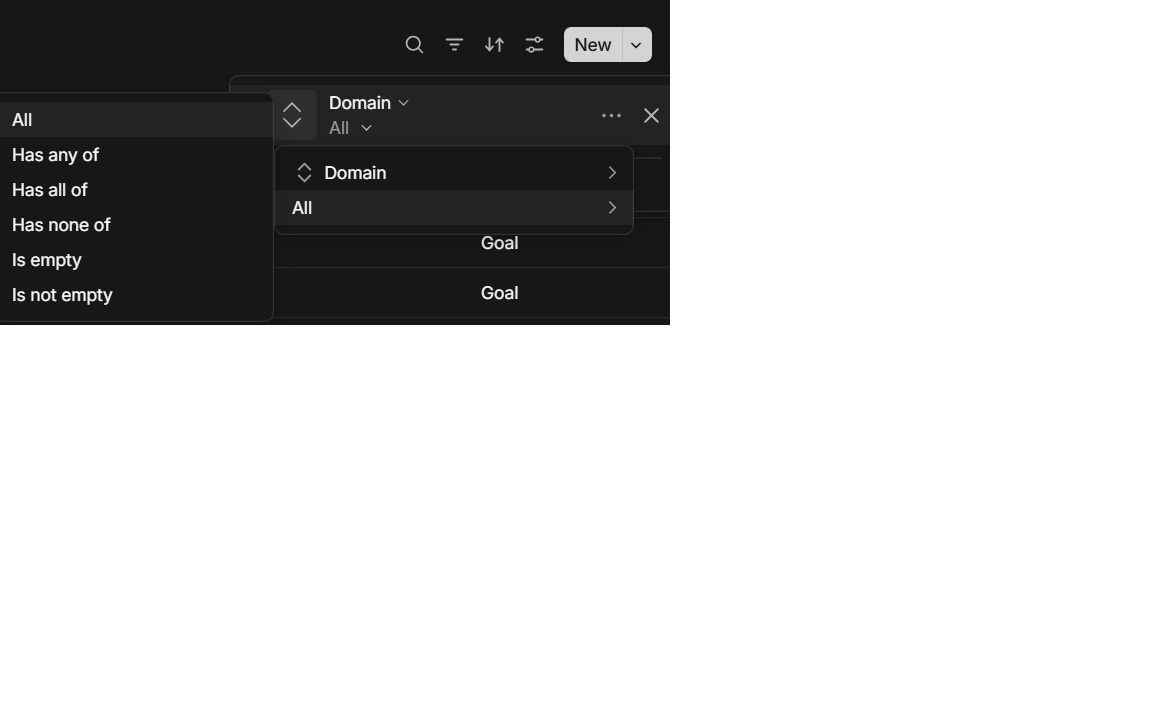
 The menu immediately displays the user-defined enum options (e.g. “Work”, “Personal”, “Archived”), allowing the user to filter by those values.