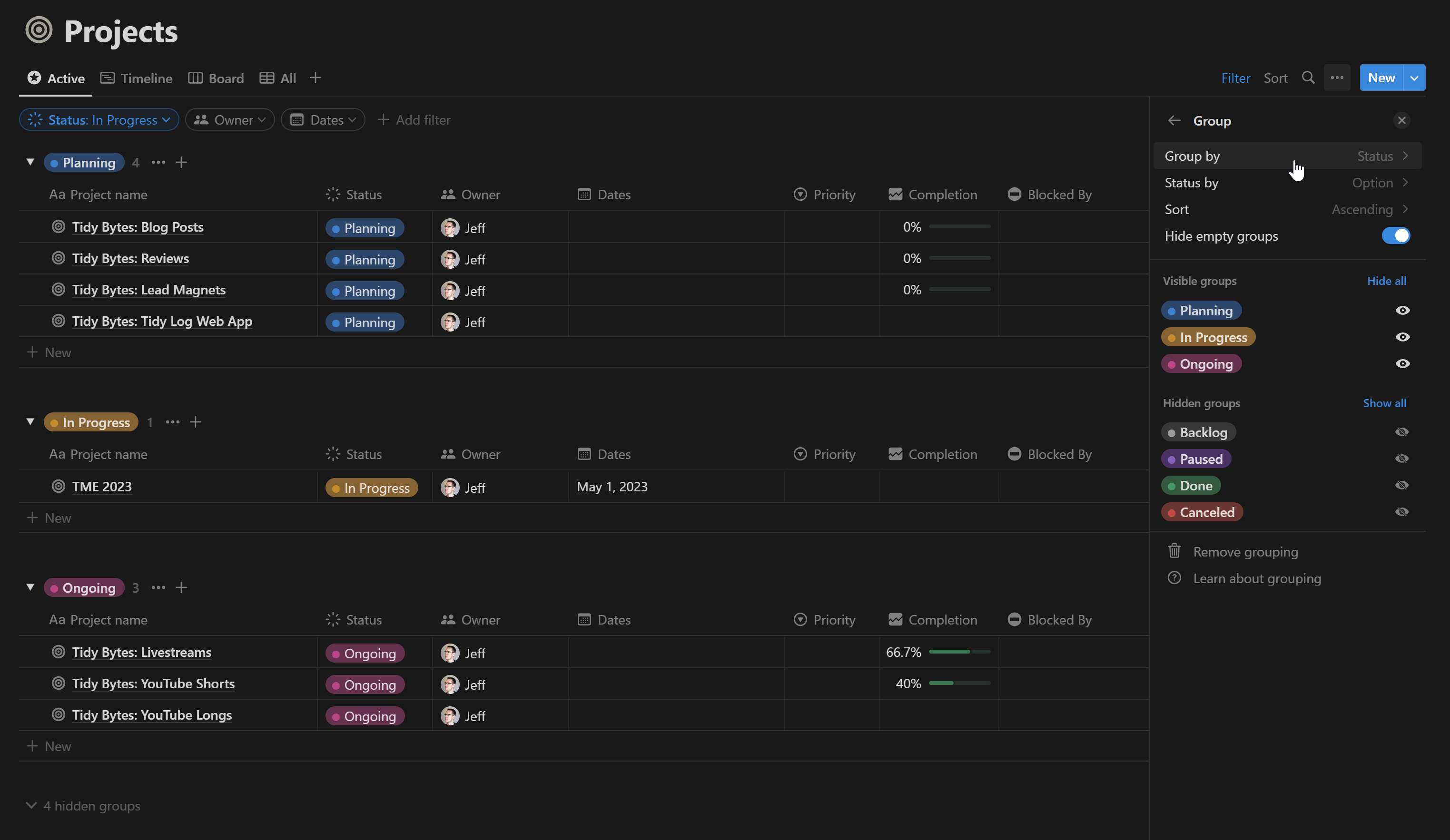
As someone who’s been living in Notion for a little while (but got super excited about Anytype when I discovered it on Product Hunt yesterday!), the inability to group sets or collections was one of the first things I noticed. It’s true that you can sort multiple layers to achieve the same overall order, but it doesn’t come across the same way.
For example, like @patrickb’s screenshot, this is what my Projects list in Notion looks like:
Grouping is one of only a couple of missing features that would make Anytype fit perfectly with my individual use case (and arguably subjective preferences). I consider this feature request worth spending one of my 15 votes on!
It’s not as good as the Notion screenshot above because you still have the redundant column. Additionally, once you group in Notion - the +New button creates a new Object/Database row with the properties pre-filled for that list. So for the example in @jrowberg screenshot - you can click + New in the “In Progress” group to create a new object with the Status already set to In Progress. So on top of providing a helpful visual aid - it also provides a quicker path to create objects with specific properties.
Same as ‘Group by’ implemented inside the Kanban Layout
REAL WORLD USE CASES
Use case of a home page with all objects grouped by one or more property tags
RECOMMENDED ALTERNATIVES
ᅟNA:
ADDITIONAL CONTEXT
ᅟTo take this idea a bit further, If we could also Hide the Name of the object, within the gallery view. This could allow you to create a dashbord made up of icons grouped by any number of combinations of property tags
Doesn’t that look like over complicating things to create several sets & then gather them into a bigger set… when all you need is just to group the content of a Set?
I am not sure how you plan to use it but here is a workflow that I regularly use to get things grouped.
What you could do is EITHER
create a custom Parent Object (lets a ‘Task’ as an eg) with tags relation and a Child Object (say ‘Subtask’) and (1) link the two (for graph view) using an Object Relation (for case of ‘Subtask’ you could use the inbuild ‘Tasks’ Relation or create your own) or (2) add Tag Relation to Child Object and filter it using Inline Set View within the Parent Object (for eg. clicking into ‘Task’ Object you would see a Set View of 'Subtask’s but filtered out appropriately as need for the Parent Object)
OR
the much more easier way is to ditch the Parent Object altogether and use tags (say ‘Project 1’, ‘Project 2’, etc) and use the set view to filter it based on these tags. The advantage here is that its much more flexible for filtering as you can add any amount of tags for different regrouping needs. Disadvantage being you are not setting up any relation here, so wont appear in the Graph view.
I suppose this feature request is mainly about grouping on list/grid layout of set… but since the title is about set in general, may I ask: Do you need grouping for calendar layout or gallery layout as well? How do you all expect grouping to behave?
Currently calendar layout allows ‘grouping’ by date relation… is this meaningful to you? Do you guys want sub-grouping? e.g. toggle closed for done tasks after showing to-do tasks on a date.
Haven’t explored much of the calendar features, but for Gallery, definitely.
I envision something similar to Notion’s where it just looks like multiple inline sets or collections, but without the settings cluttering the top. It is much, much more convenient than having to manually group everything by creating filters and inline sets.
Example, grouping people by category would neatly stack the cards instead of having only one huge wall of cards. If I add a new category, I won’t have to create a new inline set for it because it automatically creates a new group. I just don’t like seeing walls of texts (or lists) in my layouts.
As for your example, I can see the convenience of hiding done tasks but I don’t think I’d use it mysef. I prefer viewing tasks in the order that I put it, plus I find it motivating to be reminded of what I’ve accomplished.
For gallery, yes.
I have cases of grouping by text, date, number, tag (and formula) values.
A few examples with gallery (from my Notion databases or from personal website) :
A vacation photo gallery, which I’d like to divide/group by date or by location (a text relation). I use group by date to publish for those of you following my journey: the division by day makes perfect sense for marking each day by displaying it in front of the day’s photos.
A view of a whisky cellar (usercase coming soon ) : I want a global view with card (whose display is very limited, but never mind), group by Origin.
I have the same thing with wine cellar but only with Kanban and grid view (and more type of group by)
For Tabletop RPG (in a free template for Notion) : in a single screen with a database, I have multiple view. For example, I can view all my skill, group by condition; all my inventories, group by type of item; etc. Here, card provide a clearer view than a list or grid
It boils down to this:
the card view is useful for very visual rendering (with images) and clearer rendering (card format)
the advantage of group by is to keep everything displayed while separating each “category” with a clear label
it’s not possible to do this with several sets: if I filter, sort or whatever, I’d have to do it for all sets. It’s clearly not the same use!
I’m not sure you can apply this in Anytype without using Group by feature and depends in sorting feature, because grouping for me it’s not just a sorting with dividers. But much more and I used a lot.
For example
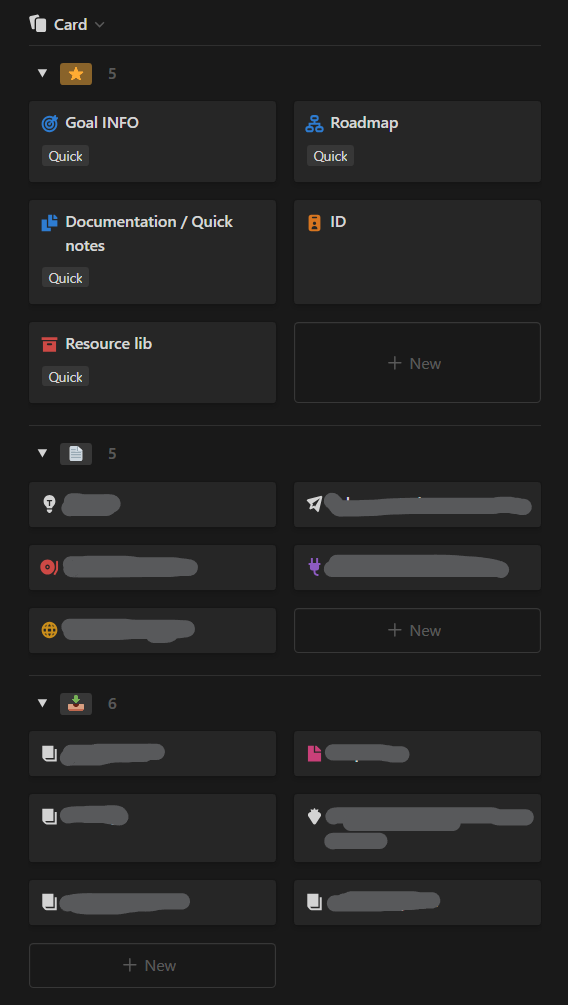
In this inline view on my goal dashboard in Notion, I consistently group my documents by a Relation known as Status aka property in notion. These statuses include Favorite, Document and Archive. If a document becomes outdated or is no longer in use, I simply drag it into the Archive status, which is the last option. On the other hand, the Favorite status is at the top, where I drag my favorite or important documents.
Added my vote for this one.
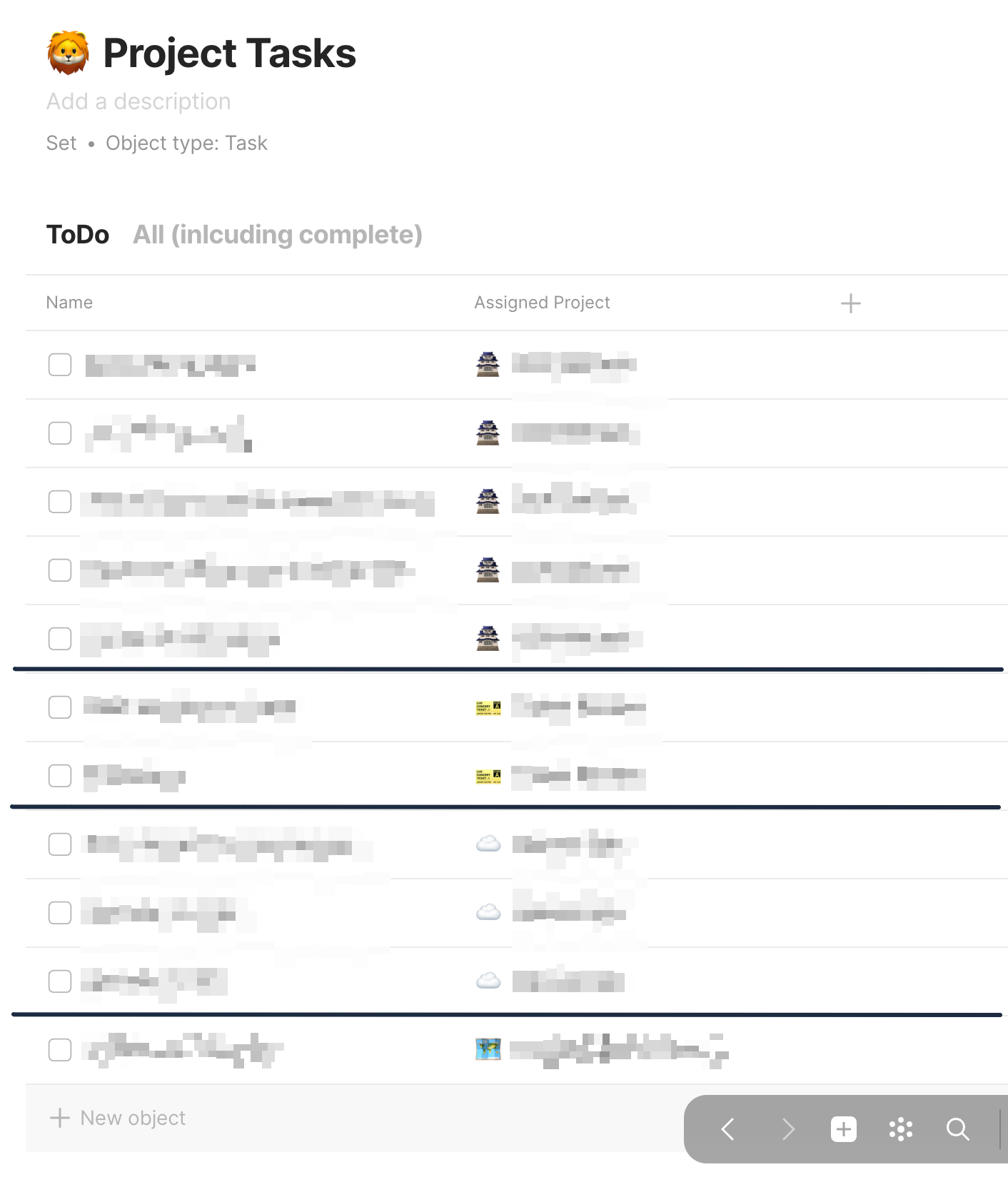
My Tasks set can quickly become a mess and the ability to group them by object relation (in my case Projects) would be a big plus.


 ) : I want a global view with card (whose display is very limited, but never mind), group by Origin.