What’s The Bug?
There is still an unsolved bug I’ve already mentioned in a discussion with @Razor weeks ago.
Seems it became forgotten, so I write now an own BR for it:
The Graph View doesn’t show all Objects which are connected by Relation.
In my case only five Objects are shown, but there should be much more.
How To Reproduce It
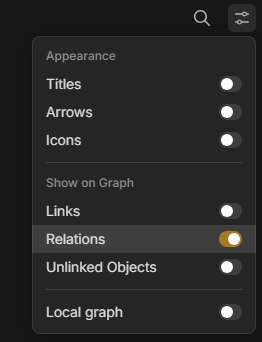
- Goto the Graph View’s setting menu.
- Switch everything OFF but let only the Relation switch ON:
In this configuration the Graph shows much too less Objects.
There are only Objects shown which are connected by an incoming AND also an outgoing Relation.
For example: Husband ← → wife
(Both Objects are shown in the Graph)
In contrast: Objects where the connection by Relation goes only in one single direction are not shown.
For example: Hero → Razor
(None of these two Objects are shown in the Graph)
Image or Video
The Expected Behavior
Each object which has an incoming Relation OR an outgoing one, should be shown in the Graph.
(In the moment there is an AND in the logic, instead of an OR.)
Additional Context
In the shown configuration also the connection lines between the Objects are not shown. There are only the dots, representing the Objects.
To see the connection lines you need to switch “Links” on, but then you’ll see also all linked Object’s, and that is not what you want if you want to see only the Object’s which are connected by a Relation.
Device
Desktop PC
OS
Win 10
Anytype Version
v0.39.0
Technical Information
OS version: win32 x64 10.0.19045
App version: 0.39.0
Build number: build on 2024-03-05 15:37:42 +0000 UTC at #a7986fffadcc2031b1eb3372265db5dda05f4c6d (dirty)
Library version: v0.32.1
Anytype Identity: AAtt6aReARByswg2CbvZhveoJEEcnydfDu7U2VAkgJALsE7D
Analytics ID: 8a514008-4f5d-40d3-970f-a0d241b63af2
Device ID: 12D3KooWGqd6JSafCCcEwvnke5JAVgBNnuR9gGQeSBQ5HdUboWtG