Global search and Object selectors: show additional information, not only the title

As already discussed with @kaye in this thread, I suggest that lists of Objects – for example the results of global search, or the Object selectors for adding links – should show more information then just the titles.

WHAT DO YOU RECOMMEND?

Very often, we have more then one Object with a specific name (title).

For example, I still have 126 images with the name “image”.
Without additional information, they are indistinguishable. And this lack of useful information makes global search often useless.
Same with the Object selector for linking to other Objects.

The screenshot shows some of the additional information that I use in the Grid Views, to identify the needed Object.
Not to denying: the Grid View would obviously be useless if it would show only the object names.
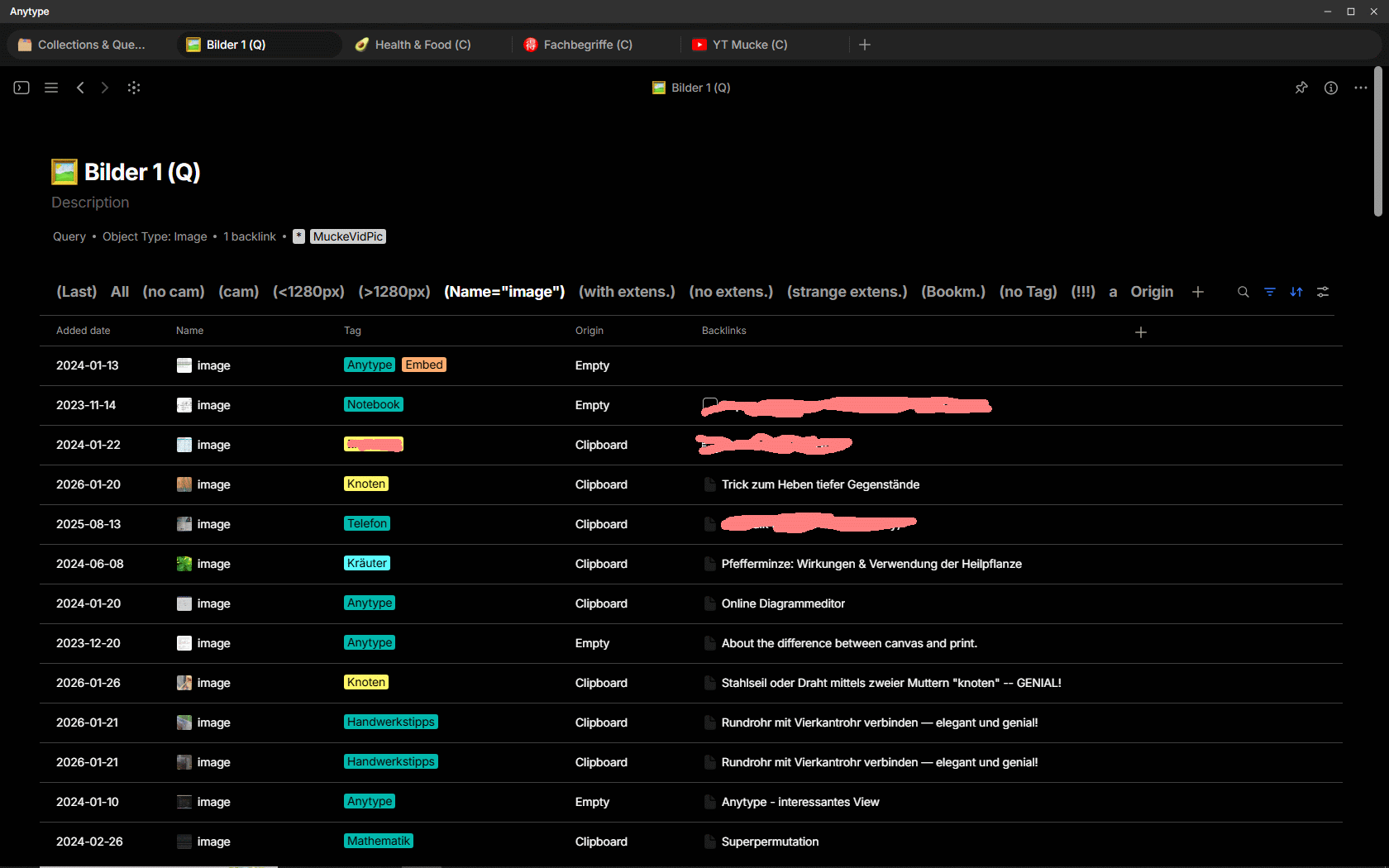
Unfortunately, the global search, as well as object selectors for linking, doesn’t provide such additional information, although they are so obviously indispensable!

I expect that the same problem will also appear in the upcoming Collection 2.0, if it gets the feature to manually exclude certain Objects from the filter results in a View.
There must be some kind of Object selector involved, similar to the one that we use to set a Link to another Object.
– Time to finally do something against the general problem!

HOW COULD IT BE DONE?

Having in mind that search should work as quick as possible, I suggest that the additional information pop up only if the user hovers the mouse above a title in the list of global search results.
Same for the list of the Object selector that appears for linking to Objects.

But important: the user should be able to configure what additional information he needs.
My suggestion to make the implementation easy for the devs:
– Simply add the following option to the View configuration:

  • “Use this View configuration as preset for global search and Object selectors”

These two suggestions make it really a quick and easy task to implement it:
We need only this:

  1. A kind of tool tip in Lists of Objects (global search results etc) that shows the additional information.
  2. One additional button or option in the configuration menu for Views to make the actual configuration the preset for the used additional information.

REAL WORLD USE CASES

As described, the global search, as well as the Object selectors, are often useless because of the lack of needed information to distinguish Objects. The name alone is definitely not enough.

  • And I would like to emphasise that the lack of these additional information is the reason why I normally quasi never use manually added Links to other Objects!
    – Anytype has the feature to link to other Objects, but the implementation was always and still is so shoddy (sorry to say that!), that it’s simply too frustrating to use it!
    – That’s a shame, because Anytype could easily do it so much better with barely no effort!

RECOMMENDED ALTERNATIVES

Nothing.
It’s not only essential, it’s even basic to have such functionality!

ADDITIONAL CONTEXT

There is an older and similar request, but my one is IMHO more “advanced”, more detailed and comes with suggestions for an easy implementation.
Furthermore, @kaye has begged me to discuss the thing in a separate topic, therefore I created this FR.
@kaye again, I think different.
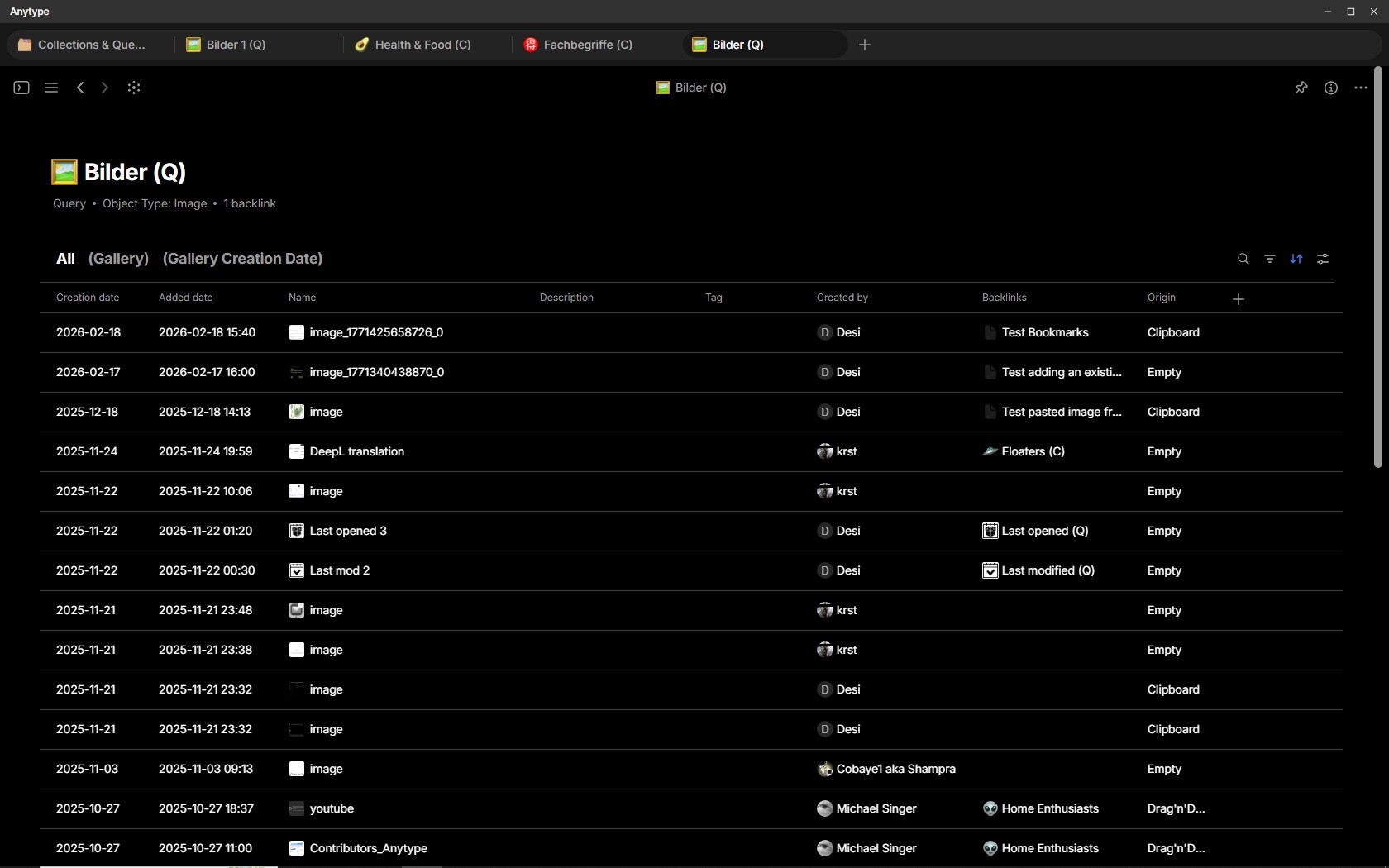
You could use the Relation “Created by” to filter out images from other users.
Here a screenshot from my shared Space for Bug Detectives:

Even without Tags and although there are useless names like “image” you can have many useful additional information that together help a lot to identify Objects.
It may not solve all problems on planet earth, nor all problems to identify EVERY Object without any doubt, but it helps in maybe 80% of all cases.

f you have 100 times the Object “image” and you urgently need one specific of them, then it’s clearly much better if you need to click on only 20 of them then on all 100. :slight_smile:
And if you have only ten identical named Objects, then are two clicks clearly better then 10.

That’s not only a little better then nothing – that’s a huge help!

Agree!

Yes, I agree it will be very helpful.

I hope my additional points are not seen as dismissing this as a needed solution. I simply want to provide additional light to other issues we see and would like to resolve as well. That is, in exploring solutions to the remaining 20%, we might think differently about the original solution for the 80%.

As further context, we are also evaluating the challenges surrounding objects that are ‘moved’ between spaces—which happens a lot in teams (imagine a project starting in one space and then moving to another). This can also create issues with object provenance, inconsistent properties between spaces, broken links, etc. So we have to think through a lot of different use cases, as searching for objects intersects across many user flows.

But cases like that would never come into conflict with my suggested solution.
Why?
Because my suggestion starts at the point where a list of Objects already exists.
NOW does the user hovering the mouse over an entry (Object name) in that list. Only NOW, in exactly this moment, does the pop-up tooltip gather the additional information (Relations) for this particular Object.

That means:
There is no need for dealing with an index (that could be out of sync because of moving Objects etc.). Nope, what I suggest works in real time at the moment when the user hovers the mouse over an Object’s title.
To gather the additional information from that Object needs maybe a millisecond, that’s why it can happen in real time and based on the real additional data (Relations) that the Object has. No need for an index etc.

No matter how often the Object was moved between Spaces etc., etc., – my suggestion works with the real Relations the Object has (and these are always actual ) – the same Relations as also a Grid View shows.

The Grid View shows these data even for all listed Objects relatively quick.
In my suggestion, the pop-up tooltip needs to do in principle the same thing as a View, but only for one single Object at the time, not for all Objects. Nope, only for the one that’s below the hovering mouse pointer.

In principle, most of the needed routines already exist!
My suggestion works with the preset from an existing View and can use a part of its routines.
– Honestly, I believe it would need only 15 - 30 minutes to implement everything!
And I definitely expect that it would inevitably always work absolutely flawless, no matter how Anytype may change in future and no matter if you move Objects between Spaces.
Why am I so sure about that?
Because, as long as the View itself works that was used as the template for the preset, automatically will also the tooltip pup-up do its job. That’s inevitable, because the tooltip uses the same underlying routines as the View.

Thank you for your suggestion. It’s been added to our tracker and will be reviewed.

Oops, this slipped through my notifications for some reason.

Frankly, many things that seem like 15-30 minutes are really a lot longer in reality. And considering we are already behind on reminders and have hundreds of feature requests in our backlog, everything small thing here and there that we add ultimately pushes many other things back.

Trust me when I say that search is painful at the moment and needs a lot of improvement (from many angles). You have some good ideas shared here, for sure. Search is definitely important in our minds, as well as better shortcuts, because of the complexity we’re seeing in multi-collaborative spaces.