What’s The Bug?
I noticed multiple unexpected results when exporting a page to PDF in the desktop client, depending on the Color mode settings:
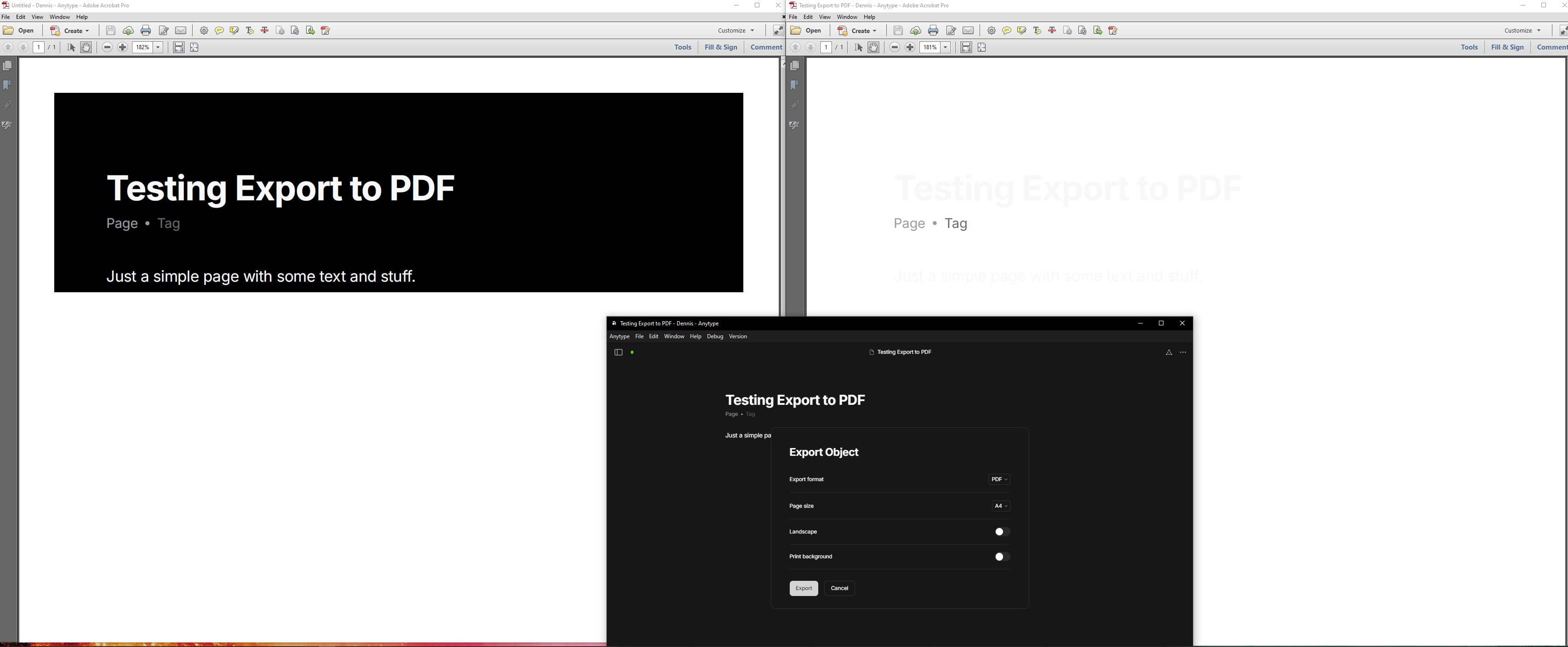
(1) The client is set to display in dark mode, so in the desktop app standard text is white on a black background. However, when I export to PDF (leaving “Print background” option unchecked), it prints a black box with white text on a white sheet in the PDF document.
(2) The client is set to system color mode, which for me results in a dark color scheme (again, white text on a black background). This time, when I export to PDF, it prints white(ish) text color on a white page.
How To Reproduce It
Windows Desktop app:
- Settings → Vault → Color mode (select either Dark or System when OS is set to dark mode)
- Open an object
- In the … - menu select Export
- Select PDF as the Export format and leave Print background unchecked (in my case page size is set to A4)
Image or Video
The Expected Behavior
I would expect a standard PDF document is created with black text on white paper.
Device
HP Elitebook G5
OS
Windows 10
Anytype Version
v0.44.0
Network Mode
Self-hosted
Technical Information
OS version: win32 x64 10.0.19045
App version: 0.44.0
Build number: build on 2024-12-16 16:53:50 +0000 UTC at #c04d64d52304c0fe8800032e74e49a7159abdbad (dirty)
Library version: v0.38.7
Anytype Identity: A65AtX16WHcb4TKiqT7m2NodZ2Sre6twymg4nMAf83wuHLUb
Analytics ID: edf0cd92-0c37-462f-89d4-a68a43a8ffad
Device ID: 12D3KooWAE7nJDbxHWn4N2a2eTSTxQSXwoNWCusTHqvpomdCqQp9