Embed "edit" button overlaps with embed "fullscreen" button

What’s The Bug?

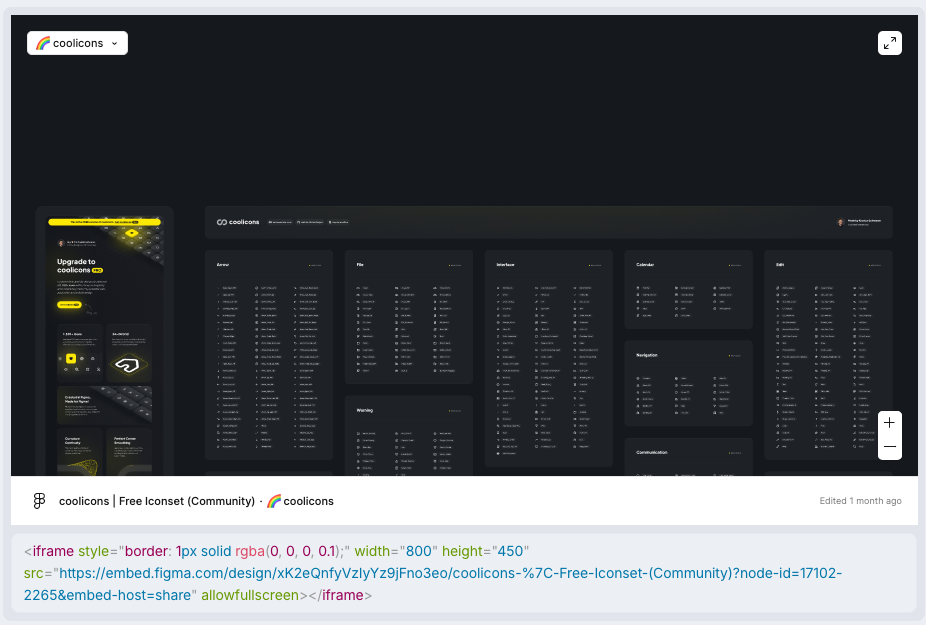
If the embed’s iframe contains the “allowfullscreen” tag, it will create a small “expand” button that allows the user to explore the embed in fullscreen.
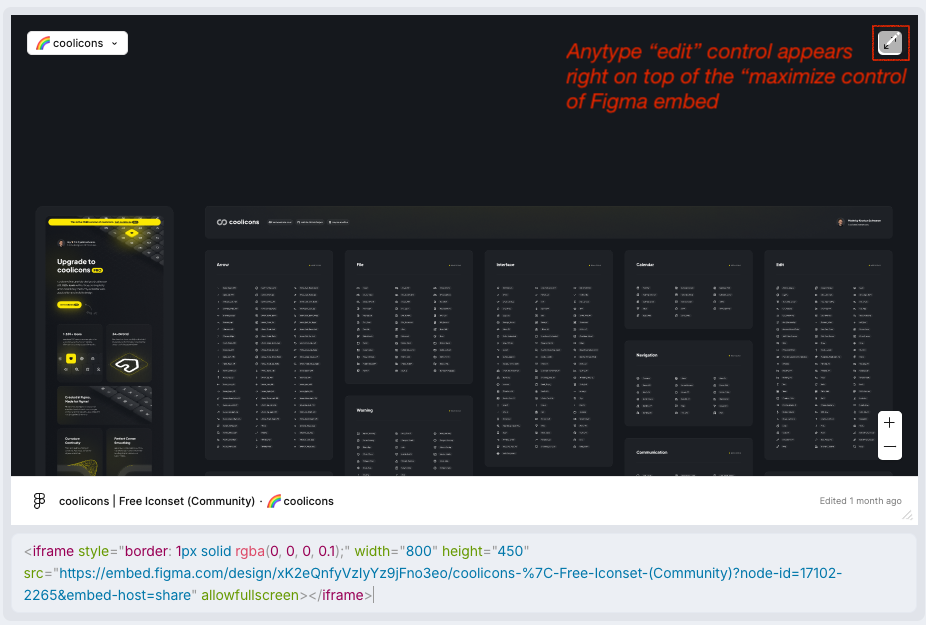
The problem is that the “Edit embed” button is exactly on the same position as the “fullscreen” button, making it very hard to go fullscreen.

How To Reproduce It

  • Create a figma embed
  • Copy any figma embed link, make sure it contains the “allowfullscreen” tag
  • See that “edit embed” button and “fullscreen” button overlaps

The Expected Behavior

Buttons should not overlap, edit button should be moved elsewhere

Device

Framework Laptop 16

OS

Windows 11

Anytype Version

0.44.0

Network Mode

AnySync

Technical Information

OS version: win32 x64 10.0.22631
App version: 0.44.0
Build number: build on 2024-12-16 16:53:50 +0000 UTC at #c04d64d52304c0fe8800032e74e49a7159abdbad (dirty)
Library version: v0.38.7
Anytype Identity: AAXosAM2HaYEMozay2xhcPejgZGFfn8G8FWbGQf91G7gPpzk
Analytics ID: Mep8f4dy11yPWkWsn4gZdU15vVLqNcXtVTysXMdU1jfgjQVF
Device ID: 12D3KooWDndEvFkEMbEskUAesyDw6h6SP4YEqM1nx2shqEMXT2js
This report has been added to our issue tracker and received by the Development Team.

What’s The Bug?

When you use the embed object for Figma, the hover control for editing is just at the same place as the maximize control of the Figma iframe

How To Reproduce It

  1. Editing a new block in an object, create a Figma embed block by using /Figma
  2. In Figma, go to share, copy embed code
  3. Paste the code into anytype
  4. the iframe gets updated (see screenshot 1)
  5. Hover over the iframe with the mouse
  6. on the top-right corner, the hover control with a pencil appears right where the 2 arrow button of Figma is (see screenshot 2)
  7. You cannot use the Figma control. Because size and position is almost the same, resizing the embed space does not solve the problem

Image or Video


The Expected Behavior

I would propose that the edit button from anytype appears in a corner where no other controls are visible. Ideally on the Bottom left

Device

Macbook Pro M1 2020

OS

Sequoia 15.2

Anytype Version

0.44.0

Network Mode

AnySync

Technical Information

OS version: darwin arm64 15.2.0
App version: 0.44.0
Build number: build on 2024-12-16 16:53:50 +0000 UTC at #c04d64d52304c0fe8800032e74e49a7159abdbad (dirty)
Library version: v0.38.7
Anytype Identity: A7nyMDWbR5A5EfzZ3f4mSkntRZcY7jnKpKQEMqTUj1nB9FBh
Analytics ID: MavnAAcbNm41xfYBgQ5MwW2dWN7YGeCKFdZV2RvDZMxHg2B4
Device ID: 12D3KooWDosQBaMtys9uJderutfP6UvYChFC3RzR6e7hBQ6NPi29

I saw it is duplicated: this bug relates to this: Embed "edit" button overlaps with embed "fullscreen" button

This issue has been fixed by the Development Team and will be implemented in an upcoming release.