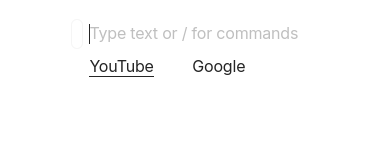
What’s The Bug?
Editing multiple links on one line will cause some of them to be lost.
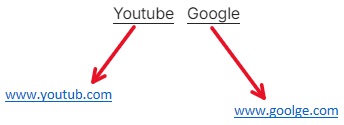
How To Reproduce It
- Enter text: GoogleYouTube
- Select Google, and then paste https://www.google.com/ to make Google become a link.
- Select YouTube and cut
- Press home key to move the cursor in front of Google
- Paste to make YouTube appear in front of Google
- Separate two texts with spaces by several spaces between YouTube and Google
- Select YouTube and paste https://www.youtube.com/ to make YouTube become a link
- At this time, the Google link that was supposed to be turned into ordinary text, and the link was lost.
The Expected Behavior
The original link will not disappear
Device
PC
OS
Windows11
Anytype Version
v0.40.8
Technical Information
操作系统版本: win32 x64 10.0.22621
应用版本: 0.40.8
构建版本: build on 2024-04-25 13:28:54 +0000 UTC at #4ec64b016e2be3a5229dc865452c066f653e209c (dirty)
库版本: v0.33.2
Anytype 身份标识: A8Dj8qdQehkSC4UNQdXUyeMCyXvBUdVk8b7P7CM39SqRZnub
分析 ID: 31896c9d-58bb-4d02-a598-0e7a0f3916c5
设备 ID: 12D3KooWHdUFZXi5Tr3HfhsVNhW8ruQun8CPd8Jg9QBHXLcZUppX