WHAT DO YOU RECOMMEND
If you have multiple objects of the same type with the same name, you have a problem:
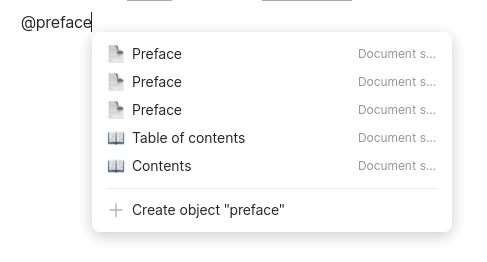
What is needed is some way to instruct Anytype about what additional pieces of information should be displayed in contexts like these to help users choose the correct object.
HOW COULD IT BE DONE
Right now it’s possible to star certain relations in a type so that they are displayed in a privileged position in the header when the object is viewed. The very simplest solution simply expands their function by displaying them in contexts like the one in the above picture.
But it might be more appropriate for there to be a separate button, enabling users to choose different relations for headers and for disambiguation. From the excellent Remix Icon set I would suggest (in no particular order) the icons git-branch, fingerprint, list-check-2, question-mark, mind-map, compass, map, guide, direction, shuffle, lightbulb, scales, or box-2. Call such marked “disambiguators”, because they help to disambiguate.
REAL WORLD USE CASES
Any time you need to choose among multiple otherwise identical options, such as in the screenshot above when creating a hyperlink. But also useful in graph view and in search.
RECOMMENDED ALTERNATIVES
This solution focuses on making additional information about an object visible alongside its name. But another route is to embed that information in the name itself, by selecting and ordering fields which are implicitly appended to object’s name.
In the meantime, there is a procedural workaround. First, open two Anytype windows, and open in one of them the object you wish to discern from others. Modify its name in some distinctive way (e.g. by prepending an exclamation point). Then, in the other window, perform the task for which you need to discern this object (e.g. creating a link using @-notation). Afterwards, restore the original name of the object. It’s extra steps, but it’s not too onerous.