I’m looking for a practical workaround to delete notes (objects) along with their attached files (e.g., images, PDFs) in Anytype. I understand that when a note is moved to the Bin, the attached files remain in the vault as separate objects, which can clutter storage over time. The Manage Files section in Space Settings helps, but manually identifying and deleting these files is tedious, especially for orphaned attachments with no clear backlinks.
Is there an effective way to:
Automatically delete linked files when deleting a note?
Easily identify and remove orphaned files that are no longer linked to any note?
OS
macOS 15.5
Anytype Version
0.46.1
Network Mode
AnySync
Technical Information
OS version: darwin arm64 15.5.0
App version: 0.46.1
Build number: build on 2025-04-17 20:22:50 +0000 UTC at #de38863027eb064b5b0ec258ce088fc45cb213cb
Library version: v0.40.16
Anytype Identity: A6RxNLbFg8xSgwzzjT87nj2L8776eAaEAwpdUGvL4518JxHJ
Analytics ID: McBEMjEPkHEFuSa3y1DtKGuX9kt4Yas6zkbNSg3mwD2tjpBD
Device ID: 12D3KooWAmdTZYkJPvAPRwh59s1EXEabTSGavHtbvM9nx3WEm52b
Ethereum Address: 0x536b76852fD51D81462ca16D8a5ec3557B81ac13
a link between each element of a note and that note (this is not the case with images, which have no visible link)
A cascading delete function.
You should also be aware that some deletes only remove; that a real delete also involves emptying the trash; and that despite all this, the space is not necessarily freed (local or server-side space)
And for more complex thing to delete (with property, type, etc)… fortunately, this is not your request.
For you, here’s a request close to your needs (there are plenty of others), please vote if you want :
Alternative :
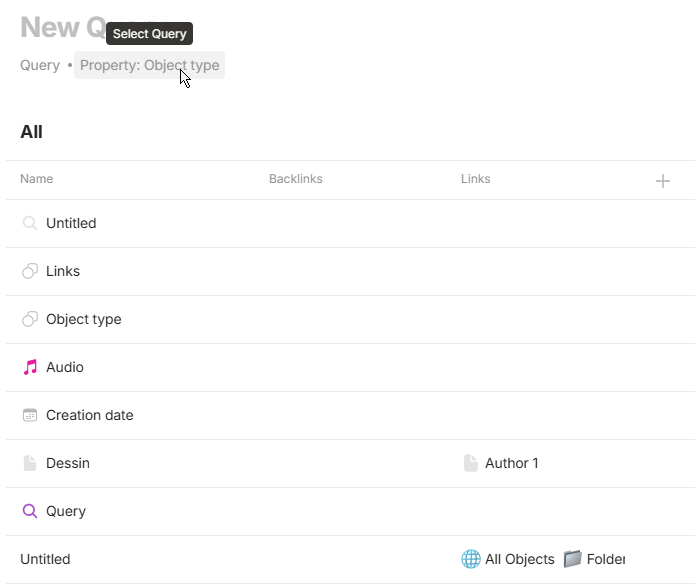
You can create a Query to find all item without link and/or backlinks.
I thinks it can work for files except image (all your images will be without links).
Create a query with all object (Property : object type), add “Links”, “Backlinks” and filter to show all unlinked objects.
I understand that!
I’ve gotten into the habit of multiplying “disposable” spaces, but I have a “clean” space that’s been turned into a trash can, so I’d have to spend some time cleaning up the residue (images and a few properties in my case).
Incidentally, I haven’t tested whether a deleted space frees up server/local space…
we don’t and let the files section grow and grow and rot esp. when you use the web clipper you cannot under any circumstances keep that organized.
I’m not sure if it doesn’t get freed on the client side. the cached and already downloaded files won’t get deleted for sure. I’m not sure about the encrypted blobs though.
the linked issue for sure mentions that on the server side (when self hosting) anytype doesn’t free up any disk space. this is true. for now self hosters need to be aware that they could eventually run out of disk space at some point. I for example host services I often use on SSDs, so I don’t need to hear my NAS disks near my desk all the time. and SSD space is expensive, I can’t afford inefficient services on there
That’s painful. Using webclipper is gonna be a sure fire way to mess things up.
At this point I am thinking I use Anytype for journaling only. I like it being minimal and offline. Obsidian is also good but it has file modification/creation date issues on Android. So yeah maybe something like Joplin notes for everything else I guess. So much to think about.
I checked my local only data in Anytype. Deleted 1500 test images and the space occupied by Anytype data folder was shrinked, so emptying bin will free up space on local hdd/ssd.



 esp. when you use the web clipper you cannot under any circumstances keep that organized.