Can’t right click

What’s The Bug?

On macOS, I used to be able to control-click an object in a set/collection and bring up an edit menu. Now nothing happens.

How To Reproduce It

Control-click an object in a set/collection

The Expected Behavior

Bring up a menu with editing options

Device

MacBook Air 2025

OS

15.5

Anytype Version

0.47.6

Network Mode

AnySync

Technical Information

OS version: darwin arm64 15.5.0
App version: 0.47.6
Build number: build on 2025-07-15 19:43:00 +0000 UTC at #e00139164345b2810e260bccd6648616ead2b93c
Library version: v0.41.3
Anytype Identity: A6rzf6XWCDXQKP39TqpsBBo9DqBKkHw1ZBrLPTXY7o4ASQVb
Analytics ID: ddf44f43-d176-40d1-b858-b35db771a525
Device ID: 12D3KooWNMwQmHWmrwMurFZUE7VYXn358H46HtRxuziQTK9spcNR
Ethereum Address: 0x416Cc5EC6Ac8EA1B79aC508e437cF0478761Ad1B

What exactly are the control click and edit menu supposed to do? Could you share some screenshots or a video?


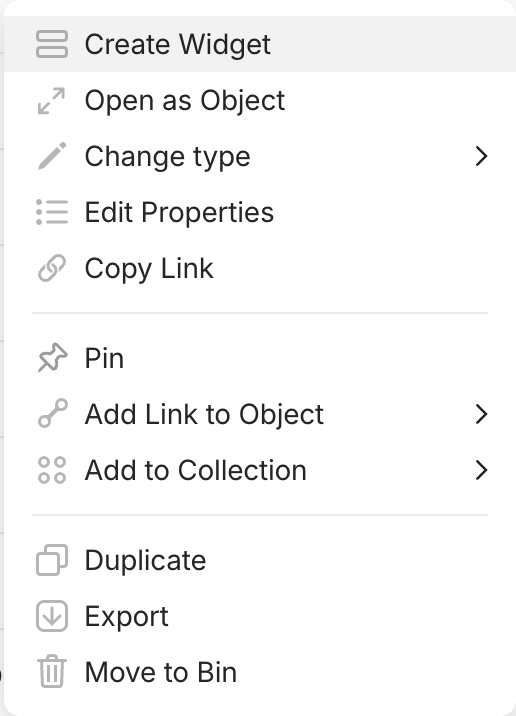
Here is a screenshot of the menu I’m looking for. I was able to access this by using secondary click on my MacBook trackpad (my settings have secondary click as click in bottom left corner, but the default is tap with two fingers). I have a physical disability that makes it difficult for me to secondary click, so I normally make it easier on myself with a workaround - on my onscreen keyboard, I click control, and then click whatever I need to - this is equivalent to secondary click (or right click on PCs). I used to be able to pull up the screenshotted menu either by secondary clicking an Anytype object or by control-clicking it as just described. Now only secondary clicking works, so this process has become less accessible to me.

ctrl+left mouse button on macOS is the same as right clicking. it is a leftover from an era where not all apple mice had two mouse buttons and it’s also an accessibility feature when people have issues triggering the second mouse button and are more comfortable with only the primary button (perhaps also because of other input devices).

and indeed, this does not work in Anytype. haven’t experienced this in other Electron apps so far.
instead ctrl acts like cmd on macOS

I will look into it. Btw you can setup your right click to be not 2 fingers but just one, in the corner, I use it like this.

this would require a touchpad

This report has been added to our issue tracker and received by the Development Team.

This issue has been fixed by the Development Team and will be implemented in an upcoming release.