Thanks @razor for the reason behind the dynamic filters!
I came here to emphasize exactly this point: I’d like to see the page icons in the pinned tabs, not the photo of the space.
Perhaps the most useful update for me. Special thanks to the PM, I didn’t even realize the need for these features until upgraded. Now only fields with formulas are kept on Notion 
Love it! 
Love it! 
Love it! 
I’m really thrilled with the tabs, thank you!
I love the dynamic filter values. I’m having trouble assigning dynamic filter values in a template though.
In tasks, I’d like to set the assignee to “Current User“ when creating a task using the template. Are dynamic filter values coming to templates?
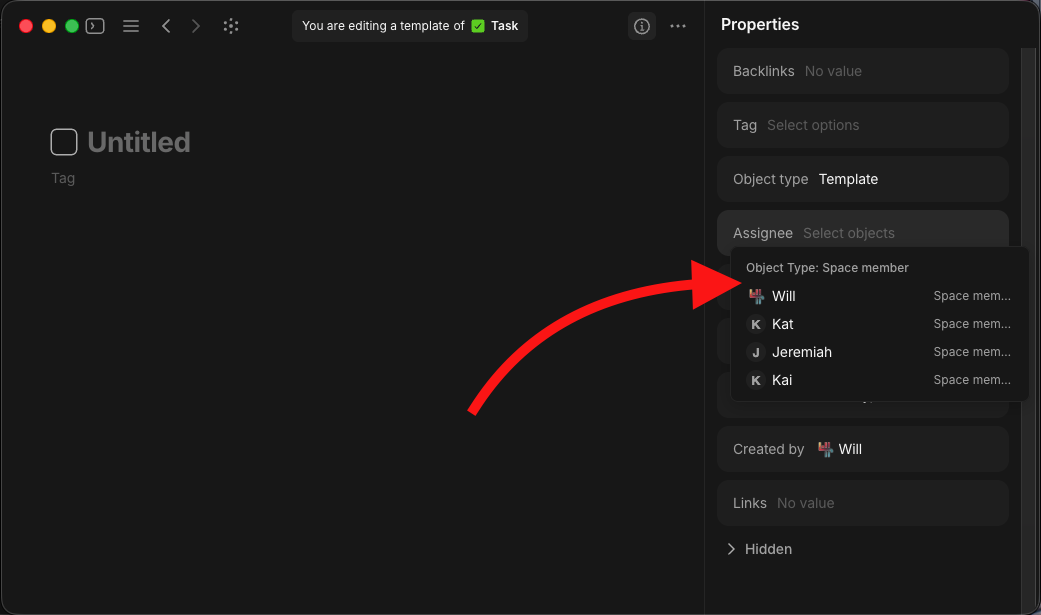
@LineArcLine Dynamic filters are “Filters” which can only be used in views not template properties.
They are coming, yes
One of the most incredible updates ever. The system is becoming more and more complete.One of the most incredible updates ever. The system is becoming more and more complete. It’s truly an amazing project, and I recommend it to everyone who asks me.
I believe you are referring to dynamic filters working in templates.. if yes, when is this feature coming ?
You can check out the latest roadmap for this information. It’s ‘Dynamic Placeholders in Templates’ which is ‘coming up next’. I.e. it’ll be in the month or so.
Return Loses Text Style
Some minor update after 0.54.0 has changed the following long-standing behavior.
BEFORE
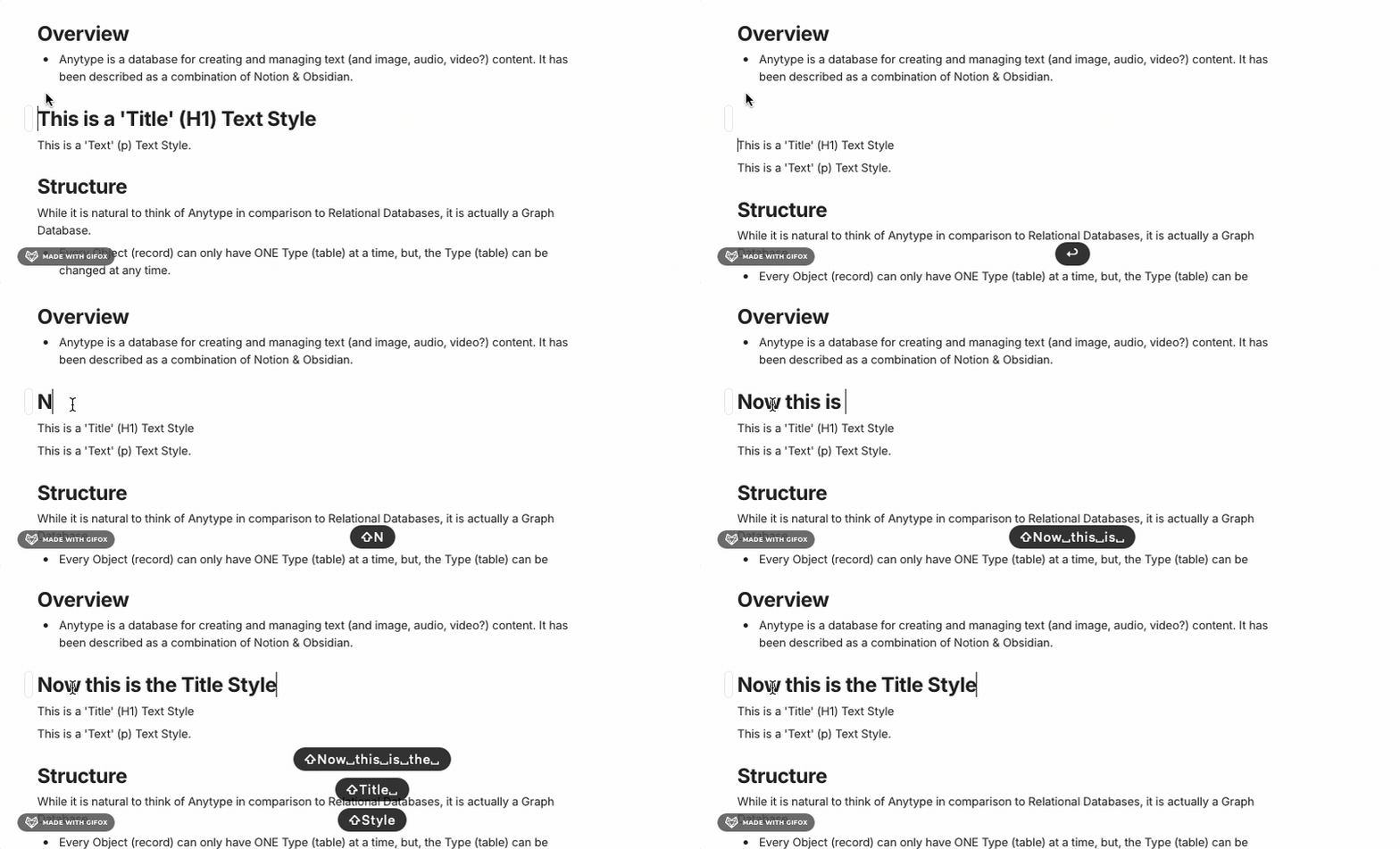
If you had the cursor at the beginning of an existing line of text, with a Text Style applied other than the standard ‘Text’ (example: Title, Heading, or Subheading), and you hit ‘Return’ on the keyboard, a new line would be created with the same Text Style in place, both for the new line, AND the line of text that now moved one line down.
AFTER
Now, after some 0.54.x update, when you have the cursor at the beginning of an existing line of text, with a Text Style applied other than the standard ‘Text’ (example: Title, Heading, or Subheading), and you hit ‘Return’ on the keyboard, a new line is created with the same Text Style in place, BUT… the previous line that was moved down now gets reverted to standard ‘Text’ Text Style, forcing me to have to re-apply the previously applied Text Style.
Solution?
While this isn’t that big of a deal, I was surprised how often I’m in this situation, where I need to add another point, or heading, or other statement, and I got to ‘Return’ and start a new line, only to find out the formatting of the line I had started at reverted, and I have to re-apply. Is this possibly just a configuration with the new 0.54.x settings, and I’m unaware of it? Please let me know if there is a solution or workaround to this situation. Thanks.
Thanks for the detailed explanation, this is really helpful.
Before I confirm whether this is expected behavior or a bug, could you share a quick screen recording of what’s happening on your side? That will help me make sure I’m reproducing the exact same scenario.
If possible, please include:
-
Where your cursor is placed before pressing Return
-
The text style applied (Title, Heading, etc.)
-
What happens right after you press Return
Once I have that, I’ll check this with the team and get back to you with a clear answer 
uh lá lá, just wanted to give the team major props and a hug of gratitude for the product you’re building 
I’m positively DYING to be able to move to Anytype. Looking at the roadmap it’s almost there!!
Thanks Filip! You bet.
Attached is a GIF animation of the ‘Return Loses Text Style’ behavior. Thanks for investigating this.
Hey, I can no longer reproduce this issue in the latest dev versions, so it should be fixed in the next update.
Good deal! Thanks for the investigation and info Filip.
FYI
I see that 0.54.10 was just released. Unfortunately, this did NOT include a fix for the ‘Return Loses Text Style’ behavior, but it does seem to have introduced some new odd behavior…
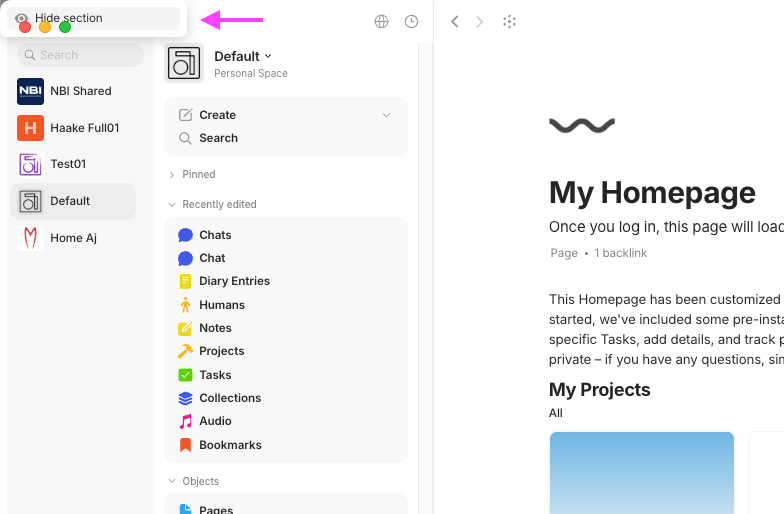
- In the left sidebar, the ‘Pinned’ section is unable to be clicked or turned down. Basically, inaccessible. That is a big bummer for how I work.
- In the left sidebar, clicking on the three dots for Pinned results in the ‘Hide Section’ button showing up in the top left corner, under the default macOS navigation.
UPDATE
That was FAST work!
- 0.54.11 was just released, and it FIXED the left sidebar ‘Pinned’ section issue. Thanks!
- The ‘Return Loses Text Style’ behavior is still NOT fixed, but that is minor compared to the Pinned section.
Thanks for “Toggled Headings**”**  Glad to see this coming to Anytype.