Already reported here:
This is excellent!
How do i enable ray cast AI?
Great work, keep it up!!
@Boodybon we’re still waiting for the raycast update to be rolled out. everything is ready on our end, but their review process is slower due to the upcoming easter holiday.
i’ll follow up with you as soon as it’s available!
@Filip , it seems that properties can’t be locally added to templates because the + New Property action, which is present in the / actions window for objects, is missing for templates. The only way I found to have a local property included in a template is by adding the property to an object of the same type, and then saving that object as a template. I find this quite contradictory, but I am not sure it is a bug.
Object editor:

Template editor:
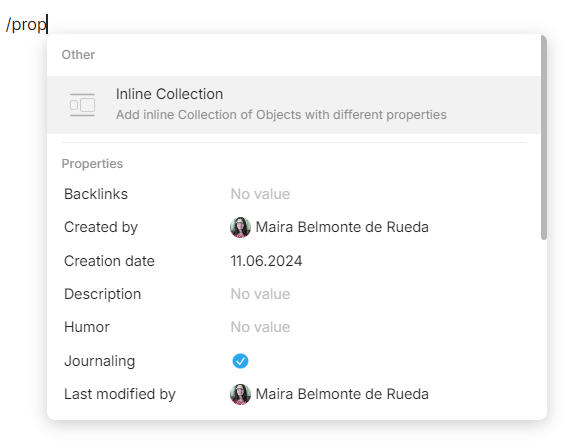
By the way, I think this + New Property entry should be renamed as “+ Local Property” or “+ Add Property” for consistency and clarity reasons.
I hope it’s coming before easter…  We need something cool to play with ^^
And are there a little bit more information about how Raycast AI works? Is it sending our data to ChatGPT or other services? 
Thanks to Anytype-Team! Grand release!
My question is:
Is it possible with new types system to do queries to more than one type?
For expample, I have some different types of task, with some the same properties, and with some unique properties for each type.
And I need to see in one query some selected types, for example, what tasks planned for today or tomorrow (with some details from their properties), with no matter what type those tasks has.
Thank you!
It was possible to do so before. Sets (at the time, now Query) could be either based on a Type, or on a Relation (now Property).
I got a similar error on my iPhone during this update. It has been a long time since I have used Anytype on the iPhone. It appears before this recent update there was another database update which needed to be done first. On my iPad I did that update first by opening the app before upgrading. By going through the previous update and the recent one the iPad migration worked.
To get my iPhone working again I had to delete Anytype and reinstall it. Fortunately I didn’t have anything exclusive to the app that hadn’t synced so I had no data loss. My guess is that this latest migration isn’t checking for previous migrations/updates before doing it’s thing.
To note, I‘ve had the same behavior occasionally on the current MacOS desktop release (haven’t upgraded yet). It can be super annoying, but it’s rare, maybe every few hours, usually when I want to edit an object that hasn’t been opened for a while.
What’s interesting: while undo (cmd-Z) does not work in these cases to bring the lost text back, the version history has it all. So to restore the lost text (usually no more than a line), that works reliably.
For me this feels related to this other super strange editor bug that when I type fast with some formatting (e.g. bold and foreground+background color), the formatting ends randomly after a while, so that the text looks like this: formatted text even though it should look like this: formatted text
Looks like a pesty sync error. Has been for ages.
I followed all the new instructions, and I still don’t see the templates applied to the object… I only see the top and right sidebar properties. That’s not the template I created anyway!
I’m not sure if this is a bug or a design choice, but with Properties in the header, rather than instructions for what to do e.g “Select status” “Select date”, surely it should be the Property’s name as it can be confusing as to what you’re actually setting a date/status for (if you have multiple dates like Start, Due, End)?
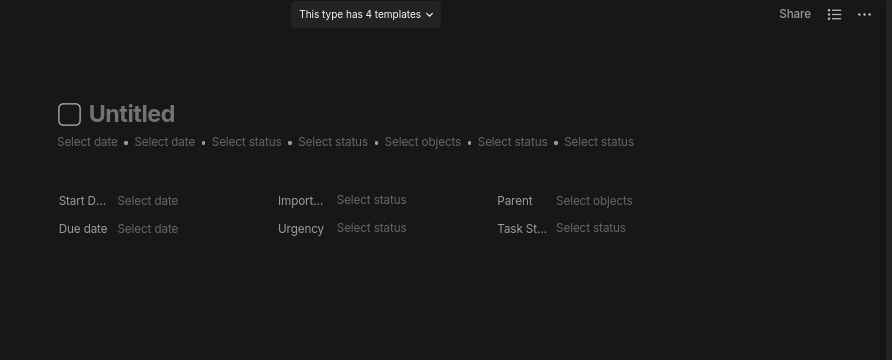
It was a bug, fixed now
Thank you for the release - I think the standardisation of type properties is a very welcome addition, as are all the little bug fixes. I am still thinking about the one template for each type change but as I’m a relatively new user I don’t think I’m ready to give my opinion yet.
Here are some small bugs I noticed already:
- (MacOS): Inside a note, pasting something as link does not work - the link doesn’t appear in the editor (but e.g. pasting the same text without the
https://prefix works fine) - (iOS): There doesn’t appear to be any way to edit a bookmark - it always just opens the link. I organise bookmarks with tags so this is unfortunate.
- (MacOS): Adding a new query (property: tag) for all objects - when I add a filter - the filter gets added twice (and if you try to delete one it removes both of them) - so it appears to be a rendering bug of some sort
releasing a new major version just before a 4 day holiday
I’m not sure about that 
We are online and monitoring)
I do love these updates, but… I guess that templates can still not be applied to objects within a type? This is THE feature that would make a HUGE difference. I have objects that were imported that I’d like to use the default template on but I can’t… Not even one-by-one (which I don’t want to do with hundreds of items anyway).
Agree
In my case, I juggled between versions 45.0 and Primitives with several accounts (used in a primitive version and then an old version in particular) without any blocking problems or loss of data. I haven’t tested it since 46.1, but I’m sure I’ll get the chance (I have 3 versions installed, which I sometimes use simultaneously).
I think we should be able to select built-in query when adding an inline query.
Generally speaking built-in query and “normal” query should behave the same across the app, it’s a bit confusing otherwise.
Thanks for fixing and shipping the favorite bug so fast btw !
Guys, regarding the name vs placeholder in properties in the header - there was already a logic to show name instead of placeholder, but due to recent refactoring of components I’ve created a bug, so today it was fixed.