Seems like objects that use the p2p sync don’t show up in this menu, so yes, it’s only for syncing over the internet to either the Anytype network or to a self-hosted network.
Honestly, that development was sooo close to release date, that it might have been rushed.
But then again, the team was under pressure and insults from certains topics on this board and reddit (which I suspect involve the same person) that I don’t blame them if things were not “Steve Jobs” thought out.
I can imagine the pressure. Especially in this space of productivity apps there are people here and there (I also noticed that in other app communities) that get mad and toxic if the devs don’t please them as they want. This is a tough space and a lot of users want the dopamine rush again and again (that are also often people who switch apps constantly, similar to distro hoppers on Linux).
Therefore I also cannot appreciate enough what Anytype does and has done to my daily workflow.
As part of the community, I just do suggestions and point things out that irritated me after the update (and potentially others).
Thank you to the Anytype team, and props to y’all for finding an elegant solution to the community’s diverging opinions on the Spaces bar! It’s smooth, accessible, easy to use, and we maintain control over our preferred user experience.

Thanks @Facility6384, I got it to work!
@perereco This was so not intuitive… I added a widget from the object menu on the top right corner. This adds a widget with the default “Compact list” view. I had to go to the bottom of the widget sidebar to “Edit Widgets”. Then go to the specific widget, click 3 dots and change the “Appearance” to “View”.
You can at anytime just “right click” on the widget title, for example, to switch the view.
@sturdily thank you! I need more coffee this morning. 
No need to thank me!
Or better, thank me by doing your awesome, very well done videos 
Thanks, @Curie! It’s working correctly now.
This was the second change that I wasn’t able to intuitively figure out how to change (the first was the auto-hide sidebar).
A user in the Discord pointed it out and I would like to forward it:
- previously the sidebar when auto-hide was enabled was in a fixed position
- meaning that the content area did not move or resize
- and the sidebar moved above the content area and auto hid again
- now when the sidebar gets visible when auto-hide is enabled, also the content area gets resized
- it then also auto hides again and the content area also gets expanded again
This is a lot of animations going on and feels very restless / hectic and creates friction.
Esp. if one wants to create a calm space with focused thoughts in mind, when the user like to have the sidebar hidden by default and wants to concentrate on the writing, when the sidebar comes up again, all those resizing of the content area could cause some kind of confusion, depending on the mental state and spectrum the user might have.
Would it be possible to restore the previous behaviour? The sidebar doesn’t need to float like previously, the position just could be fixed.
Edit: Claude AI’s approach to switch between the auto hiding and sticky sidebar is a good example.
You’re not alone. New updates sometimes feel like a hidden objects game…
Great release! I have always been a fan of Side widgets. They add a good artistic touch to Anytype that makes the app unique, and it’s the factor that made me interested in Anytype in the first place. Now, with new views that adapt to the collection, it becomes even more interesting. I look forward to any updates related to the widgets in the future. All my respect to the developers.
However, there’s something that annoys me a little, which is the space side sidebar. It takes up too much space in the interface, and I believe there are better UX implementations to show it. I hoped the space sidebar would show and hide automatically when I hover to the left of the monitor or by a button to expand or collapse. It could show as an overlay or something similar. This is the least I can expect, unlike having to permanently disable it and navigate using shortcuts as I do now.
I understand that you might want to add the communication aspect to the app later, so all the spaces I have or joined are visible in your first interaction with the app instead of opening a drawer to pick which space to navigate to. But this is not the primary focus of the app, unlike other apps. Anytype, for me, is a hybrid app that includes multiple elements like the Editor, Collections, and later Chat groups. So hopefully, there will be a bit more customization, like hiding the space sidebar automatically if it’s out of reach of the cursor or by a button.
Anyway, I’m good with the new space selector the developer become slowly eliminate the need of the Nav dock, Also I’m once shared my opinion of good way to switch between spaces here and I see it was great way since for me anytype really creative in the side widgets.
I LOVE the space bar and the new widgets! The app looks a lot nicer now! 
A little question, is the sidebar non-togglable now? I can’t figure out how to make it stick to the side.
I’ve been too busy lately that I rarely used Anytype 
EDIT: I found it in preferences.
Totally agree with that. A UI/UX redesign/enhancement would be much appreciated in general.
- Will the same search improvements be implemented in the upcoming release of mobile app?
- If we want to show only widgets in side panel, there should be an option to quickly access the vault settings like there is a button at the bottom left when we choose to show both, spaces & widgets.
If we want to show only widgets in side panel, there should be an option to quickly access the vault settings like there is a button at the bottom left when we choose to show both, spaces & widgets.
Agree.
@GrayArc and @Hexara
There is some new options on the preferences and when right clicking on the little icon of “hide and show” sidebar. (these options were very late introduced and failed the release news and onboarding).
In the latest commits, these options were added to the preferences page.
I feel 2 issues should be addressed: overlay mode (meaning showing the sidebar above the editor and not resize it) and in autohide mode, is impossible to use when using layout width > 80%.
Still I would like to ask the devs and community if this could be put on hold and get a “redo” when the right sidebar comes, like in the mockup previously shown somewhere here on the forum.
Finally… I don’t know why the Go team gets no love, but congrats on the amazing work of v0.35 release!
@sturdily yeah, the only option right now in the preferences is auto hide for the whole side bar which’s I disabled by default since I didn’t like it, I was hoping for another option in preferences to show and hide the side space bar part. I found really great implementation for that by @Shampra which’s the following:
What I meant was, do you know about this:
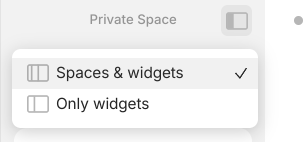
(right clicking on the sidebar toggle icon)
Yeah, I know about it, I’m already set it to only widgets by default, but I wished to be button to press, or hover over it like in the pervious example, for me right click to change is not convenient and require extra click.