Finally the beta app is out and I’m not in anyway disappointed so far. I must commend the efforts of the team. I came across Anytype on reddit when I was looking for an offline alternative to Notion in 2020. I signed up for the alpha test instantly as my heart tells me it’s the next big thing in the productivity space. After that I never commit to any app not even logseq and obsidian.
Now that the beta is out, can I start using it as PKM app fully. I asked during the alpha period, though I was anxious then but I’m glad I didn’t use it for longtime purpose.
The app has basically meet 85% of my personal workflow.
The most exciting part is that it still has potential that could blow any app away. And the development team are the best I’ve come acrossed.
It depends on what you need. I personally can’t imagine using it as a proper PMK without backlinks / references, and even possibly panes. There are also many other small QoL stuff that would be annoying.
I am also hoping to use it as my PKM - granted it will evolve over the versions - but I am confident that once it is released in the public domain and open sourced, the iterations of features will drastically improve.
Can’t you access backlinks/references from the Flow page? I mean it would be neat to have them displayed directly on each page but the function is already here
It really depends on your needs. If you don’t rely on heavy formulas for databases like Notion, don’t need the inline Tex feature for research and don’t want to have roll-up/relation feature of Notion, I would say you are good to go.
Anytype is pretty stable already. I have been using it for over a year as my PKM and I’m pretty satisfied with the experience.
When it comes to backlinks, I am still hoping for an informational sidebar on the right. That shows all kind of informatie about the current opened page, information like:
local graph view
Relations
Table of Content (or sometimes called Outline)
Backlinks (incoming and outgoing)
Objects inside this page (like bookmark, weblinks, files, etc)
Statistics (like word count, creation date)
Ofcourse this sidebar should be customizable like the left one. Where you can add/remove widgets to your own liking as well as minimizing them.
This would level up my Anytype experience immensly!
Yes, I made multiple (suggestion) topics and replies on this forum already.
Hi @Jeroen ,
Thank you for your suggestions.
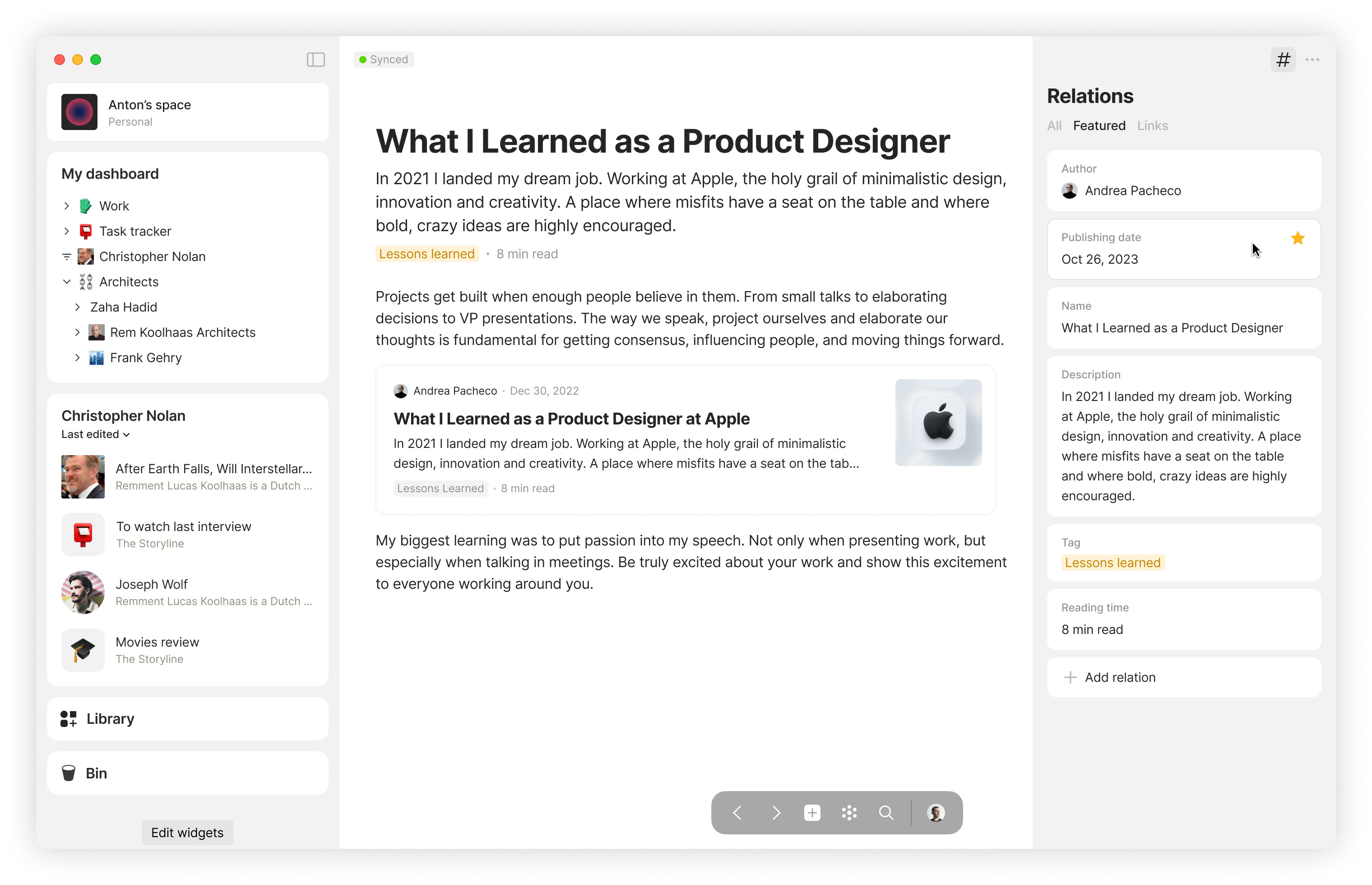
I am currently designing the right sidebar. Here is a sneak peek of the WIP. I’d love to hear your thoughts!
I would love for each “box” in the panel to be toggleable, similarly to those in the left-side panel. For example, I would like to keep the description relation, but only show it when I need it, and hide it (show only the name of the box) by default for the rest of the time.
How would you envision the WIP backlinks implementation being shown in the right-side panel? I suppose that is what the Links tab is for?
I would really like the outline with a table of contents to be visible in the panel as well, according to Table of content / outline navigation on the side, maybe even in its own tab next to Links etc.
Hey!
Very good idea to collapse/expand relation blocks as it was already done in Widgets. Thanks!
MVP of backlinks will be done as it is done in Flow. Inbound/outbound links.
Of course, I only showed the relationship panel in the picture. In the future it can be used for the table of contents, and object stats. For instance, I also want to add Layout settings there.
Imagine I have a Project object. I link projects to Task objects with Task relation Linked projects. I would like to show for each Project type in the right-side panel a list of tasks which link to this project. Basically, an inline set of tasks with a filter set to Linked projects → has any of “@thisproject”. How could this be incorporated to the right-side panel?
It would be ideal if I do not have to set such filter for each project separately. Should the configuration of a right-side panel be coupled with object templates, for example? Having a template for object content and a separate one for object right-side panels? And being able to create a full template with choosing content template (with relations) and side panel content?
Furthermore, this right-side panel is usable for full-screen view of an object (as in the picture above, open as an Object). Could the whole panel be also toggleable in a pop-up window mode for an object (when opening an item from a set, for example; a set of projects in my case here).
Oh my lord, thank you so much for your work! There’s not enough bubbles to show how bubbly I got about this.
My suggestions / questions would be as follows:
Have the sections be toggable, as to avoid visual clutter.
The ability to shift+click files and/or blocks, and open them in this side bar (I’m not sure if this is already possible from this screenshot? Not being able to easily visualize multiple files is my biggest gripe, so if this becomes available… more bubbles!)
An outline of the page, with word, character count, etc.
Hi, this is awesome!! Loving it. Could you please consider the TOC to be on the sidebar? This is a huge pain to scroll up (to TOC), as I have my cheat sheets/ snippets for coding in Anytype. I have to put some of them in Nimbus Note (they also have an app for Mac OS (for offline work) for now), but I do miss Anytype