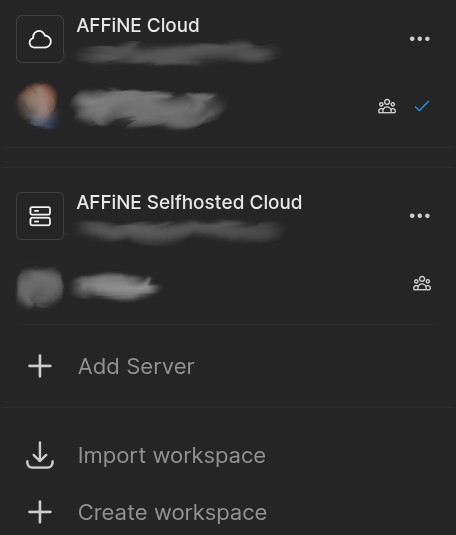
User can switch between multiple accounts. For instance, one account utilizes Anytype’s network for synchronization, while another account is synchronized via a local network.
HOW COULD IT BE DONE?
In the account settings, add a new option labeled ‘Log in with Another Account’, which upon clicking leads to a ‘Switch Account’ functionality.
REAL WORLD USE CASES
I would like to set up two separate accounts rather than two spaces within a single account. The reason being that if both spaces under one account utilize Anytype’s network for synchronization, they would collectively consume the same remote node backup storage space allotted to that account. My specific requirement is as follows:
One account dedicated to note-taking and writing, containing predominantly text content along with some associated resource files. This account would rely on Anytype’s network for synchronization.
A second account specifically designed for synchronizing images and videos within a local network. This setup would not consume any storage on Anytype’s remote backup nodes, instead utilizing only the local storage capacity of devices within the LAN. By managing images and videos through Anytype, I can fully exploit its features such as types&relations, creating an experience surpassing that of conventional photo albums.
In summary, my aim is to have two distinct accounts: one for text-heavy notes and resources synced via Anytype’s network, and another for media-rich content synchronization within a local network, harnessing Anytype’s advanced features without encroaching upon the cloud storage quota of the first account.
RECOMMENDED ALTERNATIVES
Yinxiang Note(The Chinese version of Evernote), Dayone. Notion, FlowUs.
The former two options are relatively limited in their data filtering and presentation capabilities; the latter two overly rely on network connectivity and store data offsite, rendering them less secure.
Network settings per space in this post seems also will work.
I often switch between my 3 accounts (mainly for testing purposes) and I can confirm that it’s laborious at the moment, with a disconnect button that’s well “hidden” (it could have been put in direct access in the menus) and followed by confirmation messages.
I’d also love this feature for a similar use case. I have a personal local-only vault which I want unlimited local space for, and an Anytype-network vault for sharing with roommates. I’d love to be able to easily switch between them.
Could be a “switch vault” option in the vault settings page, showing a list of saved vaults, each with their own saved settings for Network and Location.
I would like to see this feature implemented, maybe not now, but in the near future. My ideal use case for two accounts is the following:
One Private Account: This would be with a local or self-hosted network. Ideally, this will be for my PKM system for managing journaling, goals, projects, tasks, notes, resources, etc. Currently, I depend on Notion, but I am waiting for the main release date for Anytype to make the switch.
Second Public Account: This would utilize more spaces to manage projects on a larger scale with my partners. Currently, I use Anytype for this purpose, and it is decent enough for the job. I also use the Anytype network with it.
My concerns in the near future are that I will not have smooth way to switch between to accounts in desktop or mobile with independent network. my only solution will be using self-host network and not depending in the others network at all.
I have a work account and a personal account to separate and organize my spaces. Almost daily I am switching accounts to get different work done. I would love this feature implemented. It would be nice to have pin codes set for both for added security as well!
This workaround might be useful for you if you often switch between your vaults:
Here’s a tweak that works only on desktop: you need to create a separate shortcut for your other Vault and add the --user-data-dir="$path" flag to the launch command (i.e. --user-data-dir="D:\Anytype").
This should work on a Mac too. Of course, the path will be slightly different, so it should be something like --user-data-dir="/Users/<your name>/AnytypeAltProfile".
Would definitely ease the workflow with like private acc, family acc, business acc. Or just have different accounts for different networks. It’s for sure possible tbh.
Amazing! The tweak works. What happens if I open 2 instances of Anytype, because I forgot to close the 1st vault, so both were open and operational. Is there any risk to use both instances at the same time?
I also read that it is safe. Even the copy link command can be used in one to point to the notes or files in the other vault, sure not works on open, but when needed copied and opened in the source vault, and it is a temporary solution till multi vault support will be available (maybe). To use a single terabyte-sized vault to put all my files inside it is probably risky, I don’t know, even though I like the all-in-one place method.
Anytype currently does not have native support for multiple user accounts within a single Anytype client. Ideally, I should be able to create, switch between, and manage a personal account and a work account without logging out. Each account should be able to connect to the standard Anytype cloud or to a distinct self‑hosted sync server.
HOW COULD IT BE DONE?
Besides the backend functionality, a similar UI to the existing spaces UI could be used. Instead of
REAL WORLD USE CASES
Personal vs. professional data – A user can keep private journals, recipes, and hobbies separate from work projects, meeting notes, and client files, while still using the incredible .
Reduced friction – Switching between accounts eliminates the need to log out, or run simultaneous installations of the app, which have a tendency to self destruct or be difficult to setup.
RECOMMENDED ALTERNATIVES
This functionality is currently preventing me from moving full time to Anytype. While my work has a full self hosted Anytype sync set up that we’re encouraged to use, without being able to switch back and forth between personal and work easily, Anytype just isn’t a viable note taking tool, especially when managing Anytype across multiple systems.
Instead, the most realistic alternative solutions are from alternative companies, such as OneNote or Obsidian.
ADDITIONAL CONTEXT
While there have been requests for this in the past, the newest is from over a year and a half ago. I’m hoping that now that Anytype is a more mature product, there might be additional demand as more users are using Anytype for more use cases.
Ideally we should be able to easily navigate spaces that are hosted on different networks. I’ve setup my self hosted node and It’s really annoying to logout and lose access to all my spaces to be able to interact with friends that have spaces on the default network.
Is this just not a priority or is there some technical reason behind it? From my point of view it seems like a very basic feature to really achieve the ‘peer to peer’ and ‘decentralized’ potential of the project.