Maybe more missing features, than bugs, but adding an existing image into a Page is cumbersome and not every imaginable way works.
Let’s say, the user comes up with the idea, to type “/image” (in the hope he can insert an existing image this way).
There appears a placeholder, ready for pasting a link or to upload an image.
We don’t want to upload, because there the image already exists. We want to choose an image.
Unfortunately no object-selector appears for choosing that image.
→ That’s the first problem.
OK, we need to get that dammed link.
Therefore will the user now use the search pane to find the image.
But if the cursor is placed in the placeholder, the key-combination “Ctrl+k”, for opening the search pane, doesn’t work.
→ That’s the second problem.
Now the user places the cursor outside of the placeholder, because then he can open and use the search pane.
He will find the desired image in the pane, good. But if he uses the right mouse-key, there is only the option to add the link to a Collection, but no option to add the link to an existing Object (the Page).
→ That’s the third problem.
Because of that the user now chooses to use the “copy link” function in the right click menu.
– Now he has that link in the clipboard, theoretically ready to paste it somewhere.
But now would the user of curse expect, that if he pastes that link into the placeholder-box, that the image then appears there in the Page.
NOPE, unfortunately it doesn’t work!
→ That’s the 4. problem.
What can the (already stressed) user do?
– My cumbersome way is to open the image as Object.
There you can use the right menu to add a link to the Page in that he wants to integrate that image.
After that you need to navigate back to that Page for moving the image to the desired position.
– It all feels very cumbersome, full of unneccessary frictions, and not intuitive at all! – It’s a pain!
How To Reproduce It
Try to add an existing image into a Page by using “/image”.
See also my video.
Unfortunately you can’t see there, that I try to press “Ctrl + k” for opening the search pane. The search pane doesn’t appear if the cursor is placed in the placeholder for the Link.
Image or Video
The Expected Behavior
See above. There are four different obstacles that need to become solved, alone to use the function “/image”.
What I really wish would be a complete simpler way:
Pressing the right mouse key wherever the cursor is located and an option-menu should appear that allows to choose an existing image for inserting ist here!
– Easy peasy, fast and intuitive that way!
Additional Context
And by the way:
What I really miss, more the every other fancy feature, is a simple thing: Backlinks for images!!!
I need to know which Pages use a particular image!
That’s sooo important in practice! And it feels also sooo basic!
– Please, please integrate the backlink feature!!!
Device
Desktop PC
OS
Win 10, also Linux
Anytype Version
0.46.4
Network Mode
AnySync
Technical Information
It doesn’t matter, the described features are simply not there.
And it depends from the point of view if you call it “bugs” or “forgotten, missing features”.
Or /link and choose your image ?
Or /file and choose your image ?
But agree, /image should also allow you to choose an existing image. I finally got the hang of it, but I complained beforehand.
… and when we have tons of image, find the good one in this small and limited seach menu is a pain.
I remember when I downloaded a big pack of numbered images, when I wanted to add them to a page one by one without duplicating…
Yeah, these work, thanks. But it’s not intuitive.
That’s why I wrote:
“Let’s say, the user comes up with the idea, to type “/image” (in the hope he can insert an existing image this way).”
Why is “/ink” not intuitive?
– Because the user does not want to set a “Link”. For this particular function he would expect something like a text link on that he then in future always needs to click to see the image. But he wants to see the image directly.
And why is “/file” not intuitive?
– Because the user does not want to upload an external file or something like that.
The image already exists in the Space, there is no need to upload something.
What the user most expects that would fulfill his need is “/image” – and nothing else.
But exactly that does not work.
.
One more point for the “not so good” list:
After typing the Slash (“/”) does a list of available options appear, but nor “file” nor “link” nor “image” appears in that list (v0.46.4).
He needs to know that these commands exist.
All in all, nothing here can be called “intuitive”!
The latest versions have made some things worse.
Oh, and by the way:
Yeah!
That’s one of these points I never could understand!
If there is enough space on the screen, why do so many of these menus appear in such a small box so that we need to scroll all the time?
Is this going to become a priority? So much time spent fighting the software due to forgetting over and over how troublesome it is and how to work around it!
I was wondering the same thing recently. Adding (already uploaded) images is not intuitive.
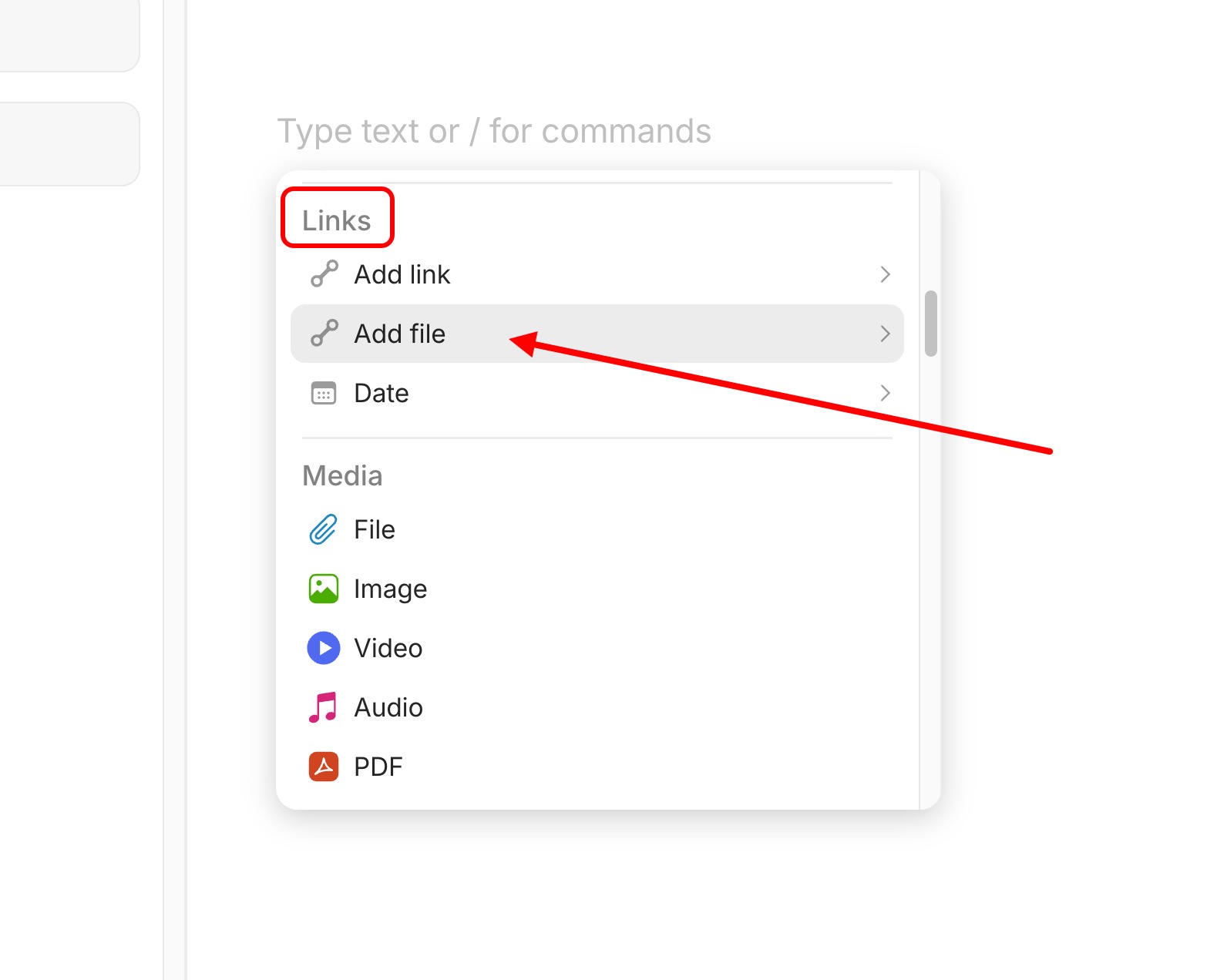
I’m usually inserting images via drag & drop, so I had forgotten how to select an existing image to insert it into a page. In the context menu (called by entering “/” or by clicking the + icon) it can be found under “Links”, not under “Media” as one may expect.
If you want to embed an image (that’s already in the Space) into a page, the context menu - while technically correct - is confusing.
It’s technically correct that when you insert an existing image into a page, you’re essentially just adding a link to the image file - an embed link - which is why the menu option is found under “Links.”
“Add file” is also technically correct, since images are files, and you can insert (existing) PDFs for example in the same way.
Once you know how it works, everything is fine, but this isn’t immediately clear to new users.
One option could be to add a separate “Add image” option to the context menu in addition to “Add file” which would open a selection dialog specifically for images.


 So much time spent fighting the software due to forgetting over and over how troublesome it is and how to work around it!