Unfortunately, I’m missing tabs after I set up AnyTypr for a day and now wanted to use it.
I used to quit Evernote because they got rid of tabs. That’s how I came to StandardNotes and Joplin, also Obsidian and LogSeq.
If you need to work with multiple documents or notes at the same time, tabs are essential.
I’m eagerly waiting for the introduction until the switch, then it will be the best program I’ve tested so far!
I wish anytype has this feature which is convenient for multitasking
I would also love tabs, ideally with the following shortcuts:
- ctrl+# goes to the # tab (e.g. if # is 3, ctrl+3 would go to the 3rd tab; ctrl+9 always goes to the last tab)
- ctrl+tab goes to the next tab
- ctrl+shift+tab goes to the previous tab
- ctrl+t or ctrl+n creates a new tab
- ctrl+w closes the tab
- ctrl+shift+w closes all tabs.
Basically, the same as how it works in browsers.
As a future idea, we could maybe have tab groups (like in chrome). I know you can use multiple spaces, but it would still be nice to have multiple tab groups within the same space.
Thanks!
Tabs would be fine,
but a kind of a simple Tab-function already exists!
It’s a bit “hidden” - just use the magnificent glass from the bottom menu.
There you have the list of recent objects under the search field.
OK, it’s not exactly as good as real Tabs, because it needs two clicks instead of a single one, also each switching causes a reload of the Page (with the cursor on top position).
But it is half as good as Tabs.
It would become 75% as good as Tabs if the reload wouldn’t start at the top of the page, but remember the last scroll position and cursor position.
- Even much better then Tabs would be the feature to open and edit two Pages parallel (for copying contents from one Page into the other).
“Copy some content on the left page, paste it in the right one” - and so on.
I actually have the need for parallel editing two Pages.
I made an error with two complex forms and filled datas into the wrong form, so that they need to swap.
Sounds extremely simple, but I indeed gave up in two attempts on different days. 
These repeatedly opening and closing the two forms, with all the scrolling and cursor positioning for each time just one single act of copy and paste was a bit too tiring and error-prone.
Opening two Pages at the same time (without any switching) would have been the game changer!
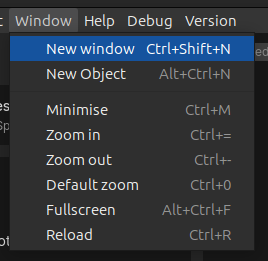
Seems like you are not aware that you can open two Anytype windows already. You can open a new window by pressing Ctrl / Cmd + left click on an object link, or you could use this instead:
Indeed! I wasn’t aware about that! <:-)
Oh man, thank you so much! This is really helpfull!
Normally, my favourite apps are those that have the classic old menus.
Anytype also has such a menu but makes nearly no use of it.
That meant an annoying adjustment for me at first in how to work with this App. But at some point I got used to it. As a result, the App menu somehow became insignificant for my daily work and slipped somehow away from my perception. So it happened that I overlooked this feature.
The advance of a classic menu that offers ALL features an App has, is that it is impossible to oversee a feature. Also there is never a doubt about keyboard shortcuts, because they are listed right beside each menu entry.
I find this more beginner-friendly.
t took me weeks to get used to Anytype due to it’s somehow unconventional operating concept.
And, as we see, even some weeks aren’t enough to master it completely (at least for someone like me, who prefers classic old menus).
Many thanks again, you opened my eyes, now I get much more out of the App as before!
This is most urgent to me when working on an iPad. On desktop i can open several windows, but on iPad there is no workaround to have several notes opened at the same time, making it really difficult to work on Anytype for iOS.
I would very much like to see Tabs + Panes in Anytype. More specfically, Tabs and Panes should be able to exist within each other. I.e., a pane could have multiple tabs and a tab could have several panes within it. This would users to fully control how they view multiple notes/pages/objects at once and also be able to switch between rapidly between different notes/pages/objects while doing more complex work.
I think the example shared earlier in the thread of how Accreom does this was pretty good.
I am curious as to whether the dev team has added this feature request to the roadmap, given its high vote total.
@Anytype-Team I too would like to see tabs introduced. I liked the example of panes (seen above), as well. I jump between several task lists, and databases, and currently have to click around a lot. Loving the software, though! I’ve only been on the app for a few days but have the beginnings of a nice workflow.
I do love AnyType and really want this feature  . Also I like how Notion opens new pages side by side, really useful.
Also chiming in to say:
I’m a new Anytype user, and I absolutely love the app. One thing that I really do wish I had, though, was multiple tabs of Objects open simultaneously! It’d be a really sweet feature
Would love to see Panes and Tabs, Tabs being definitely the first priority.
To note, Notion now has tabs built in, and their peek view is also very useful as you can click down objects in a database without closing the one before it.
You could aslo make tab groups like in opera 1 or in chrome (with extention “tabius”, without it chrome doesn’t do it automaticly and doesn’t save them) so it automaticly groups related tabs into those groups with colour and name if needeed, it works like this - if you open something from one page it automaticly puts it in one group but could be changed manualy. Persnoally i love this feature and it would be really usefull for making and veiwing wiki like databases.

would also like to see the anytype iOS client support the native multi-window feature of the platform
People keep mentioning all sort of advanced features but really, I’d be more than happy with simple tabs. If you can change the order of them and if the app can remember them when relaunched, even better!
There is a way actually - just click on WINDOW → NEW WINDOW.
windows != tabs
This is my new year wish for 2024. Can dev plz do smth? 

Sliding panes are a different pane design, mimicking paper notes and physical files where you can you overlay one pane on another. It had changed and became a plugin in Obsidian which can no longer be found from Obsidian (in-app) community plugins.
I really like the sliding pane concept. This would especially be help smooth reading with materials of vertical alignment (top-to-bottom RTL, if ever implemented). The mindset and worldview to understand horizontal and vertical materials can be very different and enriching. (Just like doing maths division ÷ in horizontal equation vs long division)
Things I don’t like about Obsidian’s sliding pane’s implementation:
- Whenever I tried to reach the earlier opened pane, it slides all panes to the right to reveal it. ← What I would like is mimicking paper, when you pull the below paper out, it becomes the first in order. (More like paper notes; when the original implement is more like file and tabs)
– This enables full paged reading for whichever comes on top for two stacks of paper. In other words, I suggest keeping the modern concept of horizontal panes but flipping tabs - For Square characters (e.g. Chinese and Kanji) that meant to go top-to-bottom without rotating the characters are still rotated…
Note: Fellow stationary lovers should easily understand and would like the concept of sliding panes a lot.