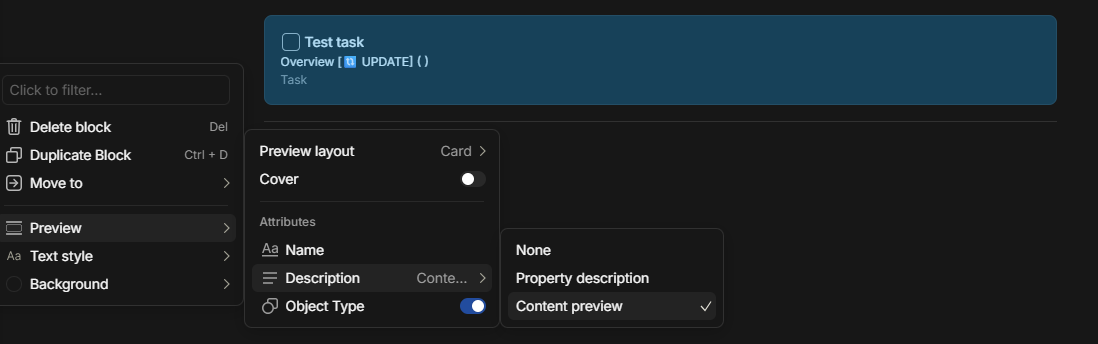
Add Featured relations option to the object Preview menu.
HOW COULD IT BE DONE
Featured relations in the object Relations window can be selected for display on the object page. Add Featured relations option to the object Preview menu to display and edit Featured relations on the parent page of the object.
REAL WORLD USE CASES
View the featured relations (Status, Priority, Due Date) on a list of tasks on the parent page without having to select each task page to view the relations.
The more Anytype becomes multiplayer, the more this feature becomes necessary I think. We’re looking into using Anytype to manage our team tasks, but right now, when we write down a task in Anytype during a meeting in the meeting minutes, it does not show in the minutes directly to whom it was assigned to or when it’s due. For us it’s really important to quickly see in the meeting minutes that a task was actually assigned to someone, so we can be sure it will be taken care of. It’s just too much effort to bring up the task object page everytime just to check if it was assigned to someone already or not.
I’m writing to propose a feature that I believe would significantly improve the usability of the platform, particularly for objects like tasks.
I would like to request the ability to select and display more properties in link-to-object blocks.
Currently, these blocks only provide a limited preview, typically showing attributes like Name, Description, and Object Type. However, in my daily workflow, I frequently need quick access to more detailed information about a linked object without having to open it.
Having the option to customize which properties are displayed—such as Status, Due Date, Client, and Last Modified Date—would be incredibly beneficial. This functionality would be similar to the list view mode, where users can select various properties to view at a glance.
This change would save a considerable amount of time and effort by allowing users to get the necessary context instantly.