A HACK to create tasks linked to a project


Note: if you want to skip all this preamble, head to “ACTUAL HACK”
I wrote this long preamble to show I exhausted all possibilities…


Note2: Maira (in a comment below) has a far better solution in my opinion. I am leaving mine here in case it suits your workflow better…


You’ve all seen the pain, for past few years in anyType:
You try to create a project and would like a nice interface (a la) “set” to create tasks within the body of the project. And you’d like those tasks to be “children” of that particular project.

You’ve tried to likely put an embedded set in the template, thinking it would instantiate a new unique set that would only live in that project when you create a new project. Silly you; you really thought it could be that easy?

Then you perhaps realized: oh I got it! Sets are bound to the type, so any set would work on ALL tasks and then you have to use filters…but how would you filter for the tasks for specific project created within the set when their backlinks property is empty?

Okay, so you tried to use /task to create tasks within the body of the project…yes, that works in that backlinks will be filled with the name of that instance of the project. And indeed this allows you to then be on some global dashboard and then filter using backlinks and have for example a kanban grouped on backlinks. However this approach is truly annoying for entering tasks in batch, because the small card view it offers within the project is just ugly, has big margins and does not allow you to see the fields like we all love and desire in a set or collection.

Okay, so now you try to be even smarter: let’s use collections! So you put a collection in the project template. You create a new project object…hmmm…interesting. Any task you add to the collection DOES NOT have a backlinks filled! And even more interesting…if you go to all objects → type → collection it does not exist. If you click on the title of this collection in your project and say ‘view source’ it will say on top ‘in view mode only because this collection is in the trash’

Yes, these are all real struggles many of us have gone through to make this work, while we IMpatiently wait for a proper solution from anyType.

My last attempt at this was to create a new project object from my template and thus get this collection I set up in the template. I was thinking I’d simply “duplicate” this collection and retain the views and the setup…because that is what I am after after all…ease of setup per each project.

Unfortunately this does not work since you cannot duplicate this inline collection, but only duplicate the ‘block’. And as such you are duplicating the "reference "to the same exact collection that lives in trash

So! Here’s is the only way I managed to make this work. Meaning…create a project from template and have my collection with tasks linked to the project.

(of course tasks living within a project is only one such example. This issue extends to any parent child relationship)


ACTUAL HACK


  • create a template for a project. Add all your stuff for the project you wanted in there, section where the tasks will live in a collection, but DO NOT ADD THE COLLECTION PROPER.

  • Instead, go to all objects → types → collection and add a new collection. Add views, add some tasks so you can test things out, add filters, sorting, the whole thing

  • important: for each view, go on the top right menu NEW → select type ‘task’ and then select the template you’d like to use for the task and then “add as default to this view”. Do this for each view. This allows you then to just start entering tasks in projects later without each time choosing task + template (otherwise adding a new object in a collection picks your default object you set in the settings for the space you are in)

  • delete all your test tasks so your collection is empty

  • Name this collection something like "Project Template Collection (Do not use, duplicate)

  • Now we instantiate (create) a new project.

  • Each time you instantiate a new project, you must, alas duplicate a collection:

  • go to all objects → types → collection. Right click on the “Project Template” collection, duplicate. Rename it to the name of your new project (use same exact name as the project to make it simpler)

  • Now back in your project, go to the spot where you want your tasks. type /inline and select “inline collection”.

  • It will ask you to connect it to a collection source. Chose the previously duplicated collection.

  • Any task you enter will have backlinks set to the name of this unique, per project collection you duplicated.


WHAT YOU GET WITH THIS HACK:


  • you get a collection “template” that you do not have to recreate for each project, with all its sorting, filtering, views, etc. You just have to duplicate and rename this “template” collection
  • you get tasks linked to your project (sort of) by having them attached to the same named collection as your project
  • you can then navigate to any project and quickly add / interact with tasks linked uniquely to that project only
  • you can also go to a global dashboard and pull up tasks and filter them (or group them in kanban) by project name, since the collections you named same as your actual projects.

Yes it is hacky, I HATE IT, but it works, with few extra steps. Hope this helps someone, and if I said something incorrect, please correct me. If you have a better hack, I’m all ears!

Thanks for sharing, your effort deserves a heart …

But wouldn’t do Sets plus Tags nearly the same thing without so much fiddling within the data structure?
I have given up to relay so much on Collections and Links between Objects.

Mostly I use one very big Collection for nearly everything, and tag each Object.
Sets do the job for filtering and sorting.
OK, the Objects have then a mostly useless Link to that big Collection and the Graph is not so nice.
But the work goes fast from hand:
– Go to the big Collection, create a new Object, give it a project Tag. Finnish!
To show all the Objects that belong to a specific project, use a Set that filters for the project Tag.

I have found out that it makes in practice too much work to give Objects Links.
Tags are much faster for me.
Some things could be a bit better, because Anytype still misses functions, but it works mostly fluid for me this way.

You are not wrong that tags could be used to solve this.
And actually one could solve it simply by having a ‘parent’ property (ehm sorry, relation) in your global dashboard S/C and as you are creating a task, you would chose the project object in the ‘parent’ property.

The problem is rather in the workflow.

I find many of us, when at the cusp of a project, would create the project instance and go to its page to fill out its many properties. Given that a project is a rather ‘big’ object data wise (with lots of lose textual notes), you’d likely edit the page’s properties and texts etc ON THE PROJECT’s ‘page’ itself.

And while there, as you are rummaging in your mind, you will discover early tasks to jot down and flesh out…so you want to stay on the project page.

So you see, in such case, one does not approach creation of project and all its INITIAL tasks from a global dashboard of all tasks. Later, one may add a task or few from a global dashboard, but one may equally still do it from the project’s page.

Where the global dashboard of tasks SHINES is in daily interactions with tasks. Because a human is involved in many various projects, this dashboard will now show you (perhaps in a kanban way, grouped by project and sorted with priority and due dates slipping/upcoming) ALL your tasks, across projects and you now have the excellent views of a set or collections to display all these tasks just the way you want.

It does not mean of course everyone works this way; but given how many times people talked about this (with project → tasks as prime example, but by no means the only usage case) it is safe to say many work that same way :slight_smile:

It is amazing the many ways we find to get to the same place in Anytype! I like your hack with duplicate names, but I think it would end up increasing the confusion in my system. This is my recipe for a similar setup, in case you find any part of it useful:

Ingredients

Types: Project, Task
Templates: Project, Task
Relation: Linked Projects
Collection: Task Inbox

Preparation

  1. Create a type named Project if you don’t already have one.
  2. Open the system type Task and add/create a relation named Linked Projects, with relation type: Object, and limited to object type: Project.
  3. In your preferred Task template, feature the relation Linked Projects or drag and drop it to a block.
  4. Open your type Project, open a template and insert an inline set of Task objects in it.
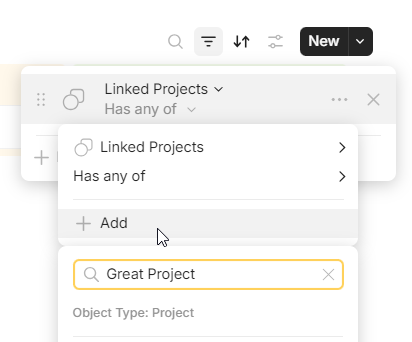
  5. In the inline Task set, go to the view settings (top right) and filter the view by Linked Projects > Has any of > [leave empty]. Select the step 3 Task template as the default for this view.
  6. For your global dashboard, create a collection with Task as default object (mine is titled “Task Inbox”) and the step 3 Task template as default template.

Workflow

Create a new project (let’s imaginatively call it Great Project) using the step 4 template. Go to the inline task set, click on the view’s filter and select Great Project for the relation Linked Projects.


From now on, every task you create from this inline set, either by clicking on top New ▼ or on bottom + New Object, will be associated and linked to Great Project. If you suddenly realize that this task actually belongs to a different project, you can edit its Linked Projects relation, which will hide the task in the current inline set (and show it in the corresponding project’s inline set).

When creating a new task from the Task Inbox collection, you just need a click to choose its Linked Projects. If no project is chosen, you can always find the new task as linked to this collection on your Graph.

I try to restrict my task creation to these two entry points, i.e., the filtered set in the project page and the inbox collection in my global dashboard, so that they are always grouped together one way or another (or both!).

Pros & Cons

Cons:

  • Because you can only apply filters to views, and not to the whole set (yet?), this setup is not very convenient if you want many views for your inline Task set, as you will need to adjust the filter for each view when creating a new project.
  • The Graph is missing the option to unlink an object from a collection, so your Task Inbox may soon become cluttered if you rely on the Graph for housekeeping.
  • If you create a task from anywhere else (for example, by typing “/” in a block) and leave its Linked Projects relation empty, you won’t find it in the Task Inbox collection unless you manually link the task to that collection. You can always find it in the unfiltered Task set, though.

Pros:

  • Most options are just one click away.
  • No need to have duplicate collections.
  • Quick tasks can be collected for further processing.

I use this approach with Relations as well, mainly because Collections seem half-baked and the graph view is messy when using Links to navigate. My main graph view only shows relations, which are mostly project connections.

I have the Parent Project relation visible on all my templates by default and a rule that the status cannot move from “Created” to “Planned” until a Project is assigned. This will work better with automations once they are implemented.

I’ll wait for a native feature, that should already been release IMO. How to use Anytype for collaborative or solo project if this cannot be done easily?

Thank you immensely for taking the time to write up such a comprehensive, step by step guide.
I am sure it will help many others.
I was almost thinking to go and edit my post and mention that your approach is far superior.
But I decided not to. Reason being because your approach (mainly setting filter per view) has drawbacks too, so I think it is best left to the reader to decide which approach works for them.

Personally, I think your approach is superior. I was not ecstatic at all I had to go and create a same named collection per project and then link it. I just did not see another way - and writing up this post attracted others like you to showcase there is indeed another way. I come from a programmer’s background where I believed to keep related information close to each other, otherwise it is hard to keep track of or update. Thus your method shines in my point of view.

One thing that puzzles me to no end, and seems frankly an anomaly (and the reason why I did not think of this): how on earth does setting a FILTER on the set (a query, really) actually also ASSIGNS a value to the property (ehm, relation) of the task object?!?

Thank you so much for this post!

I will say this: although anyType may be missing some features still, there do seem to be enough of workarounds to make majority of workflow work. Not all, but most.

The thing is, the competing products all have very serious downfalls. I’d say 3/4 of them are all only online. Not encrypted. To many of us, that is simply not an option.
And for the rest of 1/4 that remains and have various offline capabilities, few of them are as robust and as local first, with also native local LAN sync to other devices (this last feature is actually very unique)

anyType also has incredibly rich widgets - I mean seriously, they outshine most other apps. Its sets and collections are also really well polished already and I love using them.

if you switch to some other competitor that has some offline capability, you will invariably be trading some features for others. I really don’t see a clear winner right now among the competition.

I think a lot of people here think the same way. Of course we all want bazillion features and we want it now. But that is fantasy. So, we find ways to make it work, work together with the devs to showcase ideas, bugs and the product is moving forward. It has a very strong foundation.

If you do not value E2E, local first and many other unique features to anyType, then I would say you won’t be happy in this camp for a long time, simple because anyType is a much younger product and so cannot possibly compete - feature wise - with other projects that have been established for much longer.

Cheers

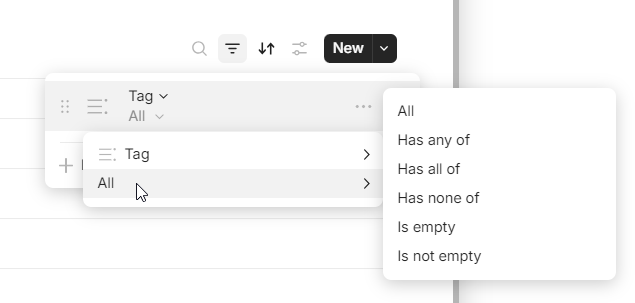
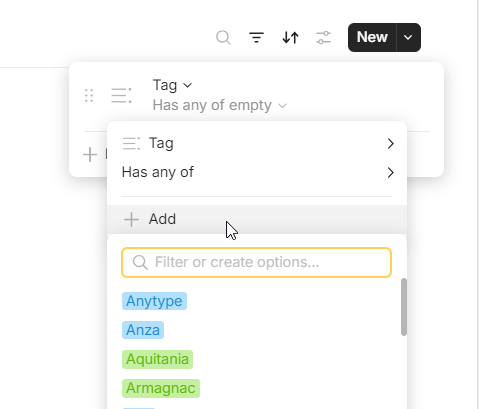
I am not sure if this is what you are asking, but sets can only query one thing, be it an object type or a relation. If you want to query, for example, all pages (objects of Page type) where the tag (relation) is XXX (value), you have to create a set of Page type and then filter the view, which requires a good lot of clicks: ★click the filter button, ★click to select the Tag relation if already present (if not, a couple of ★★clicks more to add the Tag relation to this list), ★click on Tag and hover over All to open the condition list, ★click to select the condition Has any of, ★click + Add and, at last, ★click or write your desired tag.


If you create a set of the Tag relation, you will get all the objects that have the Tag relation included in their definition, even if they have no tag assigned at all. You cannot create a set of relation values, nothing like a set of Tag=XXX, but again you can filter the view to show only what you need.

Thank you. Your first post definitely solved this issue for me to a satisfactory level (before we have bidirectional linking). I can’t thank you enough to clue me onto the fact that setting a filter in a set will assign the set’s parent value to the set’s objects. I still think it is an anomaly, but it works in our favour this time :slight_smile:

As for making a set of a relation, I have not used it much, but I do understand the disctinction: you are querying all objects that have that type “definition” within them. You’re not querying for a particular value of that type.

I can see this being useful in different cases; I just have not gone that route yet as I am quite new to anyType and only started setting up my workspace a week ago. It’s been an interesting journey!

Cheers

Not exactly. The filtered view acts as an input template: setting the filter will apply that value to any NEW objects you create using that inline set, which makes much sense to me because now the set is showing only objects with that value. Previously existing objects will not be modified by your filters in any way.

We’re saying the same thing.
I am happy you made me understand this.

Ok I had to wrap my head around why filters would ASSIGN values, and I think I finally get it.
Sets are not just queries. They’re hybrids.
If they were just queries, they would not allow adding new objects from within them.

If filters did not assign values to newly created objects from within the set…the minute you created the object, it would disappear, having been filtered out.
It seems (rightly in this case) the devs have opted for filling the filter values into the newly created objects, so the objects would actually appear in the view after it was created.

Okay, it all makes sense now!

I got to say though, this is truly not obvious and hopefully some future implementation would do it better or make the users aware of this feature.

Cheers

What makes it a bit more confusing is that most of the time Anytype deviates from industry standards it feels like in these cases, but this time it actually just does what other tools would do as well (which is good).


As a side note to @Maira’s way of organizing with a type Project, we had the below discussion a while back where instead of a Project type, the Sets themselves act as Projects. I am still debating whether to move to that way of working or not, as it seems very appealing to me, I am just mostly afraid that they will change how things work (as well as it might be a bit much to migrate).

Thank you for pointing me to that thread again, @ferdzso. That conversation put some ideas in my mind back then, but at that moment I found the proposed structure too rigid for my needs. Now I see you can have a mix of both systems if you just consider my Linked Projects relation as equivalent to the Set relation mentioned there.

I like having all my projects as flexible page objects with some room for each project to have its own look and feel. By mixing both approaches, I just have to include an empty inline set in my project template and click to add the relevant Linked Projects set once I have created it. And the best part is that this inline set can contain everything I have connected to my project: notes, bookmarks, tags, etc., very much like a collection. AND I can get rid of my Task Inbox collection by replacing it with a set for items with the Linked Projects relation empty. AND I will be able to manage these “flying” objects through the graph by editing the Linked Projects relation directly. :slight_smile:

Yeah, I have not moved to that system either, and use an inline set as well. I barely use Page as a type, because Project as a type acts the same way for me, which is also difficult to let go for me.
So the Project type has an inline Set in there, that is pre-filtered to the “Linked Project” relation, and when I create a Project, all I need to do is add what I just created and it works.

Still, it is a super cool approach to know about and iterate on.

Thank you, that was a good read.
I will however stick with the approach you and Maira use.
Why?
As an ex dev, connecting objects just makes way way more sense to me - longevity wise, then connecting objects to ‘sets’, which are really just queries. Building a structure that would grow into thousands of objects in a beta application and use queries as means of structure seems like shooting one’s self in both feet.

I understand why people might like this approach of using sets for organizing. Sets are powerful and anyType is missing many features.

However anyType is based on objects and objects being interconnected, right? So sticking with any sort of categorization that uses objects and linking them and tagging them is far more future proof.

All I was missing was that piece that setting a parent link in a set - and that creating a new object in the set would make the link to the parent object. You see this is acceptable usage of sets to me because in the end, I still end up with a structure where objects are linked.

Cheers and thank you!

Hello !

Is there any visibility on the roadmap for this feature? A quick win could be adding a self-reference filter directly within the template or, even more simply, within the default project template pages.

I recently discovered Anytype, and I’m amazed by how advanced the application is in areas like collaboration. However, it’s surprising that such a basic feature is still missing! :face_with_diagonal_mouth:

AnyType is based on decentralized IPFS system - one of its kind, really - and so it has taken the team much longer to bring UI features forward than other such types of application which work with centralized servers.
This is not only anyType. Any decentralized app takes herculean effort.

Unfortunately this meant that the application, the part the user interfaces with, has not had as fast development as would be typical. I get the impression AT team is refocusing - to a degree - more efforts on desktop now. So there is hope many improvements will come this year and next. I would invite you to follow the roadmap and also attend the townhall meetings live where you can glean more details.

Reality is that this is beta software and although a strong foundation is there, many of the features we need in the UI will ‘trickle in’. So basically I would approach it like this if I were you: do I value decentralized/privace a lot? Yes? Then stick with AT, learn to work with the missing features (there are often workarounds) and wait patiently for the main missing features to be brought in incrementally over 2025/2026.

If this ‘mode of operation’ does not fit your work style presently, you may need to wait for anyType to mature more.

Cheers

Hello everybody!
I’m actually not consistent in this community, and this is my 1st post. I fell in love with Anytype early 2024. Nevertheless, like most of you, I struggled to find my system… linking between tasks & projects has been the main headache :face_with_head_bandage:… and restarted from scratches at least 3 times :woman_shrugging:t2:
Main struggle for me lies always in combining automated links and flexibility…
I finally found MY system once I’ve choosen my preferred objects (forgetting all the other yet amazing features offered by Anytype) and decided to use mostly sets, almost forgetting collections.
I’m self-employed and have a lot on my plate to deal with all the time! Many of my notes or tasks might be connected to several projects or areas. The more we have to capture, the simpler our system must be, in my opinion.
I’ve therefore created a set of “projects” called Areas & Projects and have created the relation “linked project”. Task is something to do - sooner or later, no matter if related to a project or an area! Therefore I decided to put both in one set only. This relation (“linked project”) is then everywhere: in pages, in tasks, in bookmarks, in human… these are the objects I use, and I manage all of them by sets, to automate links.
Every project (or area) has inline sets of all (pages, tasks, bookmarks, human) each one filtered for that project.
My set of Tasks is the MAIN DRIVER for the whole system. Having the due date, a new relation which I called “time sector” (this week, next week, etc), and one or more linked projects, when I have to work on a task in my TODAY view, I actually tap on its linked project and I can focus on that project (or area) for that chunk of time without distractions, modifying task planning if needed.
A view (1st one) in my tasks set has filter with DUE DATE “empty” and I use it as inbox. These tasks are processed later, when I can review both my tasks and related project.
Similar way I use for the page set, where I use the STARRED relation. If empty, I have to process it later, and link it to its proper project or area.
Any other category I need goes then in tags (type of action, type of note, context, etc.)

My system also include two collections: Daily Notes, to quickly capture all randomly in a usually busy day. I review and clean these notes updating the rest of my system daily or, in worst case, every week. And I keep then for archive only a short summary of the week, or month for relevant issues only.
The second collection is called MY EVERGREEN, where I collect my frequently used checklists, or special tag filtered sets, whatever I need to quickly go back to at any time.

For special projects, real and great PROJECTS, business related, I prefer and use a separate space. In this case, “projects” identify more an objective of that big project. But linking system between tasks & system runs the same way - as simple as possible.

Solution for my mobile use: Daily Notes are perfect for quick & free capture “on the run”. Then every set has a view “by project”, with filter already set. I just need to select the project I have to check.

I do not think my system is perfect and I’m aware I’m using just 1% or less of what Anytype offers, but it is working well for me to manage a lot of quite different duties in my daily life. Who knows? It might be of some help to somebody there… :wink:

Thank you for taking the time to describe your system. Mine is very similar to yours.
One additional thing I do, is that on top of having tasks for projects inside an inline set in each project, I also have one inline set on my dashboard. This dashboard collects two types of tasks: those from projects, but also tasks that are standalone. And most tasks are standalone. As such, I have a placeholder project called ‘global’. Tasks that are not related to any project, will belong to global. (I suppose depending on how one sets up their system, this field could be empty for ‘global’ tasks)

I wanted however to see in my dashboard tasks both from ‘global’ and from various projects. To do that, I set the relation ‘projects’ in the template of a task to ‘global’. So when I make a task anywhere, that is the default value it will have.

Now in various projects, the inline sets get a filter for ‘projects’ relation set to that parent project. So tasks created on the page of the project, via this inline set have their project linked.

It all works really well. I am aware there are various hacks one must do to make it work, and it is not as automated as one would desire, but…once it is setup, for majority of daily tasks and note taking, it works rather well. And one of course hopes AT will become even more frictionless as time goes.

Cheers!