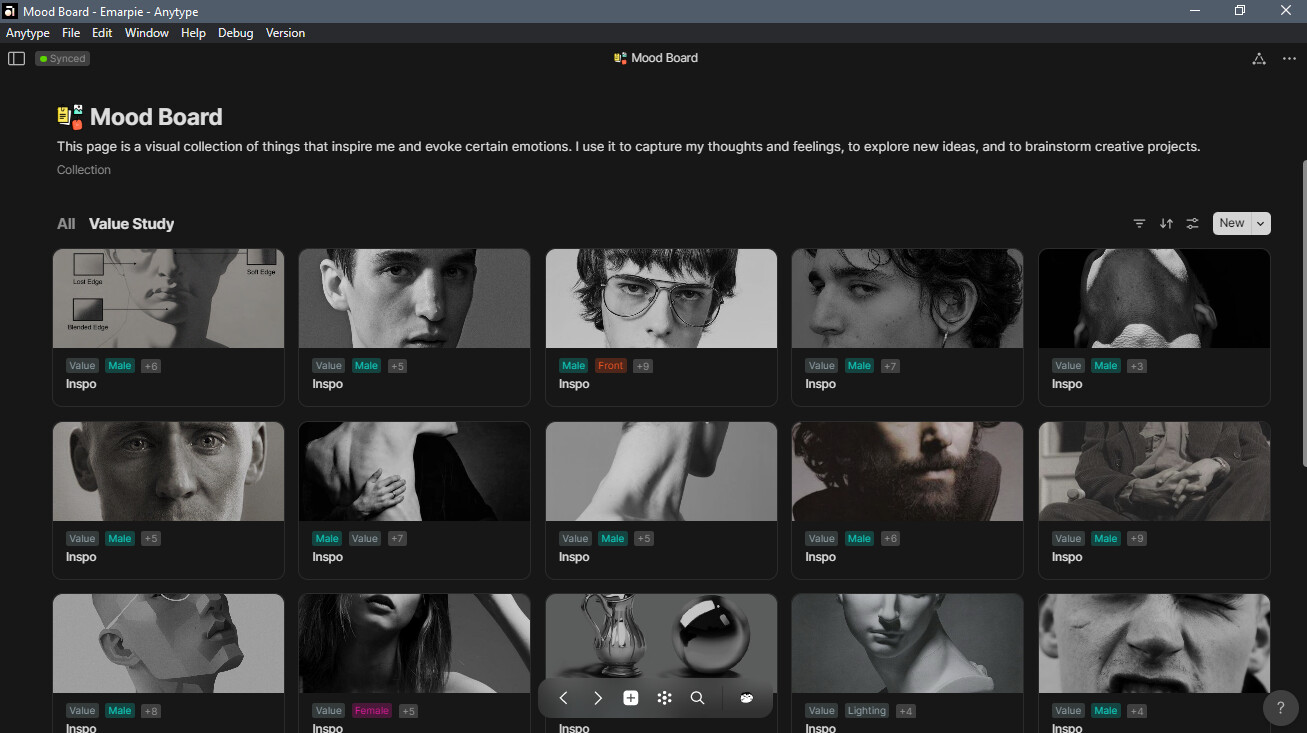
This is my first week of using Anytype. I have imported almost all of my stuff from Notion to Anytype, except for my mood board. I now use Anytype as my go-to tool to organize my personal stuff, such as notes, to-dos, reminders, and personal bookmarks.
On my fifth day of using Anytype, I was manually importing a page with a database from Notion called “Mood Board.” This page is where I put all of my personal picks of pictures for value study, model references, and so on. In Anytype, I created a collection for this page, with a default object type of “Board,” which I created myself. In the Mood Board collection, I tried to copy the setup I have from Notion (table view): Image | Tags | Name. However, I faced a major problem with efficiency.
As an artist, it is important for me to be able to access my stuff quickly and easily. In Notion, I can instantly view an image in the Mood Board database with just one or two clicks. But in Anytype (using the Gallery layout), I have to make four clicks (or three clicks in the Grid layout) before I can view the full image. I can’t even zoom the image like I can in Notion with Ctrl+wheel. This is too much wasted effort.
To add to this, I use collections because I use custom tags in each board to organize each image. Since there is no way to put a tag in an object file (image, video etc…), the only way to do this is to create a collection with a custom object type in it, and then put the tags and file attachments in the relation.
Another option I tried was to create a custom object relation called “Image Object” with an object type of “image.” However, this resulted in the same problem: I have to make three clicks to view the full image.
I believe the only possible solution for this is to redesign the image viewing function. I have postponed importing my mood board for now. If you have a temporary workaround to efficiently view images, I would love to know.
Other than that, I am loving Anytype! Compared to Notion, I can personalize my pages more. I would rate Anytype a solid 8 out of 10. Here are the features I would like to see soon in Anytype:
Custom colors of blocks
The ability to put relations in an object file
A web version or web view
Image zooming
I appreciate all of the efforts and patience of the Any team with the community. Sending virtual hugs!
Howdy, @emarpiee! We’ve got your message about the file issues. Fixing it is a big task and will take some huge architecture changes, but don’t worry—we’ve got a plan, and it’s in the plans for next year. Thanks for sticking with us
Waddup, @ignatovv ! It’s been almost a month since I started using Anytype, and I have now fully migrated all of my documents from Notion to Anytype. I am at ease using this app as a management tool and have not encountered any serious problems so far.
.
I fixed my Mood Board image viewing and zooming issue by creating a new custom object type called “inspo.” This object type has two custom relations: “Board Img” (Attachment) and “Board Tag” (Tag). When I want to add a new image to my Mood Board, I simply insert the image into the “inspo” object. This allows me to resize the image to fit my needs. Once the image is uploaded, I add it to the “Board Img” relation. This ensures that the image will be displayed as the card cover when viewing my Mood Board in gallery mode.
agreed! My main thing right now for me is understanding and figuring out how to use these 2 things the right way but they all seem to do almost the same thing.
I also found a way to create tags just by using a set of objects as tags and then adding them to any set you want.
Damn, it’s frustrating to face difficulties with tagging and file management, but at this point, I think most frustrations are surpassed by the sheer joy of observing (and using eheh) the workarounds the community comes up with.
Having “file as object” is a big step forward. Now it just needs to be refined to make it easy and efficient.
Following are a few quick suggestions:
The current flow to reach an image-object is right-clicking and menu-selecting “open as Object”. As a general rule, if it’s in a menu it’s semi-hidden. Being such a powerful tool, I suggest adding pathways to reach it. Two come to mind: a little “open as object” overlay icon (target? burger?) next to the top-right “download” icon. Alternatively, have the magnifying glass open the image-as-object directly. Alternatively, after the magnifying glass opens an enlarged overlay, have a small button “open as object” beneath it. Any other solution that will make it either one-click or non-menu will be an improvement.
The file-as-object window could definitely be improved a lot. The entire right half of the screen is dead white space, and it begs to display Relations. Currently, the only Featured Relations can be displayed; the rest are hidden in a background panel. It’s the same issue: make this existing feature more prominent so it’s easier to use
When adding an image-as-object it would be nice to have EXIF data added as Relations. We already have them in the Library, I sort of assumed that’s the point.
Enable a template for each file type. Thinking how I’d like to have the file-object page, images would display relations such as “tag”, “date”, “location”, while .PDF files would want to see other relations displayed by them (author, DOI link, citation, etc.). Templates could probably be a nice way to handle this.
This might be tricky: the ability to add blocks to the file-object
Weird bug: opening an image-as-object the only relations displayed are width, height and size. All three can be edited, but it’s not clear why or what for. Changing the file size doesn’t seem to do anything but change the number. Changing height and width seems to change the box in which the image is displayed (but not the actual image dimensions).
I like to think these are mostly minor adjustments rather than features that require extensive development, but I have no idea. But when this feature is further polished, together with the upcoming multiplayer then Anytype also has the potential of becoming an efficient asset management system for photographers, graphic studios, etc. The ability to tag and comment files, making them easily searchable and groupable, feels like it’s almost at arm’s reach.